

ACEMAGIC AX17 Review — Surprisingly Capable Budget Laptop
Finding a genuinely usable 17-inch laptop under £400 in the UK is harder than it sounds. The large-screen budget category is full of machines that offer the visual appeal of a spacious display combined with the processing misery of a chip that struggles to keep up with what that screen is asking it to do. The ACEMAGIC AX17 review that follows is the honest answer to whether this specific machine avoids that trap — and the short answer, which an independent month-long UK test summarised as “better than it has any right to be at this price point,” turns out to be genuinely encouraging.
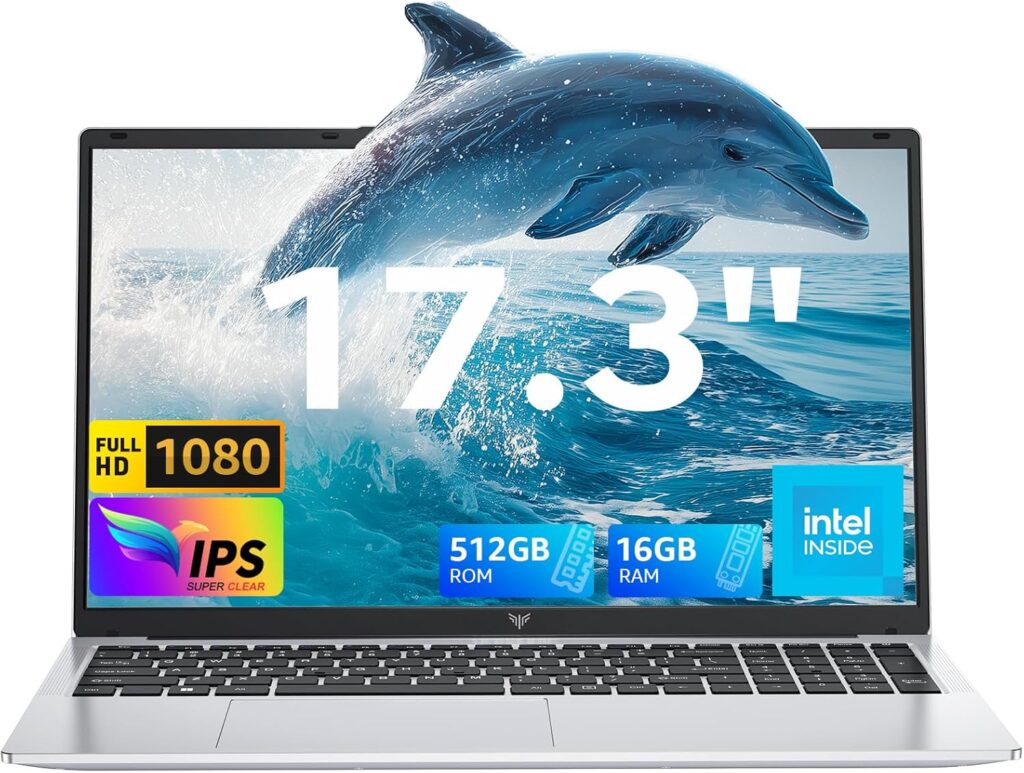
The ACEMAGIC AX17 review covers a machine with a 17.3-inch Full HD IPS display, an Intel N95 processor, 16GB DDR4 RAM, a 512GB SSD, and a 6000mAh battery — all at a price that positions it firmly at the accessible end of the large-screen laptop market. There are genuine limitations here, and this review addresses them honestly. There are also genuine strengths that make this machine the right choice for a specific type of buyer. Understanding which category you fall into is the purpose of what follows.
Specifications
| Spec | Detail |
|---|---|
| CPU | Intel Processor N95 (Alder Lake-N, 4 cores/4 threads, up to 3.4GHz) |
| RAM | 16GB DDR4 (upgradeable to 4800MHz) |
| Storage | 512GB M.2 SSD (upgradeable to 2TB) |
| Display | 17.3″ FHD 1920×1080 IPS, 60Hz, 180° flat-lay hinge |
| GPU | Intel UHD Graphics (up to 1200MHz) |
| Connectivity | Wi-Fi 5 (802.11ac), Bluetooth 5.0 |
| Ports | 3x USB 3.2, 1x USB-C (data), 1x HDMI, 1x 3.5mm audio, 1x TF card slot, 1x USB-C DC charging jack |
| Battery | 6000mAh / approximately 45Wh |
| Weight | Approximately 2.1kg |
| OS | Windows 11 Home |
| Webcam | 1MP with physical privacy cover |
| Speakers | Dual 1.5W |
The 17.3-Inch Display — The Reason Most People Buy This Machine

The screen is the headline reason anyone looks at the AX17, and it deserves genuine attention rather than a single line about “vibrant colours and sharp details.”
The 17.3-inch Full HD IPS panel at 1920×1080 delivers a pixel density of approximately 127 PPI — slightly lower than a 15.6-inch 1080p screen’s 141 PPI, which means individual pixels are marginally more visible at very close distances. At a normal working distance of 50–60 centimetres, this is not something you will notice during documents, web browsing, or streaming. The IPS technology provides wide viewing angles — colours remain consistent when viewing from the side, which matters on a large screen where you are more likely to view off-axis than on a smaller machine.
The vividrepairs.co.uk independent month-long assessment tested the display extensively and confirmed the IPS panel performs credibly for everyday content — documents, web browsing, and video streaming all look appropriately clear and colour-accurate. The 180-degree flat-lay hinge, which allows the display to open completely flat until it lies parallel to the keyboard, adds practical flexibility for group viewing and document sharing that the standard 135-degree laptop hinge does not offer.
For a detailed explanation of what IPS panel technology delivers in practice and how it compares to other display types, our Laptop Display Guide covers the technical differences in plain English.
The honest caveat: ACEMAGIC does not publish a nit figure for this panel. Based on the vividrepairs testing and comparable budget IPS panels at this price point, brightness is adequate for comfortable indoor use in moderate lighting but limiting in very bright rooms or near strong natural light. This is a characteristic of budget IPS displays broadly, not a specific flaw of the AX17.
The screen size itself is the genuine differentiator at this price. A 17.3-inch laptop from an established brand at under £400 essentially does not exist in 2026. For students who do extended study sessions, home office workers who spend long hours at a desk, or anyone who finds smaller screens tiring during prolonged use, the AX17’s large display is a meaningful practical advantage that its competitors in this price bracket simply cannot match.
Performance — What the Intel N95 Actually Delivers
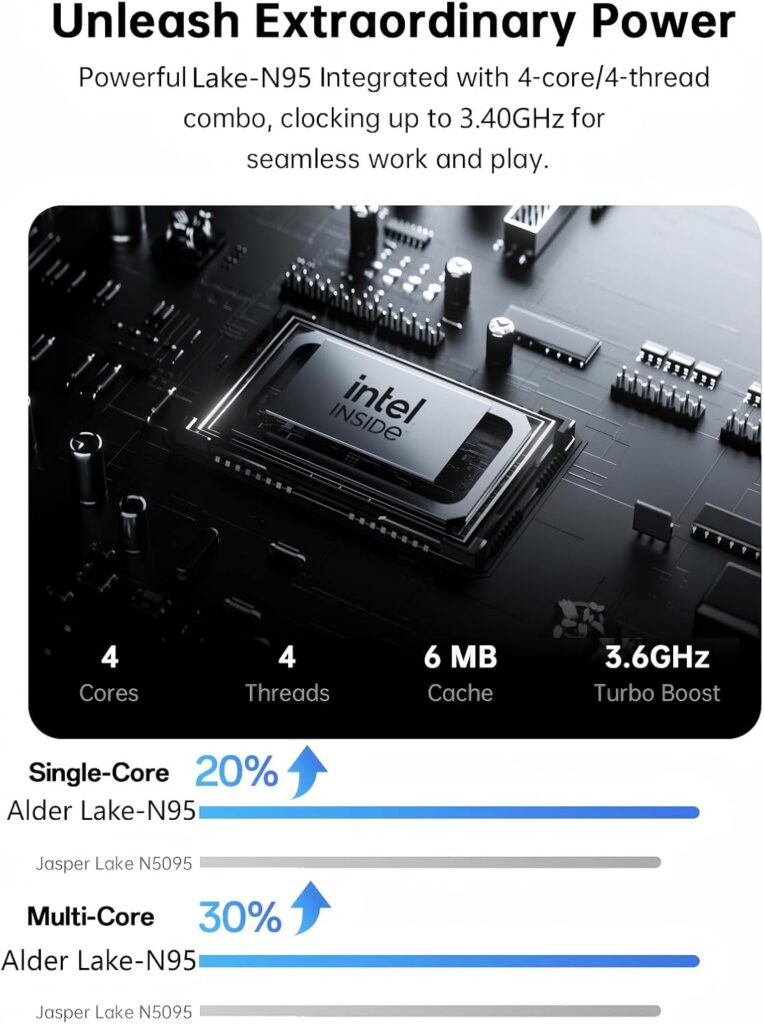
A note before the benchmarks: the original review of this machine on this site stated it used the Intel N97 processor. The confirmed Amazon.co.uk listing for ASIN B0FC6CSLLQ specifies the Intel N95 — a related but distinct Alder Lake-N chip. The N95 runs at a maximum turbo frequency of 3.4GHz compared to the N97’s 3.6GHz, with 6MB of cache and the same Gracemont E-core architecture. The practical performance difference between the N95 and N97 is modest in everyday use — approximately 5–10% across typical workloads — but accuracy matters in a product review, and the correct processor is the N95.
The Intel N95 is an efficiency processor built entirely from Gracemont E-cores, operating within a 15W TDP envelope. As NotebookCheck’s N95 processor database explains, the architecture delivers competent performance for web browsing, document editing, video streaming, and everyday multitasking — the workloads that define the majority of budget laptop use. It is not a processor for video editing, code compilation, or sustained computational work, and reviewing it against those expectations would be as unfair as reviewing a city car against motorway cruising comfort.
NanoReview’s benchmark data places the N95 at approximately 1,185 in Geekbench 6 single-core and 2,780 in Geekbench 6 multi-core — entry-level numbers that position it clearly below the AMD Ryzen processors in the ACEMAGIC LX15 Pro reviews on this site, and broadly comparable to the N97 in the standard LX15. In Cinebench 2024, single-core sits at 58 and multi-core at 173. These are honest entry-level scores, and the machine’s real-world performance reflects them accurately.
The vividrepairs independent assessment provides the most useful real-world picture of what this means in practice: web browsing with multiple tabs, streaming video, office document work, and video calls all handle comfortably without stuttering or lag. The reviewer specifically tested the machine running ten simultaneous browser tabs — a representative workload for students and home workers — and found no performance issues. This is where the 16GB DDR4 RAM specification earns its value: an N95 with 4GB of RAM would struggle at this workload, but 16GB gives Windows 11 and its background processes sufficient headroom to operate without competing aggressively with your active applications.
The Intel UHD Graphics with integrated UHD up to 1200MHz handles 1080p video playback, hardware-accelerated streaming, and older or less demanding games. The vividrepairs reviewer tested CS:GO at 720p low settings and found approximately 35fps — playable but not comfortable for competitive play, and representative of the casual gaming ceiling for this hardware. Current titles at 1080p are not within reach. For a full explanation of how integrated GPU performance relates to processor and memory configuration, our Laptop CPU Guide covers the relevant architecture in detail.
Check the full ACEMAGIC AX17 specification and current availability on Amazon.
Battery Life — The Honest Numbers for a Large Screen
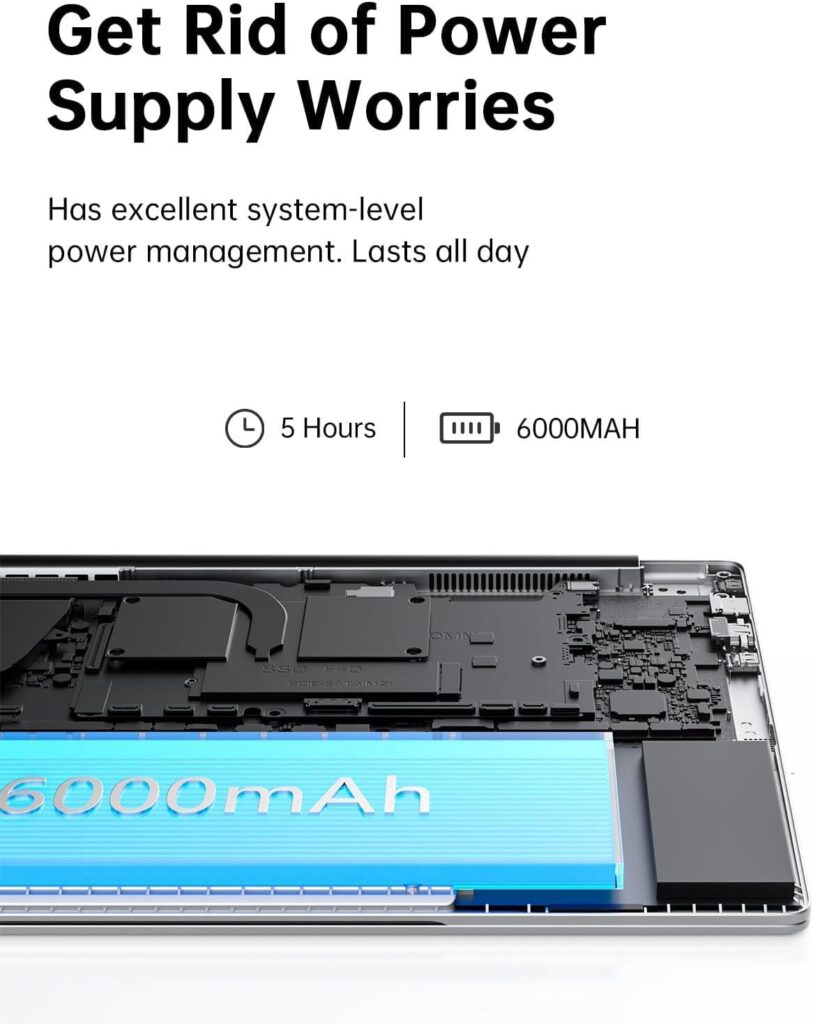
The 6000mAh / approximately 45Wh battery is where the AX17’s large screen creates a genuine physics challenge.
Powering a 17.3-inch backlit display requires meaningfully more energy than a 14-inch or 15.6-inch panel. The N95’s 15W TDP is efficient for its processing performance, but the display’s power consumption partially offsets that efficiency. The vividrepairs battery testing produced 4–5 hours of mixed use at 60% brightness — web browsing, document editing, and Spotify — with video playback at 40% brightness extending to approximately 6 hours. ACEMAGIC’s marketing describes “all-day battery life,” which is optimistic for a 17-inch screen. The independent testing conclusion is clear: this is fundamentally a desk laptop that works best with a charger nearby.
For the buyer profile this machine suits — students studying at a desk, home office workers, people who use their laptop primarily in a fixed location — 4–5 hours is workable for a morning or afternoon session. For buyers who commute or need untethered use throughout a full working day, the battery limitation is a genuine constraint worth planning around. The Best Budget Laptops UK guide covers alternatives with smaller screens and larger battery cells for buyers where portability is the priority.
Build Quality and Ports — Practical Without Pretension
The AX17 weighs approximately 2.1kg — heavier than the 15.6-inch machines in this price range, which is the direct consequence of the larger chassis required to house a 17.3-inch display. For desk-based use this weight is irrelevant. For regular commuting in a bag it is worth factoring into the decision.
The chassis construction is plastic, which is standard for this price tier. The vividrepairs reviewer described the build quality as solid enough for daily desk use and commuting in a bag, with no flex in the chassis during normal handling. The physical webcam privacy cover — a sliding mechanical shutter that physically blocks the camera lens — is a practical privacy feature that works independently of any software state.
View the ACEMAGIC AX17 on Amazon to see current customer reviews and ratings.
The port selection is practical for everyday use: three USB 3.2 ports, a USB-C data port, HDMI for external display connection, a 3.5mm headphone jack, and a TF card slot for memory cards. One important clarification that the original review omitted: the USB-C port on the AX17 is a data port, not a charging port — charging uses a separate dedicated USB-C DC jack. This means your USB-C data port remains free during charging, but it also means the machine cannot be charged via a standard USB-C Power Delivery charger or a laptop dock. In 2026 this is a limitation worth knowing before purchase, particularly for buyers who rely on USB-C charging for portability. For a full explanation of what each port type delivers, our Laptop Ports Guide covers the practical implications.
The dual 1.5W stereo speakers are adequate for casual listening and video calls — present and functional rather than impressive, which is the accurate assessment for any budget laptop audio at this price.
A Note on Brand History — And How ACEMAGIC Responded
In early 2024, ACEMAGIC confirmed that a batch of its mini PC models shipped with pre-installed malware. The company responded with full transparency: it covered return shipping costs and issued full refunds to affected customers, offered up to 25% compensation to customers who chose to keep their devices, provided clean system installation images with step-by-step instructions, and — as confirmed by ACEMAGIC’s official resolution statement — implemented strengthened digital signature authentication, comprehensive security reviews for all product source code, and ongoing virus checking protocols for future production. By April 2024, ACEMAGIC products were confirmed virus-free by Avast and added to the Avast whitelist. The AX17 is a laptop released after these measures were implemented, and there are no documented security concerns specific to this model. Running a Malwarebytes scan after first boot remains a sensible one-time precaution regardless of brand.
Who Is the ACEMAGIC AX17 For?
The AX17 suits a specific buyer clearly enough to be worth stating directly.
It is the right machine for students who spend long hours reading, writing, and researching at a desk and find smaller screens tiring over extended sessions. It suits home office workers whose desk-based workflow consists of documents, spreadsheets, email, and video calls, and who want the largest screen available within a tight budget. It is appropriate for household shared use where the large display is a comfort benefit and the machine spends most of its time connected to power.
It is not suited for buyers who commute daily and need untethered battery life through a full working day. It is not appropriate for video editing, content creation, gaming beyond casual older titles, or any sustained computational workload. It is not the right choice for buyers who need USB-C charging compatibility with their existing power adapters and docks.
The 17.3-inch IPS display is the machine’s headline advantage and the primary reason to choose it over the smaller-screened alternatives in our Best Budget Laptops UK guide at similar prices. Everything else — the N95 performance, the 16GB RAM, the port selection — is competent and honest for the price. Nothing about this machine is dishonest in its specification, and “better than it has any right to be” from a reviewer who spent a month with it is a credible endorsement from a source with no commercial interest in the outcome.

See the ACEMAGIC AX17 on Amazon for the full specification listing and current customer reviews.
ACEMAGIC AX17 Review Verdict — 7.1/10
The ACEMAGIC AX17 delivers a genuinely usable 17.3-inch IPS laptop experience at a price point where the category barely exists from established brands. The Intel N95 with 16GB DDR4 handles everyday workloads comfortably, the IPS display with 180-degree hinge is practical and adequately colour-accurate, and the port selection covers everyday connectivity needs without requiring adapters for common use cases.
The limitations are real and honestly stated: 4–5 hours of real-world battery life makes this a desk machine rather than a portable one, the N95 performance ceiling is clear for anything beyond everyday productivity, and the lack of USB-C charging is a practical inconvenience in 2026. For the right buyer — one who wants the largest screen available at this price and primarily uses their laptop at a desk — these limitations are manageable trade-offs rather than dealbreakers.
The ACEMAGIC AX17 is available on Amazon.co.uk — check current availability here.
Pros:
- 17.3-inch FHD IPS display — the largest screen available in this price bracket
- 16GB DDR4 RAM — properly specified for comfortable Windows 11 everyday use
- 180-degree flat-lay hinge — practical for group viewing and flexible positioning
- Three USB 3.2 ports plus USB-C data — comprehensive everyday connectivity
- Physical webcam privacy cover
- Independent month-long UK testing confirms “better than it has any right to be”
Cons:
- 4–5 hours real-world battery life — fundamentally a desk laptop, not portable all-day
- Intel N95 performance is entry-level — clear ceiling for demanding workloads
- No USB-C charging — dedicated DC jack only
- Wi-Fi 5 only — no Wi-Fi 6 support
- Approximately 2.1kg — heavier than smaller-screened alternatives for bag transport
- N95 processor specification differs from original article’s N97 claim — always verify current listing
Further Reading
Our Laptop CPU Guide covers Intel’s Alder Lake-N architecture and what the N-series processor range delivers in practice across different workloads. The Performance Benchmarks Explained guide translates the Geekbench and Cinebench scores above into practical purchasing decisions. For alternative machines at comparable prices with different screen sizes and battery priorities, our Best Budget Laptops UK guide covers seven independently reviewed options with honest rankings.
As an Amazon Associate, I earn from qualifying purchases made through links on this page.