
The display is the one component you interact with every single second your laptop is open, yet most buyers spend less time evaluating it than they spend choosing a phone case. Understanding laptop display types properly — not just panel names but what each technology actually means in daily use — is one of the most valuable things you can do before buying a machine. A mediocre display on a powerful laptop is a daily frustration. An excellent display on a modest machine is a daily pleasure.
This guide covers every laptop display type available in 2026 — IPS, OLED, Mini-LED, QD-OLED, Tandem OLED, and TN — explaining not just what each is but what it means for your eyes, your work, your battery life, and your wallet. There is also a section on the display specifications that matter most and the ones manufacturers use to mislead buyers. By the end, choosing between laptop screen types will feel considerably less daunting.
Why Laptop Display Types Matter More Than Most Buyers Realise
Walk into any laptop retailer or browse any online listing and display specifications are typically presented as a short line of numbers — “15.6-inch FHD IPS, 250 nits” — with no explanation of what any of it means for real-world use. This brevity suits manufacturers because it prevents buyers from making direct comparisons on the metrics that matter most.
The display determines how accurate colours appear in your photographs, how comfortable your eyes feel after four hours of work, whether you can use the laptop near a window without squinting, and how immersive films and games look in the evening. These are not abstract considerations — they affect every minute you spend with the machine.
What makes the subject genuinely complex in 2026 is that the landscape of available technologies has expanded considerably beyond the traditional IPS versus TN choice. OLED has moved from premium curiosity to mainstream option at mid-range prices. Mini-LED has emerged as a serious alternative that addresses OLED’s key weaknesses. Tandem OLED and QD-OLED represent the next generation of self-emissive displays. And TN panels, long declared dead, persist in niche gaming contexts for reasons worth understanding. Knowing the differences between these laptop display types before you buy saves both money and regret.
The Foundation: How LCD and OLED Displays Work Differently
Before comparing specific panel types, understanding the fundamental difference between the two display families clarifies everything else.
LCD (Liquid Crystal Display) technology — which includes IPS, TN, VA, and Mini-LED displays — works by shining a backlight through a layer of liquid crystals that act as shutters, blocking or allowing light to pass through colour filters. The backlight is always on, even when displaying black content. This means black on an LCD is not truly black — it is the darkest shade the shutters can achieve by blocking as much backlight as possible. How well a panel blocks that backlight determines its contrast ratio, and it is the central limitation of all LCD-based displays.
OLED (Organic Light-Emitting Diode) technology works entirely differently. Each individual pixel generates its own light and can be switched off completely when displaying black content. There is no backlight at all. This produces true, absolute blacks — not very dark grey but genuinely no light — and the infinite contrast ratio that follows from that. When an OLED pixel is off, it emits zero light. This fundamental difference in architecture is why OLED images look so markedly different from even excellent LCD displays, particularly in dark scenes and high-contrast content.
Understanding this distinction is the key to understanding why IPS and OLED are not directly competing on the same performance curve — they are different technologies with different strengths, and no amount of backlight improvement will give an LCD panel OLED’s black levels.
IPS Panels — The Reliable Standard
IPS (In-Plane Switching) is the most common laptop display type in 2026, found across budget, mid-range, and professional laptops. Its dominance is deserved — it represents a well-understood, well-optimised technology that delivers a genuinely good experience for the majority of users at a reasonable cost.
The defining strengths of IPS are wide viewing angles and colour consistency. IPS panels maintain accurate colour reproduction when viewed from angles up to approximately 178 degrees in both horizontal and vertical planes. On a laptop this matters more than it might first appear — you are not always sitting directly in front of the screen, and the slight angle of laptop lids means colour consistency at off-axis positions is relevant in daily use.
Colour accuracy on quality IPS panels is excellent, particularly for professional creative work. A well-calibrated IPS panel covering 100% sRGB and factory-calibrated to a Delta E below 2 is entirely suitable for photo editing and colour-critical design work. Some premium IPS panels extend into DCI-P3 colour space coverage, the standard used in professional cinema and increasingly adopted across consumer displays.
The weaknesses of IPS are well established. Contrast ratios on standard IPS panels are typically around 1,000:1 — meaning the brightest white the panel can produce is only 1,000 times brighter than its darkest black. In practice this produces greyish blacks that are immediately apparent in dark scenes. IPS glow — a milky haziness visible in the corners of IPS panels when viewing dark content — is a related phenomenon that affects most IPS displays to varying degrees.
Response times on IPS panels are slower than OLED, though modern Fast IPS variants have closed this gap significantly — achieving response times as low as 1ms, making them viable for competitive gaming where motion clarity matters.
For buyers: IPS is the sensible default for everyday use, professional work, and anyone who spends long hours in front of a screen. It is bright, accurate, widely available, and free from the burn-in concerns that affect OLED displays.
OLED Panels — Exceptional Visuals With Important Caveats
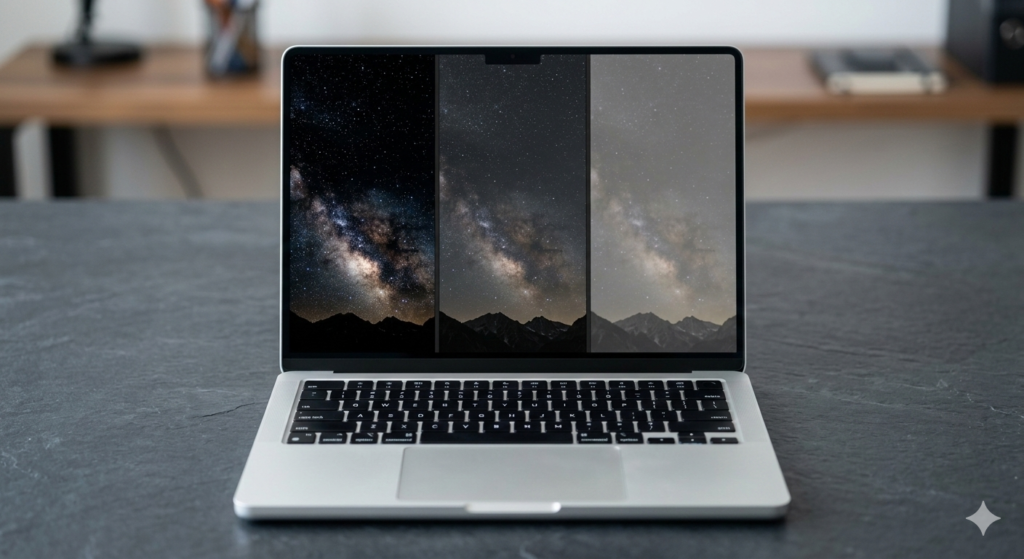
OLED is the most talked-about display technology in 2026, and for good reason — the visual experience it delivers is genuinely different from any LCD display. But it comes with trade-offs that are worth understanding clearly before paying the premium it commands.
The advantages begin with contrast. Because OLED pixels switch off completely for black content, contrast ratios are effectively infinite — there is no measurable black level to compare against white. Films with dark scenes look cinematic in a way that no LCD can match. Colours appear vivid and saturated without the overdriven quality that cheaper displays use to simulate vibrancy. Response times are instantaneous — OLED pixels transition between states so quickly that ghosting is essentially eliminated, making fast-moving content in games and video exceptionally clean.
Colour gamut coverage on OLED panels is typically excellent, with most reaching 100% DCI-P3 and some approaching Adobe RGB coverage — genuinely useful for professional creative work where colour space matters.
The most significant weakness of OLED in a laptop context is burn-in. Static interface elements — the Windows taskbar, browser tab bars, application toolbars — displayed for long periods can cause permanent image retention as individual pixels degrade at different rates. Modern OLED panels have substantially improved burn-in resistance through pixel shifting, screen savers, and automatic brightness management, and the risk is considerably lower than it was in earlier generations. However it remains a genuine consideration for buyers who run the same applications with persistent interface elements for many hours daily.
Brightness is the other meaningful limitation. Some Mini-LED displays can reach up to 1,500 nits of peak brightness, while OLED displays are usually limited to around 1,000 nits for small areas and up to 275 nits for full-screen white windows. For working near bright windows or in direct sunlight, this difference is tangible — an OLED laptop can look washed out in conditions where a bright Mini-LED machine remains perfectly readable.
PWM flicker deserves specific attention and rarely receives it in mainstream buying guides. Many OLED panels use Pulse Width Modulation to control brightness by rapidly switching pixels on and off at frequencies that the eye cannot consciously detect but that can cause headaches and eye strain in sensitive individuals, particularly at lower brightness levels. Higher PWM frequencies of 480Hz and above are comfortable for most people, with frequencies above 1,000Hz being virtually undetectable by human eyes. When evaluating an OLED laptop, checking whether it uses DC dimming or high-frequency PWM is worth the effort for anyone who experiences eye fatigue during long screen sessions. Sources like NotebookCheck’s PWM ranking test real laptop panels and report specific flicker frequencies — a genuinely useful resource before committing to a purchase.
Mini-LED — The LCD Challenger
Mini-LED represents the most significant advancement in LCD technology in years and is increasingly common in premium laptops in 2026. Understanding what it is — and what it is not — requires a brief clarification that most retail descriptions skip entirely.
Mini-LED is a backlight technology, not a panel type. It uses thousands of tiny LEDs to create the backlight behind an LCD panel (usually IPS), enabling what is called local dimming — the ability to dim or turn off sections of the backlight independently rather than treating the entire backlight as a single unit. A standard IPS panel with conventional LED backlighting has no local dimming at all. A Mini-LED panel might have hundreds or thousands of individual dimming zones.
The practical result is dramatically improved contrast compared to standard IPS. Dark areas of the image can be genuinely dark because the backlight zones behind them are dimmed or off, while bright areas retain full brightness. The Samsung Odyssey Neo G9 hits 2,000 nits peak brightness — nearly double what current OLED panels achieve. For HDR content specifically, Mini-LED’s ability to combine extreme brightness with genuinely dark shadows produces an experience that competes seriously with OLED.
The remaining weakness is blooming — a halo of light that appears around bright objects on dark backgrounds because the dimming zones are finite in size. A single bright star against a dark sky will illuminate a small zone around it as well as the star itself. The more dimming zones, the smaller and less noticeable the bloom. High-end Mini-LED panels with over 1,000 zones achieve blooming that is barely perceptible in normal use. Budget Mini-LED implementations with fewer than 500 zones can produce blooming distracting enough that a quality standard IPS panel would have been preferable.
Mini-LED is also burn-in free — a significant advantage over OLED for buyers who use their laptops heavily for productivity work with persistent interface elements.
QD-OLED and Tandem OLED — The Next Generation
Two newer display technologies are appearing in premium laptops in 2026 and represent genuinely meaningful improvements over standard OLED.
QD-OLED (Quantum Dot OLED) combines Samsung’s quantum dot colour technology with an OLED panel. Standard OLED uses white light filtered through colour layers, which wastes some brightness. QD-OLED uses blue OLED pixels to energise quantum dot colour converters, producing red and green light with greater purity and efficiency. The result is colour gamut coverage approaching 84% of Rec. 2020, compared to approximately 73% for standard W-OLED panels — a meaningful improvement for professional creative work requiring the widest possible colour reproduction.
Tandem OLED stacks two OLED panels on top of each other, which achieves approximately double the brightness of a single-layer OLED while maintaining the technology’s perfect black levels and infinite contrast. LG revealed its latest NEO:LED display technology at CES 2026, continuing the rapid innovation cycle at the premium end of the display market. Tandem OLED addresses the one area where OLED has traditionally been weakest — outdoor and bright ambient light visibility — without compromising the contrast and colour performance that makes OLED desirable.
Both technologies currently appear primarily in flagship laptops at premium prices. As e-catalog’s 2026 monitor market analysis notes, Mini-LED and OLED are following the same adoption curve that IPS once did — gradually moving from expensive premium option to mainstream standard as manufacturing scales and costs reduce.
TN Panels — Old Technology With One Niche Use Case
TN (Twisted Nematic) panels are the oldest LCD technology still in active production and are generally considered obsolete for mainstream laptop use. Viewing angles are narrow and colours shift noticeably when the screen is viewed from anything other than directly in front. Colour accuracy is poor. They are not worth considering for everyday work, creative use, or general purpose laptops.
The one scenario where TN technology remains relevant is extreme competitive gaming. As e-catalog’s market analysis notes, Fast-TN panels with refresh rates up to 600Hz are used in niche esports applications where the absolute minimum of input lag and maximum of motion clarity matters more than colour quality. For the overwhelming majority of laptop buyers, TN panels should be avoided entirely.
The Display Specifications That Actually Matter
Panel type is the most important display decision but several other specifications determine the real-world experience within each panel category.
Resolution and Pixel Density
Resolution defines how many pixels the display contains. The standard resolutions in current laptops are Full HD (1920 × 1080), QHD (2560 × 1440 or 2560 × 1600), and 4K UHD (3840 × 2160). What matters more than the raw resolution figure is pixel density — pixels per inch (PPI) — which accounts for screen size. A 1080p panel on a 13-inch screen has higher pixel density than a 1080p panel on a 17-inch screen, and text appears noticeably sharper on the smaller display.
On screens 15 inches and above, 1080p begins to show its limits. Text and icons lack the sharpness of a QHD panel at the same size. For professional creative work and general visual quality, QHD is the sensible step up from 1080p on larger screens.
Brightness
Brightness is measured in nits (cd/m²). For comfortable everyday indoor use, aim for a minimum of 300 nits. Working near windows or in bright rooms requires 400 nits or above. Outdoor use benefits from 500 nits or higher. Below 250 nits, screens wash out in typical British office lighting on overcast days — which is to say, most days.
Colour Gamut — The Most Underreported Specification
Colour gamut describes the range of colours a display can reproduce, expressed as a percentage of a reference colour space. The two most common references are sRGB (the standard for web content, general photography, and most software) and DCI-P3 (the cinema and professional creative standard, covering a wider range of colours).
A display covering 100% sRGB produces colours that match what most content is actually created in. A display covering only 45–60% sRGB — common in cheap laptops — produces visibly flat, washed-out colours that make everything from photographs to website interfaces look dull. This is one of the most impactful and least discussed quality differences between budget and mid-range laptop displays. Improving from 60% to 100% sRGB coverage on the same panel type produces a more visible improvement in daily experience than upgrading from 1080p to 1440p resolution on the same panel with poor colour coverage.
Delta E is the measure of colour accuracy — how closely the displayed colour matches the intended colour. A Delta E below 2 is considered colour-accurate and suitable for professional work. Above 3 is noticeable to trained eyes. Most factory-calibrated professional displays achieve Delta E below 2 out of the box; budget displays can be significantly higher.
Refresh Rate
Refresh rate, measured in Hz, indicates how many times per second the display updates its image. 60Hz is the standard for everyday use — entirely adequate for documents, browsing, and video. 120Hz and above produces noticeably smoother scrolling, cursor movement, and interface animations even in non-gaming use. Once you use a 120Hz display regularly, returning to 60Hz feels sluggish in a way that is difficult to un-notice.
For gaming, 144Hz is the mainstream standard and 240Hz or above is the competitive gaming tier. Higher refresh rates require more GPU power to drive and consume more battery, which is worth factoring in for battery-dependent use.
Anti-Glare vs Glossy Coatings
Laptop displays use either matte (anti-glare) or glossy coatings. Matte coatings diffuse reflections from ambient light sources — ceiling lights, windows — making the display more usable in varied lighting conditions at the cost of slightly reduced colour saturation and perceived sharpness. Glossy coatings produce more vivid, punchy colour rendition in ideal lighting but reflect ambient light aggressively in real-world environments.
For a laptop used in typical UK environments — offices, cafes, commutes, homes with windows — a matte coating is almost always more practical. Glossy coatings suit controlled lighting environments and users who prioritise visual quality over glare management.
HDR on Laptops — Separating Real From Marketing

HDR (High Dynamic Range) support is listed on almost every laptop above budget level in 2026, and the specification is almost universally misleading. Understanding what genuine HDR requires versus what most laptops actually deliver prevents disappointment.
True HDR requires sufficient peak brightness (at least 600 nits for HDR600 certification, 1,000 nits for HDR1000) and genuine local dimming capability to simultaneously produce bright highlights and dark shadows. These requirements eliminate most laptop IPS displays, which lack both the brightness and the local dimming to deliver a genuine HDR experience despite carrying an “HDR” badge.
The two display types that deliver genuine HDR on laptops are OLED (which achieves infinite contrast through pixel-level dimming and covers the dark side of the range excellently) and high-end Mini-LED (which achieves the extreme brightness peaks required for HDR highlights). Standard IPS laptops labelled HDR are delivering what is sometimes called fake HDR — the badge with none of the meaningful visual improvement.
When a specification lists “HDR400” on an IPS display, treat it as a marketing label rather than a meaningful capability.
Choosing the Right Laptop Display Type for Your Needs
With the full picture of laptop display types in view, here is honest guidance by use case.
Everyday use — browsing, streaming, email, video calls: A quality IPS panel covering 100% sRGB at 300 nits or above is entirely sufficient and represents excellent value. OLED is a welcome upgrade for media consumption but unnecessary for purely productive everyday use.
Professional creative work — photo and video editing, graphic design: OLED or a factory-calibrated IPS panel with 100% DCI-P3 coverage and Delta E below 2. Colour accuracy and gamut coverage matter here more than brightness or refresh rate.
Gaming: OLED for the best visual experience in games with dark scenes and fast motion. Mini-LED if burn-in concerns are relevant or if maximum brightness for HDR matters. Fast IPS at 144Hz or above for competitive gaming where response time and high refresh rate matter more than contrast. Check our guides to best budget gaming laptops and best premium gaming laptops for tested display performance in specific models.
Remote work and long screen sessions: IPS with a matte coating, 300+ nits, and ideally TUV Rheinland flicker-free certification. Eye comfort over long hours matters more than peak visual performance for this use case. If considering OLED, verify the PWM frequency — above 480Hz is the comfortable threshold for most people.
Students: IPS at QHD or above on larger screens, 1080p acceptable on 13–14 inch form factors. Prioritise brightness and colour gamut coverage over resolution. A 1080p display covering 100% sRGB looks better in daily use than a 1440p display covering 60% sRGB.
A Quick Reference Guide to Laptop Display Types in 2026
| Display Type | Contrast | Brightness | Colour | Best For | Watch Out For |
|---|---|---|---|---|---|
| IPS | 1,000:1 typical | 250–500 nits | Excellent sRGB | Everyday use, professionals | IPS glow, grey blacks |
| TN | 600:1 | 250–400 nits | Poor | Extreme competitive gaming only | Poor colours, narrow angles |
| OLED | Infinite | Up to 1,000 nits | Excellent DCI-P3 | Gaming, media, creative work | Burn-in risk, PWM flicker |
| Mini-LED | Up to 1,000,000:1 | Up to 2,000 nits | Excellent | HDR, gaming, bright environments | Blooming on cheap variants |
| QD-OLED | Infinite | Up to 1,000 nits | Outstanding | Professional creative, gaming | Premium price |
| Tandem OLED | Infinite | Up to 2,000 nits | Outstanding | All-round premium use | Very premium price |
Further Reading
For the full picture on how display specifications fit alongside processor, RAM, and build quality choices, our Laptop Buying Guide UK covers every component in the context of real purchasing decisions. The Laptop CPU Guide explains how processor choice affects the GPU capability that drives your display — relevant if gaming or creative work at high resolutions is on the agenda. And our Performance Benchmarks Explained guide helps you cross-reference the real-world display performance data that independent reviewers publish, rather than relying on manufacturer specifications alone.
The display technology market is moving faster in 2026 than at any point in the past decade. Understanding laptop display types today means understanding how to evaluate whatever comes next — because the fundamental principles of contrast, colour, brightness, and comfort will remain the right framework regardless of what the marketing copy calls it.
I bring years of experience in IT infrastructure and tech reviews for British buyers. Any affiliate links on this site do not shape our evaluations.
As an Amazon Associate, I earn from qualifying purchases.