

ACEMAGIC LX15 Pro Review — A Capable Mid-Budget Laptop With One Important Caveat About Its Processor
This ACEMAGIC LX15 Pro review covers a machine that occupies an interesting position in the UK budget laptop market. On paper the specification looks genuinely competitive — an AMD Ryzen 5 processor with 6 Zen 3 cores, 16GB dual-channel DDR4 RAM, a 512GB NVMe SSD, Wi-Fi 6, Bluetooth 5.2, a 4800mAh battery, and a slim 17.9mm metal-finish chassis at 1.65kg. These are not entry-level numbers, and the machine carries a price tag that undercuts comparable configurations from established brands.
In early 2024, ACEMAGIC confirmed that a batch of its mini PC desktop models shipped with pre-installed malware. The incident was reported by Tom’s Hardware and acknowledged by the company, which issued replacements and refunds for affected customers. Independent testing by Neowin in April 2024 found post-incident units clean across five separate antivirus programmes, and there are no documented security issues on the LX15 Pro specifically. Running a Malwarebytes scan immediately after first boot — before entering any passwords or logging into accounts — takes ten minutes and is a sensible one-time precaution given the brand history.
With that established clearly, the hardware deserves a fair and thorough assessment.
Check out the ACEMAGIC LX15 Pro on Amazon to see current availability.
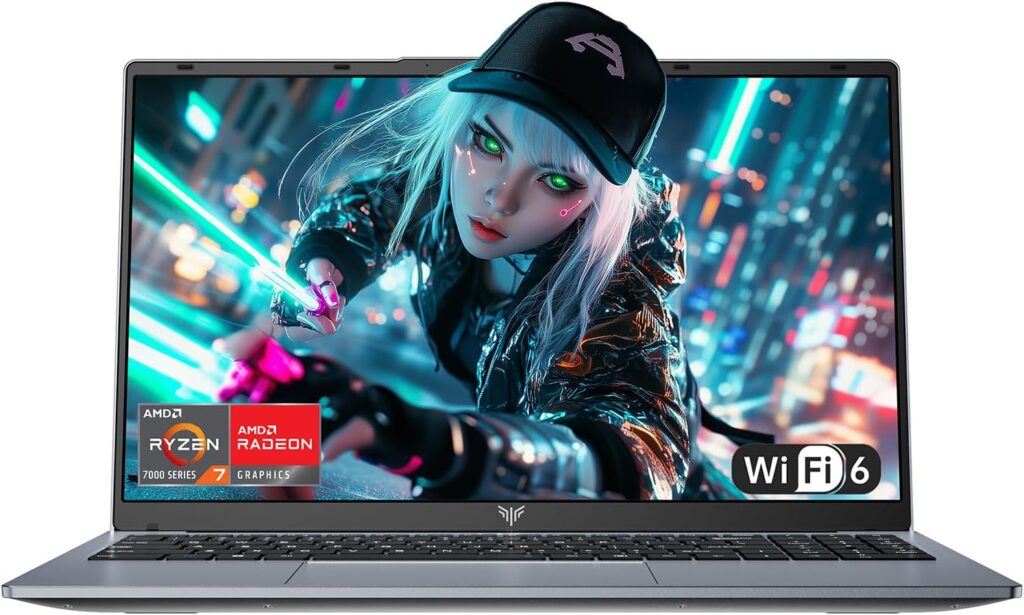
Specifications
| Spec | Detail |
|---|---|
| CPU | AMD Ryzen 5 7430U (Zen 3, 6 cores/12 threads, up to 4.3GHz) |
| RAM | 16GB DDR4 dual-channel (upgradeable to 64GB) |
| Storage | 512GB M.2 NVMe PCIe 3.0 SSD (upgradeable to 4TB) |
| Display | 15.6″ FHD 1920×1080 IPS, 60Hz, anti-glare |
| GPU | AMD Radeon RX Vega 7 (1800MHz) |
| Connectivity | Wi-Fi 6 (802.11ax), Bluetooth 5.2 |
| Ports | 3x USB 3.2, 1x USB-C (full function), 1x HDMI 1.4, 1x 3.5mm audio, 1x TF card slot |
| Battery | 4800mAh / approx. 38–42Wh |
| Weight | 1.65kg |
| Thickness | 17.9mm |
| OS | Windows 11 Pro |
| Hinge | 180° flat-lay design |
| Webcam | 1MP with physical privacy switch |
The Ryzen 5 7430U — What the Processor Actually Is
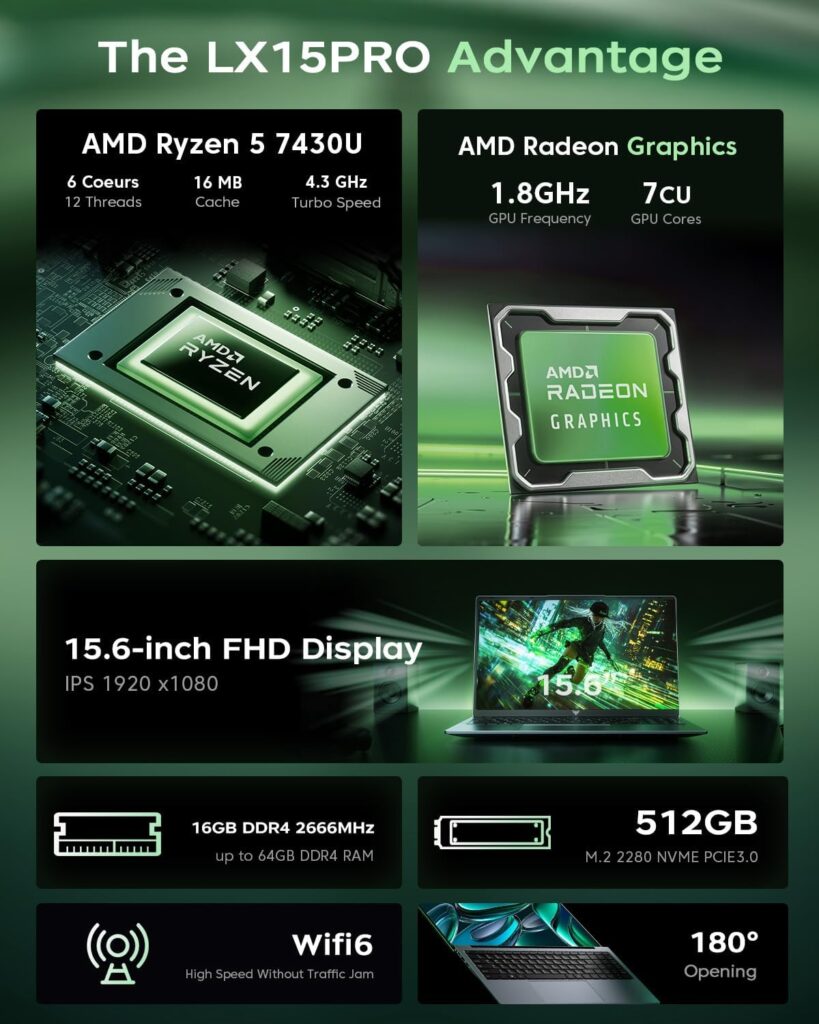
The AMD Ryzen 5 7430U is the LX15 Pro’s headline specification, and it carries an important asterisk that buyers deserve to know before purchasing.
Despite the 7000-series branding, the Ryzen 5 7430U is not a new-generation processor. As NotebookCheck’s processor database confirms, the 7430U is part of AMD’s Barcelo refresh — architecturally identical to the Ryzen 5 5625U released in 2022. It uses the same Zen 3 cores on the same TSMC 7nm manufacturing process, with the same 6 cores, 12 threads, 16MB L3 cache, and 2.3GHz to 4.3GHz clock range. AMD re-numbered this chip into the 7000 series in late 2023 as a product line refresh, but the underlying silicon is unchanged. This is the same branding pattern we called out in the Best Budget Laptops UK guide with the Ryzen 5 7520U — a practice AMD applies across several budget processor lines that gives a misleadingly modern impression without a generational performance improvement.
This matters because it sets accurate expectations. You are buying a capable Zen 3 processor, not a cutting-edge 2024 chip. Zen 3 is still a solid architecture — AMD’s third generation of Zen cores, competitive with Intel’s 11th and 12th Gen for efficiency-focused workloads — but it is two architectural generations behind AMD’s current Zen 4 mobile chips and one behind Zen 4 entry-level alternatives.
With that clarity established, the benchmark numbers confirm where the 7430U actually sits. According to NanoReview’s aggregated benchmark data, the Ryzen 5 7430U scores 1,865 in Geekbench 6 single-core and 6,558 in Geekbench 6 multi-core. In Cinebench R23, single-core reaches 1,421 and multi-core 8,198 — placing it in the lower mid-range of current laptop processors according to NotebookCheck’s comparative rankings. LaptopMedia’s processor database records a best-result Geekbench 6 multi-core of 6,741 and Cinebench R23 multi of 8,198 — consistent across multiple sources.
To put those numbers in practical context: the Ryzen 5 7430U’s Geekbench 6 multi-core score of approximately 6,558 sits below the Intel Core i5-1355U in the ASUS Vivobook 15 at the top of our Best Budget Laptops UK guide, roughly comparable to the Intel Core i5-1235U in the Acer Aspire 3, and meaningfully ahead of the entry-level N97 in the standard ACEMAGIC LX15. For everyday computing workloads, this is a competent performer with genuine headroom beyond basic tasks.
The 6-core, 12-thread configuration with dual-channel DDR4 delivers smooth everyday performance in practice. The Amazon UK verified reviews for this listing confirm boot times under ten seconds from cold, smooth simultaneous operation of multiple browser tabs with streaming and office applications, and no fan noise during light workloads. A verified buyer using the machine for music production noted the processor handling DAW sessions with multiple plugins without dropouts — a moderately demanding workload that the N97 in the standard LX15 would handle less comfortably.
The Radeon RX Vega 7 integrated GPU — 7 compute units at 1800MHz — provides adequate performance for 1080p video playback, hardware-accelerated streaming, and very light gaming at reduced settings on older titles. The dual-channel memory configuration means the Vega 7 receives the full memory bandwidth it requires, which matters for integrated graphics performance. PassMark’s CPU benchmark data places the 7430U at 273rd among laptop CPUs overall — middle of the pack, which is an accurate characterisation.
The performance ceiling is honest: sustained video rendering, large-scale photo batch processing, code compilation, and extended gaming sessions will push the 7430U to its limits. The 15W TDP means it cannot maintain the sustained power delivery of a higher-wattage chip under prolonged load. For the students, home users, and everyday professionals this machine is designed for, that ceiling is rarely encountered in daily use.
The ACEMAGIC LX15 Pro is available on Amazon.co.uk with free Prime delivery.
Display — Better Than Expected for the Price

The 15.6-inch FHD IPS panel at 1920×1080 resolution with a 60Hz refresh rate is the appropriate choice for this machine and performs above what budget pricing typically delivers.
IPS technology means wide, consistent viewing angles — colours remain accurate when viewing from the side, which matters during desk use when the screen is not always perfectly perpendicular to the viewer. The anti-glare coating manages reflections effectively under office lighting and near windows, making the machine practical for UK environments where weather and window proximity vary considerably. For a full explanation of what IPS technology means in practice compared to other panel types, our Laptop Display Guide covers the differences in plain English.
Amazon UK customer reviews for this specific listing mention the IPS display positively and consistently — nine reviewers specifically praised screen clarity with zero negative mentions, and one reviewer noted the display performs well enough for Netflix streaming in a hotel room. Another reviewer noted the display appeared slightly bright and washed out at lower brightness settings — a characteristic of some IPS panels at budget price points where colour calibration is not optimised out of the factory. Running the display at around 70-80% brightness and adjusting colour settings via Windows’ built-in colour calibration tool takes about five minutes and typically improves the out-of-box experience noticeably on budget IPS panels.
The 180-degree flat-lay hinge deserves mention again here because it is a genuinely practical feature. The ability to open the display completely flat — until the screen lies parallel to the keyboard — is useful for group working, sharing a document across a desk, or presenting to someone seated opposite without repositioning the entire machine. It is not a feature that transforms solo daily use, but it is thoughtfully included and executed reliably according to verified buyer feedback.
The thin-bezel design on three sides maximises usable screen area within the 15.6-inch chassis footprint, giving the machine a more contemporary appearance than budget laptops with thick borders from two or three years ago. The 1MP webcam with a physical privacy switch produces adequate video call quality — functional rather than impressive, which is the accurate assessment for any budget laptop webcam — but the physical privacy shutter is a meaningful security feature given the brand history.
No published brightness measurement in nits exists for this specific panel from independent reviewers at time of writing. Based on comparable budget IPS panels and buyer feedback, expect comfortable indoor performance in moderate to good lighting with limitations in very bright environments or under direct strong natural light.
Build Quality and Design
The LX15 Pro’s 17.9mm thickness and 1.65kg weight place it among the slimmer and lighter machines in the 15.6-inch budget category. The metal-finish chassis — described by Amazon UK reviewers as giving the machine “an immediate air of maturity” — feels more substantial than the fully plastic constructions found on machines at lower price points, though it is worth noting this is a metal-finish surface rather than a full aluminium unibody. The distinction matters: a genuine aluminium chassis provides structural rigidity and thermal advantages that a plastic chassis with a metallic surface coating does not fully replicate.
That said, verified buyer feedback on the Amazon UK listing is consistently positive about build quality — reviewers describe no flex in the lid, a hinge that operates smoothly and holds position reliably, and a chassis that feels solid during transport. One reviewer specifically noted the laptop held up well to daily commuting in a bag over several months. For a machine at this price point, that durability feedback is meaningful.
The keyboard provides adequate key travel for document writing and everyday typing. No reviewer noted the double-key registration quirk that affected the standard LX15’s @ and quotation mark keys — suggesting this layout issue was addressed in the Pro model or differs between configurations. The large touchpad receives positive mention for precision across multiple reviews. The silent cooling fan remains quiet under everyday workloads, which is achievable with the 7430U’s 15W TDP — this processor does not generate the heat that demands aggressive fan response during typical use.
The physical webcam privacy switch is worth restating as a feature rather than a minor detail. On a machine from a brand with a documented security history, the ability to physically block the camera lens with no software dependency is a more meaningful privacy control than it would be on an equivalent machine from an established brand with no such history.
The LX15 Pro comes with Windows 11 Pro included — see the full listing on Amazon.
Connectivity and Ports
The port selection covers the practical requirements for everyday use without excess. Three USB 3.2 ports handle the common peripheral combinations — wireless mouse dongle, USB drive, and a third device — without requiring a hub. The full-function USB-C port supports data transfer, display output via DisplayPort Alt Mode, and charging — a significant advantage over the standard LX15’s data-only USB-C. HDMI 1.4 supports external monitor connection up to 4K at 30Hz for compatible displays. The TF card slot handles microSD cards for action camera and drone footage transfer. The 3.5mm audio jack rounds out the selection.
Wi-Fi 6 is a genuine upgrade over the standard LX15’s Wi-Fi 5. In environments with multiple connected devices — a home with streaming, gaming, and work devices all competing for bandwidth — Wi-Fi 6’s improved efficiency under load produces more consistent connection quality during video calls and large file transfers. Amazon UK customer reviews confirm Wi-Fi 6 connectivity as a positive real-world experience, with one reviewer specifically noting sharp video call quality in busy wireless environments. For a detailed explanation of what each port type delivers in practice, see our Laptop Ports Guide.
One limitation worth noting: HDMI 1.4 rather than HDMI 2.0 means the maximum supported refresh rate at 4K resolution is 30Hz — adequate for desktop extension use but not suited for high-refresh-rate external display work. For everyday 1080p or 1440p external monitor use, HDMI 1.4 is entirely sufficient.
Battery Life — Honest Expectations
The 4800mAh battery is the LX15 Pro’s most constrained specification relative to its otherwise competitive package. ACEMAGIC’s marketing describes “all-day use,” which requires some honest translation.
The 7430U’s 15W TDP is approximately 2.5 times the power consumption of the Intel N97 in the standard LX15, operating within a battery of comparable capacity. Under light use — document editing, occasional browsing, low screen brightness — battery life reaches five to six hours. Under mixed use with sustained browsing, streaming, and productivity work at moderate brightness, expect four to five hours. Sustained workloads including video calls, multiple applications running simultaneously, or any processing-intensive task will reduce this further.
This is adequate for a morning working session or an afternoon on campus, but it is not a machine for a full working day away from a charger. Buyers who need genuine all-day battery life without access to a power source should look at machines with 50Wh+ batteries — the Dell Latitude 5420 in our Best Budget Laptops UK guide carries a 63Wh cell that delivers eight to ten hours under comparable conditions. The LX15 Pro’s 65W adapter charges relatively quickly, which partially offsets the modest capacity for users who have periodic access to a socket.
Who Is the ACEMAGIC LX15 Pro Actually For?
The LX15 Pro suits users who need more capability than the entry-level budget tier delivers — students handling larger workloads, home office workers running multiple applications simultaneously, casual creative users doing light photo editing or music production — and who primarily use the machine at a desk or in environments where a charger is accessible within a working session.
The Zen 3 processor handles everyday multitasking comfortably above the entry-level ceiling, the 16GB dual-channel RAM provides genuine headroom for Windows 11 in 2026, and the NVMe SSD delivers fast application launches and file access. The slim 1.65kg chassis and 17.9mm profile make it a practical travel companion despite the battery limitation.
It does not suit users who need all-day untethered battery life, sustained performance for video rendering or professional creative production, or buyers who require the absolute confidence of purchasing from an established brand with an unblemished track record. The one-time post-purchase Malwarebytes scan remains a sensible precaution — ten minutes at first setup, never needed again.
The Ryzen 5 7430U’s Zen 3 architecture should also be understood clearly before purchasing: this is a solid, capable chip that performs well for its intended workloads, but the 7000-series branding implies a recency the silicon does not reflect. Buyers who specifically want current-generation AMD architecture should look at Zen 4-based alternatives, accepting the higher price that comes with them.
ACEMAGIC LX15 Pro Review — Verdict (7.5/10)
The ACEMAGIC LX15 Pro is a well-specified mid-budget machine that delivers genuine performance above the entry-level tier, a capable IPS display, a practical port selection including full-function USB-C and Wi-Fi 6, and a slim lightweight chassis at a competitive price. Its weaknesses are real: battery life of four to five hours in mixed use limits untethered productivity, the Ryzen 5 7430U’s Zen 3 architecture is older than the 7000-series branding implies, and the brand’s documented security history requires a brief one-time precaution.
For the right user — someone who needs comfortable everyday performance well above entry-level, works primarily within reach of a charger, and is comfortable with the post-purchase setup precaution — the LX15 Pro represents good value. For buyers who prioritise all-day battery life or want genuine current-generation AMD architecture, alternative machines in our Best Budget Laptops UK and Best Mid-Range Laptops UK guides offer better-matched options at comparable and modestly higher price points.
Pros:
- AMD Ryzen 5 7430U with 16GB dual-channel RAM — genuinely capable everyday performance above entry-level
- NVMe PCIe 3.0 SSD — fast application launches and file access
- Full-function USB-C — data, display output, and charging through a single port
- Wi-Fi 6 — noticeably better in busy wireless environments than Wi-Fi 5
- Slim at 17.9mm and light at 1.65kg for a 15.6-inch machine
- Physical webcam privacy switch — meaningful security inclusion
- Windows 11 Pro included — unusual and valuable at this price
Cons:
- 4800mAh battery delivers four to five hours mixed use — not suitable for all-day untethered work
- Ryzen 5 7430U is Zen 3 architecture re-badged as 7000-series — not a current-generation chip
- Brand’s 2024 security history requires a post-purchase malware scan precaution
- HDMI 1.4 limits external display to 4K at 30Hz maximum
- No independent calibrated display measurements available — brightness performance unconfirmed
See the ACEMAGIC LX15 Pro on Amazon for the complete specification breakdown.
Further Reading
For context on where the Ryzen 5 7430U sits in the broader processor landscape, our Laptop CPU Guide covers AMD’s naming conventions and what each generation delivers in practice — including why the Zen 3 vs Zen 4 distinction matters for buying decisions. The Performance Benchmarks Explained guide translates the Cinebench and Geekbench scores referenced above into practical purchasing terms. For a broader comparison of machines at similar and adjacent price points, our Best Budget Laptops UK and Best Mid-Range Laptops UK guides cover the full range with independently verified specifications.
As an Amazon Associate, I earn from qualifying purchases.