
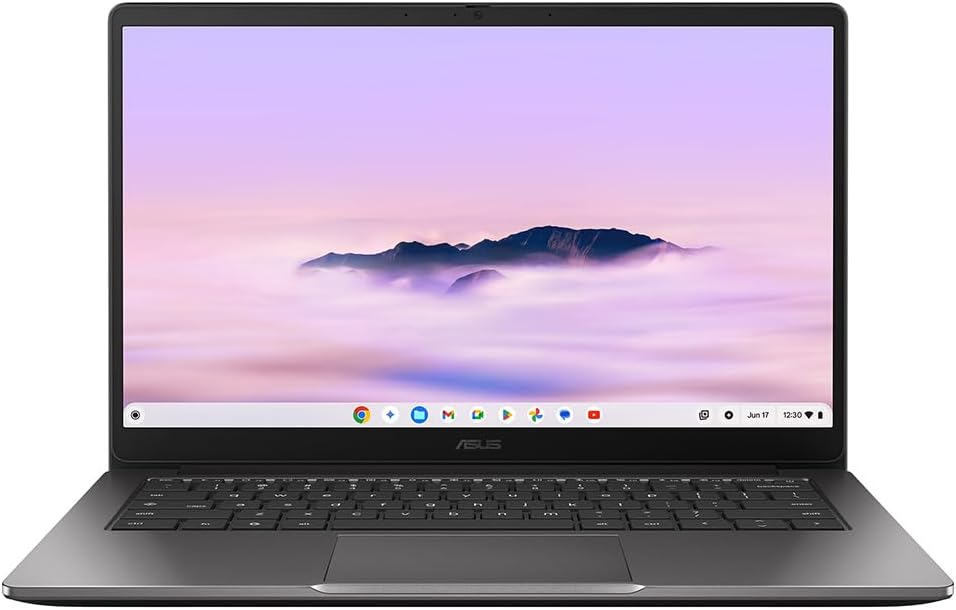
ASUS Chromebook Plus 14 CX1405CTA Analysis: ChromeOS Done Right
The Blunt Verdict
The ASUS Chromebook Plus 14 CX1405CTA is a straightforward machine for a straightforward use case: browsing, streaming, light document work, and not much else. If that covers your daily needs, this is a genuinely decent option from the budget laptop segment. It won’t embarrass you on build quality, the screen is fine, and ChromeOS keeps everything running cleanly without the bloat that drags down similarly priced Windows machines.
The headline specs are 8GB of LPDDR4 RAM, 128GB eMMC storage, and an Intel Core 3 N355 processor with eight cores clocked up to 3.8GHz. The display is a 14-inch 1920 x 1080 LED panel with touch support. Battery is rated at 42Wh with a claimed 12-hour life. Nothing here is going to blow anyone away on paper, but for ChromeOS it’s a solid configuration — this OS genuinely needs less than Windows to run well.
Buy this if you want a lightweight daily driver for web-based work, studying, or travel, and you’re comfortable living inside Google’s ecosystem. Don’t buy it if you need Windows software, local app flexibility, or anything heavier than casual media consumption. Gamers, developers, and creative professionals: this is not your machine.
See the ASUS Chromebook Plus 14 CX1405CTA listing and availability on Amazon.

Pros and Cons
Pros
- ChromeOS runs genuinely fast and secure on this hardware — no Windows sluggishness at this price point
- Backlit full-size keyboard with numeric keypad, a rarity at this end of the market
- Touchscreen with stylus support adds flexibility for note-takers and students
- Claimed 12-hour battery life is credible for light ChromeOS usage — backed by buyer feedback on day-long travel use
- At 1.39kg it’s light enough to carry daily without complaint
Cons
- eMMC storage is slower than SSD — fine for ChromeOS but worth knowing if you’re comparing to Windows alternatives
- No Ethernet port and Wi-Fi limited to 802.11ac (Wi-Fi 5) — no Wi-Fi 6 here
- Hard locked into ChromeOS — no Windows apps, no local installs of Microsoft 365, no escape hatch
Spec Breakdown
- Model: ASUS Chromebook Plus 14 CX1405CTA
- CPU: Intel Core 3 N355, 8-core, up to 3.8GHz
- RAM: 8GB LPDDR4
- Storage: 128GB eMMC
- GPU: Intel integrated graphics
- Display: 14-inch LED, 1920 x 1080, 60Hz, touchscreen (capacitive)
- Battery: 42Wh, rated 12 hours
- OS: Chrome OS
- Weight: 1.39kg
- Ports: 3 x USB, HDMI out
- Connectivity: 802.11ac Wi-Fi
- Keyboard: Full-size with numeric keypad, backlit
- Camera: Yes (webcam included)
- Special Features: Stylus support
Hardware & Performance Reality Check
The Intel Core 3 N355 is an efficiency-first chip, not a performance chip. Eight cores sounds convincing, but these are low-power cores designed to stretch battery life rather than crunch heavy workloads. Paired with 8GB of LPDDR4 RAM, it handles ChromeOS tasks — multiple browser tabs, Google Docs, Sheets, YouTube, video calls — without breaking a sweat. That RAM is almost certainly soldered, which is standard for Chromebooks. You cannot upgrade it later, so what you buy is what you keep. If you want to understand how RAM sizing affects day-to-day use, our RAM guide breaks it down. Eight gigabytes is the minimum worth accepting in 2025, and here it’s fine for the OS it’s running.
The 128GB eMMC is not flash SSD storage in the traditional sense — eMMC is slower, cheaper, and non-upgradeable. For ChromeOS, which is built to live in the cloud and keeps very little local, it’s workable. Don’t expect to store a large local media library or a hefty app collection. The integrated Intel GPU handles basic video playback without issues, including 1080p streaming. It won’t run anything graphically demanding — not even lightweight PC gaming. If you’re curious about performance expectations for chips in this class, don’t expect miracles, but for the use case this machine is designed for, it holds up.
For 2026 and beyond, the real-world picture is this: student essay writing, spreadsheets, web research, video calls — handled. Office tasks through browser-based Microsoft 365 — yes, but you need a subscription and you’re doing it via the web, not a local install. Gaming — forget it, even lightweight titles will struggle. Programming — basic web-based tools and coding environments like Replit will work, but anything requiring local compilers or heavy IDEs won’t. Video editing — ruled out entirely. This is a consumption and light productivity machine, and it doesn’t pretend otherwise. If you need a CPU with genuine headroom for heavier work, you need a different category of machine entirely.
One thing worth flagging: the port situation is basic. Three USB ports and HDMI out are your options. There’s no Ethernet, no Thunderbolt, no card reader visible in the spec data. If you rely on wired internet or need to connect a lot of peripherals simultaneously, you’ll want a USB hub. Our ports guide covers what to look for if connectivity is a priority.
Check the full spec sheet and buyer Q&As for the ASUS Chromebook Plus 14 CX1405CTA on Amazon.
Everyday Usability: Battery, Build & More
At **1.39kg** and with a footprint of 32.5 x 21.4cm, this is genuinely light and slim. Buyers specifically mention it being comfortable to use on the sofa and easy to carry through airports — that’s not an accident, it’s what this form factor is designed for. The backlit keyboard is full-size and includes a numeric keypad, which is a genuine practical bonus and not something you routinely find at this end of the market. Buyer feedback on keyboard feel is positive — described as comfortable with decent spacing. The trackpad also draws no complaints. The 1920 x 1080 LED display has drawn favourable comparisons from buyers switching from more expensive Windows laptops, with brightness and clarity coming up as highlights. If you want to understand the differences between display panel types, the short version here is that LED at 1080p is adequate for everyday use without being exceptional. The touchscreen is capacitive and responds properly — useful for note-taking with the stylus, or just navigating ChromeOS casually.
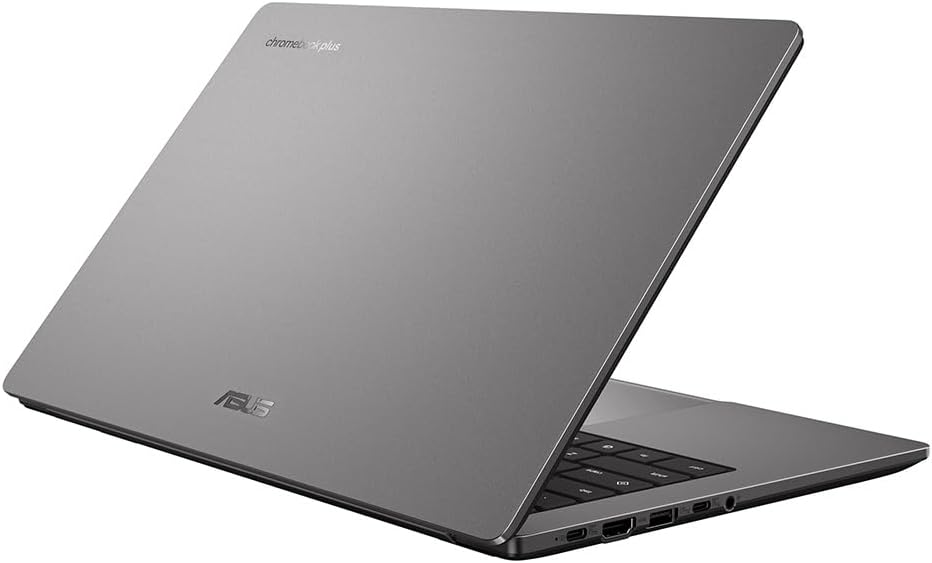
Battery life is rated at 12 hours from a 42Wh cell. One buyer specifically noted it lasted through a full day of travel including watching two or three films — so the claim isn’t completely detached from reality, though heavy streaming will pull it down. The build is all-plastic, which keeps weight down but means it won’t win any premium feel contests. Buyers accept this without complaint because the trade-off is obvious. There’s no fingerprint reader mentioned in the spec data. The webcam is present, which matters for video calls. No notable complaints about heat or fan noise in the reviews, which makes sense — this chip in this OS configuration runs cool and quiet under typical loads. Wi-Fi 5 (802.11ac) is fine for most home routers, but if you’re on a Wi-Fi 6 network and care about wireless throughput, it’s a step behind. Bluetooth support is listed as absent in the spec data, which would be a meaningful gap — worth confirming on the Amazon listing before purchasing.
Lifespan & Future-Proofing
On build quality: all-plastic construction at this weight is durable enough for daily use, but don’t expect it to survive drops or rough handling. The hinge and chassis are typical budget Chromebook fare. Realistically, three to four years of careful daily use before physical wear becomes a problem — that’s honest, not pessimistic. These aren’t built to last a decade.
On spec longevity: ChromeOS is notably kind to older hardware because it’s lightweight by design. Google does commit to software update windows for Chromebooks — check the Auto Update Expiry (AUE) date for this specific model on Google’s official list before buying. Once updates stop, security patches stop with them, and that matters more on ChromeOS than on Windows where you have more control. The 8GB RAM ceiling with no upgrade path means you’re locked in. For light web-based use, this configuration will feel adequate through 2026 and likely a year or two beyond. Push it harder and the eMMC storage and RAM ceiling will start to pinch sooner. Soldered, non-expandable hardware means there is no upgrade path — when it feels slow, you replace it.
View current stock levels for the ASUS Chromebook Plus 14 CX1405CTA on Amazon.
What Buyers Are Saying (And Potential Dealbreakers)
The ASUS Chromebook Plus 14 CX1405CTA holds a 4.5 out of 5 rating from 55 customer reviews on Amazon. That’s a reasonable sample size, though not enormous — the sentiment is consistently positive with no recurring dealbreaker complaints surfacing across the feedback. The tone across reviews is one of pleasant surprise, particularly from buyers coming from Windows machines who expected more compromise than they found.
Build quality, keyboard feel, screen quality, and general ease of use are the most commonly praised aspects. Battery life gets a qualified thumbs up — buyers note it’s good for a day’s use without a charger, though one buyer hedged that it could “do with a bit more capacity.” The ChromeOS learning curve appears to be minimal for buyers who went in knowing it wasn’t Windows — those who did their research beforehand report no issues. Students and travel users make up the clearest buyer profile in the reviews, and both groups express satisfaction.
One buyer flagged the absence of an SD card slot as a minor irritation but not a dealbreaker given the 128GB on-board. No major complaints about thermals, noise, or reliability cropped up. The Microsoft 365 situation is the one area where buyers need to go in clear-eyed: you’re using it via browser, subscription required, no local install. ASUS’s own product listing spells this out, to their credit.
Buyer Highlights
“I switched from a five-year-old Lenovo that cost four times as much and I honestly needn’t have worried — the build, keyboard, and screen are all fine.” — Useful context if you’re coming from a mid-range Windows laptop and worried about the step down.
“It’s brilliant for the sofa and for long flights — screen is good, it’s fast enough for everything except gaming, and the keyboard feels nice.” — Consistent with the travel and casual use positioning of this machine.
“My daughter loves it — bought it for student life and it does everything she needs.” — Student buyers are a recurring theme in the feedback, and satisfaction is high in that group.
“So easy to set up, just signed in and it was ready to go.” — ChromeOS genuinely is quicker to get started on than Windows for non-technical users.
“Battery is good enough for a day’s travelling and watching a couple of movies — no complaints, though a bit more capacity would be welcome.” — Honest qualifier on the battery; adequate rather than class-leading.
Who Should Buy It (And Who Shouldn’t)
Buy If
- You live in Google’s ecosystem — Gmail, Docs, Sheets, Drive — and want a machine that handles all of that cleanly without Windows overhead
- You’re a student who needs a light, portable machine for essays, research, and video calls, and you’re not tied to specific Windows applications
- You want a travel or sofa machine with genuine all-day battery life at a weight that won’t cause shoulder pain
- You’re switching from an old, slow Windows laptop and want something that just works without maintenance headaches
Avoid If
- You need any Windows-only software — desktop Microsoft Office, Adobe Creative Suite, specialist professional tools — none of that runs here
- You need Bluetooth connectivity — the spec data lists no Bluetooth support, which rules out wireless mice, headphones, and keyboards
- You’re expecting gaming, video editing, or any kind of local media production workflow — the hardware and OS combination rules all of that out
The Bottom Line
The ASUS Chromebook Plus 14 CX1405CTA is a well-executed machine for a specific type of buyer. If you’re a student, a traveller, or someone who does the bulk of their computing through a browser, this delivers a clean, light, and reliable experience without the friction that plagues budget Windows laptops. The keyboard is better than it has any right to be at this level, the screen is honest, and ChromeOS keeps everything snappy. Go in knowing the limitations — no Windows apps, no Bluetooth per the specs, no upgrade path — and you’re unlikely to be disappointed. Before committing, though, it’s worth reading our laptop buying guide to make sure this category of machine genuinely fits your needs, and checking our specs explained page if any of the technical detail above needs unpacking. This is also worth browsing alongside other budget options before deciding — there are Windows alternatives at a similar point that suit different needs.
Browse the ASUS Chromebook Plus 14 CX1405CTA on Amazon and read the latest buyer questions.
At LaptopAdvisorOnline, our methodology is built on data transparency rather than simulated hands-on testing. We rigorously analyse official manufacturer specifications and aggregate verified customer sentiment to provide objective, fluff-free buying advice that helps you cut through the marketing jargon.
As an Amazon Associate, I earn from qualifying purchases.
Browse by Specification
Looking for something specific? Browse our analyses by hardware and feature below, or check all laptop analyses in the Best Budget Laptops category archive.
[AMD Processor Laptops] — [Intel Processor Laptops] — [16GB RAM Laptops] — [32GB RAM Laptops] — [Dedicated Graphics] — [Long Battery Life] — [Lightweight Laptops] — [Student Laptops]
Browse by Screen Size
[13-inch Laptops] — [14-inch Laptops] — [15-inch Laptops] — [16-inch+ Laptops]




