
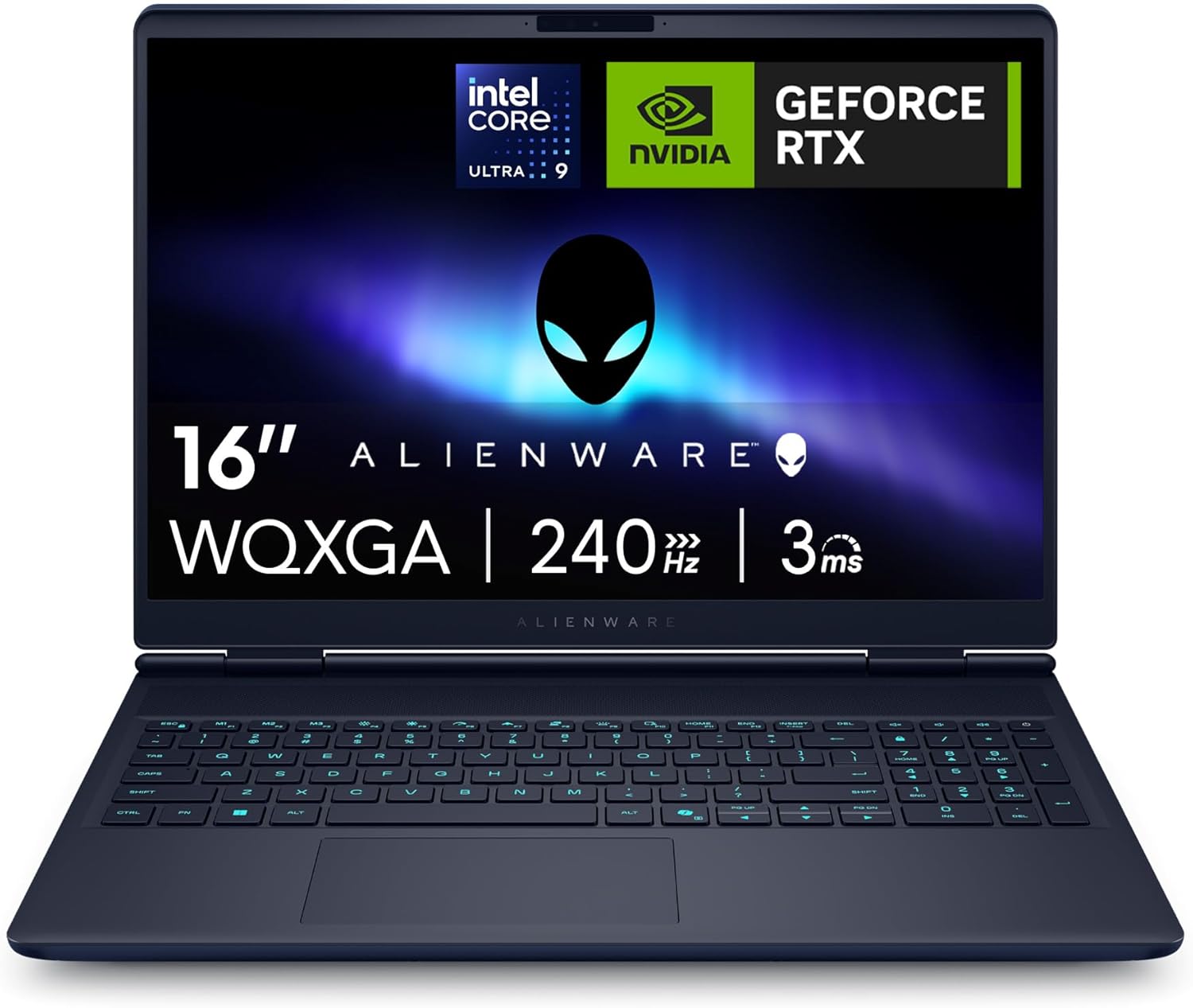
Alienware 16X Aurora AC16251 Analysis: RTX 5070 Delivered
The Blunt Verdict
The Alienware 16X Aurora AC16251 is a serious machine built for people who want near-desktop gaming performance in a chassis they can actually carry. The headline strength is the combination of an Intel Core Ultra 9 275HX and an RTX 5070 GPU — that’s Nvidia’s Blackwell architecture, not a rebadged previous-gen card. The headline weakness is everything that comes with that power level: weight, heat, fan noise, and a power brick one buyer described as “huge.” If you’re looking for something that disappears into a bag, this isn’t it. If you want to play demanding titles at high settings on a 2560 x 1600 screen at 240Hz, it absolutely is.
The 32GB DDR5 RAM is not soldered — more on that shortly. Storage is a 1TB PCIe NVMe SSD. The display is a 16-inch WQXGA panel with G-Sync, a matte finish, and 100% DCI-P3 colour coverage. That last spec matters more than manufacturers typically let on — it means colour-accurate work is actually viable here, not just gaming. The GPU carries 8GB GDDR7 VRAM and the whole system draws up to 155W combined TDP/TGP. This is not a machine you run on battery for any serious workload.
Buy this if you play graphically demanding games and want a display good enough to match. Buy this if you do video editing or 3D rendering and want GPU acceleration that won’t bottleneck you. Avoid it if you primarily work in coffee shops, need all-day battery life, or want something genuinely quiet under load. This sits firmly at the top of the premium gaming laptop tier — and the spec sheet justifies every inch of that positioning.
See the current availability and listing details for the Alienware 16X Aurora AC16251 on Amazon.

Pros and Cons
Pros
- RTX 5070 with GDDR7 VRAM and DLSS 4 support — Blackwell architecture, not a warmed-over previous generation
- WQXGA 240Hz G-Sync display with 100% DCI-P3 coverage and matte finish — genuinely strong for both gaming and creative work
- 32GB DDR5 RAM across two SO-DIMM slots, both user-upgradeable — real long-term flexibility
- Two PCIe Gen 4 SSD slots with room to expand to 4TB total — storage isn’t a dead end
- Thunderbolt 4 port present alongside HDMI 2.1 and Ethernet — connectivity is comprehensive
- Wi-Fi 7 and Ubuntu compatibility confirmed by buyers — works cleanly outside of Windows
Cons
- Power brick is large and the cable is non-detachable — annoying for anyone who travels with it regularly
- Fan noise under full load is significant, and thermals run hot — one buyer reported temperatures around 80–100°C under gaming load
- At least one buyer has reported minor light bleed in screen corners — worth inspecting on arrival
Spec Breakdown
- Model: Alienware 16X Aurora AC16251 (AWAC16251-9346BLU-PGB)
- CPU: Intel Core Ultra 9 275HX (Series 2), 24 cores, up to 5.4GHz turbo, 36MB cache
- RAM: 32GB DDR5, 5600 MT/s, 2x16GB SO-DIMM (user-upgradeable, max 32GB per spec)
- Storage: 1TB PCIe Gen 4 NVMe SSD (two SSD slots, expandable to 4TB)
- GPU: NVIDIA GeForce RTX 5070, 8GB GDDR7
- Display: 16-inch WQXGA (2560 x 1600), 240Hz, G-Sync, 3ms response, 100% DCI-P3, matte, no touchscreen
- Battery: 96Wh, 6-cell
- OS: Windows 11 Home
- Weight: 2.66kg
- Ports: USB-A 3.2 Gen 1 (x2), USB-C with Thunderbolt 4 / USB 3.2 Gen 2 / DisplayPort 2.1 (dGPU), USB-C USB 3.2 Gen 2 / DisplayPort 2.0 (iGPU), HDMI 2.1 (dGPU), RJ-45 Ethernet, 3.5mm headset jack
- Connectivity: Wi-Fi 7 (802.11be), Bluetooth
- Keyboard: 1-Zone AlienFX RGB backlit, UK layout, numeric keypad
- Camera: Front-facing webcam
- Audio: Dolby Audio speakers
- Dimensions: 357 x 265 x 23mm
- Warranty: 1 Year Alienware Care
Hardware & Performance Reality Check
The Intel Core Ultra 9 275HX is a high-end H-class processor — 24 cores, 36MB cache, and a 5.4GHz peak turbo. For anyone wondering what that means in practice: this CPU doesn’t struggle with anything. Compiling code, running virtual machines, streaming while gaming, rendering video — it handles the lot without negotiation. The inclusion of an onboard NPU for AI task offloading is genuinely useful if you use tools like live background removal in streaming software, since it lifts that burden from the main CPU and GPU. The 32GB of DDR5 running at 5600 MT/s sits across two user-accessible SO-DIMM slots — it is not soldered. That matters enormously for longevity; if you need to understand why, our RAM guide covers it plainly. The spec sheet lists a maximum of 32GB, so you won’t be doubling up later, but the current configuration is already at that ceiling — so there’s nothing left on the table.
The 1TB PCIe Gen 4 NVMe SSD is fast and large enough for most users, but the second available SSD slot means you can add storage without replacing what’s already there. Genuinely good design choice. The GPU is an NVIDIA GeForce RTX 5070 built on Blackwell architecture — this is not a Max-Q shadow of itself if you believe the spec sheet, with a reported 115W TGP with Dynamic Boost. The 8GB GDDR7 VRAM is technically a reduction from what previous-gen 5070 Ti cards offered, but GDDR7’s bandwidth improvements mean it punches above its capacity. DLSS 4 with Multi Frame Generation and full ray tracing support are real-world advantages in supported titles, not just marketing lines. For anyone tracking performance benchmarks, the RTX 5070 in laptop form sits meaningfully above last generation’s mobile 4070 Ti — it’s a genuine step forward.
In 2026 terms: student work is trivially handled — this chip would be embarrassed by a Word document. Office tasks are the same story. For gaming, you’re in the top tier of what any laptop can currently offer. Programming, including running local LLMs, compiling large codebases, or running Docker containers, is where the 24-core CPU with NPU assist actually makes a tangible difference over mid-range alternatives. Video editing in Premiere or DaVinci Resolve — including 4K timelines — will run with GPU-accelerated rendering without complaint. This machine is explicitly not underpowered for any current consumer task. The only limits are thermal and battery, not silicon.
The port configuration deserves its own mention. Read the spec sheet carefully: Thunderbolt 4 is present alongside HDMI 2.1, a dedicated Ethernet jack, and two USB-A ports. Both USB-C ports support DisplayPort output — one via the dGPU, one via the iGPU. This is comprehensive. Anyone connecting to a dock, an ultrawide monitor, or a wired network for low-latency gaming will find everything they need without adapters. The full ports guide covers what each standard actually delivers if you want to compare.
Check the full spec sheet and buyer Q&As for the Alienware 16X Aurora AC16251 on Amazon.
Everyday Usability: Battery, Build & More
At 2.66kg, this isn’t something you’ll forget you’re carrying. It’s manageable for commuting — people do it — but it’s not a machine that disappears into a bag. The power brick adds to that burden, and one buyer flagged that the cable from the brick to the laptop is non-detachable, which creates an annoying cable management problem. The chassis itself is built well: anodized aluminium top and bottom panels with a magnesium alloy interior frame. That’s not budget construction — it’s the kind of build that should handle years of daily use without flexing or creaking. The Interstellar Indigo colourway is divisive (it’s a gaming laptop, it looks like one), but the satin finish and iridescent Alienware logo aren’t as aggressive as older Aurora designs. Fingerprints do show on the top lid according to at least one buyer — worth knowing if that bothers you.

Battery life is the honest weak point here. The 96Wh cell is among the largest you’ll find in a gaming laptop, but when the GPU is pulling 115W under load, battery life during gaming is measured in roughly an hour or less. For light tasks — browsing, documents, video streaming — you’ll get reasonable mileage, but don’t plan a day away from a socket if you intend to actually use this machine for what it’s built for. The display is genuinely strong: 240Hz with G-Sync means no tearing under gaming loads, and 100% DCI-P3 with a matte finish makes it one of the better panels you’ll find at this tier — worth reading more about display panel types if you’re comparing alternatives. One buyer noted minor light bleed in the screen corners — not universal, but worth checking on arrival. The speakers with Dolby Audio are noted positively in buyer feedback — “good sound quality” is the consistent theme, which is a higher bar than most gaming laptops clear. The webcam is average, as buyers confirm — fine for video calls, not a streaming camera. The keyboard includes a full numeric keypad, which is genuinely useful for anyone doing data work or finance. The AlienFX RGB is single-zone — you can’t customise per-key colours — but Stealth Mode (F7) disables lighting entirely and drops the system to a quieter fan profile, which is actually a useful feature for library or office use.
Lifespan & Future-Proofing
The chassis should last. Aluminium panels and a magnesium alloy frame are not the plastic shells that show stress fractures after eighteen months of daily carry. Alienware’s build quality has historically been among the more durable in the gaming laptop space, and nothing in the buyer feedback contradicts that here. Realistically, this is a machine that should hold up physically for five-plus years of regular use — provided you don’t game on it balanced on a soft surface that blocks the intake vents.
Spec longevity is where this really earns its keep. The Intel Core Ultra 9 275HX and RTX 5070 are current top-tier — not mid-range parts wearing a premium label. For gaming specifically, the RTX 5070 with DLSS 4 support should remain capable of high-settings gaming on titles released well into the late 2020s; frame generation technology means the GPU’s effective output is higher than raw rasterisation numbers suggest. The two upgradeable RAM slots and two SSD slots mean you’re not locked into today’s storage configuration — a genuinely meaningful difference from machines where components are soldered in. Understanding what specs actually translate to in real use helps here — the short version is that this machine shouldn’t feel dated for primary tasks for at least four to five years. The one caveat: the maximum supported RAM is currently listed at 32GB, which is already installed — so that particular upgrade path is already closed.
View current stock levels for the Alienware 16X Aurora AC16251 on Amazon.
What Buyers Are Saying (And Potential Dealbreakers)
The Alienware 16X Aurora AC16251 holds a rating of 4.6 out of 5 from 28 verified UK buyers. That’s a relatively small sample — worth noting, but the ratings skew heavily positive with no score below 4 stars in the available data. The feedback is coherent enough to draw meaningful patterns from.
Gaming performance gets near-universal praise. Multiple buyers specifically reference running games on ultra settings without issues, and one confirmed VR performance as strong. Speed — both in boot and in application launches — is consistently called out as a strength. The screen gets positive mentions for brightness, clarity, and smoothness, though one buyer did flag the light bleed issue at corners, which is worth monitoring. Sound quality from the built-in speakers earns credit, which is unusual enough in gaming laptops to be worth noting.
The heat issue comes up more than once. One buyer confirmed temperatures around 80–100°C under gaming load, and Dell’s own guidance apparently acknowledges 100°C as within spec — that might be technically true, but it understandably makes buyers nervous. Fan noise at full load is described as loud. The non-detachable power cable on the large brick is a recurring gripe among those who travel with it. One buyer noted the lid slightly overhangs the base when closed, which creates some pressure risk when packed in a bag. None of these are dealbreakers — they’re the predictable trade-offs of fitting this much silicon into a 2.66kg chassis — but they’re real.
One buyer also confirmed successful dual-boot with Ubuntu, which is useful information for developers who want Linux availability without giving up gaming on Windows. That’s not a trivial thing to get right on high-end gaming hardware, and it’s a genuine positive for that audience.
Buyer Highlights
“The gaming performance has been great on every game I’ve tried — the screen is clear, bright, and so smooth at 240Hz.” — Consistent feedback across multiple buyers, not an outlier.
“I dual-booted it with Ubuntu and Windows — both run and coexist well.” — Relevant if you’re a developer who wants Linux without abandoning gaming.
“It does get very hot, but Dell says it can run at 100° with no issues — I keep mine around 80°.” — The thermals are aggressive; manage your expectations accordingly.
“The power brick is huge and the cable from the brick to the laptop isn’t detachable — no way to adjust its length.” — A genuine travel annoyance worth factoring in if portability matters to you.
“Great for work and gaming, including VR — really good product.” — VR performance confirmation is useful given the GPU’s VRAM headroom.
Who Should Buy It (And Who Shouldn’t)
Buy If
- You play graphically demanding games and want a display that can actually keep up — the 240Hz G-Sync panel with DCI-P3 coverage is matched to the GPU underneath it
- You do creative work (video editing, 3D rendering, AI-assisted workflows) and want GPU-accelerated performance without buying a desktop
- You want a machine that’s upgradeable — dual RAM slots and dual SSD slots mean this doesn’t become a throwaway device in three years
- You’re a developer who needs raw CPU power, an NPU for AI workloads, and confirmed Linux compatibility
Avoid If
- You need genuine all-day battery life away from a plug — this machine does not deliver that under any serious workload
- You want something quiet — fan noise under load is significant, and there’s no way around the thermal demands of a 155W combined power envelope
- You’re comparing this against genuinely budget gaming options — the spec and build quality here are in a different category, and so is the ask
The Bottom Line
The Alienware 16X Aurora AC16251 does what it says. The RTX 5070 with Blackwell architecture, paired with a Core Ultra 9 275HX and a display that’s actually calibrated to show it off, represents a cohesive high-end gaming and creative package. The compromises — heat, fan noise, a large power brick, and battery life that evaporates under load — are the same compromises every machine at this performance level makes. Alienware doesn’t hide them particularly well, and buyers are clearly going in with open eyes. If you’ve thought through those trade-offs and they don’t apply to how you’ll use it, this earns a genuine recommendation.
Find the Alienware 16X Aurora AC16251 and read the latest buyer questions on Amazon.
At LaptopAdvisorOnline, our methodology is built on data transparency rather than simulated hands-on testing. We rigorously analyse official manufacturer specifications and aggregate verified customer sentiment to provide objective, fluff-free buying advice that helps you cut through the marketing jargon.
As an Amazon Associate, I earn from qualifying purchases.
Browse by Specification
Looking for something specific? Browse our analyses by hardware and feature below, or check all laptop analyses in the Best Premium Gaming Laptops category archive.
[AMD Processor Laptops] — [Intel Processor Laptops] — [16GB RAM Laptops] — [32GB RAM Laptops] — [Dedicated Graphics] — [Long Battery Life] — [Lightweight Laptops] — [Student Laptops]
Browse by Screen Size
[13-inch Laptops] — [14-inch Laptops] — [15-inch Laptops] — [16-inch+ Laptops]




