
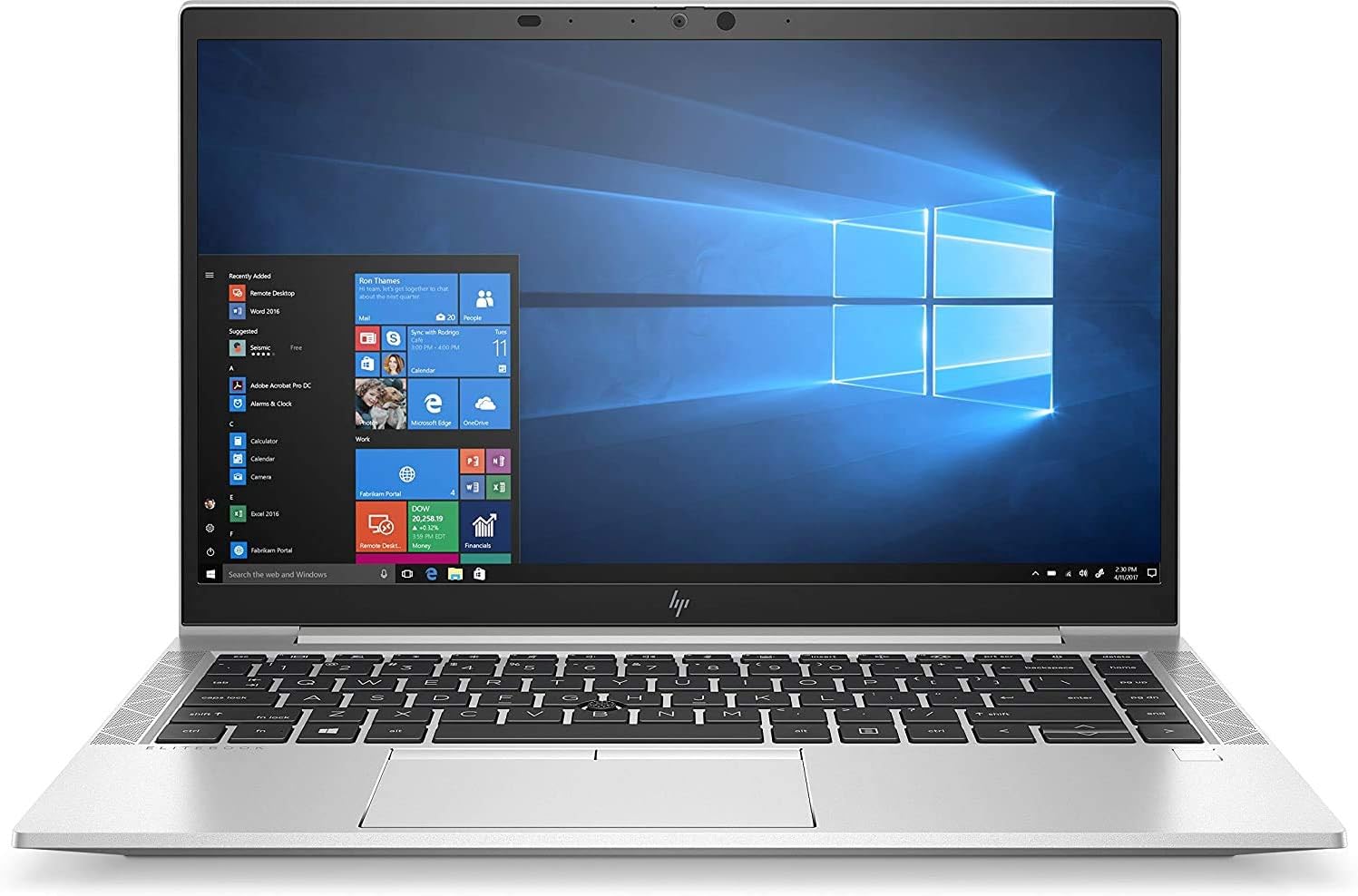
HP EliteBook 840 G7 Analysis: Refurbished Risk vs Reward
The Blunt Verdict
The HP EliteBook 840 G7 is a refurbished business laptop aimed squarely at people who need a competent, professional machine without paying new-laptop money. If you’re a student, a remote worker, or someone who’s been putting off replacing an ageing machine, this hits a reasonable spot in the budget laptop market. The headline strength is the combination of a proper business-grade chassis with 16GB of DDR4 RAM and a 512GB SSD at a refurbished price point. The headline weakness is the processor — the Intel Core i5-10210U is a 2019 chip, and in 2026 that matters more than the marketing copy wants you to think.
Specs on paper look decent for the money: a 14-inch 1920 x 1080 display, 16GB DDR4 RAM, a 512GB SSD, integrated Intel graphics, and Windows 11 Pro pre-installed. The EliteBook line is HP’s business-oriented range, so the build quality standard is higher than most consumer-grade plastic boxes. That’s genuinely worth something on a refurbished unit — EliteBooks are built to survive corporate environments, which means they tend to age better than budget consumer alternatives.
Buy it if you need a capable everyday machine for office work, studying, or general use and you’re not fussed about having the latest silicon. Avoid it if you’re doing anything compute-intensive — video editing, gaming, heavy development workloads — or if you’re buying a refurbished laptop without understanding that you’re accepting some risk alongside the savings. One buyer experienced a unit failure within a month. That’s the refurbished lottery, and you need to go in with eyes open.
See the HP EliteBook 840 G7 listing and current availability on Amazon.

Pros and Cons
Pros
- 16GB DDR4 RAM is genuinely comfortable for multitasking — most competing refurbished units at this tier ship with 8GB
- 512GB SSD storage is enough for most users without immediately needing an external drive
- Business-class chassis — EliteBooks are built to MIL-SPEC durability standards, which gives a refurbished unit more remaining life than a consumer equivalent
- Windows 11 Pro included — BitLocker encryption, Remote Desktop, and domain join capability out of the box
- Fingerprint reader for quick, passwordless login — genuinely useful daily
- Multiple buyers noted units arrived in near-spotless condition with good battery health
Cons
- The i5-10210U is a fifth-generation-old CPU — it will feel the age under sustained workloads
- At least one verified buyer received a unit that failed within weeks of purchase — the refurbished risk is real here
- Return experience varies — one buyer reported a partial-refund dispute with the third-party seller before Amazon stepped in to resolve it
Spec Breakdown
- Model: HP EliteBook 840 G7
- CPU: Intel Core i5-10210U (10th Gen, 1.8GHz base / 4.2GHz boost)
- RAM: 16GB DDR4
- Storage: 512GB SSD
- GPU: Intel Integrated Graphics
- Display: 14-inch FHD LED, 1920 x 1080, 60Hz
- OS: Windows 11 Pro
- Wireless: Wi-Fi 802.11ac (Wi-Fi 5)
- Bluetooth: Yes
- Ports: HDMI, USB (3 total), additional port (4 ports listed)
- Keyboard: Backlit
- Security: Fingerprint Reader
- Camera: Webcam with microphone
- Condition: Renewed (Refurbished)
- Warranty: 2-year EU spare part availability; 1-year limited product warranty
Hardware & Performance Reality Check
The Intel Core i5-10210U is a quad-core chip with a base clock of 1.8 GHz and a boost up to 4.2 GHz. In plain English: it handles email, documents, spreadsheets, video calls, and light browser use without complaint. It won’t stutter on a Teams call with a few tabs open. Where it runs into trouble is sustained load — anything that pins the CPU for more than a few minutes, such as compressing files, batch-processing images, or running local dev environments. For a CPU that was mid-range in 2019, it’s now positioned firmly in the capable-but-not-quick category. The 16GB DDR4 RAM is the saving grace here — if you want to understand why that matters more than people realise, the RAM guide covers it well. Whether the RAM is soldered or via SODIMM slots depends on the specific refurbished unit’s configuration — HP did offer both on the 840 G7 generation — so worth verifying with the seller before purchasing if upgradeability matters to you.
The 512GB SSD is solid. SSDs in the EliteBook 840 G7 generation were typically M.2 PCIe NVMe units, which means fast read/write speeds rather than the sluggish SATA drives that plagued earlier budget business machines. Storage size is adequate for most users — you’re not going to fill it overnight with documents and a browser profile. The GPU situation is straightforward: this is integrated Intel graphics, which means it handles 1920 x 1080 display output, video playback, and light photo editing fine. It does not do gaming beyond very old or very undemanding titles. If you want anything more from a GPU, this isn’t your machine — check the budget gaming category instead.
For 2026 use: student work and essay writing, yes without hesitation. Office tasks like Word, Excel, Outlook, browser-based tools, yes comfortably. Programming — light Python, web development, small Node projects, probably fine; Docker-heavy or compilation-heavy workflows will test it. Video editing — basic cuts in something like DaVinci Resolve Free will work slowly; anything multi-track or 4K, no. Gaming — browser games and titles from 2010, maybe; anything modern, no. If you want to sanity-check performance expectations for this class of hardware, the benchmarks page is a useful reference.
On connectivity: the spec lists HDMI output and 3 USB ports across 4 total ports. The 840 G7 in its standard configuration also typically includes a USB-C/Thunderbolt 3 port, which is worth confirming with the seller — on a business machine of this era that’s a meaningful addition. The wireless spec is 802.11ac (Wi-Fi 5), not Wi-Fi 6 — fine for most home broadband setups, but if you’re on a congested office network you’ll notice the ceiling. For a full picture of what these ports actually mean in practice, the ports guide is worth a look.
Check the full spec sheet and buyer Q&As for the HP EliteBook 840 G7 on Amazon.
Everyday Usability: Battery, Build & More
The EliteBook 840 G7 is a professional-grade chassis, which in practical terms means a magnesium alloy-reinforced build rather than the flexing plastic shells you get on consumer laptops at similar refurbished prices. It’s compact and light for a 14-inch machine — designed to go into a bag and come out looking respectable. Battery life on the original unit was rated reasonably for a business machine, but a refurbished unit’s battery is the wildcard. One buyer specifically called out arriving at 90% battery health, which is a good sign — but battery health on a refurbished device varies by unit. A degraded cell is the most common way a refurbished laptop disappoints. The backlit keyboard is a genuine daily-usability win — it’s not cosmetic, it’s practical when working in dim environments, and on a refurbished unit it’s not something you always get.

The 1920 x 1080 display on a 14-inch screen gives a sharp pixel density — text is crisp, documents are clear. The LED panel is a standard-brightness IPS-class unit typical of this EliteBook generation — adequate indoors, fine for video calls and general work, but not going to wow you outdoors or in a bright room. No touchscreen — this is a conventional clamshell. If display quality is something you care about when shopping, the display types guide explains what to look for. The webcam covers basic video calling, nothing more. The fingerprint reader works as it should — quick and reliable on HP’s implementation at this tier. One minor flag: one buyer noted Windows Update didn’t auto-trigger correctly on setup, requiring a manual driver refresh from Microsoft’s site. Not a disaster, but worth being prepared for on any refurbished Windows unit.
Lifespan & Future-Proofing
The EliteBook chassis itself ages well. HP builds these to MIL-STD-810 standards — dust, humidity, vibration tolerance — and the magnesium construction doesn’t creak and flex with age the way consumer plastics do. Realistically, the physical build on a unit in good condition has another three to five years of comfortable daily use in it before hinges and ports become a concern. That’s one of the genuine advantages of buying a refurbished business machine over a new budget consumer one.
The specs are the more honest limiting factor. The i5-10210U was already mid-range in 2020 when this machine shipped. By 2026, Intel has released multiple subsequent generations with significantly better efficiency and performance. For light everyday tasks — email, documents, browsing — this chip will stay serviceable for another two to three years. For anything more demanding, it’ll feel increasingly slow sooner than you’d like. The 512GB SSD is fine long-term for most users. The 16GB DDR4 RAM helps extend the usable life — 8GB machines of this era are already struggling with modern browser and OS overhead. If the RAM is on accessible SODIMM slots, there’s an upgrade path; if it’s soldered, you’re capped at 16GB — which at least is a reasonable ceiling. Storage is worth checking too: if there’s a spare M.2 slot, you can expand down the line without replacing the unit. No Thunderbolt 4, no Wi-Fi 6 — these aren’t dealbreakers today but will matter more as peripherals and networks move on.
View current stock and condition grades for the HP EliteBook 840 G7 on Amazon.
What Buyers Are Saying (And Potential Dealbreakers)
The HP EliteBook 840 G7 currently holds a rating of 4.0 out of 5 stars from 54 customer reviews on Amazon. That’s a usable sample — enough to identify patterns. The majority of buyers are happy with the physical condition of the unit on arrival and found setup straightforward. Several specifically noted the machine looked near-new. That consistency on cosmetic condition is genuinely reassuring for a refurbished buy.
The recurring praise: good condition on delivery, solid battery health on arrival, easy Windows setup, and the sense that they got a capable machine without overpaying. The recurring concerns are sharper. One buyer had a unit fail entirely within a month — charging stopped working, no display output. That’s a hard failure, not a niggle, and it’s worth taking seriously. A second buyer had a return dispute with the third-party seller that Amazon had to resolve, which flagged an issue with the seller’s partial-refund policy. Both complaints are refurbished-specific risks rather than product-specific flaws, but they’re real risks and you need to factor them in. If you’re unfamiliar with what to look for when evaluating a refurbished laptop purchase, the laptop buying guide has a section worth reading.
One buyer also flagged that Windows Update didn’t auto-initiate on setup — a manual refresh via Microsoft’s website fixed it. Minor, but worth noting as something to check on first boot of any refurbished Windows machine.
Buyer Highlights
“The unit is spotless and as described — happy I didn’t splurge on some overpriced laptop with a bunch of AI I don’t need.” — Comes up repeatedly from buyers who wanted a no-nonsense capable machine without paying for features they’ll never use.
“90% battery when it arrived and clean as a whistle — very happy with the purchase.” — Battery health on arrival is a known variable with refurbished units, so this is genuinely worth noting.
“A quick look on the Microsoft website let me refresh some drivers and then everything worked perfectly.” — The Windows Update issue is minor and fixable, but you do need to be prepared to do a bit of housekeeping on first setup.
“It’s clean and looks new, and does everything I expect from it.” — Consistent theme across multiple buyers: expectations matched reality, which isn’t always the case with refurbished hardware.
“Was a great laptop — but be cautious with refurbished as it needed returning and the company only gave a part refund; Amazon sorted it.” — Important flag: check your seller’s returns policy before buying, and buy through Amazon directly where possible to ensure you have recourse.
Who Should Buy It (And Who Shouldn’t)
Buy If
- You need a capable everyday work or study machine and want something better-built than new budget consumer laptops at the same price point
- You’re comfortable with refurbished hardware and understand the small but real risk of a unit failing — and know Amazon’s buyer protection is there as a backstop
- Your workload is office applications, web browsing, video calls, and light multitasking — this handles all of that without complaint
- You want Windows 11 Pro features (BitLocker, Remote Desktop) without paying for a new Pro licence
Avoid If
- You need a machine that’ll comfortably handle demanding tasks in 2026 and beyond — a 10th Gen i5 is already showing its age under real workloads, and a mid-range new laptop will serve you significantly better long-term
- You can’t tolerate any hardware risk — refurbished is never zero-risk, and one buyer in this sample had a unit fail within weeks
- You have any gaming requirements beyond very light browser-based titles — this machine simply isn’t equipped for it
The Bottom Line
The HP EliteBook 840 G7 is a sensible refurbished buy for the right person: someone who needs a proper business-grade machine for everyday tasks, wants 16GB RAM and a 512GB SSD without new-laptop pricing, and accepts that a 2019-era processor and refurbished hardware risk are part of the deal. The EliteBook chassis ages better than most of what you’d find at the same price point new. If you go in with realistic expectations — capable everyday machine, not a speed demon, not zero-risk — this delivers. If you need more from the hardware or can’t accept a refurbished gamble, look at new mid-range options instead and spend accordingly.
At LaptopAdvisorOnline, our methodology is built on data transparency rather than simulated hands-on testing. We rigorously analyse official manufacturer specifications and aggregate verified customer sentiment to provide objective, fluff-free buying advice that helps you cut through the marketing jargon.
As an Amazon Associate, I earn from qualifying purchases.
Browse by Specification
Looking for something specific? Browse our analyses by hardware and feature below, or check all laptop analyses in the Best Budget Laptops category archive.
[AMD Processor Laptops] — [Intel Processor Laptops] — [16GB RAM Laptops] — [32GB RAM Laptops] — [Dedicated Graphics] — [Long Battery Life] — [Lightweight Laptops] — [Student Laptops]
Browse by Screen Size
[13-inch Laptops] — [14-inch Laptops] — [15-inch Laptops] — [16-inch+ Laptops]




