
ASUS Vivobook 16 X1605VA Analysis: Large Screen, Real Limits
The Blunt Verdict
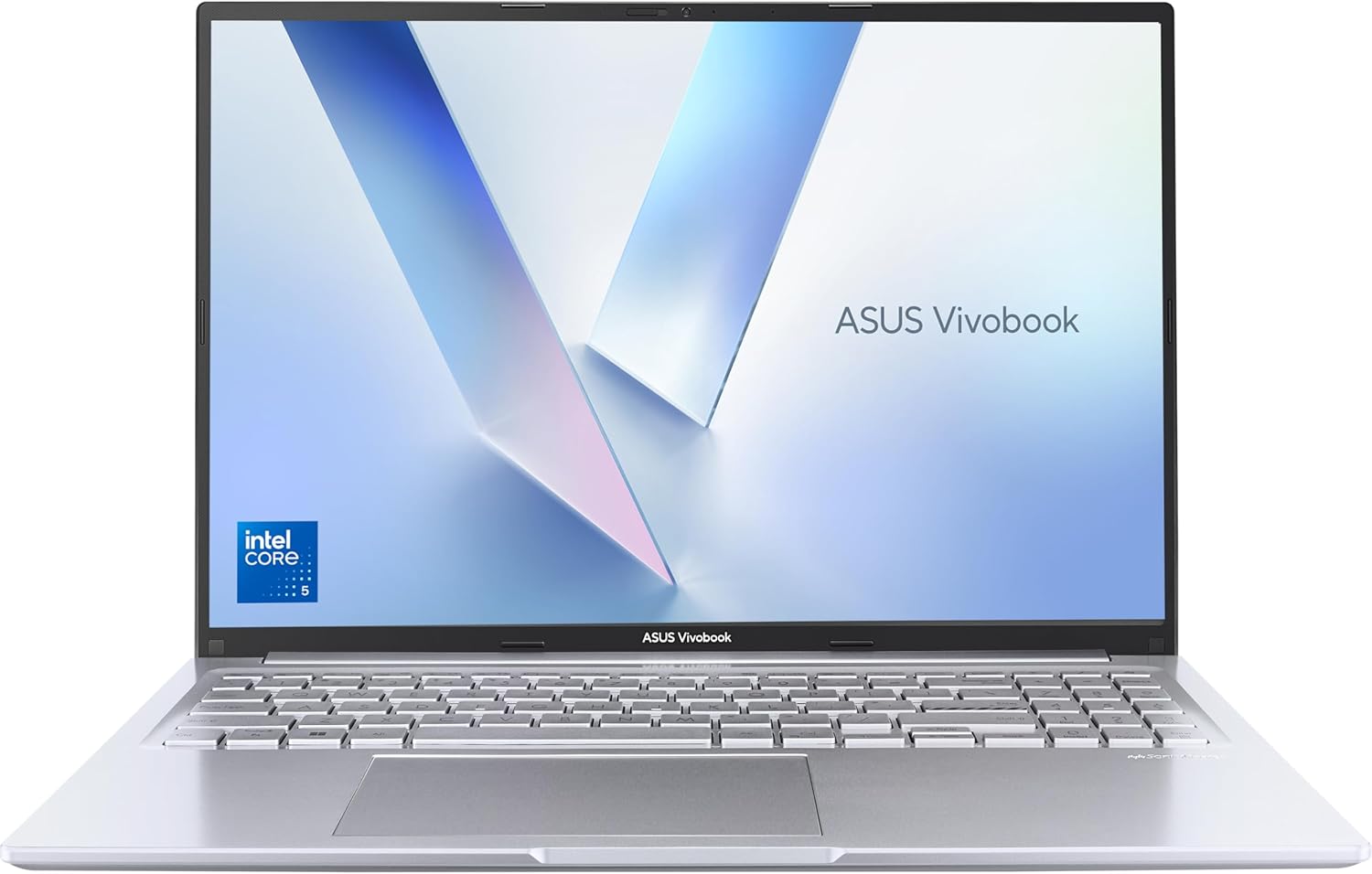
The ASUS Vivobook 16 X1605VA is a straightforward everyday laptop that does what most people actually need from a laptop, without fuss and without breaking the bank. It is aimed squarely at home users, students, and office workers who want a large screen, a fast enough processor, and decent build quality. The headline strength is that 16-inch screen with its 16:10 aspect ratio — genuinely more useful than the usual widescreen format for reading, browsing, and working in documents. The headline weakness is battery life, which falls well short of the claimed 42 Wh capacity in real-world conditions, particularly at the brightness levels you actually need to see the screen clearly.
Under the lid you get an Intel Core 5-120U processor, 16GB of RAM, and a 512GB PCIe SSD. That combination is enough for everything a typical household or student needs — web browsing, Office, video streaming, light coding — with headroom to spare. The 1920 x 1200 WUXGA display gives you slightly more vertical resolution than a standard 1080p panel, which matters more than most people realise until they try it. The machine weighs 1.88kg, which is on the lighter end for a 16-inch machine.
Buy it if you want a larger screen for home and desk use, you’re not bothered about working on battery for extended stretches, and you have no need for serious gaming or colour-accurate creative work. Avoid it if you need all-day battery away from a socket, or if you’re expecting a bright, wide-colour display for photo or video editing. If you’re still weighing up options, a look at the laptop buying guide is worth a few minutes of your time before committing.

Pros and Cons
Pros
- 16-inch 16:10 screen gives noticeably more vertical space than standard 1080p widescreen laptops at this size
- Intel Core 5-120U handles everyday multitasking, Office, and streaming without hesitation — buyers consistently note it doesn’t feel slow
- 16GB RAM is the right amount for this class of machine; no performance cliff when you have multiple browser tabs and applications running
- Metal casing gives it a sturdier feel than most plastic-bodied machines in this bracket
- MIL-STD-810H durability certification means it’s been tested against drops, dust, and temperature variance — not just a marketing label
- Fan noise is minimal during typical use — multiple buyers note it stays quiet for day-to-day tasks
Cons
- Real-world battery life is noticeably shorter than claimed — buyers report around 3 hours at usable brightness levels, which is poor
- Screen brightness is below average; in a well-lit room or near a window it becomes a genuine problem, and the panel’s sRGB coverage is limited
- The product listing contains a spec contradiction worth flagging — addressed in detail in the hardware section below
Spec Breakdown
- Model: ASUS Vivobook 16 X1605VA
- CPU: Intel Core 5-120U, 10-core, up to 5GHz
- RAM: 16GB DDR4
- Storage: 512GB PCIe SSD
- GPU: Intel integrated graphics (see hardware section — listing contains a GPU spec anomaly)
- Display: 16.0-inch WUXGA, 1920 x 1200, 16:10, LED, 60Hz
- Battery: 42Wh lithium-ion, claimed 10 hours
- Operating System: Windows 11 Home
- Weight: 1.88kg
- Ports: USB-C 3.2 Gen 1 (with power delivery), 2x USB 3.2 Gen 1 Type-A, 1x USB 2.0, HDMI output, audio combo jack, 1x Ethernet
- Thunderbolt: 1 port
- Connectivity: Wi-Fi 6E (802.11ax), Bluetooth
- Keyboard: UK QWERTY, backlit
- Webcam: Yes, with physical privacy shield
- Dimensions: 35.9 x 25 x 2cm
- Colour: Silver
Hardware & Performance Reality Check
The Intel Core 5-120U is a 10-core efficiency-focused chip built for thin and light machines — it’s not a powerhouse, but it’s genuinely adequate for the workload this laptop is designed for. Web browsing, spreadsheets, Office apps, video calls, and even light code editing all run without the processor becoming the bottleneck. One buyer ran 60 tabs open in Chrome and reported no slowdown — that’s a decent stress test for daily use. The 16GB DDR4 RAM complements this well; it’s the right amount to prevent page file thrashing under typical multitasking. If you want to understand why RAM capacity matters more than most spec sheets suggest, the RAM guide breaks it down clearly. One thing worth noting: the data lists the RAM as both DDR4 and DDR5, which is a product listing inconsistency rather than a real dual-standard setup. Based on the CPU platform and listed memory speed, DDR4 is the most credible reading here. What matters more for most buyers is whether RAM is upgradeable — the X1605VA’s upgrade path isn’t confirmed in the available data, so treat it as a sealed configuration and buy accordingly.
The 512GB PCIe SSD is the right call at this level. It’s fast enough for Windows 11 to boot quickly, apps to open without delay, and large file transfers to not be painful. Five hundred and twelve gigabytes is enough storage for most people; if you’re managing large video libraries or game installs you’ll want an external drive eventually, but for typical home and student use it’s fine. Now, the elephant in the room: the spec sheet lists an NVIDIA GeForce RTX 4070 with 8GB of graphics RAM under “Graphics Coprocessor”, while every other graphics field says “Integrated” and the CPU is a low-power mobile chip that physically cannot pair with an RTX 4070. This is a product listing error — almost certainly a copy-paste mistake from a different product. For spec clarity, the X1605VA has integrated Intel graphics only. Don’t buy it expecting discrete GPU capability. Anyone looking for actual gaming grunt needs to look elsewhere — the budget gaming options are a better starting point for that.
For 2026 everyday use, the ASUS Vivobook 16 X1605VA covers the practical bases well. Student assignments, online research, spreadsheets, Teams or Zoom calls, Netflix — all fine. Light programming in Python or web development works without drama, as confirmed by buyers. Gaming is limited to undemanding titles: Stardew Valley, browser-based games, older indie titles. Anything from the last three years requiring a dedicated GPU is off the table. Video editing is possible in a pinch for basic timeline work but export times will test your patience. Don’t expect to run Premiere Pro on complex timelines and stay sane. If you want a clear picture of where this CPU sits relative to other options, the CPU guide gives useful context.
The port selection is genuinely one of the stronger points of this machine. A USB-C port with power delivery, two USB-A 3.2 ports, a legacy USB 2.0 port, HDMI output, an audio jack, and a dedicated Ethernet port — that last one is rare at this size and appreciated by anyone who works from home on a wired connection. The Thunderbolt port adds further flexibility for external displays or docks. The ports guide is useful if you’re not sure which connection types matter for your setup.
Everyday Usability: Battery, Build & More
Start with the thing that will actually affect your daily life the most: battery. The official claim is 10 hours. The reality, based on multiple buyer accounts, is closer to 3 hours at the brightness you actually need to see the screen properly. That’s a significant gap. The 42Wh battery is on the small side for a 16-inch machine — most competitors in this class run 50–60Wh — and the screen’s power draw combined with the relatively modest capacity means you’ll be near a charger for any serious work session. This laptop is best treated as a desktop-replacement style machine that occasionally moves around the house, not something you’d take to a library for a full day without the charger in your bag. On heat and fan noise: multiple buyers flag that the fan stays quiet almost all the time under normal use. That’s consistent with the Core 5-120U’s efficiency-first design. It’s not a machine that’s going to sound like a jet engine during a video call.

The 1920 x 1200 display resolution with its 16:10 ratio is a genuine plus for productivity — you see more of a document or webpage without scrolling. The identified panel is a Innolux CMN1618, which has weak sRGB coverage. Translation: colours look washed out compared to higher-quality IPS panels, and it’s not suitable for anyone doing photo editing or graphic design work. The bigger daily frustration for some buyers is brightness — the panel is dim enough that in a bright room or with sunlight nearby, it becomes hard to read comfortably. Not a dealbreaker for home use in a controlled environment, but worth knowing. The screen is not a touchscreen — if that matters to you, this isn’t the machine. The keyboard is backlit with a UK QWERTY layout, and buyers find it comfortable enough for extended typing sessions. The 180-degree lay-flat hinge is a practical feature for sharing screens with someone sitting across from you, and the hinge itself is reported as sturdy. The physical webcam shield is a thoughtful addition — particularly for video call users who value privacy without tape over the camera. Speaker quality isn’t flagged as a strength by any buyer; headphones are the recommended route for anything where audio quality matters.
Lifespan & Future-Proofing
On chassis longevity, the ASUS Vivobook 16 X1605VA has a few genuine points in its favour. The metal casing is more durable than the polycarbonate plastic used on most machines in this bracket, and the MIL-STD-810H certification means it’s been put through structured durability testing — drop resistance, temperature cycling, and similar real-world stress scenarios. Buyers comment positively on build quality. Realistically, with average home use, this chassis should hold up for five or more years without structural issues. The 180-degree hinge has been called sturdy by buyers, which matters — hinges are typically the first mechanical point of failure on cheaper laptops. For a machine that will sit on a desk most of its life, the build quality case is solid.
On spec longevity, the picture is less rosy. The Intel Core 5-120U is an efficiency chip, not a high-performance one. For everyday tasks — browsing, documents, streaming — it will feel adequate for the next four or five years. By 2026 standards it’s already a mid-tier chip, and as browser engines and web apps get heavier, the gap will widen gradually. The RAM cap of 16GB and the absence of a confirmed upgrade path means you’re locked to what you have. That’s not a problem today, but it does mean you can’t extend this machine’s life by adding more memory later the way you could with older, socketed designs. The 512GB SSD can potentially be swapped out down the line, but given the rest of the hardware ceiling, a storage upgrade is unlikely to be worth it. Treat this as a 4–5 year machine for its intended use case, not a long-term platform.
What Buyers Are Saying (And Potential Dealbreakers)
The ASUS Vivobook 16 X1605VA holds a rating of 4.4 out of 5 from 128 customer reviews on Amazon UK. That’s a meaningful sample — large enough to surface genuine patterns rather than just a handful of outliers. The overall tone from buyers is positive, with most complaints centring on a single recurring issue rather than systemic hardware problems.
The dominant praise is around day-to-day speed. Multiple buyers express genuine surprise at how fast the machine feels for the price — web browsing, Office apps, and even running dozens of browser tabs simultaneously get positive mentions. The setup experience also gets consistent credit: buyers who described themselves as non-technical found the Windows 11 out-of-box process straightforward and stress-free. The metal build quality earns specific compliments, with several reviewers comparing it favourably to plastic-cased alternatives. Fan noise — or rather the near-absence of it — is noted by buyers doing general work. The screen size comes up repeatedly as a positive for home use.
The battery is the dealbreaker that polarises opinion. One buyer is unambiguous: real-world life at usable brightness is around 3 hours. Another frames it as acceptable because they mainly use it at home. If you’re buying this to use away from a desk without a charger, you need to factor this in as a hard limitation, not a mild inconvenience. The display brightness issue is a secondary recurring complaint — at maximum brightness it’s fine indoors, but drop below max and the screen dims to a level that’s uncomfortable in daylight. One technically-aware buyer identified the specific panel model and confirmed it has limited colour gamut coverage — not a surprise for this price bracket, but worth stating plainly for anyone considering the machine for display-sensitive work. One buyer also flags that the keys are not illuminated on their unit — the spec data lists a backlit keyboard, so this may be a variant difference or a listing inconsistency worth clarifying before purchasing.
Buyer Highlights
- 60 browser tabs open simultaneously with no performance drop — noted by a buyer testing its limits.
- Battery life of approximately 3 hours at usable brightness — well below the claimed 10 hours.
- Screen brightness is insufficient for use near windows or in bright rooms at less than maximum setting.
- Metal casing specifically praised over plastic alternatives — buyers notice the difference in feel and rigidity.
- Fan stays near-silent during typical everyday tasks — no thermal noise complaints from general users.
- One buyer reports their unit does not have backlit keys, contradicting the listed spec — worth confirming before purchase.
- Setup experience rated as easy by multiple non-technical buyers — Windows 11 out-of-box process gets credit.
- Identified display panel (Innolux CMN1618) has limited sRGB coverage — not suitable for colour-critical work.
Who Should Buy It (And Who Shouldn’t)
Buy If
- You want a large-screen laptop primarily for home use — desk use, streaming, browsing, and general productivity — and you’ll mostly be near a power socket
- You need a reliable, fast everyday machine for Office applications, web research, video calls, or light student work without spending on a mid-range machine with features you won’t use
- You value a sturdy build and MIL-SPEC durability certification over a thinner, lighter chassis that feels less robust
- You want a wide port selection including dedicated Ethernet, multiple USB-A ports, and HDMI without buying a hub separately
Avoid If
- You need all-day battery away from a charger — 3 hours of real-world life at usable brightness makes this genuinely impractical for commuting, studying in libraries, or working on the move
- You do any photo editing, graphic design, or video colour work — the panel’s limited sRGB coverage and low brightness will compromise your results and frustrate you daily
- You want to game on anything beyond undemanding indie titles — there is no discrete GPU here, whatever the listing’s erroneous spec entry says, and the integrated graphics ceiling is low
The Bottom Line
The ASUS Vivobook 16 X1605VA is a competent home and student laptop that earns its rating for the right buyer. The large 16:10 screen, capable everyday processor, generous RAM, solid build quality, and full port selection add up to a machine that handles real-world daily tasks without fuss. The battery is its Achilles heel — if you need to work unplugged for a full day, this isn’t the one. The display’s limited brightness and colour gamut rule it out for creative work. But for someone who wants a bigger screen for home use, fast everyday performance, and a machine that feels well made, the X1605VA delivers on what it promises. Just buy it knowing you’ll be plugged in most of the time.
At LaptopAdvisorOnline, our methodology is built on data transparency rather than simulated hands-on testing. We rigorously analyse official manufacturer specifications and aggregate verified customer sentiment to provide objective, fluff-free buying advice that helps you cut through the marketing jargon.
As an Amazon Associate, I earn from qualifying purchases.
Browse by Specification
Looking for something specific? Browse our analyses by hardware and feature:
[AMD Processor Laptops] — [Intel Processor Laptops] — [16GB RAM Laptops] — [32GB RAM Laptops] — [Dedicated Graphics] — [Long Battery Life] — [Lightweight Laptops] — [Student Laptops]
Browse by Screen Size
[13-inch Laptops] — [14-inch Laptops] — [15-inch Laptops] — [16-inch Laptops]




