
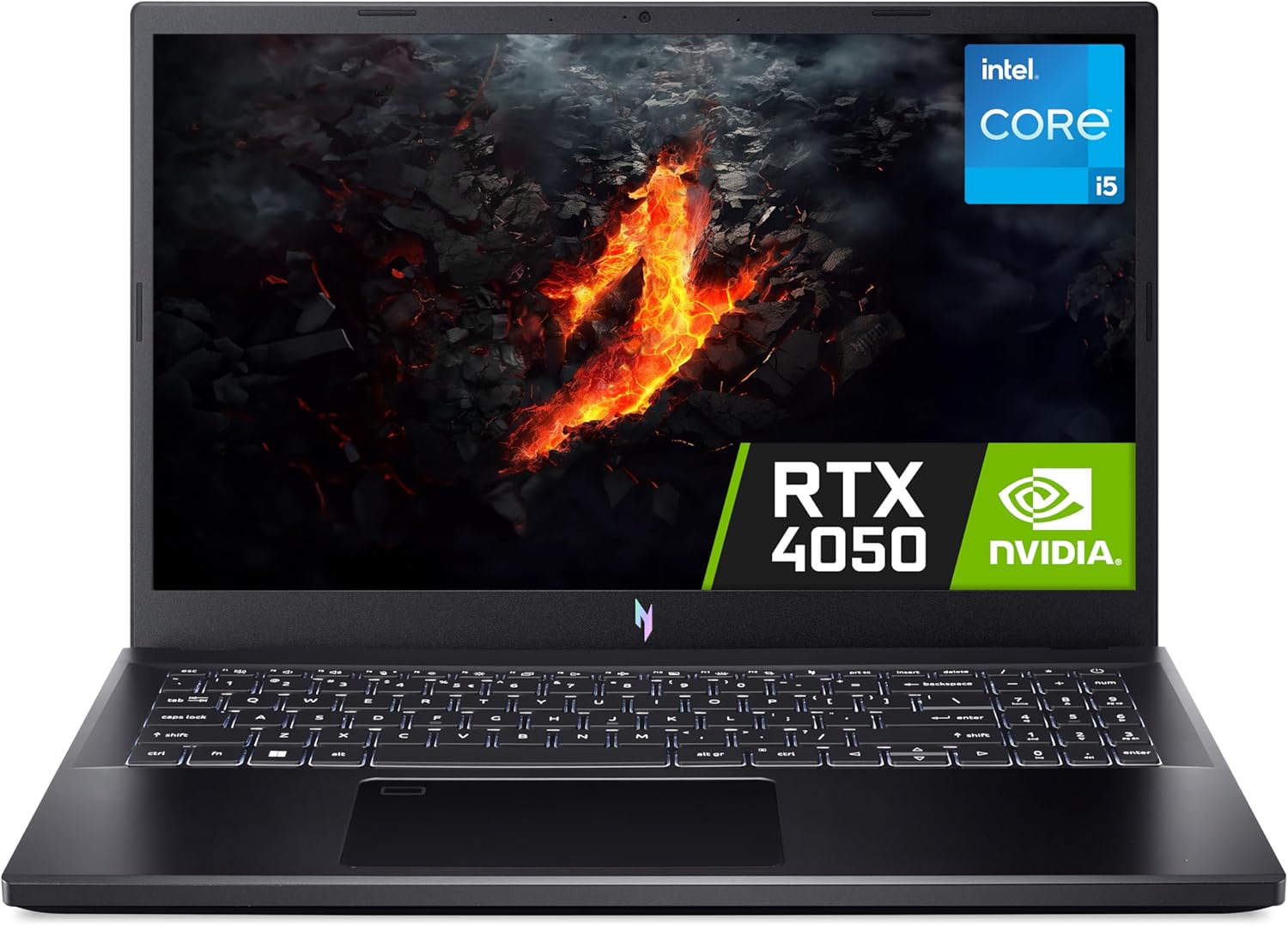
Acer Nitro V15 ANV15-51 Analysis: RTX 4050 at Its Floor
The Blunt Verdict
The Acer Nitro V15 ANV15-51 is a mid-range gaming machine that gets the fundamentals right without pretending to be something it isn’t. You get a dedicated GPU, a fast display, and a CPU that won’t bottleneck you in most games — all in a chassis that won’t make you wince every time you pick it up. It sits squarely in the mid-range bracket and behaves accordingly.
The headline spec is the NVIDIA GeForce RTX 4050 paired with an Intel Core i5-13420H, 16GB of DDR5 RAM, and a 512GB NVMe SSD. That combination is genuinely capable for 1080p gaming. The 15.6-inch Full HD display at 165Hz means you can actually use those frame rates rather than watch them get wasted on a 60Hz panel. The RTX 4050 also supports DLSS Frame Generation, which is genuinely useful for squeezing more fps out of demanding titles without brute-forcing it through raw hardware.
Buy it if you want a no-nonsense gaming laptop for 1080p titles, light creative work, or general productivity that doesn’t feel sluggish. Skip it if you need thin-and-light, you’re chasing the highest graphical fidelity, or you want a display that does justice to colour-accurate work — the panel here is about speed, not subtlety.
See the Acer Nitro V15 ANV15-51 listing and current availability on Amazon.

Pros and Cons
Pros
- RTX 4050 with DLSS support handles 1080p gaming across most modern titles without breaking a sweat
- 165Hz refresh rate is a genuine step up from the 60Hz and 144Hz panels common at this tier
- DDR5 RAM gives meaningful headroom for multitasking and future-proofing the memory bandwidth
- Thunderbolt 4 port is rare at this price point and opens up fast data transfer and external display options
- Wi-Fi 6 (802.11ax) ensures online gaming stays stable and responsive rather than dropping out mid-session
- Minimal bloatware — multiple buyers flagged this as a genuine positive straight out of the box
Cons
- Fan noise gets loud under load — buyers confirm this, not just a spec concern
- No OLED panel — the LCD display is fine for gaming but won’t satisfy anyone wanting rich contrast or accurate colour
- One confirmed early failure in the review pool — not a trend yet, but worth noting on a machine with only a 1-year warranty
Spec Breakdown
- Model: Acer Nitro V15 ANV15-51 (NH.QNBEK.00A)
- CPU: Intel Core i5-13420H (13th Gen, up to 4.6GHz, 8 cores)
- RAM: 16GB DDR5 (upgradeable to 32GB)
- Storage: 512GB NVMe SSD
- GPU: NVIDIA GeForce RTX 4050 (6GB GDDR6)
- Display: 15.6-inch Full HD (1920×1080), 165Hz, LCD/LED, 16:9
- Battery: 57Wh Lithium Ion
- OS: Windows 11
- Weight: 2.11kg
- Ports: Thunderbolt 4, HDMI, 3× USB (total 4 ports)
- Connectivity: Wi-Fi 6 (802.11ax), Bluetooth
- Keyboard: Backlit QWERTY
- Webcam: Yes
Hardware & Performance Reality Check
The Intel Core i5-13420H is a solid mid-range chip — eight cores with a boost clock pushing to 4.6GHz, which translates to snappy application launches, smooth browser performance, and enough headroom to run background tasks without your game stuttering. It’s not the top-end H-series chip, but it won’t embarrass itself. Pair it with 16GB of DDR5 RAM and you’ve got adequate headroom for gaming, light editing, and serious multitasking simultaneously. The RAM is listed as upgradeable to 32GB, which matters — if you ever need more, you’re not throwing the whole machine away. Check our RAM guide if you’re unsure whether 16GB is enough for your use case. For a detailed look at what the i5-13420H actually delivers, the CPU guide has context worth reading.
The 512GB NVMe SSD is the right type of storage — fast enough that Windows 11 loads quickly and games don’t take an age to read assets. The capacity, though, is something to think about. Modern AAA games routinely clock in at 60–100GB each, so five or six big titles will fill that drive. An external drive or upgrade path is something to plan for. The RTX 4050 with 6GB of GDDR6 VRAM is the star of this build. It handles 1080p gaming comfortably across most current titles, and DLSS Frame Generation means you can lean on AI upscaling to maintain smoothness in more demanding games without tanking visual quality. This is the entry point to RTX 40-series serious gaming capability — it’s not an RTX 4070, but it’s not pretending to be.
For actual day-to-day use in 2026: student work and office tasks are handled without any strain — this is vastly overpowered for spreadsheets and video calls. Gaming at 1080p is the sweet spot, and buyers are running titles like Baldur’s Gate 3 without issue. Programming and light data work will run cleanly. Video editing in 1080p is feasible with some patience; 4K editing will be sluggish and is not what this machine is built for. CUDA acceleration for image processing works — one buyer confirmed this directly, which is worth knowing if you’re doing GPU-accelerated workflows. Refer to benchmark context if you want a clearer sense of where the RTX 4050 sits in the wider landscape.
The port situation deserves a specific mention. Thunderbolt 4 on a gaming laptop at this tier is genuinely unusual and useful — fast external storage, eGPU potential down the line, and monitor daisy-chaining all become realistic. HDMI covers basic external display use. There’s no dedicated Ethernet port listed in the specifications, so wired gaming will require a USB adapter — worth knowing if you’re moving from a desktop setup. Total of 4 ports including 3× USB, which is workable but not lavish. For a full rundown on what these connectors actually mean, the ports guide lays it out plainly.
Check the full spec sheet and buyer Q&As for the Acer Nitro V15 ANV15-51 on Amazon.
Everyday Usability: Battery, Build & More
Battery life is the honest weak spot here. A 57Wh battery in a gaming laptop with a dedicated GPU is not going to last a full working day under real load. Expect four to five hours of general use, and significantly less if you’re gaming. This is typical for the category, not a specific Acer failing — any RTX 40-series machine draws serious power under load, and gaming laptops live near a plug. If you’re buying this thinking it’ll cover a full day of lectures unplugged, recalibrate that expectation. The charger is included in the box with a UK plug, which is worth confirming since some imports don’t include it.

Fan noise is a real factor — multiple buyers flag it as loud under gaming load. This is the dual-fan cooling system doing its job, but it’s audible enough that gaming without headphones will put the fans right in the foreground. For casual use and lighter tasks, the system reportedly stays quiet. The backlit keyboard is present and functional; gaming laptops at this tier tend to offer adequate but not exceptional typing feel, and nothing in the buyer feedback suggests the keyboard is a problem either way. The 15.6-inch 1920×1080 display at 165Hz is fast and clean for gaming — the display panel type here is LCD, not OLED, meaning contrast ratios and deep blacks won’t match premium panels. Colours are serviceable rather than accurate. One buyer specifically noted the absence of an OLED screen as the main downside, which tells you the rest of the package largely satisfied them. No touchscreen — this is a standard clamshell gaming laptop. Bloatware is minimal according to buyers, which is a genuine quality-of-life win on a machine running Windows 11.
Lifespan & Future-Proofing
The Nitro V15 chassis is plastic, as gaming laptops at this tier almost universally are. That’s not automatically a problem — Acer’s Nitro line has a reasonable track record for surviving daily use — but it won’t age as gracefully as an aluminium build. Realistically, three to four years of regular use before the build starts feeling tired or the hinges develop slop is a reasonable expectation. One buyer reported a unit failure within three weeks, which is worth logging, though a single data point from 22 reviews doesn’t make a pattern. The 1-year manufacturer warranty is standard for this category and not particularly generous.
Spec longevity is the more encouraging story. The RTX 4050 with DLSS support means this machine will handle 1080p gaming well for at least three to four years, with DLSS helping compensate as games get more demanding. The i5-13420H won’t feel cutting-edge in 2026 terms, but it’s not going to become a bottleneck for everyday tasks any time soon. Crucially, RAM is upgradeable to 32GB DDR5 — that upgrade path matters if workloads grow. Storage can almost certainly be expanded via M.2. The combination of Thunderbolt 4 and Wi-Fi 6 also means the connectivity side won’t age out quickly. This machine has more legs in it than the entry-level budget gaming options it competes with.
View current stock levels for the Acer Nitro V15 ANV15-51 on Amazon.
What Buyers Are Saying (And Potential Dealbreakers)
The Acer Nitro V15 ANV15-51 currently holds a rating of 4.2 out of 5 from 22 customer reviews on Amazon. That’s a reasonably encouraging signal, though 22 reviews is a small sample — treat trends here as directional rather than definitive, and consider checking back as the review count grows.
The majority of buyers land somewhere between satisfied and genuinely pleased. Gaming performance across titles from casual to moderately demanding gets consistent positive mentions. The machine runs quickly, startup is clean, and the low bloatware is flagged more than once as a welcome surprise. One buyer uses it for CUDA-accelerated image processing and reports it handles the workload well — useful confirmation that the RTX 4050’s compute capability is accessible beyond just gaming.
The fan noise under load is the most consistent practical complaint. It’s loud enough under gaming conditions that headphones aren’t just optional — one buyer explicitly notes they only tolerate it because they wear a headset while playing. A second buyer purchased additional cooling to manage heat under more demanding titles. That’s not catastrophic, but it is a genuine quality-of-life consideration if you’re gaming in a shared space or without headphones.
The one serious red flag is a buyer whose unit stopped working entirely after three weeks. That’s a hardware failure, not a design flaw — but it’s the kind of thing that stings when you only have a 1-year warranty. If you’re purchasing, it’s worth verifying what Amazon’s return window looks like and stress-testing the machine properly in the first few weeks.
Buyer Highlights
“It runs quickly and efficiently, and I was pleasantly surprised by the lack of bloatware straight out of the box.” — Consistent feedback from buyers who’ve set up previous Windows machines loaded with trial software.
“I had to buy additional cooling for more demanding games, but for casual gaming it’s above average and more than enough.” — Worth knowing if you plan to push the GPU hard regularly.
“The fan gets quite loud when you play certain games — not a bother since I wear a headset, but worth knowing.” — Relevant if you’re gaming in a shared or quiet environment without headphones.
“Playing BG3 well and at a good price — initial impressions are very positive.” — Useful real-world confirmation that demanding RPGs run without issue.
“I use it for image processing with CUDA acceleration and it’s fast and handles the workload.” — Relevant if your workflow involves GPU-accelerated applications beyond standard gaming.
Who Should Buy It (And Who Shouldn’t)
Buy If
- You want a gaming laptop that handles 1080p titles competently without spending flagship money
- You’ll always be near a power socket when gaming — battery limitations are acceptable in a desk-adjacent setup
- You want upgrade headroom — the 32GB DDR5 ceiling and M.2 storage expansion mean this machine can grow with you
- You do GPU-accelerated creative or data work alongside gaming and want a single machine for both
- Thunderbolt 4 and Wi-Fi 6 connectivity are meaningful for your workflow or gaming setup
Avoid If
- You need all-day battery life away from a charger — this is not a laptop you take into a meeting and expect to survive the afternoon unplugged
- You’re a colour-sensitive creative professional who needs accurate display output — the LCD panel is not built for that, and there are better options in the professional space
- Fan noise in a shared or quiet environment is a genuine dealbreaker for you
The Bottom Line
The Acer Nitro V15 ANV15-51 is a straightforward, competent gaming laptop that delivers where it needs to: the RTX 4050, 165Hz display, and DDR5 memory form a coherent package for 1080p gaming and GPU-accelerated work. The fan noise is real, the battery is limited, and the LCD panel is adequate rather than special — none of which are surprises in this category. If you’ve read a buying guide and know what you’re looking for, this machine makes a credible case for itself. Go in with accurate expectations and it’s unlikely to disappoint.
Find the Acer Nitro V15 ANV15-51 and read the latest buyer questions on Amazon.
At LaptopAdvisorOnline, our methodology is built on data transparency rather than simulated hands-on testing. We rigorously analyse official manufacturer specifications and aggregate verified customer sentiment to provide objective, fluff-free buying advice that helps you cut through the marketing jargon.
As an Amazon Associate, I earn from qualifying purchases.
Browse by Specification
Looking for something specific? Browse our analyses by hardware and feature below, or check all laptop analyses in the Best Premium Gaming Laptops category archive.
[AMD Processor Laptops] — [Intel Processor Laptops] — [16GB RAM Laptops] — [32GB RAM Laptops] — [Dedicated Graphics] — [Long Battery Life] — [Lightweight Laptops] — [Student Laptops]
Browse by Screen Size
[13-inch Laptops] — [14-inch Laptops] — [15-inch Laptops] — [16-inch+ Laptops]




