
2020 Apple MacBook Air Intel Core i3 Analysis: Refurb Gamble
The Blunt Verdict
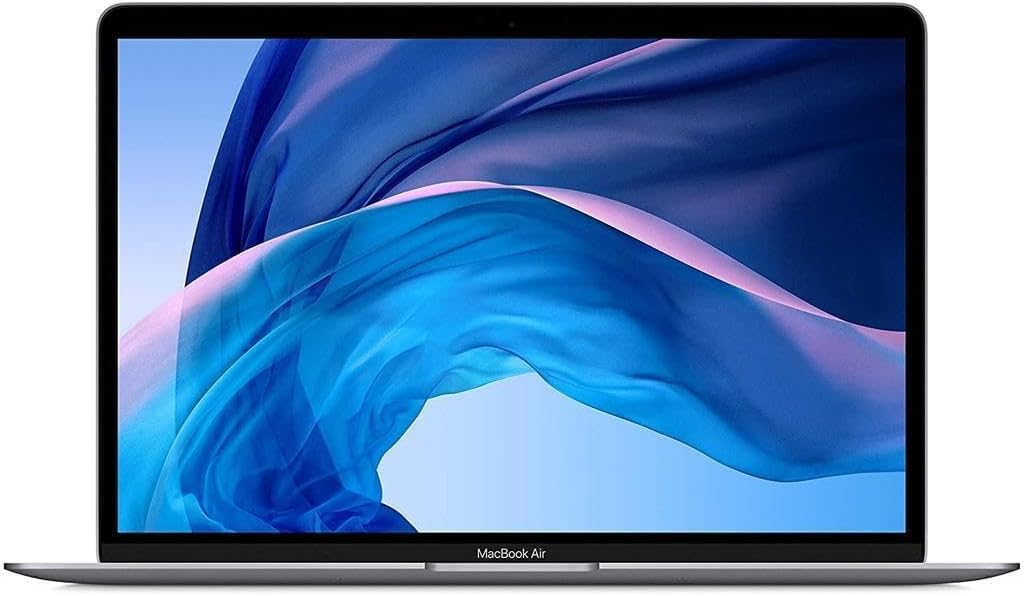
The 2020 Apple MacBook Air Intel Core i3 is a refurbished machine, and that context matters more here than with almost any other laptop you’ll consider. Strip away the Apple branding and what you have is a 1.1GHz dual-core Intel Core i3 processor, 8GB DDR3 RAM, and a genuinely lovely 2560 x 1600 Retina display in a chassis that weighs just 1.4kg. For light everyday use — browsing, documents, email, video calls — it does the job. The problem isn’t the hardware. It’s the lottery of buying refurbished Apple kit from a third-party seller on Amazon, where condition consistency is, to put it politely, variable.
This is Apple’s 2020 MacBook Air in Space Gray, running on an entry-level Intel i3 — not the M1 that made the 2020 line genuinely exciting. The 256GB SSD is adequate but tight. The Intel Iris Plus integrated graphics rule out anything GPU-intensive. What you get in return is fanless-silent operation, a build quality that still holds up, and macOS’s usual polish. If you’re coming from a five-year-old Windows laptop, this will feel like an upgrade in several areas even if the raw numbers look modest.
Students and light home users who want macOS without paying for a new machine are the target audience. Anyone who needs to run demanding software, edit video regularly, or wants confident longevity past a couple of years should look elsewhere — and not just because of the processor. The refurbished nature of this unit adds a layer of risk that the specs alone don’t capture.
See the listing and current availability for the 2020 Apple MacBook Air Intel Core i3 on Amazon.
Pros and Cons
Pros
- Retina display at 2560 x 1600 is genuinely sharp and colour-accurate — well above what you’d normally see at this tier
- Fanless design means dead-silent operation under light-to-moderate workloads
- At 1.4kg, it’s among the lightest 13-inch laptops available — noticeably lighter than most Windows alternatives
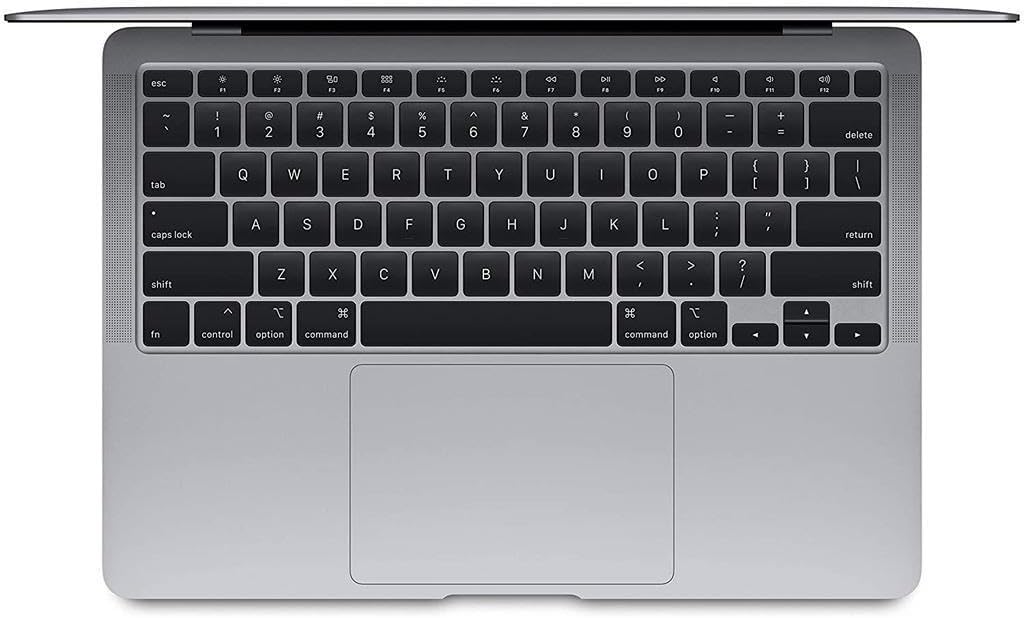
- Backlit Magic Keyboard with Touch ID fingerprint login works reliably and feels good to type on
- Battery rated at 11 hours — buyers confirm it regularly gets through a full university day without a charge top-up
- macOS updates were still rolling through to this unit as of late 2025, giving it reasonable short-term software viability
Cons
- Refurbished condition is inconsistent — multiple buyers received units with scratches, worn corners, and in one case a non-functional machine with a stained keyboard
- Battery health on some units is already degraded before delivery — one buyer reported 79% health and 300 charge cycles on a supposedly “Excellent” graded unit
- Only 2 USB-C / Thunderbolt ports, no HDMI, no USB-A, no SD card slot — you will need a dongle for almost everything
Spec Breakdown
- Model: Apple MacBook Air 13.3-inch 2020 (Renewed) — Space Gray
- CPU: Intel Core i3 (10th Gen), 1.1GHz dual-core
- RAM: 8GB DDR3 SDRAM (soldered — not upgradeable)
- Storage: 256GB SSD
- GPU: Intel Iris Plus Graphics (integrated, 4GB DDR3)
- Display: 13.3-inch Retina IPS, 2560 x 1600, True Tone
- Battery: Lithium Polymer, rated 11 hours
- OS: macOS 10.15 Catalina (as shipped; updates available)
- Weight: 1.4kg
- Ports: 2x USB-C (Thunderbolt 3)
- Connectivity: Wi-Fi, Bluetooth
- Keyboard: Backlit Magic Keyboard, QWERTY, with Touch ID
Hardware & Performance Reality Check
The Intel Core i3 at 1.1GHz is a dual-core processor — entry-level even by 2020 standards. For the CPU performance context: you’re looking at a chip fine for word processing, spreadsheets, light web browsing, and video calls, but one that starts showing strain with heavier browser tab loads, background app activity, or anything computationally demanding. Paired with 8GB of DDR3 RAM — which is soldered directly to the board — there is no upgrade path whatsoever. What you buy is what you’re stuck with for the machine’s entire lifespan. If you want to understand how much RAM you actually need, 8GB in 2025 sits at the minimum acceptable threshold for general use, and it shows when you have multiple browser tabs, a video stream, and a document open simultaneously.
The 256GB SSD storage is the standard Apple SSD — fast read/write speeds relative to budget Windows laptops, but 256GB fills up quicker than people expect once macOS, apps, and files settle in. No expandable storage slot means you’re reliant on external drives or cloud storage from day one. The Intel Iris Plus integrated GPU shares system memory and is strictly for everyday tasks and light media consumption. Gaming is off the table beyond casual browser-based stuff. Video editing in iMovie is possible at a push — anything in Final Cut Pro at higher resolutions will choke. Check the performance benchmarks for Intel Iris Plus to set realistic expectations before buying.
In 2026 terms, this machine handles student coursework, office document work, video calls, and general browsing without drama. Programming in lightweight environments (VS Code for web dev, basic Python scripts) is viable. Heavy compiling, running virtual machines, or data science workloads are not. Video editing beyond simple cuts in iMovie is frustrating. Gaming is a non-starter — if that’s a factor, look at the budget gaming laptop options instead.
Connectivity deserves a direct call-out. Two Thunderbolt 3 / USB-C ports is the entire port selection. No USB-A, no HDMI, no headphone jack workaround, no Ethernet — nothing. If you plug in a charger on one side, you have one port left for everything else. A USB-C hub or dongle is not optional with this machine; it’s mandatory. Budget for it. The full picture of what this means day-to-day is covered in our laptop ports guide.
Check the full spec sheet and buyer Q&As for the 2020 Apple MacBook Air Intel Core i3 on Amazon.
Everyday Usability: Battery, Build & More
Battery life is a genuine strength. Apple rated it at 11 hours and real-world buyer feedback supports that — one student explicitly mentioned getting through nearly two full university days without charging. That’s not marketing fiction for light use. The fanless design is also a tangible quality-of-life feature: there is no fan in this machine, so it runs completely silently. Under sustained load it will throttle performance rather than spin up, which means it stays quiet but slows down. For everyday tasks that’s a reasonable trade. The keyboard — Apple’s Magic Keyboard — is a significant step up from typical budget laptop keyboards. Comfortable key travel, good feedback, and backlit for low-light use.

The Retina display is one of the few areas where this machine punches well above its weight class. The 2560 x 1600 panel with True Tone delivers sharp text, accurate colours, and a 16:10 aspect ratio that gives more vertical screen space than most 16:9 Windows competitors — something anyone doing document or web work will notice immediately. See our guide to laptop display types for context on why IPS Retina at this resolution matters. There is no touchscreen — this is a standard trackpad-and-keyboard machine. The trackpad itself is Apple’s Force Touch unit, which is large, precise, and well above average. No HDMI port is a genuine inconvenience; presentations, external monitors, and TV connections all need an adapter. No Ethernet either — Wi-Fi only out of the box.
Lifespan & Future-Proofing
The MacBook Air chassis itself is aluminium unibody construction — Apple’s build quality at this level is genuinely good and the physical hardware can last a long time. A well-maintained unit from 2020 should have no chassis concerns for another four to five years. The caveat, of course, is that this is a refurbished unit, and the physical condition varies significantly between sellers and units. Some buyers received machines in near-new condition; others received items with scratched corners and worn surfaces. What you get is not guaranteed.
On spec longevity, the picture is bleaker. The 8GB DDR3 RAM is already on the thin side for 2025 general use and will feel constrained by 2027. It is soldered — there is no upgrade path. The 256GB SSD offers no expansion. macOS support for 2020 Intel machines has a finite runway; Apple has been phasing Intel hardware out of its software update cycle in favour of Apple Silicon machines. This is not a machine to buy expecting five years of problem-free software support. If you want to think through long-term value properly, our laptop buying guide covers what to prioritise for different time horizons.
View current stock and condition grades for the 2020 Apple MacBook Air Intel Core i3 on Amazon.
What Buyers Are Saying (And Potential Dealbreakers)
This listing has a rating of 3.8 out of 5 from 165 customer reviews — a large enough sample to draw meaningful conclusions, and the spread tells an honest story. The positive reviews cluster around condition satisfaction: buyers who received units in near-new condition are delighted, praising the build quality, screen, and battery. The negative reviews are almost entirely condition and seller reliability complaints — units arriving damaged, not working, or with battery health that contradicts the advertised grade.
Several issues surface repeatedly enough to flag as genuine dealbreakers. Battery health misrepresentation is the most serious: one UK buyer tested their “Excellent” grade unit and found 79% battery health at 300 charge cycles — that’s close to Apple’s own threshold for replacement. A unit with degraded battery in a sealed-battery design is a real problem. A second UK buyer’s machine stopped working entirely within seven months of purchase. A third received a unit described as refurbished that arrived with keyboard stains and was non-functional out of the box. Against that, multiple buyers received units in what they described as immaculate or brand-new condition. The variance is the problem — this isn’t a case of consistent mediocrity, it’s a lottery.
Regional setup quirks also came up: one buyer found the machine’s location set to Dubai, preventing Apple ID sign-in until manually corrected. Minor once you know about it, but worth being aware of. For a broader view of what to compare this against in the budget laptop market, there are alternatives worth considering before committing.
Buyer Highlights
“It arrived looking brand new without a scratch on it, plugged it in and everything worked perfectly.” — Several buyers had this experience, but it’s clearly not guaranteed across the board.
“The battery almost lasted me two full uni days without charging — weight is lighter than other laptops too.” — Battery and weight are the two consistently praised hardware attributes from real users.
“The battery health was 79% and 300 charge cycles — that’s considered poor for an item advertised the way it was.” — A specific, documented complaint worth taking seriously if battery life matters to you.
“It stopped working after about seven months — not great, avoid I reckon.” — A blunt warning from a buyer whose unit failed within the first year.
“It came with a European charger, but I phoned the company and they sent me the correct one.” — Charger compatibility issues have come up more than once; worth confirming before purchase.
Who Should Buy It (And Who Shouldn’t)
Buy If
- You want macOS in a genuinely light, well-built 13-inch chassis and your workload is primarily browsing, documents, email, and video calls
- You’re a student who needs all-day battery life in a light bag and can accept the performance ceiling of an i3
- You’re upgrading from a much older laptop and the build quality, display, and keyboard will represent a clear step up regardless of raw specs
- You’re comfortable running a battery health check immediately on arrival and returning the unit promptly if it falls below an acceptable threshold
Avoid If
- You need reliable, consistent condition — the variance in what buyers actually receive makes this a genuine risk for anyone who can’t easily return a faulty unit
- You’re planning to use this for more than two to three years — the soldered 8GB DDR3 RAM, 256GB SSD, and fading macOS support cycle all point toward a short viable lifespan
- You do anything GPU-intensive, run VMs, edit video seriously, or want to game — none of that is realistic on Intel Iris Plus integrated graphics
The Bottom Line
The 2020 Apple MacBook Air Intel Core i3 is a machine with genuinely good bones — a beautiful display, excellent keyboard, fanless silence, serious portability, and real battery life — wrapped in a refurbished buying experience that has let down a meaningful number of buyers. When the condition is right, this is good value for light everyday use. When it isn’t — degraded battery, physical damage, or worse, a unit that doesn’t function — it’s a frustrating and costly mistake. If you buy, check battery health immediately, know your return window, and go in with realistic expectations about the performance ceiling.
At LaptopAdvisorOnline, our methodology is built on data transparency rather than simulated hands-on testing. We rigorously analyse official manufacturer specifications and aggregate verified customer sentiment to provide objective, fluff-free buying advice that helps you cut through the marketing jargon.
As an Amazon Associate, I earn from qualifying purchases.
Browse by Specification
Looking for something specific? Browse our analyses by hardware and feature below, or check all laptop analyses in the Best Budget Laptops category archive.
[AMD Processor Laptops] — [Intel Processor Laptops] — [16GB RAM Laptops] — [32GB RAM Laptops] — [Dedicated Graphics] — [Long Battery Life] — [Lightweight Laptops] — [Student Laptops]
Browse by Screen Size
[13-inch Laptops] — [14-inch Laptops] — [15-inch Laptops] — [16-inch+ Laptops]




