
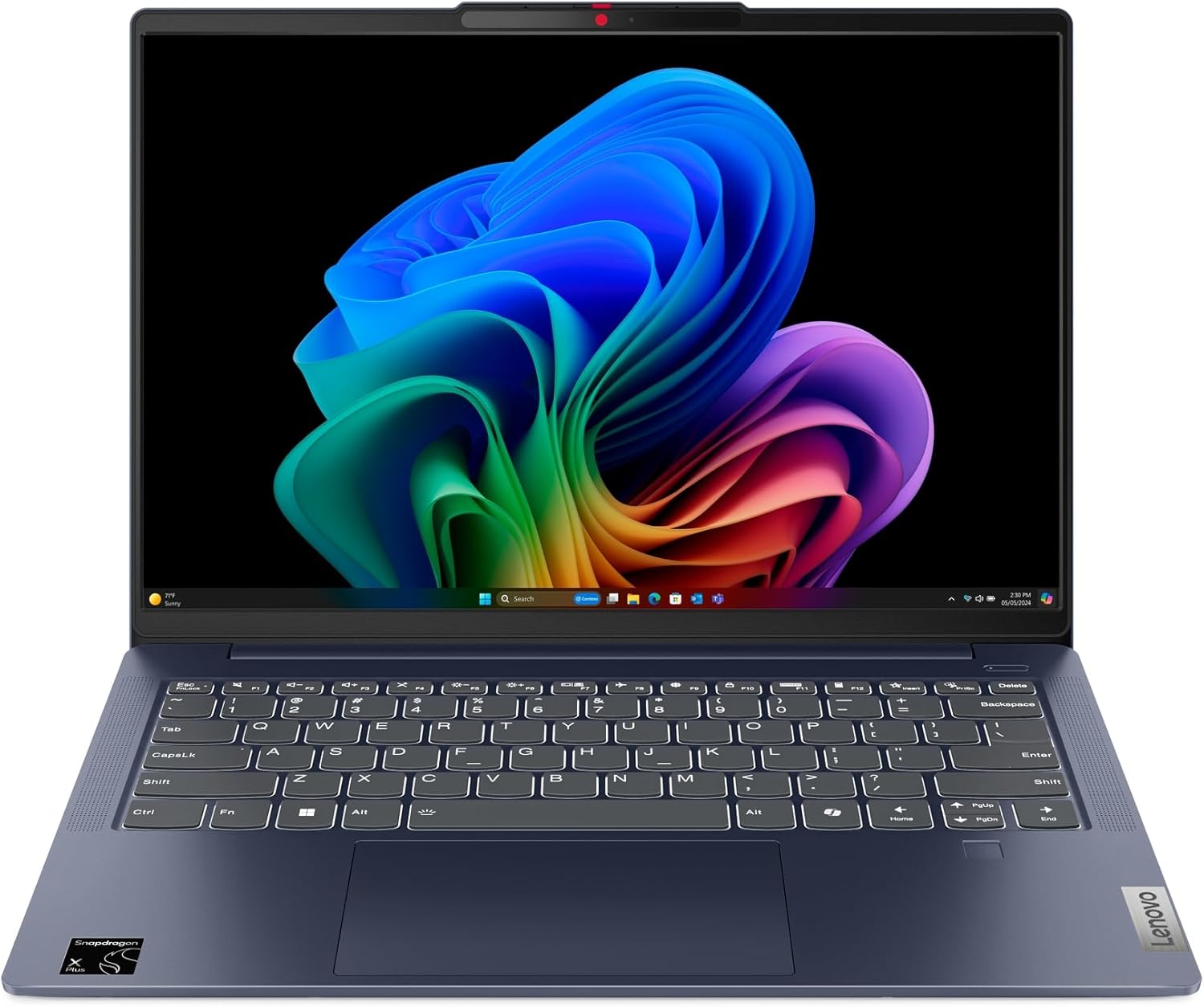
Lenovo IdeaPad Slim 5 14Q8X9 Analysis: ARM Worth It?
The Blunt Verdict
The Lenovo IdeaPad Slim 5 14Q8X9 is a genuinely interesting machine in a market full of identikit Intel boxes. Snapdragon X Plus silicon, a proper 16:10 display, an all-metal chassis, and claimed all-day battery life — on paper it punches well above its category. It sits firmly in the mid-range bracket, and for students, remote workers, and light professionals who want thin-and-light without feeling short-changed on screen or battery, it makes a credible case for itself.
The headline specs: Snapdragon X Plus X1P-42-100 processor, 16GB of LPDDR5 RAM, 512GB SSD, a 14-inch IPS panel at 1920×1200 resolution, and a 57Whr battery. The ARM-based chip is a different beast from what most Windows laptops run — more efficient, surprisingly capable for general workloads, and it brings Wi-Fi 7 connectivity along for the ride. The display is one of the genuine highlights: 100% DCI-P3 colour coverage and a taller aspect ratio make it significantly better than the bog-standard 1080p panels crammed into most laptops at this level.
Who should buy it: students and professionals who need a light, capable machine for writing, browsing, video calls, and productivity work. Who shouldn’t: anyone who needs to run x86 software that hasn’t been updated for ARM compatibility, or anyone hoping for gaming beyond casual titles. Also — and this matters — buyers should double-check the current listing around touchscreen claims, as at least one customer received a non-touch unit despite the listing suggesting otherwise.
Check the current listing and availability for the Lenovo IdeaPad Slim 5 14Q8X9 on Amazon.

Pros and Cons
Pros
- 100% DCI-P3 colour coverage on a 16:10 IPS panel is genuinely above average for this category — useful for anyone who works with photos, video, or just wants accurate colours on screen
- Wi-Fi 7 connectivity is ahead of most competitors at this level and means the machine won’t become a wireless bottleneck as routers catch up
- All-metal chassis at 16.9mm thin and 1.48kg — light enough to carry without noticing, robust enough to survive daily bag life
- Snapdragon X Plus architecture delivers strong efficiency: confirmed buyers report battery life around 10 hours, which is genuine all-day coverage for most people
- Fingerprint reader and backlit keyboard included — conveniences that shouldn’t need mentioning but regularly get cut at this price bracket
Cons
- RAM is soldered — 16GB is the ceiling, full stop, with no upgrade path available
- ARM architecture means some older or niche Windows software may not run natively; compatibility has improved significantly but it’s not a non-issue
- Touchscreen claims on the listing have caused confusion — at least one buyer received a non-touch unit; verify before buying if that feature matters to you
Spec Breakdown
- Model: Lenovo IdeaPad Slim 5 14Q8X9
- CPU: Qualcomm Snapdragon X Plus X1P-42-100, 8-core, up to 3.4GHz
- RAM: 16GB LPDDR5 (soldered)
- Storage: 512GB SSD
- GPU: Qualcomm Adreno (integrated)
- Display: 14-inch IPS, 1920×1200 (WUXGA), 16:10 aspect ratio, 300 nits, 100% DCI-P3, anti-glare
- Battery: 57Whr, with rapid charge support
- OS: Windows 11 Home
- Weight: 1.48kg
- Ports: USB-C, USB-A, HDMI, card reader (4 ports total)
- Connectivity: Wi-Fi 7 (802.11ax), Bluetooth
- Keyboard: Backlit
- Camera: Yes (webcam included)
- Dimensions: 31.2 × 22.1 × 1.7cm
Hardware & Performance Reality Check
The Snapdragon X Plus X1P-42-100 is an ARM-based chip — not the kind of x86 processor you’ll find in most Windows laptops. That distinction matters practically. For the everyday workload — browser with a dozen tabs, Office apps, video calls, email, streaming — it’s thoroughly capable and the efficiency architecture means it does all of that without hammering the battery or spinning fans. Qualcomm’s NPU handles the Copilot+ AI features locally, which is window dressing for most users right now but does future-proof the machine for AI-accelerated features as Windows leans into them. The 16GB of LPDDR5 RAM is adequate and fast, but it is soldered to the board. If you want to understand why that’s a problem long-term, the short answer is: there is no upgrade path. What you buy is what you’re stuck with. If you want to dig deeper into what RAM matters for in practice, the RAM guide covers it properly.
The 512GB SSD is a reasonable amount of storage for most users — enough for the OS, applications, and a decent chunk of files, with cloud storage picking up the slack for anything larger. Integrated graphics via the Qualcomm Adreno GPU handles display output, basic media playback, and light creative work without complaint. What it won’t do is gaming beyond casual or browser-based titles, and don’t expect to run anything GPU-intensive. If gaming is on your list at all, this machine isn’t the right starting point — even budget gaming laptops would serve you better there.
For 2026 use cases: student coursework and research — no issues whatsoever. Office productivity including spreadsheets, presentations, and document work — handled easily. Programming and development — broadly yes, with the caveat that some developer toolchains have ARM compatibility quirks worth checking in advance. Video editing — light editing in software with ARM support (DaVinci Resolve, Clipchamp) is workable; export times won’t compete with a dedicated GPU machine. Gaming — only casual. One buyer specifically noted the inability to install Google Chrome directly, which is an ARM-era friction point; Chrome does now support ARM Windows, but setup may differ from what users expect.
The port selection deserves a specific mention. Four ports total — USB-C, USB-A, HDMI, and a card reader. No Ethernet port, which is standard for an ultra-thin chassis but worth knowing if you work in environments where wired networking matters. A USB-C to Ethernet adapter fixes it, but it’s an extra. For more on what each port type actually gives you, the ports guide is worth a look.
See the full spec sheet and buyer Q&As for the Lenovo IdeaPad Slim 5 14Q8X9 on Amazon.
Everyday Usability: Battery, Build & More
Battery life is the Snapdragon platform’s single biggest practical advantage over comparable Intel or AMD machines at this size. The 57Whr cell, combined with the efficiency of the ARM architecture, delivers what buyers consistently report as around 10 hours of real use — not manufacturer lab-test hours, actual mixed-use hours. That’s genuinely all-day for most working patterns. Rapid charge support means you’re not tied to a wall for long when you do need to top up. At 1.48kg and 16.9mm thin, it’s among the lighter options at this screen size — you’ll forget it’s in your bag until you need it. The all-metal chassis earned its military-grade durability certification (MIL-STD-810H), which doesn’t mean you should drop it, but does mean it’s more likely to survive the general abuse of daily commuting than a plastic-shelled rival.

The 1920×1200 display is the other genuine standout. The 100% DCI-P3 colour spec and IPS panel type mean colours are accurate and consistent, not the washed-out or oversaturated nonsense you get on budget TN or low-quality IPS screens. The 300-nit brightness is adequate for indoor use and dim outdoor environments — direct sunlight will still win, but that’s true of almost everything at this brightness level. The anti-glare coating helps. On touchscreen: the listing data suggests touchscreen capability, but a verified buyer reported receiving a non-touch unit. The specifications list “Touchscreen” under human interface types, but this is clearly not consistent across all units — treat it as unconfirmed until verified with the seller directly. The backlit keyboard is a practical inclusion, and buyers found it comfortable to type on. No Ethernet port on the chassis — already noted, but worth repeating because it catches people out. The fingerprint reader is present and works as expected for Windows Hello login.
Lifespan & Future-Proofing
Build quality longevity first. An all-metal chassis with a MIL-STD rating and a reputable Lenovo build is realistically a 5-to-7-year physical lifespan under normal conditions. The IdeaPad line isn’t ThinkPad, but it’s a significant step above plasticky consumer machines. Hinges, keyboard deck, and lid flex are all meaningfully better than what you’d find in budget alternatives. If you’re looking at this as a machine to last through a degree or several years of work, the chassis itself isn’t the limiting factor.
Spec longevity is a different conversation. The 16GB of soldered RAM is the ceiling — there is no upgrade path, full stop. By 2026 standards that’s still a reasonable amount for everyday tasks, but it means you’re buying a machine that will age on a fixed trajectory. The 512GB SSD is replaceable in principle on some IdeaPad configurations, but you’d want to confirm for this specific model before counting on it. The Snapdragon X Plus architecture and Wi-Fi 7 are forward-looking choices — the platform will remain relevant for general workloads for at least four to five years. ARM compatibility for Windows software has improved dramatically and will continue to do so, so the current friction points around some applications are a diminishing concern rather than a growing one. For anyone weighing this against similar options, the buying guide covers what to prioritise when future-proofing is a factor.
View current stock and availability for the Lenovo IdeaPad Slim 5 14Q8X9 on Amazon.
What Buyers Are Saying (And Potential Dealbreakers)
The Lenovo IdeaPad Slim 5 14Q8X9 currently holds a rating of 4.3 out of 5 from 13 customer reviews on Amazon. That sample is too small to draw firm statistical conclusions — 13 reviews can be skewed by a handful of outliers in either direction. What we can do is take the specific feedback at face value and supplement it with hardware-based projections where the buyer pool doesn’t give us enough to work with.
The positive buyers are consistent on two things: the machine is snappy and responsive out of the box, and setup is straightforward even for non-technical users. Battery life gets specific praise — one buyer confirms approximately 10 hours of real use, which aligns with what the Snapdragon platform should deliver. The keyboard comfort also gets a mention as a positive, which is relevant for anyone doing heavy typing.
The complaints are worth taking seriously even at low sample size because they’re specific and verifiable. The touchscreen discrepancy is the biggest red flag — at least one buyer received a non-touch unit despite the listing describing touchscreen capability. The seller handled the refund without issue in that case, but it’s a product data problem that shouldn’t exist. A second buyer flagged warranty concerns, receiving the machine with less than a month of warranty remaining on what was listed as a new product — a seller issue rather than a Lenovo hardware issue, but it points to supply chain questions worth asking before purchasing. One buyer flagged difficulty installing Google Chrome, which is an ARM compatibility friction point rather than a defect, but it’s the kind of thing non-technical buyers won’t expect.
The buyer who described it as “punching above its weight for the price” and praised the Snapdragon performance and battery life is, based on the hardware specs alone, not wrong. The machine does offer a display and connectivity spec that genuinely exceeds what most similarly-positioned laptops deliver. If you want to understand how the CPU compares on paper, the CPU guide gives useful context on what the Snapdragon X series actually means in practice.
Buyer Highlights
“It was snappy straight out of the box — quick startup, easy to set up, great battery life.” — Consistent across multiple positive responses; the Snapdragon efficiency shows up immediately in daily use.
“Battery life is about 10 hours, fast charging works well.” — That’s not marketing fiction; it’s what the platform genuinely delivers for mixed-use workloads.
“The keyboard is easy to type with — generally a great laptop that punches above its weight.” — Worth noting if you’re doing significant amounts of writing or document work.
“The listing said touchscreen but it wasn’t — seller refunded with no fuss, just update the listing.” — A specific dealbreaker if touchscreen is a requirement; verify directly before purchasing.
“Arrived with less than a month of warranty remaining — I thought it was brand new.” — A seller-side issue rather than a hardware defect, but worth checking your warranty start date on receipt.
Who Should Buy It (And Who Shouldn’t)
Buy If
- You’re a student or remote worker who needs a light, all-day machine for productivity, writing, video calls, and general computing — this is built exactly for that use case
- Display quality matters to you: 100% DCI-P3 on a 16:10 IPS panel at this level is genuinely worth paying for compared to cheaper alternatives with washed-out screens
- You want a thin-and-light machine that won’t need plugging in every few hours — the Snapdragon efficiency platform is one of the few that actually delivers on battery claims
- You want future-ready wireless connectivity — Wi-Fi 7 means this machine won’t be a bottleneck as network infrastructure catches up
Avoid If
- You rely on specific x86-only software — niche or legacy Windows applications that haven’t been updated for ARM may not run, or may run poorly under emulation; check compatibility for your critical tools before committing
- Touchscreen is a non-negotiable requirement — the listing is inconsistent on this point and at least one buyer received a non-touch unit; do not assume it’s included without confirming with the seller first
- You need more than 16GB of RAM now or in future — the soldered configuration means there is no upgrade path, and if your workload demands more headroom, you’ll need a different machine entirely
The Bottom Line
The Lenovo IdeaPad Slim 5 14Q8X9 is a genuinely good thin-and-light laptop for the right buyer. The Snapdragon X Plus chip delivers real efficiency, the display is better than the category average, and the build quality is a step above what you’d expect. The soldered RAM is a dead-end you need to be at peace with, ARM compatibility deserves a quick check if you use specialist software, and the touchscreen situation needs clarifying with the seller before purchase. Get those three things straight and this is a machine that earns its place among the better options in its bracket. For a broader view of what else sits at this level, the mid-range roundup is worth checking. If you’re weighing this for professional use, it’s capable — but know its limits before committing.
At LaptopAdvisorOnline, our methodology is built on data transparency rather than simulated hands-on testing. We rigorously analyse official manufacturer specifications and aggregate verified customer sentiment to provide objective, fluff-free buying advice that helps you cut through the marketing jargon.
As an Amazon Associate, I earn from qualifying purchases.
Browse by Specification
Looking for something specific? Browse our analyses by hardware and feature below, or check all laptop analyses in the Best Mid-Range Laptops category archive.
[AMD Processor Laptops] — [Intel Processor Laptops] — [16GB RAM Laptops] — [32GB RAM Laptops] — [Dedicated Graphics] — [Long Battery Life] — [Lightweight Laptops] — [Student Laptops]
Browse by Screen Size
[13-inch Laptops] — [14-inch Laptops] — [15-inch Laptops] — [16-inch+ Laptops]




