
Lenovo IdeaPad Duet 3 Chromebook Analysis: Tablet First
The Blunt Verdict
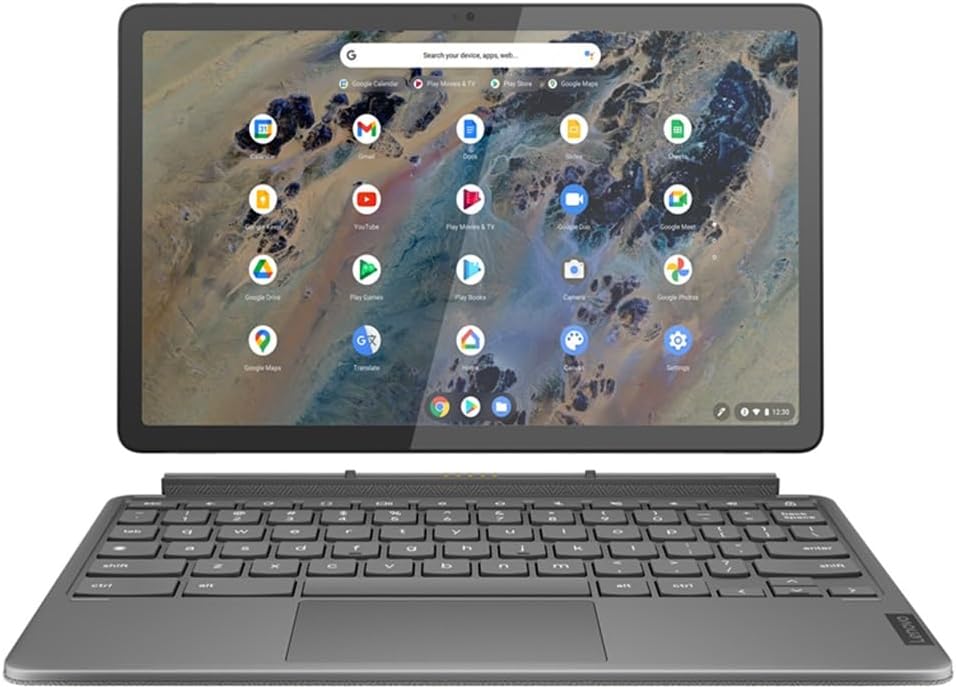
The Lenovo IdeaPad Duet 3 Chromebook is a 2-in-1 tablet-laptop aimed squarely at light users who want something genuinely small and light for browsing, streaming, note-taking, and basic productivity. It is not trying to be a Windows laptop. It is not trying to compete with a MacBook. What it is: a well-built, Chrome OS device with a sharp screen, a bundled stylus, and a chip that handles casual tasks without complaint. Know that going in and you won’t be disappointed.
The headline specs are Qualcomm Snapdragon 7c Gen 2, 8GB LPDDR4X RAM, 128GB eMMC storage, an 11-inch 2000×1200 IPS touchscreen at 400 nits, and a 29Wh battery rated for 12 hours. On paper that’s a tidy little package. In practice, Chrome OS is light enough that the Snapdragon 7c Gen 2 doesn’t feel throttled on everyday tasks — the combination actually works better than the chip would on Windows. The display resolution is genuinely good for this screen size, and the included USI Pen 2 stylus adds real value at a segment where most competitors charge extra for it.
Buy this if you want a compact note-taker, a streaming device with a decent screen, or a secondary machine for travel. Avoid it if you need Windows software, want to game beyond Android titles, or expect to do anything remotely demanding. This is firmly a budget option — it knows what it is, and mostly delivers.
See the Lenovo IdeaPad Duet 3 Chromebook listing and buyer Q&As on Amazon.

Pros and Cons
Pros
- Sharp 2000×1200 IPS display is noticeably better than most screens at this size and segment
- USI Pen 2 stylus included — most competitors make you buy it separately
- Fanless design means completely silent operation under all typical workloads
- Detachable keyboard with strong magnetic connection gets consistent praise from buyers
- Chrome OS runs well on the Snapdragon 7c Gen 2 — responsive for browsing, streaming, and Android apps
- Genuinely light at 516 grams (tablet only) — real travel and commute credentials
Cons
- No 3.5mm headphone jack — only USB-C ports for audio output, which catches buyers off guard
- eMMC storage is slower than SSD and not upgradeable — what you buy is what you’re stuck with
- Chrome OS and the Snapdragon architecture lock you out of Windows software entirely — Android and web apps only
Spec Breakdown
- Model: Lenovo IP Duet 3 Chrome 11Q727 (82T60026UK)
- CPU: Qualcomm Snapdragon 7c Gen 2 (sc7290), 8-core, 2.55GHz
- RAM: 8GB LPDDR4X (soldered, non-upgradeable)
- Storage: 128GB eMMC (PCIe interface)
- GPU: Qualcomm Adreno (integrated)
- Display: 10.95-inch IPS, 2000×1200, 400 nits, glossy, touch, TÜV Low Blue Light certified
- Battery: 29Wh polymer, rated 12 hours
- OS: Chrome OS
- Weight: 516g (tablet); approx. 945.8g with keyboard
- Ports: 2x USB-C 3.1 Gen 1 (data, video, charging)
- Connectivity: Wi-Fi 802.11ac (Wi-Fi 5), Bluetooth 5.2
- Keyboard: Detachable chiclet, QWERTY (sold with unit in this configuration)
- Camera: 5MP front, 8MP rear
- Stylus: Lenovo USI Pen 2 (included)
Hardware & Performance Reality Check
The Snapdragon 7c Gen 2 is an ARM-based chip designed for light, always-connected devices — think Chromebooks and budget tablets, not Windows workhorses. Paired with 8GB LPDDR4X RAM it handles a couple of dozen browser tabs, Google Docs, YouTube, and Android apps without meaningful slowdown. That RAM is soldered to the board, meaning there is no upgrade path whatsoever — if you need more in two years, you’re buying a new machine. For context on how much RAM you actually need, 8GB is the floor for comfortable Chrome OS use with multiple apps open, and on this device it’s the ceiling too.
The 128GB eMMC is adequate for Chrome OS given that most work lives in Google Drive, but eMMC is meaningfully slower than a proper NVMe SSD — file transfers and app launches will reflect that. There’s no microSD slot mentioned in the spec data, which is a genuine limitation if you want to expand local storage. The Qualcomm Adreno integrated GPU is enough for video playback and light Android gaming. Do not expect it to run anything graphically demanding — even mid-tier Android games may stutter. If you want to understand how integrated graphics compare in practice, our specs explainer covers the basics.
In 2026, this hardware sits at the light-use end of the spectrum. Student use for Google Workspace, note-taking, research browsing, and streaming: yes, comfortably. Office tasks that live in a browser or Google Docs: fine. Programming: only if you’re working entirely in web-based IDEs — there’s no native Linux IDE support worth mentioning on this chip and OS combination. Video editing: no. Gaming beyond casual Android titles: no. The Snapdragon architecture also means zero compatibility with x86 Windows software, which is a hard line. This is a performance tier that suits web-first workflows exclusively.
The fanless thermal design deserves a mention because it’s a genuine practical advantage. No fan means no noise, ever. It also means there’s no active cooling, so sustained heavy workloads will cause the chip to throttle — but “heavy workloads” on a Chromebook with an ARM processor means something that realistically shouldn’t be happening on this machine in the first place. For the target use cases, the fanless design is a straightforward win.
Check the full spec sheet and buyer Q&As for the Lenovo IdeaPad Duet 3 Chromebook on Amazon.
Everyday Usability: Battery, Build & More
The 29Wh battery is small by any measure — but Chrome OS on ARM is miserly with power, and Lenovo’s 12-hour claim is broadly plausible for mixed light use. Buyers report it getting through a full day without needing a charge, which is the practical test that matters. The dual USB-C port setup means you can charge from either end, which is a convenience point worth noting. Portability is genuinely good: the tablet alone at 516 grams is lighter than most paperback novels, and the full kit with keyboard still comes in under a kilogram. The display brightness of 400 nits is respectable — usable in bright indoor conditions, though direct sunlight will push it. The 2000×1200 IPS panel gets genuine praise in buyer feedback for crispness and colour — this is one area where the Lenovo IdeaPad Duet 3 Chromebook punches noticeably above its segment. For a broader look at what makes a panel worth buying, see our display types guide. The touchscreen is capacitive and works as you’d expect — responsive, with no reported issues from buyers. The TÜV Low Blue Light certification is a real accreditation, not just a marketing label.

The no-headphone-jack situation is a real irritant and multiple buyers mention it with surprise. There are only two USB-C ports on the entire device — one on each short edge — and audio output routes through those. A USB-C to 3.5mm adapter is reportedly included, but that’s still a dongle you need to carry and manage. Connectivity is Wi-Fi 802.11ac (Wi-Fi 5, not Wi-Fi 6) and Bluetooth 5.2 — there is no Ethernet port, and no HDMI port, though video output is possible via USB-C adapter. The keyboard gets specific praise for key feel and for the strength of the magnetic attachment — it snaps on firmly with no wobble. The folio stand cover is also magnetic and reportedly sturdy; one buyer specifically noted it has hinges rather than a simple folded fabric, which bodes well for longevity. The port situation here is lean — if you regularly use wired peripherals, plan on a USB-C hub. Speakers are 1W stereo — fine for quiet room playback, expectably thin for anything requiring actual bass. Audio through USB-C earbuds is reported as noticeably better than the built-in speakers.
Lifespan & Future-Proofing
The chassis is well-regarded in buyer feedback — the tablet body is described as metal with an anodised finish, and the keyboard cover uses a fabric weave backing. Nothing here feels flimsy based on what buyers report. Realistically, the physical build should last four or five years without drama assuming normal use. The hinge mechanism on the kickstand cover gets specific positive mentions, which is encouraging given that hinges and flexible covers are typically the first things to fail on 2-in-1 designs.
Spec longevity is a different matter. The Snapdragon 7c Gen 2 was already a mid-tier chip at launch and it will feel increasingly dated as web apps grow heavier. Chrome OS does receive long-term software updates — Google’s Auto Update Expiry (AUE) policy applies here, and the 2022 model year means this device should receive Chrome OS updates until around 2029–2030, which is actually decent for a budget device. But the 8GB soldered RAM and 128GB eMMC storage leave no room for hardware upgrades. You cannot add RAM, swap the drive, or slot in a faster chip. What you buy today is the maximum this machine will ever be. That’s worth sitting with before committing. If you’re looking at budget options with more upgrade headroom, the comparison is worth making before deciding.
View current stock availability for the Lenovo IdeaPad Duet 3 Chromebook on Amazon.
What Buyers Are Saying (And Potential Dealbreakers)
The Lenovo IdeaPad Duet 3 Chromebook holds a rating of 4.2 out of 5 from 227 customer reviews on Amazon — a large enough sample to draw meaningful conclusions. The overall sentiment leans positive, with recurring praise centred on the display quality, the keyboard mechanism, the included stylus, and the genuine ease of use for Chrome OS newcomers. Complaints are consistent and specific rather than scattered: the missing headphone jack catches buyers off guard, eMMC storage speed gets a mention from more tech-aware users, and Chrome OS’s limitations relative to Windows come up from buyers who didn’t fully research what they were buying.
The no-headphone-jack issue is arguably the most significant practical dealbreaker here. Multiple buyers flagged it independently. The product listing reportedly suggested a headphone jack was present (referencing included cables) when in reality there is no 3.5mm port on the tablet — only the two USB-C ports. If you use wired headphones regularly and don’t want to carry an adapter, that’s a concrete daily friction point.
Buyers who approached this as a Chrome OS device with realistic expectations — browsing, streaming, note-taking, casual productivity — are largely satisfied. The reviewer who noted using it primarily as a tablet for Android gaming and found everything “quick” and responsive is representative of that satisfied majority. The buyer who flagged it a year into ownership in March 2026 as still doing everything they need, including Canva work, is a useful data point for realistic longevity.
Buyer Highlights
“The pen is much more accurate than a simple stylus — I had fun using the handwriting app and watching it turn my writing into typed text.” — Useful if you’re considering this for note-taking or creative apps.
“The keyboard just snaps on with a strong magnet and works straight away — no loading time, no pairing, just on and off as needed.” — Consistent across multiple buyers; the magnetic connection is genuinely well implemented.
“I’m still using it a year later and it does everything I need — browsing, streaming, Canva — and it set up really easily.” — A reasonable longevity indicator for light use cases.
“There is nowhere to plug earphones in wired — I looked all over and there are only two C ports. I thought I was being stupid but that’s just how it is.” — A real dealbreaker for wired headphone users; do not assume an adapter makes this fine if you value simplicity.
“The stand has actual hinges — it’s not just bendy material that’ll wear out — so it’s made well and should last.” — Worth knowing given that 2-in-1 kickstand covers typically show wear fastest.
Who Should Buy It (And Who Shouldn’t)
Buy If
- You want a light, quiet tablet-laptop for browsing, Google Docs, streaming, and Android apps — this does all of that without complaint
- You want a stylus included without paying extra — the USI Pen 2 in this configuration is a genuine value addition for note-takers and Canva users
- You’re a student or commuter who wants something genuinely small and light and doesn’t need Windows software
- You want a sharp display at this screen size — the 2000×1200 IPS panel is better than most of the competition at this level
Avoid If
- You need Windows applications — the ARM chip and Chrome OS combination is a hard wall; check our buying guide if you’re unsure which OS suits your needs
- You use wired headphones and don’t want to faff with a USB-C adapter daily
- You want to run anything beyond light Android gaming — this chip is not for that, and if gaming is a priority our budget gaming laptop roundup is a better starting point
The Bottom Line
The Lenovo IdeaPad Duet 3 Chromebook is a focused device that knows its audience. The display is genuinely good, the build quality holds up, the included stylus adds real-world value, and Chrome OS on the Snapdragon 7c Gen 2 is a coherent, capable experience for light tasks. The constraints are real — no headphone jack, soldered RAM, eMMC storage, and a hard dependency on Android and web apps only — but none of them are hidden once you know to look. Go in with accurate expectations and this earns its place as a well-executed compact Chromebook for students, commuters, and secondary-device buyers.
Find the Lenovo IdeaPad Duet 3 Chromebook on Amazon and read the latest buyer questions.
At LaptopAdvisorOnline, our methodology is built on data transparency rather than simulated hands-on testing. We rigorously analyse official manufacturer specifications and aggregate verified customer sentiment to provide objective, fluff-free buying advice that helps you cut through the marketing jargon.
As an Amazon Associate, I earn from qualifying purchases.
Browse by Specification
Looking for something specific? Browse our analyses by hardware and feature below, or check all laptop analyses in the Best Budget Laptops category archive.
[AMD Processor Laptops] — [Intel Processor Laptops] — [16GB RAM Laptops] — [32GB RAM Laptops] — [Dedicated Graphics] — [Long Battery Life] — [Lightweight Laptops] — [Student Laptops]
Browse by Screen Size
[13-inch Laptops] — [14-inch Laptops] — [15-inch Laptops] — [16-inch+ Laptops]




