
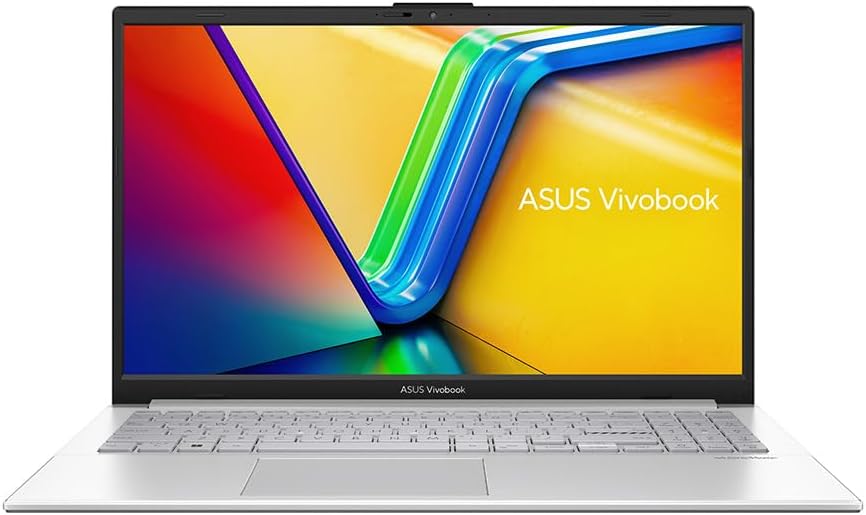
ASUS Vivobook 15 X1504VA Analysis: 16GB That Earns It
The Blunt Verdict
The ASUS Vivobook 15 X1504VA is a competent, no-drama laptop aimed squarely at students, home users, and anyone who needs a reliable daily machine without spending serious money. It earns its place in the mid-range conversation by pairing a 13th Gen Intel chip with a full 16GB of RAM and a 1TB SSD — a storage and memory combination that cheaper rivals often shortchange. That’s the headline strength. The headline weakness? Fan noise, a non-backlit keyboard, and a display that starts looking washed out the moment you tilt it off-axis.
In practice, 16GB DDR4 means you can have thirty browser tabs, a Spotify stream, a Word document, and a YouTube video running without the system gasping. The Intel Core i5-1335U — a 10-core, 12-thread 13th Gen chip with a boost clock of 4.6GHz — handles that kind of multitasking without drama. The 1TB PCIe SSD keeps things snappy on boot and file access. What you don’t get is a dedicated GPU, which puts a hard ceiling on anything graphics-intensive.
Buy it if you need a workhorse for studying, working from home, or general computing and you want storage and RAM headroom without paying over the odds. Skip it if fan noise bothers you at a desk, if you work in low light and need a backlit keyboard, or if you genuinely need anything resembling gaming capability.
See the ASUS Vivobook 15 X1504VA listed on Amazon before reading further.
Pros and Cons
Pros
- Full 16GB DDR4 RAM at this price point is genuinely rare — most rivals ship with 8GB and hope you don’t notice
- 1TB PCIe SSD gives you room for large media libraries, project files, and years of accumulated data without managing storage anxiety
- Intel Core i5-1335U handles multitasking, video editing at modest resolutions, and office workloads without throttling under normal use
- Comprehensive port selection for the class — USB-C 3.2, two USB-A 3.2, USB 2.0, HDMI, and an audio jack means fewer dongles
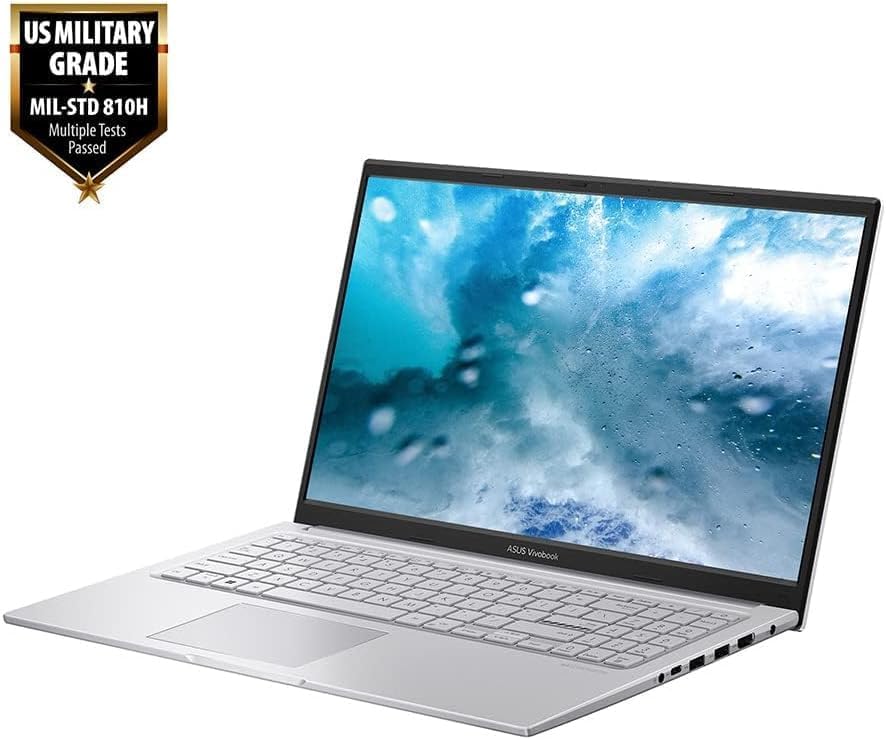
- MIL-STD 810H certification and 180° lay-flat hinge add genuine practical value for students and sharers
- Wi-Fi 6 (802.11ax) keeps wireless connectivity current well into the decade
Cons
- Fan noise is a real problem — multiple buyers describe it as permanently audible, which makes quiet desk work noticeably less pleasant
- No keyboard backlighting — a fairly standard omission at this tier but still a frustration in dim environments
- The display viewing angles are narrow; move off-centre and brightness and contrast drop noticeably
Spec Breakdown
- Model: ASUS Vivobook 15 X1504VA
- CPU: Intel Core i5-1335U, 10 cores / 12 threads, up to 4.6GHz boost
- RAM: 16GB DDR4 (1 slot total)
- Storage: 1TB PCIe SSD
- GPU: Intel HD Graphics (integrated)
- Display: 15.6-inch Full HD (1920 x 1080), LED, glossy finish
- Battery: 42Wh lithium-ion, rated ~8 hours
- OS: Windows 11 Home
- Weight: 1.7kg
- Ports: 1× USB-C 3.2 Gen 1, 2× USB-A 3.2 Gen 1, 1× USB 2.0, HDMI, audio combo jack, 1× Ethernet
- Connectivity: Wi-Fi 6 (802.11ax), Bluetooth 5.3
- Keyboard: UK layout, no backlighting, numeric keypad included
- Camera: Webcam with physical privacy shield
Hardware & Performance Reality Check
The Intel Core i5-1335U is a sensible chip for this class of machine. It’s a 13th Gen hybrid-architecture processor — two performance cores doing the heavy lifting, eight efficiency cores handling background tasks — and in practice it means the ASUS Vivobook 15 X1504VA doesn’t feel sluggish during multitasking. For a deeper look at how this chip stacks up on the performance curve, the CPU guide breaks it down clearly. The 16GB DDR4 is the real differentiator here. One important caveat: the spec sheet shows only one RAM slot, which suggests the memory is either soldered or filling the single available slot with no upgrade path. Either way, what you buy is what you keep — but 16GB is the right amount to buy. If you want to understand how much RAM actually matters for your use case, that resource is worth five minutes of your time.
The 1TB PCIe SSD on a PCIe x2 interface is fast enough for everyday use — boots, application launches, and file transfers all feel snappy. It’s not NVMe x4 speed, but you won’t feel the difference opening Excel. On the graphics side, the integrated Intel HD Graphics is honest-work territory only. Streaming, YouTube 4K, and light photo editing are all fine. Anything involving a 3D engine — gaming beyond casual browser titles, 3D rendering, GPU-accelerated video export — isn’t going to work at any meaningful level. If that’s what you need, this is the wrong machine entirely, and you’d be looking at a different category. There’s a useful breakdown of performance expectations worth checking if you’re on the fence about integrated graphics.
For 2026 use cases: student work — essays, research, presentations, Zoom calls — this handles with ease. Office tasks including email, spreadsheets, and light project management are no problem. Programming in Python, JavaScript, or web development is fine; compiling large codebases will take longer than on a Core i7, but it’s workable. Light video editing at 1080p is achievable — one buyer specifically mentioned the improvement in video editing performance — but 4K timelines will expose the chip’s limits. Gaming is effectively off the table beyond very old or very undemanding titles. This is not a budget gaming machine; don’t try to use it as one.
One additional note worth flagging: the spec sheet mentions the laptop defaults to an energy-efficient power plan out of the box, which artificially limits CPU performance until you switch it manually to High Performance. At least one buyer noticed their machine felt slow until they changed this setting. It’s a simple fix in Windows, but it’s the kind of thing ASUS probably should default better.
Check the full spec sheet and buyer Q&As for the ASUS Vivobook 15 X1504VA on Amazon.
Everyday Usability: Battery, Build & More
Battery life is rated at 8 hours by ASUS, and real-world usage is going to land somewhere between that and the 6-hour standby figure depending on what you’re doing. Mixed use — some video, some browsing, some document work at moderate brightness — will likely get you through a full working day, but heavy CPU loads will eat into that faster. At 1.7kg the machine is easy enough to carry around, and the relatively compact footprint (360mm × 233mm × 18mm) means it doesn’t dominate a desk or a bag. Several buyers noted the chassis feels smaller than expected for a 15.6-inch laptop, which is a genuine plus. Fan noise is a legitimate usability issue though — one buyer described the fan as running permanently and audibly while the laptop is on, which in a quiet office or library environment is going to be genuinely annoying. Thermal management gets the job done, but it’s not whisper-quiet doing it.

The keyboard is described positively by most buyers — comfortable to type on, with good key travel and a full numeric keypad that plenty of home users and spreadsheet workers will appreciate. The absence of backlighting is a real omission if you work in low-light conditions, and there’s no getting around that. The 1920 x 1080 display is adequate in good light but the glossy finish and narrow vertical viewing angles are notable limitations — colour and brightness drop off noticeably when you’re not sitting directly in front of it, which makes sharing the screen with someone awkward. There’s no touchscreen here. The display type discussion around panels and coatings at this price point is covered in more depth in our display types guide. On connectivity, the port selection is genuinely good for the class — HDMI, Ethernet, USB-C, and multiple USB-A ports means external monitors and wired networks connect without adapters. Multiple buyers confirmed running dual-screen setups without any issues. The webcam includes a physical privacy shutter, which is a small but genuinely useful feature. Speakers are fine for casual use; anything listening-critical will want headphones.
Lifespan & Future-Proofing
On build quality, the MIL-STD 810H certification is meaningful — it’s tested for drops, vibration, humidity, and temperature extremes, which gives the chassis more credibility than most plastic laptops at this price point. ASUS builds Vivobooks to last, and the physical construction is sturdy enough that with normal care this should hold up for five or more years without any structural complaints. The silver finish won’t show every fingerprint, and the ASUS Antimicrobial Guard treatment on high-touch surfaces is a minor but genuine bonus for hygiene-conscious users.
On spec longevity, the picture is more nuanced. The Intel Core i5-1335U is a 2023-era chip and remains capable for everyday tasks well into the late 2020s — by 2026 it was already proving comfortable for the workloads buyers are throwing at it. The single RAM slot with no confirmed upgrade path is the sharpest constraint: if 16GB starts feeling tight in three or four years, your only option is a new machine. The 1TB SSD buys you time on storage. Wi-Fi 6 keeps connectivity current. There’s no Thunderbolt, which limits future high-speed peripheral options, but for the target audience that’s unlikely to matter. Realistically, expect five solid years of everyday computing before this hardware feels genuinely dated for normal tasks — longer if your use case stays light. For broader context on making a long-term buying decision, our laptop buying guide covers the key factors worth thinking through.
View current stock and availability for the ASUS Vivobook 15 X1504VA on Amazon.
What Buyers Are Saying (And Potential Dealbreakers)
The ASUS Vivobook 15 X1504VA carries a rating of 4.3 out of 5 from 227 Amazon customer reviews — a sample size large enough to draw genuine conclusions from. The overall sentiment skews positive, but there’s a clear divide: satisfied buyers are enthusiastic about speed, storage, and value for money, while dissatisfied buyers are focused on the fan noise and the missing keyboard backlight. Both camps are right about what they’re describing.
The most consistently praised aspect is raw speed — multiple buyers coming from older or lower-spec machines describe the jump as dramatic. Video editing, multitasking, and general responsiveness get genuine praise. The dual-screen capability (via HDMI) came up positively in more than one review, with buyers running external monitors from their old desktop setups without any configuration issues. Setup and out-of-box experience is also well-regarded — buyers describe it as straightforward and quick.
The negative camp is small but pointed. One buyer dropped their rating to a single star, citing permanently audible fan noise as the dealbreaker — they describe it as something they “can’t bear.” That’s subjective, but the underlying complaint (fan runs constantly) is corroborated enough to take seriously. The non-backlit keyboard is a recurring gripe. One buyer also flagged Microsoft Edge’s non-removability under EU DMA regulations as an unacceptable flaw — fair complaint legally, though unrelated to the hardware itself. Windows 11 bloat comes up a couple of times, though that’s a Microsoft problem rather than an ASUS one.
Buyer Highlights
“I can do video editing, play music, and have a browser going at the same time — it’s dramatically raised the bar from my old machine.” — Relevant if you’re upgrading from an older or underpowered laptop.
“It boots up and opens everything so quickly, and the whole chassis is smaller than I expected for a 15-inch laptop.” — The compact footprint for a 15.6-inch machine is a consistent positive across multiple buyers.
“The fan runs constantly and I genuinely can’t stand the noise — it was the main reason I came close to returning it.” — A dealbreaker for buyers who need quiet working environments.
“Had to switch it to High Power Plan to get full CPU performance — it ships in an energy-efficient mode that holds it back.” — Worth doing immediately after setup; takes about thirty seconds in Windows settings.
“Running a second screen from my old desktop setup — no issues at all, and having two screens for some tasks has been brilliant.” — Confirmed by multiple buyers; the HDMI output handles external monitors without complaint.
Who Should Buy It (And Who Shouldn’t)
Buy If
- You’re a student or home user who wants 16GB RAM and 1TB storage without paying for specs you’ll never use
- You plan to run an external monitor via HDMI and want a machine that handles a dual-screen setup out of the box
- You do light-to-moderate video editing, document work, or coding and want a machine that won’t bottleneck you on RAM or storage
- You’re upgrading from an old or low-spec machine and want a meaningful step up in everyday responsiveness
Avoid If
- Fan noise in a quiet environment is a dealbreaker for you — this is a confirmed and recurring complaint, not a one-off
- You work regularly in low light and need a backlit keyboard — there is no backlighting here and no workaround
- You need any form of gaming capability beyond very casual browser-based titles — integrated graphics only, full stop
- You’re considering this for professional or work use that involves client-facing presentations in varied lighting conditions — the narrow display viewing angles will cause you problems
The Bottom Line
The ASUS Vivobook 15 X1504VA gets the fundamentals right in a way that many rivals at this level don’t — the RAM and storage combination is genuinely generous, the chip is current enough to stay useful for years, and the port selection means you’re not immediately reaching for a hub. Fan noise and the missing keyboard backlight are real limitations, not marketing spin, and the display is the weakest part of the package. But for the target audience — students, home workers, anyone escaping an underpowered older machine — this delivers on what it promises. It’s not trying to be anything it isn’t. For a broader comparison with other options at this tier, the mid-range laptops roundup is worth a look before you commit. If the specs fit your use case and you can live with the fan, this is a machine that earns its recommendation. Full stop. Also worth understanding the specs themselves in plain English before making a final call.
Find the ASUS Vivobook 15 X1504VA and read the latest buyer questions on Amazon.
At LaptopAdvisorOnline, our methodology is built on data transparency rather than simulated hands-on testing. We rigorously analyse official manufacturer specifications and aggregate verified customer sentiment to provide objective, fluff-free buying advice that helps you cut through the marketing jargon.
As an Amazon Associate, I earn from qualifying purchases.
Browse by Specification
Looking for something specific? Browse our analyses by hardware and feature below, or check all laptop analyses in the Best Mid-Range Laptops category archive.
[AMD Processor Laptops] — [Intel Processor Laptops] — [16GB RAM Laptops] — [32GB RAM Laptops] — [Dedicated Graphics] — [Long Battery Life] — [Lightweight Laptops] — [Student Laptops]
Browse by Screen Size
[13-inch Laptops] — [14-inch Laptops] — [15-inch Laptops] — [16-inch+ Laptops]




