
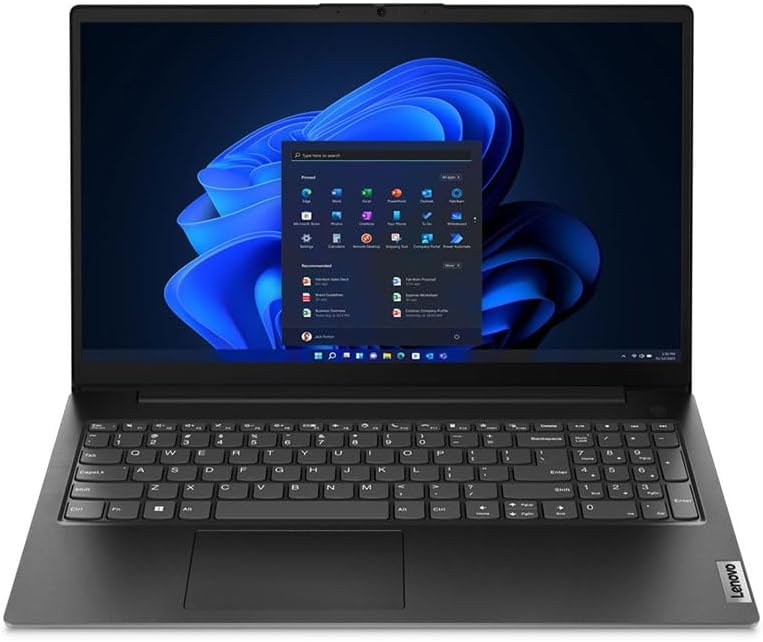
Lenovo V15 G4 83FS000LUK Analysis: Strong CPU, Real Limits
The Blunt Verdict
The Lenovo V15 G4 83FS000LUK is a business-oriented 15.6-inch laptop aimed squarely at office workers, small business owners, and anyone who needs a capable daily driver without anything flashy getting in the way. Its headline strength is a genuinely decent processor — the Intel Core i5-12500H is no toy — paired with 16GB of DDR4 RAM and a 512GB SSD. That’s a workable combination for real office workloads. The headline weakness? One confirmed buyer flagged serious battery drain, and the RAM situation has an upgrade ceiling that matters long-term.
On paper, this sits comfortably in the mid-range bracket. The i5-12500H is a 12-core Alder Lake-H chip that boosts to 4.5GHz — that’s proper performance headroom for multitasking, spreadsheets, video calls, and light creative work. The Intel Iris Xe Graphics handles integrated duties only, so gaming and heavy video rendering are off the table. The 1920 x 1080 display runs at 60Hz with a matte anti-glare finish, and the machine ships with Windows 11 Pro — which alone makes it more attractive to business buyers than most consumer-tier alternatives.
Buy this if you want a no-nonsense work laptop with a capable processor, professional OS, and enough ports for a real desk setup. Skip it if you expect the battery life claims to hold in practice, need a dedicated GPU for any kind of visual workload, or plan to upgrade the RAM down the line. This is a machine with a clear purpose. It fits that purpose reasonably well, and falls short in equally predictable ways.
See the listing and current availability for the Lenovo V15 G4 83FS000LUK on Amazon.

Pros and Cons
Pros
- The i5-12500H is a strong H-series chip — well above what most similarly positioned laptops carry, and it shows in multitasking headroom
- 16GB DDR4 RAM is a meaningful starting point for business use without needing an immediate upgrade
- Windows 11 Pro included out of the box — a genuine differentiator for business buyers who’d otherwise pay separately for it
- Matte anti-glare display is a sensible call for office and hybrid-working environments where glare is a daily annoyance
- MIL-STD-810H certification suggests the chassis has been put through durability testing — relevant if this is going in a bag every day
- USB-C 3.2 (full function), Ethernet, and HDMI all present — a proper port selection for desk work
Cons
- One buyer reported significant real-world battery drain and a keyboard key detaching — Lenovo’s support response in both cases was not encouraging
- RAM is capped at 16GB with only one slot available, meaning there is no upgrade path if requirements grow
- Integrated graphics only — no dedicated GPU means anything beyond standard office tasks hits a hard ceiling
Spec Breakdown
- Model: Lenovo V15 G4 83FS000LUK
- CPU: Intel Core i5-12500H (12-core, Alder Lake-H), up to 4.5GHz
- RAM: 16GB DDR4 (1 slot, max 16GB)
- Storage: 512GB SSD (SATA)
- GPU: Intel Iris Xe Graphics (integrated, shared memory)
- Display: 15.6-inch FHD, 1920 x 1080, 60Hz, matte anti-glare, LCD
- OS: Windows 11 Pro
- Battery: 4-cell Lithium Ion (claimed 12 hours)
- Ports: USB-C 3.2 (full function), HDMI, Ethernet (RJ45), USB Type-A x2
- Connectivity: Wi-Fi 6, Bluetooth 5.1
- Webcam: Yes, with privacy shutter
- Keyboard: Standard QWERTY
- Chipset: Intel HM670/HM650
- Colour: Black
Hardware & Performance Reality Check
The Intel Core i5-12500H is the strongest argument for buying this machine. It’s an H-series chip — designed for performance mobility, not just ticking a box — with 12 cores and a boost clock of 4.5GHz. For day-to-day office use, that means browser tabs, Office apps, Teams calls, and background processes will all run without friction. For a deeper look at what this generation of Intel chip actually delivers, the CPU performance guide is worth a read. The 16GB of DDR4 RAM is a reasonable match for the processor — enough to avoid bottlenecking routine tasks. What matters here is the upgrade ceiling: Amazon’s spec sheet lists one available memory slot with a maximum capacity of 16GB. You’re already at the limit. If your workload grows or you start running more demanding software, there is no RAM upgrade path. That’s a meaningful constraint for anything beyond a two-to-three year horizon. If you’re trying to work out how much RAM actually matters for your use case, this RAM guide breaks it down clearly.
Storage is a 512GB SATA SSD. SATA rather than NVMe — slower on paper, but the real-world difference for office tasks and web browsing is marginal. Boot times and app launches will still feel quick compared to any spinning hard drive. What matters more is the capacity: 512GB fills up faster than people expect once Windows, Office, browser caches, and work files start accumulating. An external drive or cloud storage is worth planning for. The GPU is Intel Iris Xe Graphics — integrated, running on shared system memory. Perfectly adequate for documents, spreadsheets, video conferencing, and YouTube. Not adequate for gaming, 3D rendering, video encoding, or anything that needs dedicated VRAM. If you need a machine that can handle visual workloads, this isn’t it — look at options in our professional laptops roundup instead.
For 2026 real-world use: student work and standard office tasks are well within scope — this hardware handles both comfortably. Programming and light development (web dev, Python, scripting) is fine. Video editing at anything above 1080p will struggle due to the integrated graphics and SATA storage combination. Gaming is a non-starter beyond casual browser titles. The i5-12500H is strong enough that the CPU won’t be your bottleneck for a few years yet — it’s the GPU and the RAM ceiling that will date the machine first.
The port layout deserves specific mention because it’s genuinely one of this machine’s practical strengths. USB-C (full function, 3.2), HDMI out, Ethernet, and two USB-A ports give you everything needed for a real desk setup without a hub. Wi-Fi 6 and Bluetooth 5.1 round out the wireless side. If you’re regularly connecting monitors, wired networks, and peripherals, the ports guide has context on what each interface is actually good for. This machine won’t leave you hunting for adapters.
Check the full spec sheet and buyer Q&As for the Lenovo V15 G4 83FS000LUK on Amazon.
Everyday Usability: Battery, Build & More
Lenovo claims 12 hours of battery life. One buyer directly contradicted this, reporting poor battery life significant enough to contact support — and Lenovo’s response was that it was “normal for this model.” That’s a red flag worth taking seriously. In practice, the i5-12500H is an H-series chip designed for performance, and H-series chips tend to draw more power under load than their U-series counterparts. Realistic expectations for mixed workday use are likely closer to five to seven hours, possibly less if you’re running Teams calls or anything processor-intensive. Keep the charger accessible. That said, another buyer specifically called out keeping the charger in their backpack as part of their workflow — suggesting they’d accepted this as a working reality rather than a dealbreaker. On the display side, the matte anti-glare finish is a genuine quality-of-life improvement for anyone working near windows or under fluorescent office lighting. The 1920 x 1080 resolution at 15.6 inches gives a pixel density that’s sharp enough for text work. The 60Hz refresh rate is standard for a business machine — no complaints there. For more context on what panel type and resolution actually mean for daily use, the display types guide is useful.

Build quality has two stories here. The MIL-STD-810H certification is a meaningful data point — it means the chassis has been tested against temperature extremes, humidity, vibration, and drop scenarios. That’s not just marketing language; it’s a defined standard. However, one buyer reported a keyboard key detaching after normal use, and Lenovo’s support team classified it as intentional damage to avoid warranty coverage. That’s a troubling support interaction regardless of what actually happened, and worth factoring in. The touchpad handles standard navigation duties. No fingerprint reader is mentioned in the spec data. The webcam includes a physical privacy shutter — a useful feature for anyone on regular video calls. No touchscreen on this model — it’s a traditional clamshell, full stop. Speaker quality isn’t detailed in the specs or reviews, so no claims either way.
Lifespan & Future-Proofing
Chassis lifespan: the MIL-STD-810H certification gives reasonable confidence that this won’t fall apart in two years under normal use. Business-line Lenovo machines generally have a decent physical durability track record. The keyboard key incident in the reviews is worth noting, but one data point from 17 reviews doesn’t make a pattern. Realistically, the physical machine should hold up for four to five years of standard office use. Whether Lenovo’s support experience will hold up if something does go wrong is a separate question — and based on the warranty interaction one buyer reported, that’s less certain.
Spec longevity is a different story. The i5-12500H has enough headroom to remain relevant for everyday tasks well into 2026 and beyond — it’s not a chip that will age out quickly for standard office work. The 16GB DDR4 RAM is the hard constraint. With one slot and no upgrade path, you’re locked in at 16GB for the life of the machine. That’s fine today; it becomes a limitation if software overhead continues to increase or your workload diversifies. The 512GB SATA SSD can be replaced if it fills up, assuming a standard 2.5-inch bay — but SATA storage won’t get faster. No dedicated GPU means the machine will hit the same graphical ceiling in year one as it does in year four. If you’re thinking about maximising longevity, the buying guide covers upgrade paths and what to look for when future-proofing matters.
View current stock and availability for the Lenovo V15 G4 83FS000LUK on Amazon.
What Buyers Are Saying (And Potential Dealbreakers)
The Lenovo V15 G4 83FS000LUK holds a rating of 4.3 out of 5 from 17 Amazon reviews. That’s a small sample — too small to draw firm statistical conclusions — so the individual review content carries more weight than the aggregate score here. What the reviews do show is a fairly clean split: most buyers are satisfied with basic functionality, while one buyer had a significantly worse experience that surfaces real concerns about both the hardware and Lenovo’s support responsiveness.
The positive feedback is consistent across non-technical buyers and business users: the machine does what it’s supposed to do, it was easy to set up, and it handles everyday tasks without issue. One organisation reported deploying multiple units and being happy with the results — which is meaningful, because bulk business deployment is exactly the use case this machine was designed for. On the other end, the 2-star review is detailed and specific: poor battery life confirmed by Lenovo as “normal,” a screen blacking out intermittently, and a keyboard key detaching that Lenovo classified as intentional damage to dodge warranty coverage. That last point is a legitimate dealbreaker concern — not because the issue is necessarily common, but because it signals how Lenovo’s support may respond if something goes wrong with your unit.
One reviewer specifically noted they keep the charger in their bag — a practical workaround that implicitly acknowledges the battery situation isn’t as clean as the spec sheet suggests. Non-technical buyers consistently found setup and day-to-day use straightforward, which aligns with what you’d expect from a Windows 11 Pro machine with a clean business-focused configuration.
Buyer Highlights
“We use these across our organisation and we’re very happy overall — and when there was a problem with our order, it was sorted quickly and kindly.” — Worth noting for businesses considering multi-unit purchases.
“Does everything we need — we’re not huge tech people but it was straightforward to set up and easy to use.” — Consistent feedback from buyers who aren’t technically inclined.
“The battery life is poor — Lenovo support confirmed this is normal for the model, which didn’t exactly fill me with confidence.” — A direct warning from a buyer who tested this thoroughly.
“For work it’s perfect — does the job it promises.” — Brief but representative of the majority experience.
Who Should Buy It (And Who Shouldn’t)
Buy If
- You need a business-grade laptop with Windows 11 Pro included and a proper port setup for desk work — this ticks both boxes without compromise
- Your work is email, Office apps, video calls, and browser-based tools — the i5-12500H and 16GB DDR4 handle all of that with headroom
- You’re deploying across a small team or organisation and need a consistent, certified, manageable machine — the MIL-STD-810H rating and Pro OS make this viable at scale
- You’re happy to keep the charger nearby and don’t need all-day untethered battery life
Avoid If
- You need reliable all-day battery life away from a power source — the real-world performance appears to fall well short of the claimed 12 hours, and Lenovo’s own support has confirmed limited drain is expected
- You anticipate needing more than 16GB RAM in the next three years — the single slot with no upgrade path makes this a dead end if workloads scale
- You want any gaming capability beyond browser-based titles — there is no dedicated GPU and no path to add one
The Bottom Line
The Lenovo V15 G4 83FS000LUK is a competent business laptop with a better processor than its positioning suggests, a professional OS, and a port selection that actually works for desk-based workers. The constraints are real and worth knowing before you buy: battery life is unlikely to match the spec sheet, the RAM has no upgrade path, and at least one buyer’s warranty experience with Lenovo was genuinely poor. For straightforward office work, team deployment, and non-technical users who need something that just works, it earns a cautious recommendation. Go in with clear expectations and it won’t disappoint. Go in expecting a premium experience and you’ll find the gaps.
At LaptopAdvisorOnline, our methodology is built on data transparency rather than simulated hands-on testing. We rigorously analyse official manufacturer specifications and aggregate verified customer sentiment to provide objective, fluff-free buying advice that helps you cut through the marketing jargon.
As an Amazon Associate, I earn from qualifying purchases.
Browse by Specification
Looking for something specific? Browse our analyses by hardware and feature below, or check all laptop analyses in the Best Mid-Range Laptops category archive.
[AMD Processor Laptops] — [Intel Processor Laptops] — [16GB RAM Laptops] — [32GB RAM Laptops] — [Dedicated Graphics] — [Long Battery Life] — [Lightweight Laptops] — [Student Laptops]
Browse by Screen Size
[13-inch Laptops] — [14-inch Laptops] — [15-inch Laptops] — [16-inch+ Laptops]




