
Alienware 16 Aurora AC16250 Analysis: RTX 5060 Delivered
The Blunt Verdict
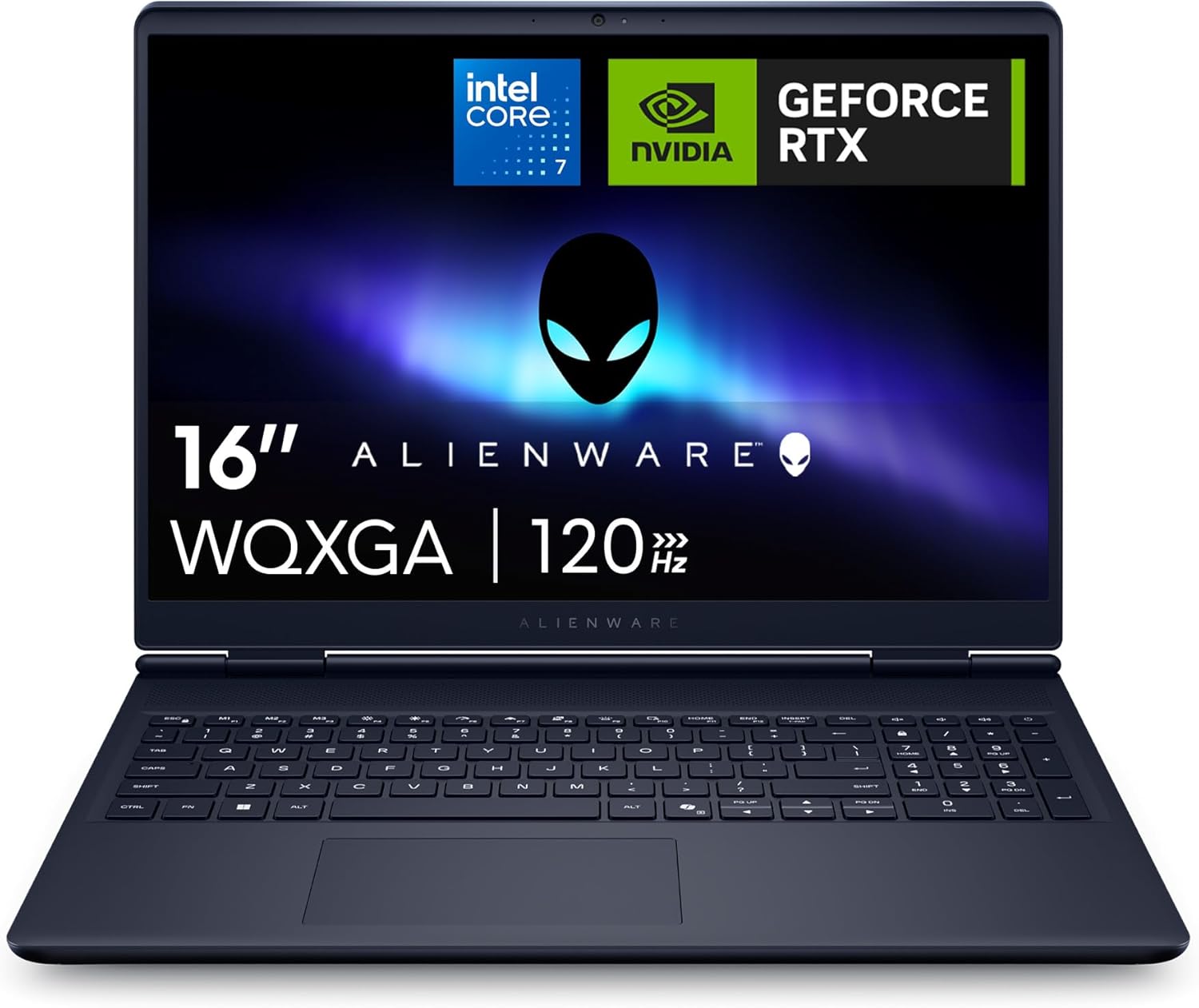
The Alienware 16 Aurora AC16250 is a serious gaming laptop that doesn’t mess about. It pairs an Intel Core 7 240H with an NVIDIA GeForce RTX 5060 and a genuinely good 2560 x 1600 display — at this tier, that’s a compelling combination. The headline strength is the GPU. The RTX 5060 with DLSS 4 and Multi Frame Generation puts this squarely in the serious gaming category. The headline weakness is battery life — buyers are unanimous on that, and we’ll get into it.
This is a 2025 machine built for performance, not commuting. The 16GB DDR5 RAM is dual-channel and runs at 5600 MT/s, the storage is a 1TB PCIe NVMe SSD, and the display hits 100% sRGB with a 120Hz refresh rate. On paper that’s a well-rounded spec sheet. In practice, several buyers have already flagged the RAM as a bottleneck for modern AAA titles — the upgrade slots exist, which softens that concern considerably.
Buy it if you game at home, edit photos or video, or want a machine that can handle demanding workloads without flinching. Avoid it if you need all-day battery life away from a plug, or if you’re bothered by fan noise under load. This is not a quiet machine when it’s working hard. It’s also not light. At 2.49kg it’s a desk machine that occasionally travels, not the other way around.
See the Alienware 16 Aurora AC16250 listing and current availability on Amazon.

Pros and Cons
Pros
- RTX 5060 with DLSS 4 and Multi Frame Generation delivers genuinely next-generation GPU performance at this form factor
- WQXGA 2560 x 1600 display at 100% sRGB and 120Hz is well above average for this class — buyers specifically praise it for photo and video work
- RAM and SSD slots are user-upgradeable, which is a meaningful advantage over competitors that solder everything shut
- Thermal architecture handles sustained loads without throttling — Stealth Mode offers a usable quiet option for lighter tasks
- Wi-Fi 7 support puts this ahead of most of the competition on wireless connectivity
- Build quality is solid — magnesium alloy interior frame and anodised aluminium lid, buyers consistently note it feels built to last
Cons
- Battery life is genuinely short under gaming or performance loads — plug-in use is the realistic expectation for serious sessions
- Fan noise under demanding workloads is significant — one buyer describes it as too loud even with an external cooler
- 16GB of RAM is a mild constraint for some modern AAA titles — you’ll likely want to upgrade it sooner rather than later
Spec Breakdown
- Model: Dell Alienware 16 Aurora AC16250
- CPU: Intel Core 7 240H, 10 cores, 16 threads, up to 5.2GHz, 24MB cache
- RAM: 16GB DDR5, dual-channel, 5600 MT/s, 2x SO-DIMM slots (user-upgradeable)
- Storage: 1TB PCIe NVMe SSD (2x PCIe Gen 4 slots, user-upgradeable)
- GPU: NVIDIA GeForce RTX 5060, 8GB GDDR7 VRAM
- Display: 16-inch WQXGA (2560 x 1600), 120Hz, 100% sRGB, 300 nits, matte, 16:10
- Battery: 96Wh, 6-cell
- OS: Windows 11 Home
- Weight: 2.49kg
- Ports: 1x USB-A 3.2 Gen 1 (rear), 1x USB-A 3.2 Gen 1 (left), 2x USB-C (3.2 Gen 2, DisplayPort 1.4 / 1.4a), 1x HDMI 2.1, 1x RJ-45 Ethernet, 1x 3.5mm headset jack
- Connectivity: Wi-Fi 7 (802.11be), Bluetooth
- Keyboard: White backlit, UK layout, numeric keypad
- Camera: Front-facing webcam
- Audio: 2x 2W speakers with Dolby Audio
- Warranty: 1 Year Alienware Care with 24/7 support
Hardware & Performance Reality Check
The Intel Core 7 240H is a 10-core hybrid architecture chip with a 5.2GHz boost clock and 24MB of cache. For a deeper look at what those numbers mean day-to-day, the CPU guide breaks it down clearly. In practical terms: this handles multitasking without hesitation. Multiple Adobe applications open simultaneously, browser sessions running in parallel, background processes — none of it causes slowdown based on what buyers report. The 16GB DDR5 at 5600 MT/s in dual-channel configuration is fast memory, but as one buyer has already noted and another has acted on, 16GB is increasingly a floor rather than a ceiling for demanding games in 2025. The good news is that both SO-DIMM slots are user-accessible — upgrading RAM to 32GB is a straightforward decision, not a locked door. That matters.
The 1TB PCIe NVMe SSD is fast — PCIe Gen 4 means boot times and game load times that feel near-instant by any reasonable measure. A second SSD slot gives you an expansion path without replacing anything. On the GPU side, the NVIDIA GeForce RTX 5060 with 8GB GDDR7 VRAM is a Blackwell-architecture GPU. DLSS 4 with Multi Frame Generation is a genuine step forward — it generates multiple AI frames between rendered frames, which means frame rates in supported titles that would otherwise require a much more expensive GPU. Ray Reconstruction improves lighting fidelity in ray-traced scenes. NVIDIA Reflex 2 reduces input latency. For AAA gaming at WQXGA resolution, this GPU is matched well to this display. Total Graphics Power is rated up to 65W, which is the realistic laptop constraint — don’t expect desktop RTX 5060 numbers, but the combination of hardware rasterisation and AI upscaling means it punches above its thermal envelope in practice.
For 2026 use cases: student work and office tasks are handled without any strain whatsoever — this is gross overkill for those purposes, but overkill never hurt anyone. Gaming across current AAA titles at WQXGA with DLSS enabled is the sweet spot. Video editing and photo work in Adobe Lightroom and Premiere genuinely benefit from the GPU — AI-accelerated denoise in Lightroom is one of the specific use cases a buyer has called out, and the RTX 5060 handles it quickly. Programming and development workloads are similarly comfortable. The machine is well above the performance threshold for any of these tasks.
The port layout deserves a mention because it’s been thought through. HDMI 2.1 routes through the dGPU — so external display gaming runs off the RTX 5060 directly, which is the right call. The two USB-C ports with DisplayPort 1.4 support route through the iGPU, which is fine for general external display use. Ethernet is present on the left side. The port configuration overall is practical for a gaming setup — you’re not reaching for a dock. Wi-Fi 7 support is a forward-looking addition at this tier and meaningfully reduces wireless bottlenecking on compatible routers.
Browse the full spec sheet and buyer Q&As for the Alienware 16 Aurora AC16250 on Amazon.
Everyday Usability: Battery, Build & More
Battery life is the honest elephant in the room. The 96Wh pack is as large as you’ll find in a laptop of this class — that’s not a small battery. But the RTX 5060 and Core 7 240H pull power when they’re working, and gaming on battery is a short session. One buyer reports around four hours of mixed use (setup, installing software, general use) with 25% remaining, which is actually reasonable for a machine this powerful. But gaming at performance settings unplugged? That’s a different story. Factor in a plug as a baseline requirement for gaming sessions. For lighter tasks with Stealth Mode active, runtime improves meaningfully — the same buyer notes it’s quiet enough to use without disturbing someone in the same room.

Fan noise under load is real and documented. When the RTX 5060 is pushed hard, the fans are audible — one buyer explicitly calls them out as too noisy even with an aftermarket cooling pad. Stealth Mode (F7) reduces fan activity and is genuinely useful for office work or lighter use, but don’t expect silence during intense gaming. The thermal architecture — dual fans with ultra-thin blades, three copper heat pipes, and four exhaust vents — does its job of keeping the hardware stable and preventing throttling. The tradeoff is acoustic. One buyer also flags that the chassis runs hot and recommends keeping it on a hard surface, which is standard advice for gaming laptops but worth reinforcing here. The display quality earns genuine praise — the matte panel at 2560 x 1600, 100% sRGB, and 120Hz is a strong combination. Colours are described as clean and lifelike, and the 16:10 aspect ratio gives more vertical real estate than a standard 16:9 screen. There is no touchscreen — this is a pure clamshell gaming laptop. The keyboard receives positive feedback for tactility, and the numeric keypad is a useful addition. One buyer notes a quirk with the UK key labelling — the @ and # symbols appear to be printed in the wrong position relative to their shift-key behaviour — worth being aware of if you touch-type by muscle memory. Build quality is consistently praised: the magnesium alloy interior and anodised aluminium lid give it a tank-like solidity that buyers appreciate, even if the surface is a fingerprint magnet. The 2W Dolby Audio speakers are adequate for casual use — don’t expect them to fill a room.
Lifespan & Future-Proofing
On build quality: the combination of a magnesium alloy interior frame and anodised aluminium lid is a proper chassis, not a budget plastic shell. Alienware has a reasonable track record here, and multiple buyers describe it as built to last. One unit reportedly failed within a week — that’s noted in the reviews — but isolated early failures happen across all brands. The overall construction suggests a realistic chassis lifespan of five or more years with normal use, assuming you keep it on hard surfaces and don’t cook it by gaming on a duvet. One year of Alienware Care with 24/7 support and global coverage is included — adequate, though not exceptional.
On spec longevity: the RTX 5060 with DLSS 4 is a meaningful advantage here. AI-assisted rendering extends the useful life of the GPU — games that would otherwise require higher rasterisation horsepower become playable through upscaling. The Intel Core 7 240H will handle everyday tasks comfortably well into 2026 and beyond. The bigger question is RAM — 16GB is already feeling tight in some modern titles, and that will only get worse. The upgrade path exists (two SO-DIMM slots), which transforms this from a potential frustration into a simple future purchase. Two PCIe Gen 4 SSD slots mean storage expansion is similarly non-destructive. For a gaming laptop, having genuine upgrade options is increasingly rare — this machine’s expandability is a genuine long-term advantage over sealed competitors.
Check current stock and availability for the Alienware 16 Aurora AC16250 on Amazon.
What Buyers Are Saying (And Potential Dealbreakers)
The Alienware 16 Aurora AC16250 holds a 4.5 out of 5 rating from 40 Amazon customer reviews. That’s a meaningful sample size and the positive skew is consistent — seven of the eight available reviews are four or five stars, with specific, credible praise rather than vague enthusiasm. The single one-star review documents a unit that failed within a week, combined with a poor returns experience — that’s a legitimate concern about build reliability and Amazon’s handling of it, not just buyer error.
The dominant theme in positive reviews is performance. Buyers coming from older machines — one specifically upgrading from a five-year-old Lenovo — report dramatic improvements in demanding applications. Adobe Lightroom AI tools, Photoshop, video editing software: the RTX 5060 and Core 7 240H combination handles creative workloads at a pace that surprises people accustomed to older hardware. One buyer explicitly plans to upgrade to 32GB of DDR5 5600 before stress-testing gaming — which reflects sensible thinking about the RAM ceiling.
Battery life is the honest recurring gripe. Every buyer who mentions it qualifies it: it’s short under load, acceptable for lighter use. None of them seem surprised — they bought a gaming laptop and got gaming laptop battery behaviour. The fan noise complaint is more pointed. One buyer found the acoustic output genuinely excessive even with an external cooler, which is a real concern if you’re in a shared space or sensitive to noise. The keyboard key labelling quirk (@ and # appearing to be printed in swapped positions) is specific and consistent enough to be a genuine issue, not a one-off misread.
Buyer Highlights
“I waited a few months to write my review because others said their unit died in a week — mine’s been running really well, games are smooth and fast even on high graphics settings.” — Reassuring for longevity concerns, though the early-failure reports shouldn’t be dismissed.
“Applying AI denoise in Lightroom Classic takes 10 seconds instead of 10 minutes compared to my old laptop — it’s absolutely fantastic for photo editing.” — Directly relevant if you use GPU-accelerated creative software.
“I had 5 to 8 chunky applications open at the same time and they all loaded together with no waiting at all — it’s still surprising me.” — Consistent with what the dual-channel DDR5 and Core 7 240H should deliver.
“It’s built like a tank — if someone tried to steal it and you hit them with it you’d probably be facing a manslaughter charge.” — Blunt but accurate summary of the build quality.
“On balanced and quiet mode it barely made a noise, yet speeds still stayed high — but for best performance you need to plug it in.” — Stealth Mode is a genuine feature, not marketing. The plug-in caveat is real.
“Oh boy is it noisy when playing graphics-intensive games — the fans make too much noise even with a laptop cooler.” — One of the clearest dealbreaker statements in the review pool. Take it seriously.
Who Should Buy It (And Who Shouldn’t)
Buy If
- You game at home at a desk and need a GPU that can handle current AAA titles at WQXGA resolution without a desktop setup
- You use GPU-accelerated creative software — Adobe Lightroom, Premiere, Photoshop — and need meaningful speed improvements over ageing hardware
- You want upgrade headroom: being able to add RAM and storage without buying a new machine in two years is a legitimate reason to choose this over sealed alternatives
- You need a machine that can handle everything from heavy multitasking to gaming without compromise, and you have a desk and a plug socket
Avoid If
- You need genuine all-day battery life away from a charger — this machine isn’t built for that and no amount of power management changes the fundamental physics
- Noise is a dealbreaker — under gaming loads the fans are loud, and if you’re in a quiet shared space or easily distracted by acoustic output, this will frustrate you
- You’re looking for a lightweight machine to carry around campus or between meetings — at 2.49kg it’s a commitment, and there are better-suited options in the mid-range or even professional categories for that use case
The Bottom Line
The Alienware 16 Aurora AC16250 is a well-specified gaming and creative workstation in laptop form. The RTX 5060 with DLSS 4 is the headline act, and it delivers. The display is genuinely good. The upgrade path for RAM and storage removes one of the most common long-term frustrations with gaming laptops. The compromises — battery life, fan noise, weight — are the same ones you accept with any performance laptop at this tier, and buyers go in with eyes open. If you’re looking for a considered purchase that handles demanding tasks now and has room to grow, this earns a recommendation. Just make sure you’ve got a desk, a socket, and reasonable expectations about acoustic output.
At LaptopAdvisorOnline, our methodology is built on data transparency rather than simulated hands-on testing. We rigorously analyse official manufacturer specifications and aggregate verified customer sentiment to provide objective, fluff-free buying advice that helps you cut through the marketing jargon.
As an Amazon Associate, I earn from qualifying purchases.
Browse by Specification
Looking for something specific? Browse our analyses by hardware and feature below, or check all laptop analyses in the Best Premium Gaming Laptops category archive.
[AMD Processor Laptops] — [Intel Processor Laptops] — [16GB RAM Laptops] — [32GB RAM Laptops] — [Dedicated Graphics] — [Long Battery Life] — [Lightweight Laptops] — [Student Laptops]
Browse by Screen Size
[13-inch Laptops] — [14-inch Laptops] — [15-inch Laptops] — [16-inch+ Laptops]




