
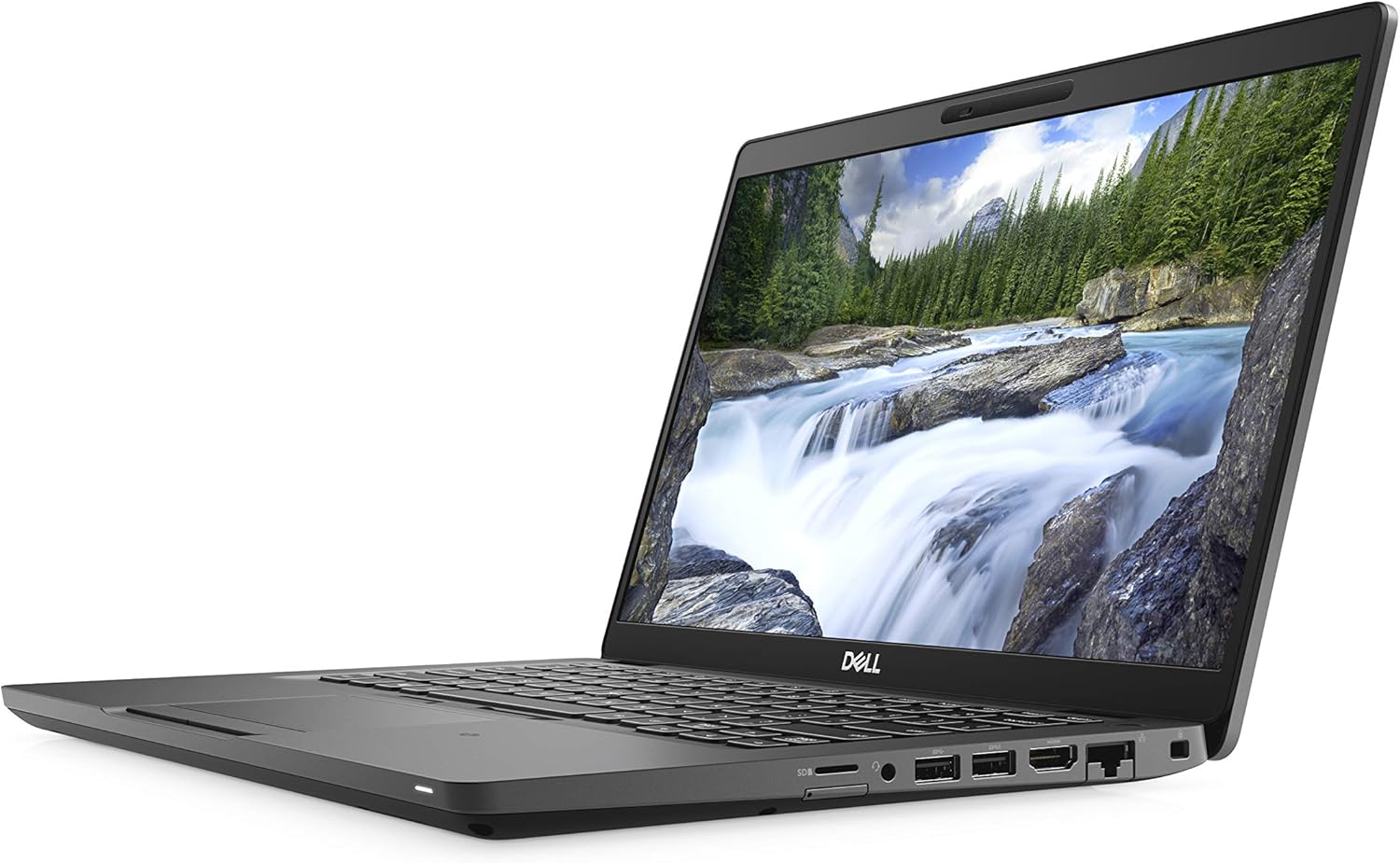
Dell Latitude 5400 (Renewed) Analysis: Worth the Risk?
The Blunt Verdict
The Dell Latitude 5400 (Renewed) is a refurbished business workhorse aimed squarely at home users, students, and anyone who needs a no-nonsense Windows machine without spending serious money on something new. It’s not a speed demon. It’s not a gaming machine. But as a secondhand daily driver for documents, browsing, video calls, and light office work, it does its job quietly and with the kind of build quality you only get from a former business fleet laptop.
The headline specs are a Intel Core i5-8365U processor paired with 16GB DDR4 RAM and a 512GB NVMe SSD. That’s a reasonable combination for the price — the SSD keeps things snappy for everyday tasks, and 16GB of RAM means you won’t be throttled by a browser with a dozen tabs open. The display is a 14-inch 1366×768 LCD panel, which is where this machine earns an honest caveat — that resolution is noticeably soft in 2025 and will look dated compared to anything Full HD. The integrated Intel UHD Graphics 620 handles everyday visuals fine but rules out anything GPU-dependent.
Buy it if you want a light, durable machine for everyday computing and you’re comfortable with the trade-offs of buying renewed. Avoid it if you spend significant time on sharp visuals, video editing, or anything that leans on dedicated GPU horsepower. For more context on how these specs stack up generally, the specs explained guide is worth a read before committing.
See the current listing and availability for the Dell Latitude 5400 (Renewed) on Amazon.

Pros and Cons
Pros
- 16GB DDR4 RAM is genuinely useful headroom for multitasking — well above the bare minimum you’d find on cheaper renewed machines
- 512GB NVMe SSD keeps boot times and app launches fast; no mechanical hard drive slowdown to put up with
- Business-grade chassis from Dell’s Latitude line means sturdier build quality than consumer-tier laptops at the same secondhand price point
- Ships with Windows 11 Pro, which gives you local account setup and better IT control than the Home edition
- Multiple USB ports including both USB 2.0 and 3.0, plus HDMI output for a second screen — more physical connectivity than many current thin laptops
- Matte anti-glare display coating reduces reflections in bright rooms — a practical advantage for office or study use
Cons
- 1366×768 resolution is below Full HD — text and images look noticeably less sharp than any modern laptop display at the same size
- Battery life is a genuine wildcard with renewed units — at least one buyer received a machine with a completely dead battery, and the listed “1 hour” battery life figure is realistic on aged cells
- The i5-8365U is a 2018-era chip on its last legs for relevance — capable today, but the age ceiling is visible
Spec Breakdown
- Model: Dell Latitude 5400 (Renewed)
- CPU: Intel Core i5-8365U (Whiskey Lake, 8th Gen, 4 cores, 1.6GHz base)
- RAM: 16GB DDR4 (2 slots total)
- Storage: 512GB M.2 NVMe SSD
- GPU: Intel UHD Graphics 620 (integrated)
- Display: 14-inch LCD, 1366×768, matte/anti-glare, 60Hz
- OS: Windows 11 Pro
- Weight: 1.48kg
- Battery: Lithium-ion (capacity not confirmed; listed battery life 1 hour)
- Ports: 4× USB (2.0 and 3.0), 1× HDMI, 1× Ethernet (1000Mbps)
- Connectivity: Wi-Fi 802.11a/b/g/n/ac (listed as 802.11a; full standard likely broader), no Bluetooth confirmed in spec data
- Camera: Integrated webcam with integrated microphone
- Keyboard: Chiclet QWERTY layout
- Warranty: 12-month hardware return-to-base
Hardware & Performance Reality Check
The Intel Core i5-8365U is a quad-core 1.6GHz Whiskey Lake chip from 2018. It’s not going to embarrass itself on everyday tasks — web browsing, Office documents, video calls, PDF work, light spreadsheets — all handled without drama. Where it starts to breathe harder is anything that piles on concurrent load: multiple browser profiles, large spreadsheets with complex formulas, or anything that asks it to do several heavy things at once. The 16GB DDR4 RAM helps considerably here. It means the chip isn’t being starved of memory, which is the usual bottleneck on budget renewed machines. The RAM sits across 2 slots, so there is an upgrade path if you ever wanted to swap it out — though 16GB is already the ceiling for this platform, so there’s nowhere left to go on that front. For a plain-English walkthrough of what RAM numbers actually mean, see the how much RAM do I need guide.
The 512GB NVMe SSD is the single biggest quality-of-life upgrade a laptop can have over older HDD-based machines. Boot times are fast, apps open quickly, and you’re not sitting watching a spinner every time you switch tasks. Storage capacity is reasonable for most users — 512GB holds an operating system, Office suite, photos, and a decent music or video library without issues. The Intel UHD Graphics 620 is integrated graphics, which means it pulls from system resources rather than having dedicated VRAM. Streaming video, YouTube, casual image editing, basic Photoshop — all fine. Gaming is not. Even titles from 2015 will struggle at playable settings. This is not a machine you point at anything GPU-demanding. If that matters to you, look at the budget gaming laptops shortlist instead.
In 2026, this hardware profile sits comfortably at the lighter end of still-viable. Student coursework, remote working, video conferencing, coding in lightweight IDEs, and office tasks — yes, it holds up. Video editing at 4K — no. Programming in heavier environments like Android Studio or running local development servers — possible but you’ll feel the CPU ceiling. Gaming beyond browser-based titles — ruled out entirely. For those use cases, you’d want to look at something from the mid-range laptop tier with current-generation silicon. The Latitude 5400 (Renewed) is positioned correctly as a light-duty machine — it just needs to be bought with that understanding.
One flag worth raising explicitly: the Bluetooth specification in the listing shows “No Bluetooth confirmed.” The spec data lists no Bluetooth support. The Dell Latitude 5400 platform typically includes Bluetooth, but since the listing data doesn’t confirm it and this is a renewed unit, it’s worth verifying with the seller before purchase if Bluetooth is something you rely on for a mouse, headset, or other peripherals.
Check the full spec sheet and buyer Q&As for the Dell Latitude 5400 (Renewed) on Amazon.
Everyday Usability: Battery, Build & More
At 1.48kg, this is a genuinely light machine by any measure — carry it in a bag all day and you won’t feel it. The build quality is classic Latitude: mostly magnesium alloy and dense plastic, designed to handle the knocks of corporate life rather than sit pretty on a desk. The chiclet keyboard is a known quantity on the Latitude 5400 — business-focused, with decent key travel by business laptop standards. Multiple buyers have confirmed a backlit keyboard on their units, which the product listing doesn’t call out — worth noting as a quiet bonus. The touchpad is functional, nothing special, but it doesn’t get in the way. The matte anti-glare display coating is a practical win for anyone working near windows or in variable lighting — no mirror-like reflections ruining your screen.

Battery life is the single biggest usability question mark on any renewed laptop, and the Dell Latitude 5400 (Renewed) doesn’t escape it. The listed figure of 1 hour battery life is about as honest as a spec sheet gets — that reflects degraded battery cells, which is a known reality of refurbished machines. Most buyers report it charges fully and functions normally when plugged in, but at least one buyer received a unit with a battery that failed entirely within the first day. The 12-month RTB warranty covers hardware failure, so that’s a backstop, but if you need reliable unplugged runtime, plan around this or budget for a replacement battery. Connectivity is genuinely good for a 14-inch machine — HDMI output for an external monitor, a wired Ethernet port at 1000Mbps, and 4 USB ports covering both 2.0 and 3.0 standards. For a full breakdown of what those port types mean day-to-day, the laptop ports guide covers it clearly. The integrated webcam and microphone are adequate for video calls — no stand-out quality, but functional. There’s no fingerprint reader confirmed in the spec data.
Lifespan & Future-Proofing
The Latitude 5400 chassis was built to last. Dell’s Latitude business line is engineered for fleet use — multiple users, years of handling, corporate environments where laptops get used hard. The physical construction should hold up for years without issue if it hasn’t already suffered damage before it reached you. That’s the advantage of buying from the business laptop tier even secondhand: the build tolerances are genuinely better than consumer machines at the same price point. For context on what separates a robust business machine from a budget consumer one, the professional laptops guide goes into this in detail.
Spec longevity is a different conversation. The i5-8365U is a 6-year-old processor. For everyday light tasks it remains functional in 2026, but it’s not gaining ground — browser engines, progressive web apps, and operating system overhead all keep creeping upward, and an 8th-generation Intel chip has no room to grow into that. Realistically, you’re looking at 2–3 more years of comfortable use for home and office tasks before it starts feeling properly sluggish. The storage and RAM are not the bottleneck — the CPU will be the first thing that limits you. RAM sits at its platform maximum of 16GB, so there’s no upgrade headroom there. The SSD is replaceable if you ever need more space, but beyond that, this machine is what it is. Buy it knowing you’re purchasing a finite window of useful life, not a long-term investment.
View current stock and seller details for the Dell Latitude 5400 (Renewed) on Amazon.
What Buyers Are Saying (And Potential Dealbreakers)
The Dell Latitude 5400 (Renewed) holds a rating of 4.1 out of 5 from 482 Amazon customer reviews — a meaningful sample size. The headline pattern is clear: the majority of buyers are pleasantly surprised by the physical condition of the unit they received, with several independently describing it as looking brand new rather than refurbished. Cosmetic quality is the most consistent positive theme, alongside general satisfaction with how the machine performs for everyday tasks.
The recurring practical complaint is about setup: buyers who didn’t run Dell SupportAssist and push firmware and BIOS updates immediately found issues — particularly around hibernation and wake behaviour. This isn’t a hardware defect, it’s a refurbishment gap. Units appear to ship with the OS installed but not necessarily with all Dell-specific drivers and firmware current. The fix is straightforward — run SupportAssist after first boot, apply everything it flags, disable hibernation if it causes issues — but it shouldn’t fall to the buyer to know that. Worth going in with eyes open.
The battery situation is the legitimate dealbreaker to flag. Most buyers report normal charging and function. One buyer received a unit where the battery failed completely within 24 hours of use and was unable to hold charge overnight. The 12-month RTB warranty should cover this, but the process of claiming it was described as difficult, with the buyer reporting neither a replacement nor reimbursement of return shipping costs. That’s one data point from 482 reviews, but it’s the kind of thing that deserves a direct mention. If battery failure would leave you completely stranded, this risk is real — even if the odds are in your favour.
One delivery-related issue also appeared: a buyer received a unit with a cracked screen, attributed to courier handling rather than the seller. The machine still functioned, but the display was damaged on arrival. These are the inherent risks of any hardware purchase shipped by a third-party carrier.
Buyer Highlights
“It arrived looking pristine — came in a proper laptop box with warranty cards and instructions, not a battered envelope.” — A consistent theme across multiple independent buyers; physical condition on arrival is clearly being managed well.
“Make sure you install Dell SupportAssist straight away and run all the updates — there were a lot, including a new BIOS, but once done it runs fine.” — Worth following as a first-boot checklist rather than discovering the hard way.
“Really pleased to find USB-A ports — so many laptops drop them now and it makes daily use much simpler.” — Relevant if you have USB-A peripherals and are tired of hunting for adapters.
“The backlit keyboard isn’t mentioned anywhere in the listing but it’s there — nice bonus.” — Confirmed by more than one buyer independently; the listing undersells this feature.
“Battery was completely dead by the next morning after a full charge — had to use it plugged in the whole time and getting a refund for the return postage was a nightmare.” — The worst-case battery scenario is documented; the warranty process wasn’t smooth for this buyer.
Who Should Buy It (And Who Shouldn’t)
Buy If
- You need a reliable everyday machine for browsing, documents, email, and video calls, and you’re willing to do a first-boot update routine to get it running cleanly
- You want a physically robust business-grade laptop that won’t feel flimsy — the Latitude chassis earns its reputation, even secondhand
- You primarily use the laptop at a desk or near a power socket, making the uncertain battery life a manageable rather than critical concern
- You need physical USB-A ports and an HDMI output without buying adapters — this machine has both in quantity
Avoid If
- You need reliable all-day unplugged use — the battery situation on this specific unit is a genuine lottery, and the listed 1-hour figure should be taken seriously
- The 1366×768 display resolution will bother you — anyone moving from a Full HD screen will find it a noticeable step backwards in sharpness, and that’s not fixable. See the display types guide if you’re unsure what to look for
- You need Bluetooth connectivity confirmed — the spec data doesn’t list it, and it’s worth verifying before purchase if it matters to you
The Bottom Line
The Dell Latitude 5400 (Renewed) is a sensible secondhand choice for light everyday computing — a well-built business machine with a decent RAM and SSD spec, sold at a price point where the trade-offs are fair. The display resolution is genuinely below current expectations, the battery is an unknown quantity, and the hardware is ageing. None of that is hidden or surprising — it’s in the numbers. But if you go in knowing those things, run the first-boot updates, and primarily use it near a charger, most buyers get a machine that does exactly what they needed. The 482 Amazon customer reviews broadly support that. It’s not a purchase to make with high expectations; it’s a purchase to make with realistic ones. For broader context on where this fits, the budget laptops roundup lays out the alternatives worth comparing.
Browse the full listing and recent buyer questions for the Dell Latitude 5400 (Renewed) on Amazon.
At LaptopAdvisorOnline, our methodology is built on data transparency rather than simulated hands-on testing. We rigorously analyse official manufacturer specifications and aggregate verified customer sentiment to provide objective, fluff-free buying advice that helps you cut through the marketing jargon.
As an Amazon Associate, I earn from qualifying purchases.
Browse by Specification
Looking for something specific? Browse our analyses by hardware and feature:
[AMD Processor Laptops] — [Intel Processor Laptops] — [16GB RAM Laptops] — [32GB RAM Laptops] — [Dedicated Graphics] — [Long Battery Life] — [Lightweight Laptops] — [Student Laptops]
Browse by Screen Size
[13-inch Laptops] — [14-inch Laptops] — [15-inch Laptops] — [16-inch Laptops]




