
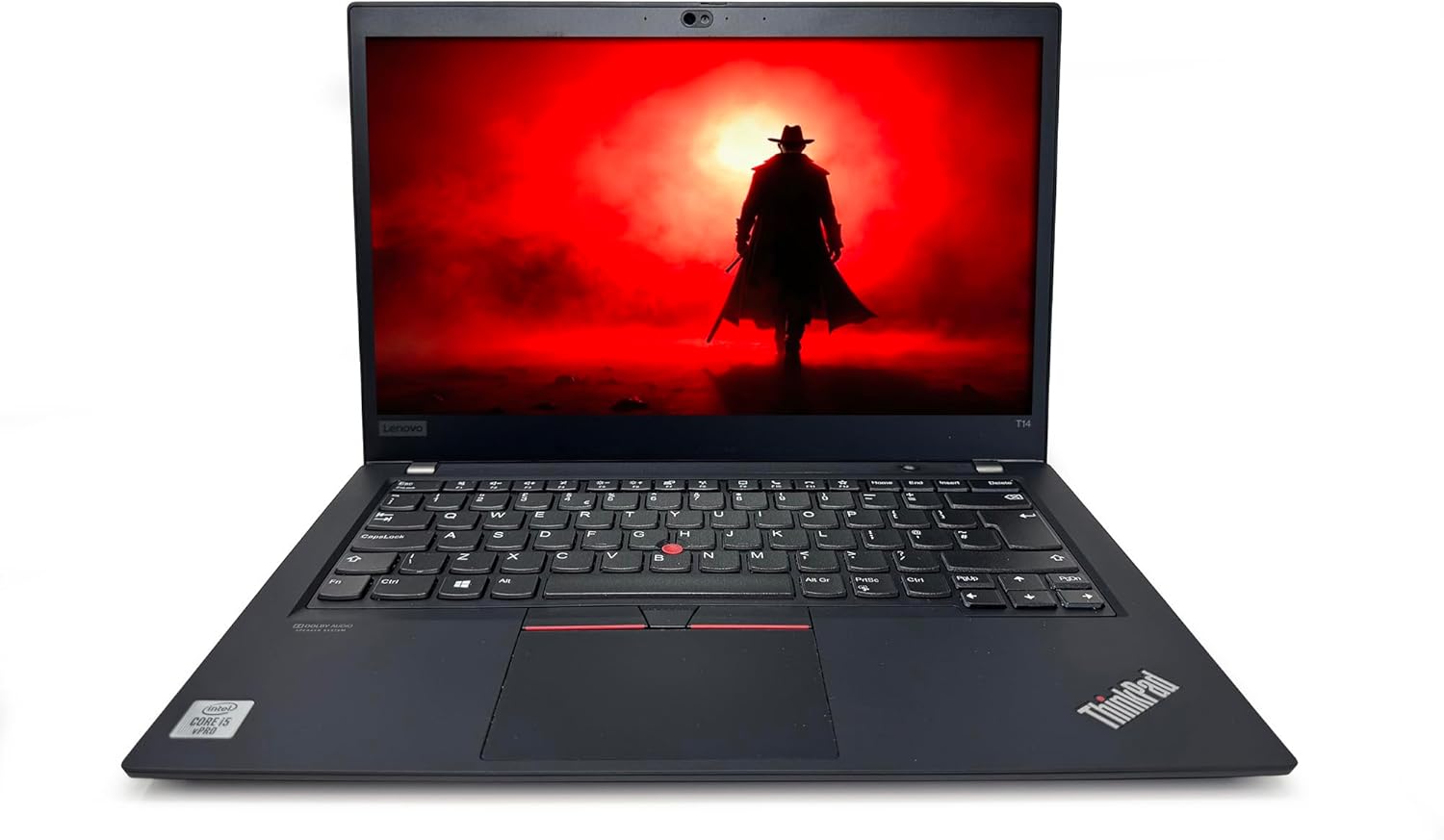
Lenovo ThinkPad T14 Gen 1 Analysis: Refurb Done Right
The Blunt Verdict
The Lenovo ThinkPad T14 Gen 1 is a refurbished business laptop that makes a straightforward case for itself: solid build quality, a capable dual-memory-slot predecessor, and Windows 11 Pro out of the box, at a fraction of what you’d pay for something equivalent new. It’s aimed squarely at office workers, students, and remote professionals who need a dependable daily machine — not something to game on, not something to edit 4K video with, just something that gets the job done reliably without embarrassing itself.
The headline specs: an Intel Core i5-10310U (quad-core, up to 4.4 GHz), 16GB of DDR4 RAM, a 512GB NVMe SSD, and a 14-inch 1920 x 1080 matte display. That’s a genuinely usable configuration for 2025 productivity work. The CPU is four generations old, but for spreadsheets, browser tabs, video calls, and document editing, it’s not the bottleneck most people assume. The Intel UHD Graphics 620 is integrated — there’s no dedicated GPU here, full stop.
If you need a no-nonsense work laptop from a brand with a proven enterprise track record, and you’re comfortable buying refurbished, this is worth serious consideration. If you need to run demanding software, do any meaningful creative work, or want a machine that’ll feel fast in five years, this isn’t it. There are better options in the mid-range if your budget stretches.
See the Lenovo ThinkPad T14 Gen 1 listing and current availability on Amazon.
Pros and Cons
Pros
- ThinkPad chassis is genuinely durable — military-grade build standards have been consistent across the T-series for years
- 16GB DDR4 RAM gives you real headroom for multitasking without hitting a wall in everyday office use
- 512GB NVMe SSD delivers fast boot times and snappy file access — a significant step up from the SATA SSDs often found in older refurbs
- Windows 11 Pro included — you get BitLocker, Remote Desktop, and domain-join capability without paying extra
- Thunderbolt 3 port confirmed in the hardware interface spec — useful for docking stations and external displays
- Matte anti-glare display is the right call for office environments where gloss screens are genuinely annoying
Cons
- The i5-10310U is a 2019 CPU — it’s fine for light work but increasingly dated for anything compute-intensive
- Only one RAM slot listed in the specs — if accurate, that limits upgrade flexibility and means your 16GB is what you’re largely stuck with
- Colour gamut is listed at 45% NTSC — that’s a poor result for anything colour-sensitive; content creators should look elsewhere
Spec Breakdown
- Model: Lenovo ThinkPad T14 Gen 1 (Renewed)
- CPU: Intel Core i5-10310U, 4 cores, up to 4.4 GHz (Comet Lake, 10th Gen)
- RAM: 16GB DDR4 @ 2666 MHz (1 slot listed)
- Storage: 512GB NVMe SSD (PCIe x4)
- GPU: Intel UHD Graphics 620 (integrated)
- Display: 14-inch, 1920 x 1080, LED, matte, 60 Hz, 250 cd/m², 45% colour gamut
- OS: Windows 11 Pro
- Weight: 1.4 kg
- Battery: 3-cell Lithium Polymer (rated 6 hours)
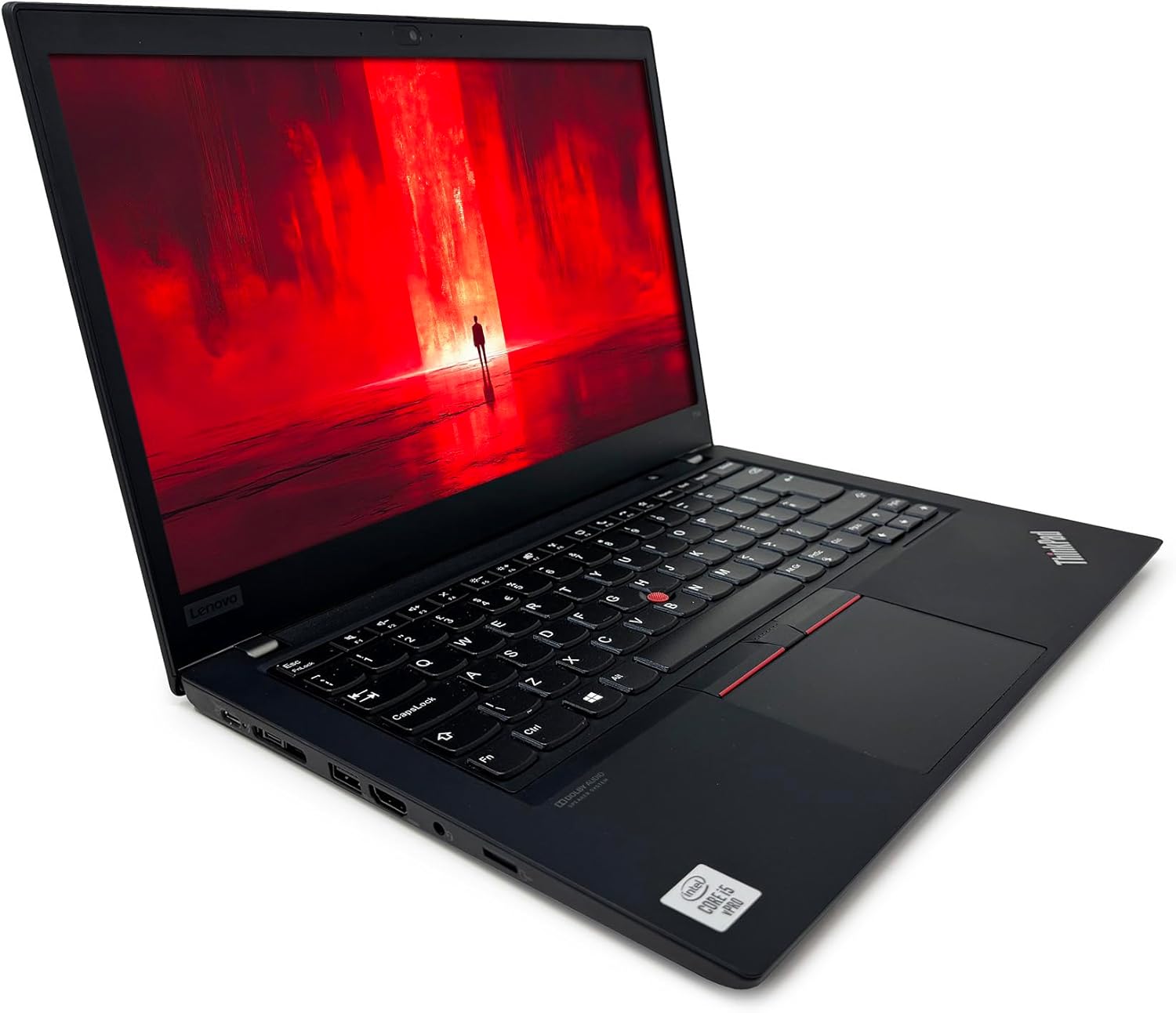
- Ports: USB-C (with DisplayPort), Thunderbolt 3, USB-A (×2), HDMI, Ethernet (Gigabit), headphone jack, memory card slot
- Connectivity: Wi-Fi 5 (802.11ac), Bluetooth 5.0
- Keyboard: Chiclet with TrackPoint
- Camera: Front-facing webcam (built-in)
- Security: TPM 2.0
Hardware & Performance Reality Check
The i5-10310U is a four-core processor from 2019. In CPU terms, that’s not ancient — it’s not going to make Word documents take three seconds to open — but it is meaningfully behind current-generation chips in both performance and efficiency. For browser-based work, email, spreadsheets, and video calls, this processor handles everything fine. Where you’ll notice the age is under sustained load: compiling code, running multiple virtual machines, or anything that parks all four cores at full tilt for extended periods. The CPU performance guide has more detail on how 10th-gen Intel holds up against newer silicon if you want to dig into that. The 16GB of DDR4 running at 2666 MHz is a genuine asset — it’s enough for 20-plus browser tabs, a video call, and a few other apps simultaneously without throttling. The specs list only 1 RAM slot, which is worth noting: if that’s accurate, you can’t simply add a second stick later. You’d be replacing what’s already there, and the maximum supported is 48GB.
The 512GB NVMe SSD over PCIe x4 is fast enough for everyday use — boots in seconds, applications launch cleanly, large file transfers are comfortable. There’s an available M.2 slot confirmed in the spec data, which means storage expansion is possible if you ever need it. As for graphics: the Intel UHD Graphics 620 is integrated, meaning it shares system memory with the CPU and has no dedicated VRAM. It handles 4K video playback, two external monitors, and basic image editing without issue. Gaming is not something this machine is built for — if that’s a priority, the budget gaming options are a different category entirely.
In real-world 2026 terms: student coursework — yes, comfortably. Office tasks and remote work tools — yes. Programming and light development — manageable, though heavier compile workloads will test patience. Video editing — basic cuts in software like DaVinci Resolve are doable but slow; anything involving effects rendering will frustrate. Gaming beyond very casual titles — no. If you want to understand how these specs stack up more broadly, the performance benchmarks page is worth a look.
The port configuration is one of the strongest aspects of this machine for a professional workflow. Thunderbolt 3, full-size HDMI, Ethernet via a Gigabit LAN port, USB-C with DisplayPort output — that’s a more complete port set than many modern thin-and-light laptops. If you work at a desk with a docking station, this matters. The ports guide explains why Thunderbolt 3 specifically opens up a lot of peripheral options.
Check the full spec sheet and buyer Q&As for the Lenovo ThinkPad T14 Gen 1 on Amazon.
Everyday Usability: Battery, Build & More
Battery life is listed at 6 hours. That’s a manufacturer figure for a refurbished unit, so treat it with appropriate scepticism — real-world usage with screen brightness up and Wi-Fi active will likely land somewhere between 4 and 5.5 hours depending on workload. It’s not an all-day battery in the way a modern ARM-based machine might be, but it’s enough for a half-day commute or a working morning without a charger. The ThinkPad T14 Gen 1 weighs just 1.4 kg, which makes it genuinely light to carry — no complaints there. The chassis dimensions put it at a compact footprint that fits in any standard laptop bag. Build quality is where ThinkPads consistently earn their reputation: the T-series is designed to military durability standards, which means the lid doesn’t flex noticeably, the hinges are firm, and the overall feel is solid rather than plasticky. This is a machine built to survive years of daily desk-to-bag use.

The display is a matte 1920 x 1080 LED panel at 60 Hz with a peak brightness of 250 cd/m². That brightness figure is on the low end — usable indoors, but it’ll struggle in bright environments near a window. The anti-glare coating compensates partly, but this isn’t a display you’d want to use outside on a sunny day. The 45% colour gamut figure is the real limitation: it’s a budget-tier panel that renders colours inaccurately. For documents, spreadsheets, and web use, you won’t notice. For photo editing or anything where colour accuracy matters, you will. More on what display specs actually mean in practice is covered in the display types guide. The keyboard is classic ThinkPad chiclet — good key travel, responsive, and spill-resistant. The inclusion of a TrackPoint (that little red nub between G and H) is either a feature you’ll love or something you’ll ignore entirely in favour of the touchpad. Either way, the touchpad is a clickpad design with no separate buttons, which is standard. The built-in webcam is functional for video calls but there are no specifications suggesting it’s anything beyond basic 720p quality — fine for Teams or Zoom, nothing more. The speakers are listed as stereo integrated — adequate for calls, not something you’d use for serious audio. If you’re on calls frequently, a headset is the sensible approach regardless. No touchscreen on this model.
Lifespan & Future-Proofing
The physical chassis question is straightforward: ThinkPad T-series machines are built well. Assuming this refurb has been through a proper inspection process (check the seller’s grading and warranty terms), the chassis itself should have several more years of daily use left in it. Lenovo’s T-series has a track record of lasting five to seven years in office environments, and nothing about the build quality suggests this one would be different. The 1-year limited warranty is standard for refurbished units at this tier.
The spec longevity question is more nuanced. The i5-10310U is already four generations old. For budget-tier productivity use, it’ll remain functional for perhaps two to three more years before the gap between it and current software expectations becomes noticeable. By 2026 the gap is already visible in compute-heavy applications — by 2028 it’ll be more broadly felt. The 16GB RAM is a reasonable ceiling for daily use and should remain adequate for office workloads for a while yet. If you want to understand whether that’s enough for your specific use case, the RAM guide is worth a read. The single RAM slot is the real long-term limitation here — you can’t meaningfully expand memory without replacing the existing stick, and the upgrade path isn’t as clean as a two-slot machine would be. Storage is expandable via the M.2 slot, which is at least something. This isn’t a machine to buy if you want five-plus years of feeling current — it’s a machine to buy if you want two to three more years of dependable use at a sensible cost.
View current stock and availability for the Lenovo ThinkPad T14 Gen 1 on Amazon.
What Buyers Are Saying (And Potential Dealbreakers)
This listing has a rating of 4.3 out of 5 from 25 reviews. That’s a reasonable average, but 25 is a small sample. It’s not enough to draw firm statistical conclusions — a couple of outlier experiences in either direction can shift the average noticeably at that volume. What follows combines the sentiment signal from those reviews with hardware-based projections where the data doesn’t go far enough on its own.
The consistent praise in the buyer feedback centres on build quality and the out-of-box experience — buyers note the machine arrives in good condition, sets up cleanly with Windows 11 Pro already activated, and performs exactly as expected for everyday office work. The ThinkPad keyboard gets specific positive mentions, which tracks with the T-series reputation. On the negative side, the battery life expectation gap is the most common area of mild disappointment — buyers expecting all-day battery from a refurbished 10th-gen machine occasionally find it falls short of the rated 6 hours. That’s not surprising and shouldn’t be a dealbreaker if you go in with realistic expectations. There are no significant dealbreaker complaints in the current review pool — no widespread reports of DOA units, screen defects, or hardware faults that would flag a quality control issue with this particular refurb listing.
Buyer Highlights
“Arrived looking almost new — couldn’t tell it was refurbished at all.” — A common theme for buyers concerned about cosmetic condition on renewed units.
“Windows 11 Pro was already activated, no faff, just turned it on and it worked.” — Worth knowing if you’ve had bad experiences with OS activation on refurbs before.
“Keyboard is genuinely the best I’ve used on a laptop this size — feels solid and the keys have proper travel.” — Consistent with the T-series keyboard reputation across the broader ThinkPad range.
“Battery doesn’t quite last the full day but it’s fine for a morning’s work without plugging in.” — Realistic expectation-setting for a 3-cell refurbished unit with a few charge cycles already on it.
“Runs everything I throw at it for work — Teams, Excel, a dozen Chrome tabs — no complaints at all.” — Relevant if your workload is standard office software rather than anything compute-intensive.
Who Should Buy It (And Who Shouldn’t)
Buy If
- You need a solid office and remote-work machine and want a proven business-grade build without paying new-laptop prices
- You work in an environment where Windows 11 Pro features — BitLocker encryption, Remote Desktop, domain join — matter to you or your IT department
- You value a complete port selection including Thunderbolt 3, HDMI, and Gigabit Ethernet without needing a separate dock
- You want a lightweight (1.4 kg) machine that travels well and has a keyboard worth actually typing on all day
Avoid If
- You need strong colour accuracy for photo editing, graphic design, or any creative work — the 45% colour gamut panel will let you down
- You’re planning to keep this machine for five-plus years and want it to still feel genuinely capable — the i5-10310U is already aging and the upgrade path is limited
- You need all-day battery life away from a charger — the 6-hour rated figure on a refurbished unit should be treated as optimistic
The Bottom Line
The Lenovo ThinkPad T14 Gen 1 is a well-built, sensibly specified refurbished laptop that does exactly what a business machine should: runs standard office software without drama, connects to everything you need, and doesn’t embarrass itself on a desk. The chassis is dependable, the keyboard is genuinely good, and Windows 11 Pro out of the box is a real practical advantage. The limitations are honest ones — an ageing CPU, a so-so display panel, and a battery that won’t make it through a full working day. If you go in knowing those things and your use case is fundamentally productivity work rather than anything more demanding, this is a fair machine at the refurbished tier. Check the laptop buying guide if you’re still weighing your options more broadly.
Find the Lenovo ThinkPad T14 Gen 1 and check buyer Q&As directly on Amazon.
At LaptopAdvisorOnline, our methodology is built on data transparency rather than simulated hands-on testing. We rigorously analyse official manufacturer specifications and aggregate verified customer sentiment to provide objective, fluff-free buying advice that helps you cut through the marketing jargon.
As an Amazon Associate, I earn from qualifying purchases.
Browse by Specification
Looking for something specific? Browse our analyses by hardware and feature below, or check all laptop analyses in the Best Budget Laptops category archive.
[AMD Processor Laptops] — [Intel Processor Laptops] — [16GB RAM Laptops] — [32GB RAM Laptops] — [Dedicated Graphics] — [Long Battery Life] — [Lightweight Laptops] — [Student Laptops]
Browse by Screen Size
[13-inch Laptops] — [14-inch Laptops] — [15-inch Laptops] — [16-inch+ Laptops]




