
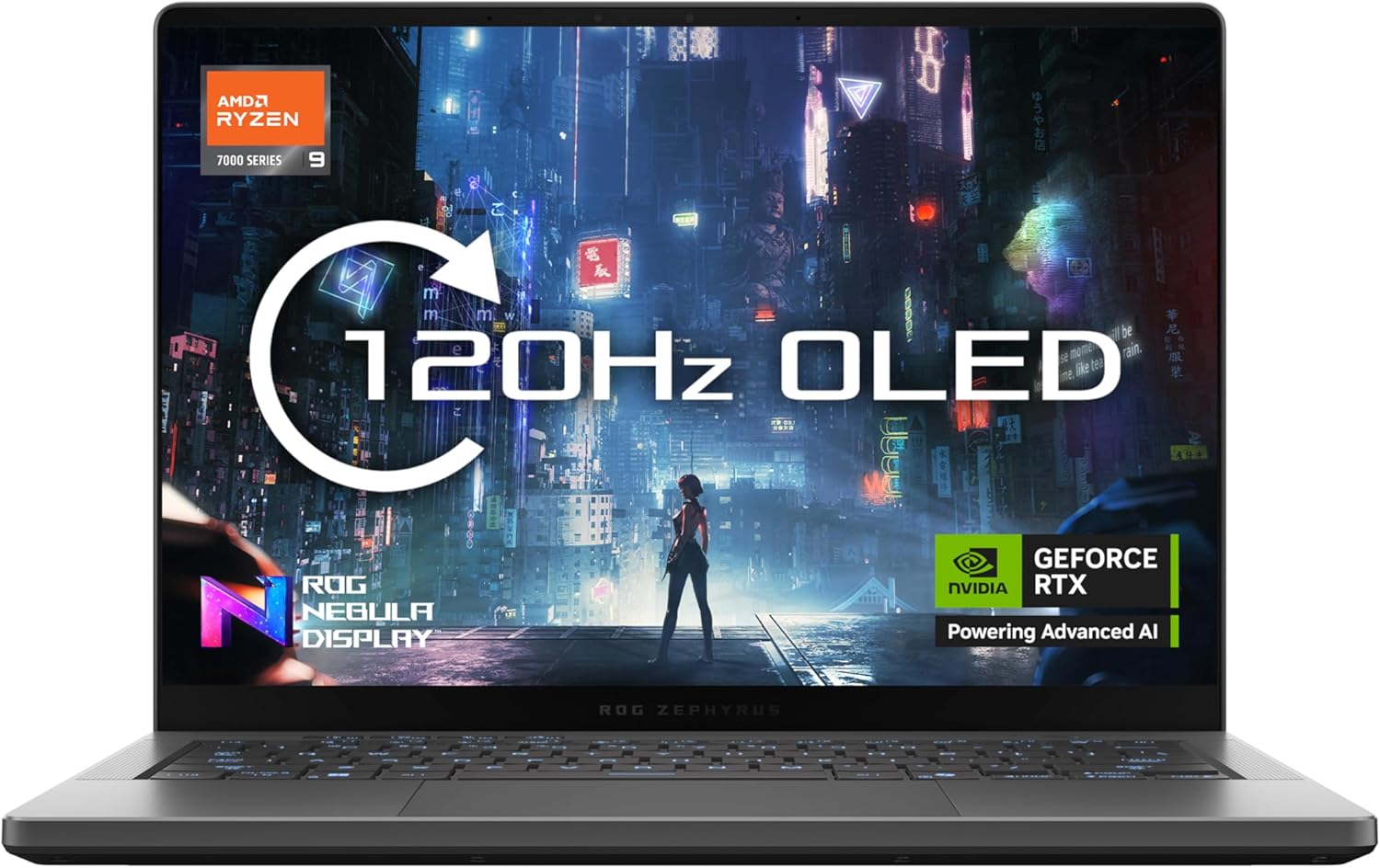
ASUS ROG Zephyrus G14 GA403UP Analysis: QC Lottery
The Blunt Verdict
The ASUS ROG Zephyrus G14 GA403UP is a genuinely powerful compact gaming machine — RTX 5070 GPU, stunning OLED screen, and a chassis that barely tips the scales at 1.5kg. On paper, it’s one of the most interesting thin-and-light gaming laptops you can buy right now. In practice, the small but pointed pool of buyer feedback raises real questions about quality control that you cannot simply wave away. This is a machine for serious gamers who know what they want from a premium gaming laptop — but buy it with eyes open.
The headline specs are hard to argue with. You’re getting an AMD Ryzen 9 270 processor clocked up to 5.2GHz, paired with 32GB of LPDDR5X 7500 RAM and a 1TB PCIe 4.0 NVMe SSD. The display is a 3K (2880 x 1800) OLED panel with a 16:10 aspect ratio running at 120Hz and hitting 500 nits peak brightness. That GPU — NVIDIA GeForce RTX 5070 with 8GB GDDR6 — is part of the latest 50-series lineup. This is not a machine hobbled by last-gen hardware.
Buy it if you need a compact, high-output machine for gaming or creative work and you’re prepared to use Amazon’s returns policy as a safety net if yours is one of the faulty units. Avoid it if you need a laptop that works out of the box without incident every time, or if you’re coming from a business machine expecting ThinkPad-grade build consistency.
See the ASUS ROG Zephyrus G14 GA403UP listing on Amazon before reading further.

Pros and Cons
Pros
- The 3K OLED display with 500 nits brightness and 100% DCI-P3 coverage is genuinely class-leading for a 14-inch screen — colours are vivid and contrast is deep
- RTX 5070 with 8GB GDDR6 is among the most capable laptop GPUs currently available, with DLSS 4 and hardware ray tracing support baked in
- 32GB LPDDR5X RAM means multitasking headroom that most gaming laptops at this form factor don’t offer
- 1.5kg weight is remarkable for a machine carrying this level of hardware — genuinely portable in a way that most gaming laptops aren’t
- 73Wh battery with fast charging (0–50% in 30 minutes) and Wi-Fi 7 support puts it ahead of many competitors on daily usability features
Cons
- Quality control issues are a documented concern — multiple buyers reported faults including a loose trackpad, noisy fans, battery delivery failures, and a unit that arrived dead
- RAM is soldered on board at 32GB with no upgrade path — what you buy is what you’re stuck with
- No webcam, which is an odd omission on an expensive machine regardless of your use case
Spec Breakdown
- Model: ASUS ROG Zephyrus G14 GA403UP
- CPU: AMD Ryzen 9 270, 8 cores / 16 threads, up to 5.2GHz, 24MB cache
- RAM: 32GB LPDDR5X 7500MHz (soldered, not upgradeable)
- Storage: 1TB PCIe 4.0 NVMe M.2 SSD (second M.2 slot available)
- GPU: NVIDIA GeForce RTX 5070, 8GB GDDR6
- Display: 14.0″ OLED, 2880 x 1800 (3K), 16:10 aspect ratio, 120Hz, 500 nits, no touchscreen
- Battery: 73Wh lithium-ion, fast charge to 50% in 30 minutes
- OS: Windows 11 Home
- Weight: 1.5kg
- Ports: 4x USB total; HDMI, DisplayPort video output
- Connectivity: Wi-Fi 6E (802.11ax), Bluetooth, Ethernet
- Keyboard: RGB backlit
- Camera: No webcam
Hardware & Performance Reality Check
The AMD Ryzen 9 270 is a current-generation chip built on AMD’s Zen 4 architecture — eight cores, sixteen threads, and a boost clock of 5.2GHz. For gaming that means strong single-core speed which translates directly into high framerates. For creative work, the sixteen threads handle video rendering, audio production, and compilation tasks with genuine muscle. If you want to understand how that stacks up against the broader market, the laptop CPU guide covers the architecture differences clearly. The 32GB LPDDR5X 7500 RAM is soldered directly to the board — meaning you cannot swap it, upgrade it, or replace a faulty stick later. At 32GB it’s not going to be a bottleneck any time soon, but that’s the trade-off ASUS made to keep the machine thin. For more on how much memory actually matters for different workloads, see the RAM guide.
Storage is a 1TB PCIe 4.0 NVMe M.2 SSD — fast by any meaningful measure, and there’s a second M.2 slot if you want to add more later. That expansion path is genuinely useful and not always present on thin gaming machines. The NVIDIA GeForce RTX 5070 with 8GB GDDR6 sits comfortably in the high-performance tier — this GPU handles modern AAA titles at the native 2880 x 1800 resolution with quality settings most buyers will be happy with, and DLSS 4 brings performance boosts in supported titles. This is dedicated graphics with real gaming headroom, not an entry-level chip dressed up with marketing language. For broader context on what GPU specs actually mean day to day, the specs explainer is worth a read.
In 2026 terms: a student will find this machine absurdly overpowered for coursework and comfortably handles anything from spreadsheets to 4K video exports. Office tasks are a non-event. For gaming it’s one of the stronger portable options available at this size. Programmers running local AI models, Docker containers, or compiling large codebases will appreciate both the CPU headroom and the RAM. Video editors working in DaVinci Resolve or Premiere Pro will get GPU-accelerated encoding that makes exporting feel genuinely quick. If there’s a ceiling, it’s the 8GB VRAM on the GPU — demanding generative AI tools and very high-resolution 3D work can push that figure. Worth factoring in if that’s your primary workload.
The display earns its own mention here. A 14-inch OLED at 3K resolution with a 16:10 aspect ratio and 120Hz refresh is a proper panel — not a compromise. The taller aspect ratio gives you more usable vertical space than the standard 16:9 screens most laptops ship with. OLED means true blacks and no backlight bleed by design. The 500 nits peak brightness is enough for most indoor environments. If display quality matters to you, this is one of the better screens in the laptop display category at this size. Check the performance benchmarks page for comparative figures on the RTX 5070 in this class.
Check the full spec sheet and buyer Q&As for the ASUS ROG Zephyrus G14 GA403UP on Amazon.
Everyday Usability: Battery, Build & More
A 73Wh battery with 30-minute fast charge to 50% is a practical feature that actually matters. On a gaming machine pushing this level of GPU and CPU performance you shouldn’t expect all-day battery life under load — that’s not physics you can argue with. Light tasks, browser work, and document editing will stretch it considerably further than gaming will. The machine weighs 1.5kg, which means you’ll barely notice it in a bag compared to most gaming laptops. The connectivity picture includes Wi-Fi 6E (802.11ax), Bluetooth, and Ethernet support. Video output covers both HDMI and DisplayPort, and you’ve got four USB ports total. Worth checking the ports guide if you rely on specific connections for peripherals or external displays. There is no fingerprint reader mentioned in the specifications.

The RGB backlit keyboard is standard ROG fare — functional, and likely comfortable for extended sessions based on the G14 line’s history. Fan noise is where things get more nuanced. At least one buyer specifically flagged a whining, struggling-sounding fan within the first two hours of use — this is a QC concern rather than a fundamental design flaw, but it’s worth being aware of. The thermal design uses ASUS’s Tri Fan Technology and redesigned Arc Flow fans, which on functioning units should manage the RTX 5070 and Ryzen 9 270 without the chassis becoming unbearable. No touchscreen is included, which is standard for a gaming-focused machine at this size. There is no webcam — an odd choice for any laptop above entry-level, and worth noting if you take calls or attend video meetings regularly.
Lifespan & Future-Proofing
The chassis quality question is the elephant in the room. The G14 line has historically been well-regarded for build quality, and on paper the form factor — aluminium lid, tight dimensions — should hold up. But the buyer feedback here specifically cites loose trackpad hardware on a new unit, which points to inconsistency at the assembly level rather than a weak design. A machine that leaves the factory with a loose trackpad or a struggling fan is not a machine you can fully trust for three to five years without that nagging doubt. If your unit is fine — and the majority of them probably are — the chassis should be durable. The dimensions at 31.1cm x 22cm x 1.6cm are tight, and there’s no wasted space in the structure.
On spec longevity: 32GB LPDDR5X RAM and an RTX 5070 GPU put this machine well ahead of the curve for gaming and creative work. You’re not going to feel outdated on GPU performance for several years. The CPU is current-generation with strong single and multi-core numbers. The only meaningful ceiling is the locked RAM — you cannot add more if 32GB stops being enough, but for most workloads that’s a comfortable ceiling through 2026 and well beyond. The second M.2 slot does allow storage expansion, which is a genuine practical benefit. What you cannot change post-purchase: the RAM, the display, and the GPU. All three are currently strong. The OLED panel will outlast the hardware usefulness of most other components — OLED longevity is not the concern it once was at this brightness level.
View current stock levels for the ASUS ROG Zephyrus G14 GA403UP on Amazon.
What Buyers Are Saying (And Potential Dealbreakers)
The ASUS ROG Zephyrus G14 GA403UP currently sits at a rating of 3.4 out of 5 from 9 reviews on Amazon. That sample size is too small to draw firm conclusions — nine opinions is not a reliable signal either way. What it does tell you is that there’s a meaningful spread between buyers who love it and buyers who had serious problems, and that spread matters.
Three of the nine reviews are one-star. One buyer received a unit that arrived dead with a bloated battery. Another experienced daily crashes combined with a BitLocker loop triggered by what appears to be a keyboard connection fault — a specific and serious failure pattern. A third flagged a loose trackpad and fan noise within the first two hours, then returned it. A fourth buyer loved it but returned it due to a power delivery fault causing crashes when unplugged. These are hardware failures, not user error, and they cluster around different components — which suggests assembly inconsistency rather than a single design flaw. On the other side, one buyer called it exceptional and highly recommended it with no caveats. Another described it as well-built with an amazing screen, performing well across all games — until a battery fault forced a return.
The pattern here is not “this laptop is bad.” It’s “the lottery element is real.” On a machine at this price point, that’s not acceptable in principle — but Amazon’s return policy does provide a practical safety net, and multiple buyers used it successfully. If you’re the kind of person who buys from a store and then has to fight a manufacturer’s service centre, this is a higher-risk purchase than it should be at this level.
Buyer Highlights
“Extremely powerful for its size — excellent display, good build quality, highly recommended.” — Consistent with what the hardware suggests when a unit functions as intended.
“Loved this computer while I had it — amazing screen, played anything I threw at it.” — The display and GPU combination clearly delivers when the unit is working properly.
“Quality control at ASUS is abysmal — loose trackpad and a fan that whined like something was stuck in it within the first two hours.” — A specific and detailed report, not a vague complaint, and worth taking seriously.
“It crashes nearly every day and asks for a BitLocker code, which I can’t enter because something is wrong with the keyboard connection.” — A compounding fault pattern that points to a hardware-level assembly issue, not a software configuration problem.
“Had a power delivery fault that caused it to crash every time I used it unplugged — returned it through Amazon before the return window was up.” — Third buyer to successfully use Amazon’s returns process, suggesting the policy is the practical backstop here.
Who Should Buy It (And Who Shouldn’t)
Buy If
- You want a compact, genuinely high-performance gaming machine and you’re buying from Amazon where returns are straightforward if yours is a dud
- You need an OLED display with serious colour accuracy for creative work — content creation, video editing, or photo editing where display quality actually changes your output
- You’re a frequent traveller who needs real gaming or creative muscle without carrying a 2.5kg+ machine — the 1.5kg weight is a genuine differentiator in this GPU tier
- You want hardware that won’t feel dated quickly — the RTX 5070 and 32GB RAM spec is ahead of where most premium gaming laptops sit right now
Avoid If
- You need a laptop for work where reliability is non-negotiable and a return-and-replace process would cost you time, clients, or deadlines — check professional laptops for business-grade build consistency instead
- You’re after solid, proven value at a lower outlay — this hardware tier isn’t necessary for most tasks, and the QC risk makes it harder to recommend if you’re stretching your budget; there are safer options among mid-range laptops
- You regularly attend video calls and need a built-in webcam — there isn’t one, and it’s not a small omission on an expensive machine
The Bottom Line
The ASUS ROG Zephyrus G14 GA403UP has the hardware to be one of the best compact gaming laptops available right now. The RTX 5070, the 3K OLED display, the 32GB of fast RAM, and the 1.5kg chassis are a genuinely strong combination. The problem is that the quality control record — small sample size acknowledged — is rough enough to introduce real doubt. If your unit is one of the good ones, you’ll be very happy. If it isn’t, you’ll be in a returns process. Buy from Amazon, check it thoroughly in the first few days, and don’t wait out the return window if anything feels off.
At LaptopAdvisorOnline, our methodology is built on data transparency rather than simulated hands-on testing. We rigorously analyse official manufacturer specifications and aggregate verified customer sentiment to provide objective, fluff-free buying advice that helps you cut through the marketing jargon.
As an Amazon Associate, I earn from qualifying purchases.
Browse by Specification
Looking for something specific? Browse our analyses by hardware and feature below, or check all laptop analyses in the Best Premium Gaming Laptops category archive.
[AMD Processor Laptops] — [Intel Processor Laptops] — [16GB RAM Laptops] — [32GB RAM Laptops] — [Dedicated Graphics] — [Long Battery Life] — [Lightweight Laptops] — [Student Laptops]
Browse by Screen Size
[13-inch Laptops] — [14-inch Laptops] — [15-inch Laptops] — [16-inch+ Laptops]




