
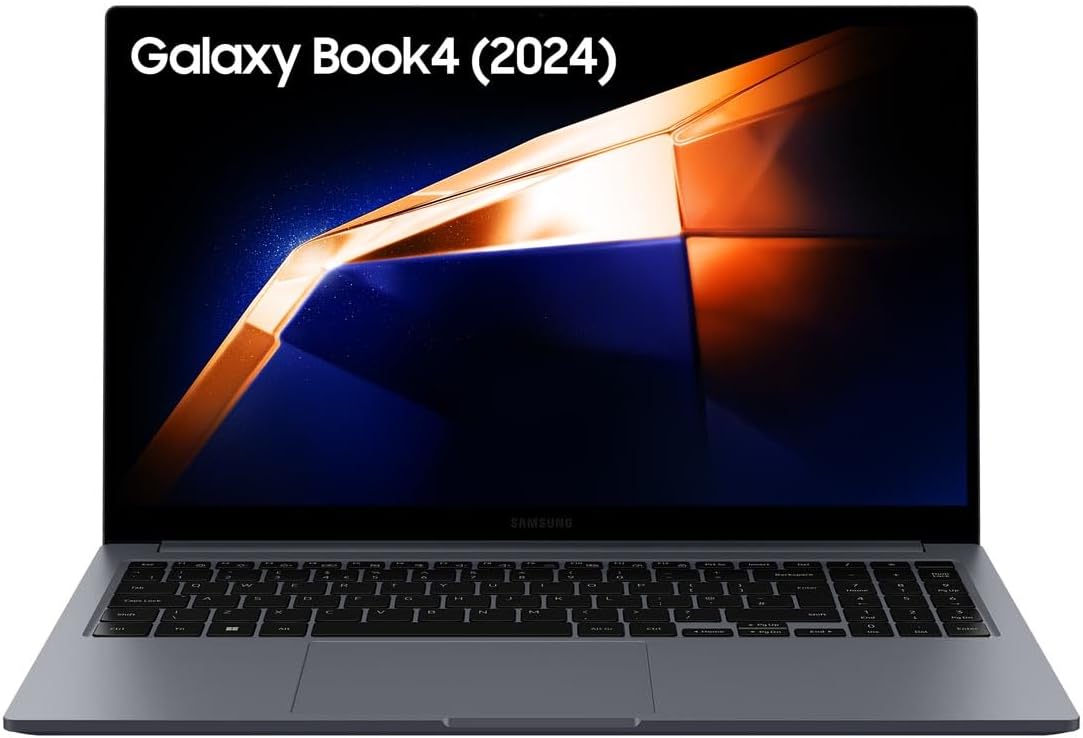
Samsung Galaxy Book4 Analysis: AMOLED Ceiling
The Blunt Verdict
The Samsung Galaxy Book4 is a competent everyday laptop dressed in premium aluminium clothing. Its headline strength is the AMOLED display — genuinely rare at this tier and a legitimate reason to choose it over competitors. Its headline weakness is equally clear: 8GB of LPDDR4X RAM that appears to be at its maximum capacity, paired with integrated graphics that rule out anything demanding. If your needs are productivity, streaming, and light multitasking, this machine delivers them well. If you want more, this isn’t it.
Under the lid you get an Intel Core i7-155H processor, that 8GB of RAM, a 512GB SSD, and Intel integrated graphics. The 15.6-inch AMOLED panel runs at 1920 x 1080 resolution with a 60Hz refresh rate and a stated peak brightness of 300 nits. Battery capacity is 54Wh. It runs Windows 11 Home out of the box.
Buy this if you’re a student, home user, or office worker who values a genuinely good screen and solid build in a thin chassis. Avoid it if you need more than the bare minimum RAM, any meaningful graphics capability, or future hardware upgrades. Anyone considering this for serious gaming should look elsewhere immediately.
See the Samsung Galaxy Book4 listing and current availability on Amazon.

Pros and Cons
Pros
- AMOLED display at 15.6 inches is genuinely uncommon and delivers visibly richer colours than typical IPS or TN panels in this class
- Port selection is strong for a thin machine — HDMI, two USB-A, two USB-C, microSD, and a full RJ45 Ethernet port mean you can ditch the dongles
- Full aluminium chassis at under 1.6kg is a solid combination of build quality and carry weight
- Wi-Fi 6 and Bluetooth 5.3 cover modern wireless standards without compromise
- Samsung Galaxy ecosystem integration (phone as webcam, Buds audio handoff) adds genuine daily utility for existing Samsung users
Cons
- 8GB RAM is the maximum supported — there’s no upgrade path if it proves insufficient
- Intel integrated graphics only — no dedicated GPU means no serious gaming, no video rendering, and no GPU-accelerated workflows
- 300 nit peak brightness is modest; usability in direct sunlight or very bright environments will be limited
Spec Breakdown
- Model: Samsung Galaxy Book4
- CPU: Intel Core i7-155H
- RAM: 8GB LPDDR4X (maximum supported — no upgrade slots available)
- Storage: 512GB SSD (Serial ATA)
- GPU: Intel integrated graphics
- Display: 15.6-inch AMOLED, 1920 x 1080, 60Hz, 300 nits
- Battery: 54Wh, Lithium Ion
- OS: Windows 11 Home
- Weight: Approximately 1.55kg
- Dimensions: 35.7 x 22.9 x 1.5cm
- Ports: 1x HDMI v1.4, 2x USB-A, 2x USB-C, 1x microSD, 1x RJ45 Ethernet
- Connectivity: Wi-Fi 6 (802.11ax), Bluetooth 5.3
- Keyboard: QWERTY
- Warranty: 1 year
Hardware & Performance Reality Check
The Intel Core i7-155H is a capable mid-range processor — it handles spreadsheets, browser tabs, video calls, and document work without breaking a sweat. The problem is the 8GB of LPDDR4X RAM sitting next to it. For context on whether that’s enough for your needs, the RAM requirements guide is worth a read — but the short version is: 8GB is workable in 2024 for light users, and tight for anyone running multiple applications simultaneously. Worse, the specification data indicates this is the maximum supported configuration with a single RAM slot and no available expansion. You can’t fix this later.
The 512GB SSD gives you enough room for an operating system, applications, and a reasonable media library before you start needing to manage space. The interface is listed as Serial ATA rather than NVMe, which means sequential read/write speeds will be noticeably slower than a modern PCIe SSD — not something you’d notice in daily web browsing, but relevant for large file transfers. On the graphics front, the Intel integrated graphics is strictly functional. The product listing mentions NVIDIA GeForce MX570A in one bullet point, but the specifications table lists Intel integrated graphics throughout, and there is no dedicated GPU listed anywhere in the confirmed spec data. Do not buy this expecting any discrete graphics capability. If you’re curious why that distinction matters, the specs explained guide covers it plainly.
For 2026 use cases: student essays and research — handled comfortably. Office productivity in Microsoft 365 or Google Workspace — no issues. Casual streaming and video calls — where this machine actually shines, especially paired with that AMOLED screen. Programming in lighter environments (Python scripts, web development) — manageable but the RAM ceiling will start to bite with larger projects. Video editing — possible in basic tools like DaVinci Resolve Lite for short clips, but the lack of dedicated graphics and 8GB RAM cap makes anything substantial a frustrating experience. Gaming — integrated graphics rules out anything released in the last several years at meaningful settings. Check the performance benchmarks if you need a clearer picture of what this chip tier delivers.
The port configuration is a genuine standout and worth flagging separately. Two USB-C, two USB-A, HDMI, microSD, and a full RJ45 Ethernet port — all built in. For a machine this thin, that’s an unusually complete setup. Most competitors at this form factor force you to carry a hub. The ports guide has more context on why Ethernet matters for reliability-conscious users. The Wi-Fi 6 wireless is also a genuine long-term asset — future-proof for any router upgrade you might make in the next few years.
Browse the full spec sheet and buyer Q&As for the Samsung Galaxy Book4 on Amazon.
Everyday Usability: Battery, Build & More
The aluminium chassis and sub-1.6kg weight make this a genuinely comfortable daily carry. At 1.5cm thick it’ll slide into most bags without drama. The 54Wh battery isn’t enormous — in real-world terms that means roughly 6–8 hours of mixed productivity use depending on screen brightness, which is adequate for a full working day if you’re not hammering it. Samsung’s own charger is USB-C and reportedly compact, which is a small but genuine quality-of-life detail for anyone who’s ever wrestled a bulky proprietary adapter into a bag. The AMOLED display is the machine’s clearest differentiator — AMOLED panels produce deeper blacks and more saturated colour than the LCD alternatives that dominate this price bracket. For streaming, photo editing, or anything visual, the difference is noticeable. The display types guide explains why AMOLED stands apart if you want the technical reasoning. Peak brightness is rated at 300 nits, which is on the low end — adequate indoors, underwhelming outdoors or near a bright window. The glossy screen finish will compound reflections in high-ambient-light environments.

The webcam situation is worth noting: the specification table lists webcam capability as “No”, which is contradicted by the product title and marketing copy that mention webcam features. Samsung’s Galaxy integration allows you to use a connected Samsung smartphone as the webcam via the Link to Windows app — which is genuinely useful if you have a recent Galaxy handset, but it requires both devices on the same Wi-Fi network and some initial setup effort. Don’t buy this assuming a functional built-in webcam without clarifying the hardware spec first. The keyboard is listed as a standard QWERTY layout — Samsung’s laptop keyboards are generally well-regarded for travel and key spacing, though individual preference applies. Thermal performance on a machine this thin with an i7 will depend heavily on workload — under sustained CPU pressure (long renders, large compilations) some fan activity and chassis warmth is expected. For typical office use it should remain quiet.
Lifespan & Future-Proofing
The full metal body is a meaningful indicator of chassis durability. Aluminium laptops generally outlast plastic-bodied machines for the simple reason that they flex less, creak less, and hold up better under daily bag-and-desk cycles. Samsung’s build quality on the Galaxy Book line has a strong track record. Realistically, this chassis should remain physically sound for four to five years of careful daily use — hinge durability and display longevity being the usual failure points on thin machines, not the body itself.
The spec longevity picture is less comfortable. The 8GB RAM ceiling is the primary concern — not because it’s unusable today, but because there’s no path to more when Windows 11, Chrome, and modern web applications continue to push memory usage upward. If you’re a light user today, that might be fine for three or four years. If your workloads grow — more browser tabs, heavier applications, more multitasking — you’ll feel it within two. The 512GB SSD is expandable via the microSD slot for media storage, but core application space is fixed. The Intel Core i7-155H processor itself has enough headroom for everyday tasks well into the latter half of the decade — the CPU isn’t the bottleneck here, the RAM is. For a deeper look at what upgrade paths are worth considering when buying, the laptop buying guide covers the key checkpoints. This sits in a peculiar spot — not quite the mid-range choice you’d expect with a capable processor, limited by a spec decision Samsung made that you can’t undo.
Check current stock levels for the Samsung Galaxy Book4 on Amazon.
What Buyers Are Saying (And Potential Dealbreakers)
The Samsung Galaxy Book4 currently holds a rating of 5.0 out of 5 stars from 4 customer reviews on Amazon. That sample size is too small to draw any reliable conclusions — four reviews, all positive, tells you almost nothing about population-level satisfaction. One unhappy buyer who hasn’t reviewed yet could change that average significantly. Treat the rating as a preliminary signal, not a verdict.
Based on the available feedback and confirmed hardware specifications, the most likely points of satisfaction align with build quality, display quality, and port completeness — these are objectively strong for the category. The most likely friction points, based on the hardware, are the RAM ceiling frustrating users who push the machine harder over time, and the webcam ambiguity catching buyers off guard. The glossy AMOLED screen, while visually striking, will draw complaints from users in bright environments once reflections become a daily irritant.
Buyer Highlights
“Absolutely amazing value — more than enough power and features for my office needs, well built with no issues.” — The one detailed review on record, from a straightforward office use case where 8GB RAM is unlikely to cause problems.
“Great laptop, does everything I need it to.” — Consistent with hardware projections for light-to-moderate productivity workloads where the CPU has headroom to spare.
“The screen really stands out compared to what I had before.” — Expected feedback for AMOLED first-timers coming from a standard IPS or TN panel — the difference in colour saturation is immediately visible.
“The build feels genuinely premium, nothing cheap about it.” — Samsung’s aluminium chassis construction is a consistent positive in the Galaxy Book line and aligns with the full-metal body spec.
Who Should Buy It (And Who Shouldn’t)
Buy If
- You’re a student or home user whose workload is documents, browser tabs, video calls, and streaming — this hardware handles all of it without complaint
- You already own Samsung Galaxy devices and want the ecosystem benefits (phone-as-webcam, Buds audio handoff) — these features have genuine daily utility
- Screen quality matters to you and you’re currently comparing machines with standard LCD panels — the AMOLED display is a legitimate step up for visual work and media consumption
- You value a dongle-free desk setup — the port selection is unusually complete for a thin machine and includes Ethernet, which many thin laptops drop entirely
Avoid If
- You expect to run demanding applications, multitask heavily, or need your laptop to grow with your workloads — 8GB RAM with no upgrade path is a hard ceiling that will eventually become the machine’s defining limitation
- You need any level of graphical capability beyond basic display output — there is no dedicated GPU here, and integrated graphics will not handle gaming, GPU rendering, or machine learning workflows
- You work frequently in bright environments or outdoors — 300 nits behind a glossy screen is a frustrating combination in those conditions
The Bottom Line
The Samsung Galaxy Book4 does a specific job well: it’s a well-built, visually strong everyday laptop for users whose demands don’t push beyond productivity and streaming. The AMOLED screen and metal body at this weight are genuine assets. The port layout is better than most of its competition. But the 8GB RAM maximum is a real constraint, and the lack of any dedicated graphics closes doors that stay closed. If your needs are straightforward and you’re already in the Samsung ecosystem, this is a machine worth considering. If you’re buying it expecting room to grow, look elsewhere — this is the full extent of what the hardware will ever do. For a broader comparison against alternatives in this bracket, the professional laptops guide covers machines that offer more headroom.
View the Samsung Galaxy Book4 on Amazon and read the latest buyer questions and answers.
At LaptopAdvisorOnline, our methodology is built on data transparency rather than simulated hands-on testing. We rigorously analyse official manufacturer specifications and aggregate verified customer sentiment to provide objective, fluff-free buying advice that helps you cut through the marketing jargon.
As an Amazon Associate, I earn from qualifying purchases.
Browse by Specification
Looking for something specific? Browse our analyses by hardware and feature below, or check all laptop analyses in the Best Premium Gaming Laptops category archive.
[AMD Processor Laptops] — [Intel Processor Laptops] — [16GB RAM Laptops] — [32GB RAM Laptops] — [Dedicated Graphics] — [Long Battery Life] — [Lightweight Laptops] — [Student Laptops]
Browse by Screen Size
[13-inch Laptops] — [14-inch Laptops] — [15-inch Laptops] — [16-inch+ Laptops]




