
Lenovo IdeaPad Flex 3 Chromebook Analysis: Know the Limits
The Blunt Verdict
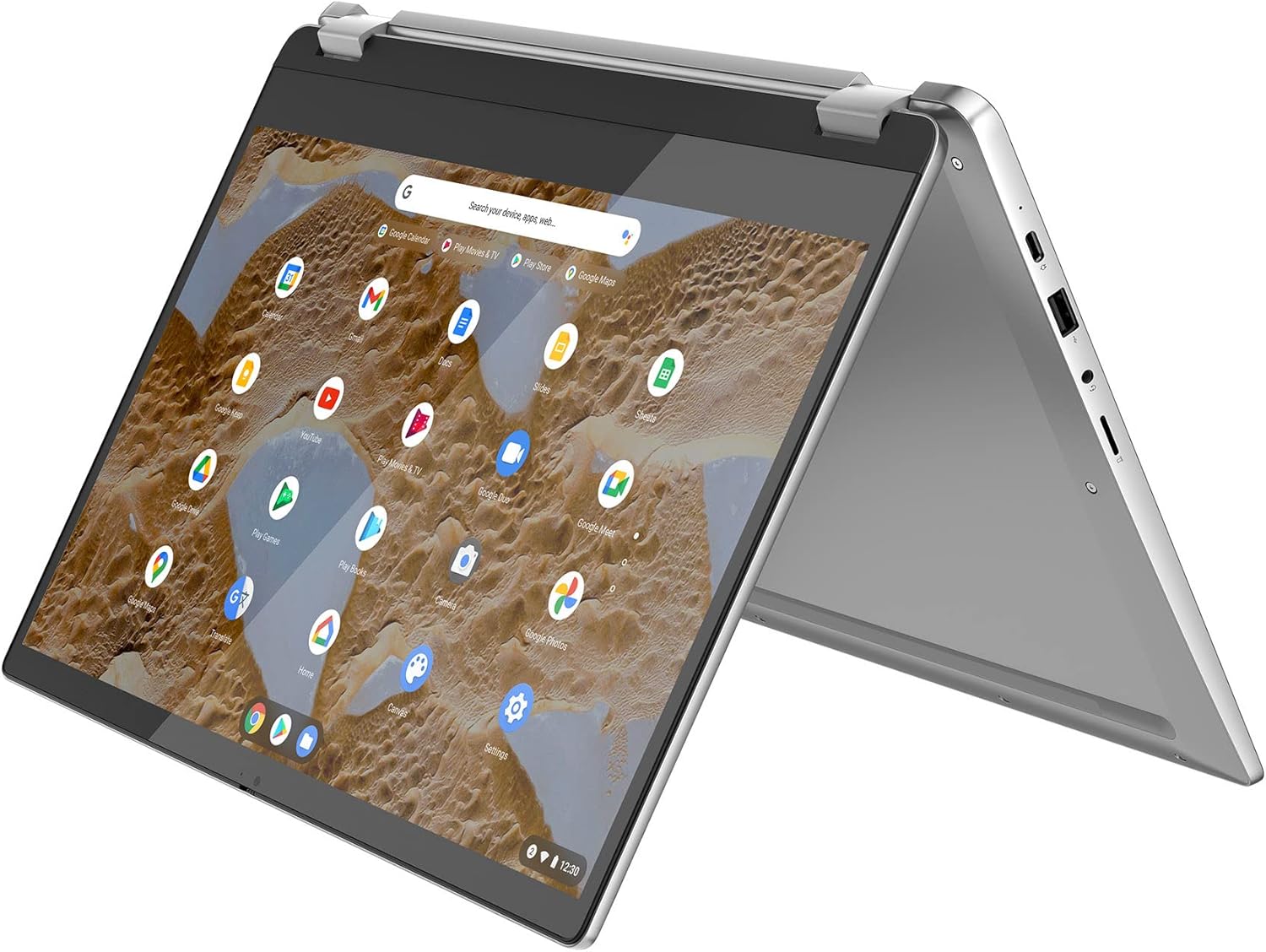
The Lenovo IdeaPad Flex 3 Chromebook is a large-screen 2-in-1 built for light daily use — browsing, streaming, emails, and not much else. It’s a machine that knows what it is and largely delivers on that promise. The headline strength is the 15.6-inch Full HD IPS touchscreen on a convertible chassis at a price point where most competitors are offering 14 inches and a mediocre panel. The headline weakness is the Intel Pentium Silver N6000 processor — fine for Chrome OS, but a hard ceiling that will frustrate anyone expecting Windows-grade versatility or sustained multitasking performance.
Under the lid you get 8GB of LPDDR4X RAM, 128GB of eMMC storage, Intel UHD Graphics 600, a 47Wh battery rated at up to 10 hours, and Wi-Fi 6 connectivity. On paper that’s a respectable kit list for a Chromebook. In practice, Chrome OS keeps the demands light enough that the N6000 rarely feels like a bottleneck for its intended tasks — web browsing, Google Workspace, and streaming video handle fine. Try anything heavier and you’ll know about it quickly.
Buy this if you want a big-screen, lightweight Chromebook for casual everyday use — it’s one of the stronger options in the budget laptop category for that use case. Avoid it if you need Windows software, serious local processing power, or a laptop that will grow with increasingly demanding tasks. This is a household browsing machine, a student note-taker, or a streaming device that happens to have a keyboard — nothing more, nothing less.
Check the current listing and availability for the Lenovo IdeaPad Flex 3 Chromebook on Amazon.
Pros and Cons
Pros
- Large 15.6-inch Full HD IPS touchscreen is genuinely big and usable in tent and tablet modes — rare at this price
- Wi-Fi 6 delivers fast, stable wireless connections that hold up well for streaming and large downloads
- 360-degree convertible hinge adds real flexibility for different viewing situations without adding significant weight
- Fingerprint reader, camera privacy shutter, and Google’s H1 security chip are welcome inclusions for a budget device
- Port selection is decent: USB 3.2, USB-C 3.2, HDMI, headphone jack, and microSD — no reaching for a dongle for basic needs
- Chrome OS boots in seconds and resumes from sleep almost instantly — daily flow is genuinely quick
Cons
- Pentium Silver N6000 is a low-power chip with a firm performance ceiling — anything beyond light multitasking will expose it
- eMMC storage is slower than SSD and not expandable — 128GB fills up faster than you’d expect, especially with Android apps
- Chrome OS software ecosystem has real gaps — some major apps are missing, behave oddly, or feel like Android afterthoughts on a laptop screen
Spec Breakdown
- Model: Lenovo IdeaPad Flex 3 Chrome 15IJL7 (82T3000LUK)
- CPU: Intel Pentium Silver N6000 (up to 3.3GHz, 4-core)
- RAM: 8GB LPDDR4X
- Storage: 128GB eMMC
- GPU: Intel UHD Graphics 600 (integrated)
- Display: 15.6-inch IPS, 1920×1080 (Full HD), touchscreen
- Battery: 47Wh, rated up to 10 hours
- OS: Chrome OS
- Weight: 1.9kg
- Ports: 2× USB 3.2 Gen 1, 1× USB-C 3.2 Gen 1, 1× HDMI, 3.5mm audio jack, microSD card reader
- Connectivity: Wi-Fi 6, Bluetooth
- Keyboard: QWERTY with numpad
- Camera: Front-facing webcam with privacy shutter
- Security: Fingerprint reader, Google Security Chip H1
Hardware & Performance Reality Check
The Intel Pentium Silver N6000 is a quad-core chip built for low-power, fan-optional designs — it is not a speed demon by any measure. Paired with 8GB of LPDDR4X RAM, it handles Chrome OS’s lightweight workload reasonably well: a dozen browser tabs, Google Docs, YouTube in the background — none of that causes drama. Where it starts to strain is when you pile on Android apps alongside heavy browser sessions, or ask it to process anything locally intensive. The RAM is soldered to the motherboard, which means there is no upgrade path whatsoever. What you buy is what you keep for the machine’s entire life. If you want to understand why that matters, the RAM guide covers it plainly. Eight gigabytes is functional here precisely because Chrome OS manages memory more aggressively than Windows — on a Windows machine this spec would feel tighter much faster.
The 128GB eMMC storage is the spec that will catch people off guard. eMMC is not an SSD in the traditional sense — it’s slower, particularly on write speeds, and you’ll feel that occasionally during app installs or file transfers. More practically: 128GB sounds adequate until you factor in Chrome OS itself, Android app installs from the Play Store, and any local media. It fills up. There’s a microSD card slot which helps, but that’s a workaround, not a solution. The Intel UHD Graphics 600 is integrated and shares system memory — it handles 1080p video playback and light 2D work without issue, but it’s not touching local gaming or any GPU-accelerated workload. Cloud gaming via services like Xbox Game Pass or GeForce Now bypasses the GPU entirely, which is where some buyers have found genuine value. For a deeper look at how integrated graphics fit into the broader picture, the specs explainer is worth a read.
Heading into 2026, the use-case picture for this machine is clear: student work in Google Workspace — yes, comfortably. Office tasks through browser-based tools — fine. Local gaming — no. Programming beyond basic web development — the OS will limit you more than the hardware. Video editing — not a chance; even lightweight cloud-based editing will push the N6000 harder than is comfortable. This is a consumption device with light productivity capability, and Chrome OS is the right operating system for exactly that. Trying to use it as a full Windows replacement will leave you frustrated.
The port layout deserves a mention because it’s genuinely better than expected at this price. Two full-size USB 3.2 ports, one USB-C 3.2, an HDMI output, a 3.5mm jack, and a microSD slot — most users will connect everything they need without a hub. No Ethernet, which is standard for this form factor, but Wi-Fi 6 covers the wireless side well. The ports guide explains what each connection type actually gets you in daily use.
View the full spec sheet and buyer Q&As for the Lenovo IdeaPad Flex 3 Chromebook on Amazon.
Everyday Usability: Battery, Build & More
At 1.9kg, this is not a featherweight — it’s a 15.6-inch machine and it feels like one. The dimensions are 36.2 × 24.8 × 1.9cm, so it’ll fill a bag but it’s not ludicrous to carry. The 47Wh battery with a rated 10-hour claim is plausible for light Chrome OS use — streaming and browsing at moderate brightness should get most people through a full day without reaching for the charger. Push it harder with Android apps running simultaneously and expect that to come down. The charger itself isn’t included as a separate unit — the listing specifies only a charging cable — so factor that in. USB-C charging works, which adds flexibility. Build quality is plastic throughout, as you’d expect, but the hinge mechanism on the 360-degree convertible feels solid enough that buyers don’t flag it as a concern.

The IPS panel at 1920×1080 resolution is decent — not a showpiece, but entirely watchable. Buyers consistently describe colours as acceptable rather than vivid, and brightness at 300 nits is enough for indoor use and manageable outdoors in shade. Don’t expect the kind of punch you’d get from a more expensive IPS let alone OLED. The touchscreen works — responsive for basic gestures and tap navigation — but it’s not in the same league as a tablet or higher-end 2-in-1. It does the job in tent and tablet mode for streaming and casual browsing. For a breakdown of what IPS actually means versus other panel types, the display types guide covers it properly. The keyboard includes a numpad which is a genuine plus for anyone doing data work, and key feel is described positively by most buyers. No backlight though — working in dim conditions means squinting. Speakers are front-facing and tuned by MaxxAudio per Lenovo’s marketing, but buyers are clear: they’re adequate, not good. Audio drop-outs have been flagged as a recurring issue by at least one long-term user — worth knowing before you buy. The fingerprint reader and camera privacy shutter are small wins that signal Lenovo was paying some attention to the feature list here.
Lifespan & Future-Proofing
On chassis longevity: the plastic build is functional and the hinge design on convertibles like this tends to either hold up well or develop wobble over time — buyer feedback doesn’t flag hinge issues here, which is a reasonable sign. Realistically, three to four years of daily light use before any structural fatigue becomes noticeable is a fair expectation. It’s not a ThinkPad, but it’s not going to fall apart in year one either.
On spec longevity: this is where you need to be honest with yourself. The N6000 was a budget-tier processor when this launched in 2022. The 8GB of soldered RAM has no upgrade path. The 128GB eMMC is not replaceable with anything faster. Chrome OS does extend the functional life of modest hardware because Google keeps the OS lean and the update cadence regular — but Chrome OS itself has a defined Auto Update Expiry date per device. Check Lenovo’s AUE date for this model before buying; once Google stops pushing security updates, the device becomes a liability on public networks regardless of how well the hardware holds up physically. For context on how CPU specs age over time, the CPU guide is a useful reference. This machine has a finite runway, and there is no hardware path to extend it.
Check current stock levels for the Lenovo IdeaPad Flex 3 Chromebook on Amazon.
What Buyers Are Saying (And Potential Dealbreakers)
The Lenovo IdeaPad Flex 3 Chromebook holds a rating of 4.3 out of 5 from 438 customer reviews — a sample size large enough to carry real weight. The overall picture is one of satisfied buyers who understood what they were buying, with a consistent minority flagging specific software and audio irritations.
Positive feedback clusters around the screen size and convertible format. Multiple buyers specifically call out how large and usable the 15.6-inch panel feels in tablet and tent mode for streaming — this seems to be the machine’s genuine sweet spot. Setup speed is praised consistently: Chrome OS requires minimal configuration, and buyers report being up and running within minutes of unboxing. The Wi-Fi 6 performance is mentioned approvingly, with one buyer clocking their full 520Mbps home connection speed through it. Boot and resume times draw regular praise — Chrome OS’s near-instant wake from sleep is something buyers genuinely notice and appreciate.
The complaints that appear repeatedly are worth taking seriously. Chrome OS app compatibility is the most common frustration — specific apps like Spotify are described as feeling unfinished, and even Google’s own Docs app via the Play Store has drawn criticism for behaving unexpectedly. One buyer flagged that the YouTube Play Store app has since stopped supporting this device entirely — a pointed reminder of the AUE issue mentioned above. Audio cut-outs are a recurring hardware complaint: one long-term buyer describes audio dropping out completely and requiring a 30-second pause before it resumes — this has apparently persisted throughout their entire ownership period. That’s a hardware or driver quirk, not a one-off, and it matters if audio quality is important to you. The touchpad sensitivity is flagged as slightly awkward — accidental cursor movement while typing is a real annoyance some buyers have encountered. No backlit keyboard is a minor but genuine omission.
Buyer Highlights
“It loads content-rich webpages quickly and streaming is completely smooth — I’ve been watching shows on my chest rather than my big TV just because it’s so easy.” — A telling endorsement of the screen size and streaming performance from a buyer who uses it daily.
“I’ve had it for two years and it does what a basic laptop should. It’s exactly what you pay for — fine for browsing, films, and emails, nothing more.” — Honest long-term assessment that sets expectations accurately.
“The audio just cuts out randomly and sounds crackly, like a badly plugged-in earphone. It’s happened the whole time I’ve owned it.” — A recurring complaint worth treating as a known issue, not an isolated fault.
“I was up and running in 20 minutes. Just needed a Google account, one update, and it was done — everything felt familiar straight away.” — Setup experience is consistently quick and painless for non-technical buyers.
“The screen feels absolutely massive in tablet mode for watching content. I wasn’t expecting it to feel as large as it does.” — The 15.6-inch size in tent and tablet mode regularly surprises buyers used to smaller 2-in-1s.
Who Should Buy It (And Who Shouldn’t)
Buy If
- You want a big-screen Chromebook for streaming, browsing, and light Google Workspace tasks — this does those things well
- You’re a student who lives in Google’s ecosystem and needs a simple, low-maintenance device that handles Docs, Sheets, and video calls without fuss
- You want a household shared device for casual internet use where Chrome OS’s simplicity and security are genuine advantages over Windows
- The convertible form factor genuinely fits your life — tent mode for streaming, tablet mode for presentations, laptop mode for typing
Avoid If
- You need Windows software for work, study, or specialist applications — Chrome OS is a hard wall, not a soft limitation, and no amount of workarounds fully bridges that gap
- You’re expecting a device that will still feel capable in five or six years — the soldered, non-upgradeable hardware and Chrome OS’s AUE date mean this has a defined end of life
- Audio quality matters to you — the reported audio drop-out issue is consistent enough across long-term buyers to treat as a known hardware characteristic
The Bottom Line
The Lenovo IdeaPad Flex 3 Chromebook earns its rating by doing exactly what it promises — a large-screen, lightweight 2-in-1 that handles Chrome OS’s intended workload without drama. The 15.6-inch Full HD IPS display, Wi-Fi 6, solid port selection, and convertible hinge are genuine strengths. The N6000 processor and eMMC storage are real ceilings. If you’re in the market for a budget device for browsing, streaming, and Google Workspace — and you’re comfortable living within Chrome OS — this is a fair choice. If you need more, look elsewhere; the buying guide can help you work out what that looks like. Know the audio quirks going in, check the AUE date, and buy with clear expectations.
See the full listing and customer reviews for the Lenovo IdeaPad Flex 3 Chromebook on Amazon.
At LaptopAdvisorOnline, our methodology is built on data transparency rather than simulated hands-on testing. We rigorously analyse official manufacturer specifications and aggregate verified customer sentiment to provide objective, fluff-free buying advice that helps you cut through the marketing jargon.
As an Amazon Associate, I earn from qualifying purchases.
Browse by Specification
Looking for something specific? Browse our analyses by hardware and feature below, or check all laptop analyses in the Best Budget Laptops category archive.
[AMD Processor Laptops] — [Intel Processor Laptops] — [16GB RAM Laptops] — [32GB RAM Laptops] — [Dedicated Graphics] — [Long Battery Life] — [Lightweight Laptops] — [Student Laptops]
Browse by Screen Size
[13-inch Laptops] — [14-inch Laptops] — [15-inch Laptops] — [16-inch+ Laptops]




