
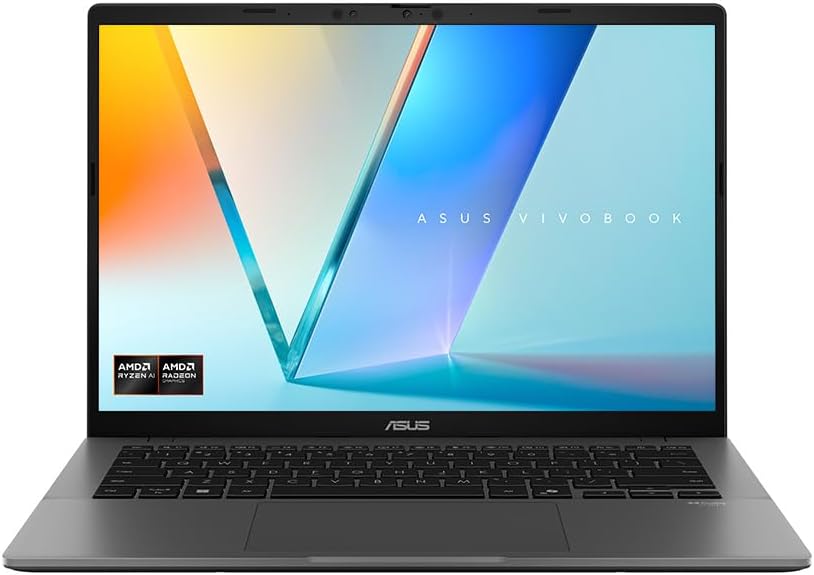
ASUS Vivobook S14 M3407HA Analysis: 32GB for Less
The Blunt Verdict
The ASUS Vivobook S14 M3407HA is a genuinely strong machine sitting in a market segment that usually forces you to compromise. It doesn’t. You get a Ryzen 9 270 processor, 32GB of DDR5 RAM, and a 1TB NVMe SSD in a sub-1.4kg chassis — specs that would have cost significantly more just two years ago. The headline weakness is the integrated-only GPU and a Wi-Fi spec that’s behind where it should be in 2025. Neither is a dealbreaker for the target audience, but they’re worth knowing upfront.
In practice, that CPU and RAM combination means genuinely fast everyday computing — not “fast for the price” fast, but properly quick. Multiple browser sessions, background apps, light creative work, university coursework — none of it will touch this machine. The display is a 14-inch WQXGA panel at 2560×1440 effective resolution with a 16:10 aspect ratio, which gives you noticeably more vertical space than the standard widescreen laptops filling most shelves. At 1.39kg, it’s light enough that you’ll genuinely forget it’s in your bag.
Who should buy it: students, remote workers, and anyone doing productivity-heavy or light creative work who wants a properly specced machine without overpaying. Who shouldn’t: anyone who needs dedicated graphics for serious gaming or GPU-accelerated workloads — the ASUS Vivobook S14 M3407HA has integrated graphics only, full stop.

Pros and Cons
Pros
- Ryzen 9 270 with 32GB DDR5 RAM is a genuinely rare combination at this end of the market — buyers confirm the specs are real and the machine delivers on them
- 2560×1440 WQXGA panel with 16:10 ratio looks noticeably sharper and taller than the budget norm — multiple buyers flagged it as better than expected
- 1.39kg weight makes it one of the lighter 14-inch machines available — real-world portability that holds up in daily use
- 70Wh battery with buyers reporting 6+ hours under genuine workloads — not a one-tab-open lab result
- MIL-STD-810H rating suggests the chassis can handle the knocks of daily commuting or student life without immediately falling apart
Cons
- Wi-Fi limited to 802.11ac (Wi-Fi 5) — no Wi-Fi 6 support, which is a legitimate spec cut on a 2025 machine
- No fingerprint reader — IR camera handles Windows Hello login, but buyers used to fingerprint unlock have flagged this as a missing convenience
- Integrated graphics only — capable for light tasks and casual gaming, but a hard wall if your workload involves GPU-heavy applications
Spec Breakdown
- Model: ASUS Vivobook S14 M3407HA
- CPU: AMD Ryzen 9 270, 8-core, up to 5.2GHz
- RAM: 32GB DDR5 (2x 16GB)
- Storage: 1TB M.2 NVMe PCIe 4.0 SSD
- GPU: AMD Integrated Graphics
- Display: 14.0-inch WQXGA, 2560×1440, 16:10 aspect ratio, 60Hz, LED
- Battery: 70Wh Lithium Ion
- OS: Windows 11 Home
- Weight: 1.39kg
- Ports: HDMI, 4x USB total (types not individually specified in data), 7 ports total
- Connectivity: Wi-Fi 802.11ac (Wi-Fi 5), Bluetooth
- Keyboard: Backlit, UK layout
- Camera: IR webcam (supports Windows Hello facial recognition)
- Build standard: MIL-STD-810H
- Colour: Matte Grey
Hardware & Performance Reality Check
The AMD Ryzen 9 270 is a Zen 5-architecture chip — current generation, not a rebranded older part — and it’s paired with 32GB of DDR5 RAM. In daily terms, that means you’re not going to hit a memory ceiling doing anything sensible: dozens of browser tabs, Zoom calls while running a document editor, light video editing, software compilation, university research workflows — none of it will cause this machine to hesitate. The RAM configuration is listed as 2x 16GB, which is dual-channel — the faster of the two memory architectures — and meaningfully benefits the integrated GPU. Whether the RAM is soldered or socketed isn’t confirmed in the data, but given the ultra-slim chassis and ASUS’s current design approach for this line, soldering is the likely scenario. Plan accordingly — assume 32GB is your ceiling. If you want to understand what these numbers actually mean day-to-day, the RAM guide here covers it cleanly.
Storage is a 1TB PCIe 4.0 NVMe SSD — not the cheapest QLC drive that some manufacturers quietly slot in, and PCIe 4.0 means read/write speeds that genuinely feel instant in daily use: application launches, file transfers, boot times. One buyer confirmed the SSD is from Micron, which is a reputable manufacturer. On the GPU side: this is integrated graphics, specifically AMD’s Radeon integrated solution within the Ryzen 9 270. It’s among the stronger integrated GPU options available — one buyer ran modded Minecraft at 256 chunk render distance at 50fps as a reference point — but it has a hard ceiling. Casual gaming at reduced settings is plausible. GPU-accelerated creative work, 3D rendering, or anything requiring a discrete card is not. If gaming is your priority, look at the budget gaming laptop options which include dedicated graphics.
For 2026 use cases: student work and office tasks, this machine is over-specced — it’ll handle them without blinking for years. Programming and software development, including running local development environments and Docker containers, is well within reach given the CPU headroom. Video editing in DaVinci Resolve or Premiere is feasible for 1080p timelines, though export times will be CPU-bound without a GPU. Serious 3D work or 4K editing is not a practical use case here. The 60Hz display refresh rate is standard — not a problem for productivity, mildly limiting for gaming but consistent with the integrated-GPU hardware.
The Wi-Fi story is worth its own paragraph because it’s a genuine quirk. The spec sheet lists 802.11ac — that’s Wi-Fi 5, a standard from 2013. On a 2025 machine with a Ryzen 9 processor, this stands out as a cost cut. In most home and office environments you won’t notice the difference in throughput, but if you’re on a congested Wi-Fi 6 network or work in environments where Wi-Fi 6 makes a tangible difference to stability and speed, it’s worth knowing. It’s not a dealbreaker — it’s a spec compromise that funded the CPU and RAM budget.
The full spec sheet and buyer questions for the ASUS Vivobook S14 M3407HA are on the Amazon listing.
Everyday Usability: Battery, Build & More
Battery life is genuinely one of this machine’s stronger cards. The 70Wh cell is large for a sub-1.4kg laptop, and buyers are reporting 6+ hours under real workloads — not the manufacturer’s idle-screen figure. One buyer explicitly said they thought 10+ hours was achievable with lighter use. The caveat from the data is honest: if you’re pushing the Ryzen 9 270 hard — video exports, sustained compilation, intensive multitasking — battery life drops noticeably. That’s physics, not a defect. For a typical student or office day with mixed browsing, documents, and calls, expect a full working day without hunting for a socket. At 1.39kg, carrying it around genuinely isn’t an issue. The 31.5 x 22.3cm footprint is compact, and it fits comfortably in a standard laptop bag or backpack.

The display is a genuine highlight. The ASUS Vivobook S14 M3407HA’s WQXGA 2560×1440 panel with a 16:10 ratio delivers noticeably sharper text and more vertical content than the budget-tier 1080p norm — buyers flagged it as better than expected, with one noting it’s WQXGA rather than the WUXGA mentioned in some listings. Brightness and colour feedback from buyers has been positive, though no specific nit values are confirmed in the data. This is not a touchscreen — worth stating plainly if that matters to your workflow. The keyboard is backlit with a UK layout, and feedback has been favourable; no complaints about flex or uncomfortable key spacing appear in the reviews. The IR camera handles Windows Hello facial recognition — fast and genuinely useful — but there’s no fingerprint reader, which a handful of buyers noticed as an omission. One honest observation from buyers: the chassis picks up fingerprints and smudges on the matte grey finish, though cleaning them off is straightforward. Build quality overall reads as solid — “sturdy” is a word that appears in buyer feedback despite its relatively light weight. The HDMI output is confirmed; Ethernet is not present based on the available data, so you’ll be relying on Wi-Fi or a USB adapter for wired connections. For a full breakdown of what the port situation means in practice, the laptop ports guide is a useful reference.
Lifespan & Future-Proofing
The chassis carries MIL-STD-810H certification, which covers drop resistance, vibration, humidity, and temperature variation. That’s a meaningful indicator of build durability — not a guarantee against serious impacts, but a reasonable signal that this isn’t a machine that’ll develop structural flex or creak after six months. Buyer feedback corroborates a sturdy feel despite the slim profile. Realistically, the physical hardware should hold up for four to five years of daily use without chassis degradation being the limiting factor.
Spec longevity is where the ASUS Vivobook S14 M3407HA earns its argument. The Ryzen 9 270 is a current-generation Zen 5 chip — it won’t be the cutting edge in 2026 or 2027, but it won’t be a bottleneck for everyday tasks either. 32GB DDR5 is genuinely future-proofed for productivity use; it’s double what most machines at this end of the market ship with, and RAM pressure from operating systems and software bloat will take years to make it feel tight. The 1TB PCIe 4.0 SSD is similarly fine for the foreseeable future. The upgrade dead-end is likely the RAM — if it’s soldered (probable given the form factor), that 32GB ceiling is fixed for the machine’s lifetime. Given the starting point, that’s not a critical problem — 32GB is plenty — but it’s a closed door. The integrated GPU is the more genuine ceiling: as software increasingly assumes discrete graphics for acceleration, that limitation will become more noticeable over time, particularly for video and creative work. If you’re thinking about hardware longevity before you buy, the laptop buying guide covers what specs actually age well.
Check current stock and availability for the ASUS Vivobook S14 M3407HA on Amazon.
What Buyers Are Saying (And Potential Dealbreakers)
The ASUS Vivobook S14 M3407HA holds a rating of 4.5 out of 5 from 33 customer reviews. Thirty-three reviews is a small-to-moderate sample — enough to identify consistent themes, not enough to treat every data point as statistically robust. What the reviews do show is striking consistency: almost every buyer is reporting positive surprise. The recurring theme is that the machine delivers more than the price suggests it should. That’s not marketing language — multiple buyers explicitly compared it to alternatives they’d tried and returned before settling on this one.
Performance praise is the dominant thread. Buyers confirm the CPU and RAM specs are genuine — one buyer verified the Ryzen 9 270 and Micron SSD through system diagnostics. Multiple people mention that it handles their workloads without slowdown, and one buyer tested it specifically for media editing work (university coursework). The screen gets consistent positive mentions; one buyer explicitly called out that it’s WQXGA rather than the lower WUXGA spec some listings imply. Battery feedback is largely positive with the honest caveat that intensive use shortens it — that’s a fair and accurate picture.
On the complaint side, two things come up: the absence of a fingerprint reader (one buyer, clear mention) and smudge/fingerprint visibility on the chassis surface (one buyer, noted as easy to clean). One buyer had a frustration with a Microsoft Office discount that wasn’t honoured — that’s a retailer/listing issue rather than a hardware problem, but worth knowing if any bundle offer is part of your calculation. There are no mentions of overheating, fan noise concerns, or build quality failures in the review set, which for a machine this thin is worth noting. For more context on what buyers typically prioritise at this mid-range level, it’s worth a look before deciding.
Buyer Highlights
“I checked the specs and it really is a Ryzen 9 270 with 32GB RAM and 1TB SSD from Micron — snappy, great screen, and the built-in GPU handles light gaming easily.” — Good to know for anyone worried the spec sheet is exaggerated.
“I’ve had multiple laptops recently — tried Dell, tried Snapdragon — all of them crashed and got sent back. This one exceeds my expectations in every single way, and the battery lasts 6+ hours unplugged easily.” — Consistent with other feedback on reliability out of the box.
“It should cost triple what it does — the integrated graphics is perhaps the second best that exists, so not having a discrete GPU isn’t really a problem for most things.” — Relevant context if you’re on the fence about the integrated GPU situation.
“My daughter uses it for uni media coursework and says it’s great for editing — and it’s lighter than I expected for something this capable.” — Worth noting for students considering it for creative coursework.
“No bells, no whistles — mundanely simple and it just works. Lightweight, sturdy build despite looking budget.” — Reassuring feedback for buyers who’ve been burned by flashy-spec machines that underdeliver.
Who Should Buy It (And Who Shouldn’t)
Buy If
- You want a properly specced productivity or student machine — the Ryzen 9 270 and 32GB DDR5 combination genuinely handles demanding multitasking, creative coursework, and development work without compromise
- Portability matters day-to-day — at 1.39kg with a 70Wh battery, this is a machine you can carry all day without resenting it
- You’re doing light to moderate creative work like photo editing, 1080p video editing, or media coursework — the CPU headroom and sharp 2560×1440 display make it a practical tool rather than a frustrating one
- You want a display that’s better than the 1080p budget norm — the 16:10 WQXGA panel is a genuine quality step up for document work and content consumption
Avoid If
- Gaming beyond casual titles is a priority — the integrated GPU has a firm ceiling, and if gaming performance matters, you need a machine with dedicated graphics
- You rely on wired Ethernet regularly or need Wi-Fi 6 for a congested network — 802.11ac Wi-Fi 5 and no onboard Ethernet are real connectivity limitations on an otherwise modern spec sheet
- A fingerprint reader is non-negotiable for your login workflow — the IR camera does Windows Hello, but there’s no fingerprint option on this model
The Bottom Line
The ASUS Vivobook S14 M3407HA is one of the more honestly specced machines in its segment. A current-generation Ryzen 9 270, 32GB DDR5, a 1TB PCIe 4.0 SSD, and a proper WQXGA 16:10 display in a sub-1.4kg chassis is a combination that punches well above where most competitors land at this price tier. Buyer sentiment backs that up — the consistent theme is positive surprise, not qualified approval. The Wi-Fi 5 spec and absent fingerprint reader are genuine limitations, and integrated-only graphics is a firm boundary for certain workloads. For students, remote workers, and productivity-focused buyers who don’t need a dedicated GPU, this is a straightforward recommendation. If you want to benchmark where it sits in the broader market before deciding, the performance benchmarks page is a useful reference point, and the budget laptop roundup shows what else is competing at this level.
At LaptopAdvisorOnline, our methodology is built on data transparency rather than simulated hands-on testing. We rigorously analyse official manufacturer specifications and aggregate verified customer sentiment to provide objective, fluff-free buying advice that helps you cut through the marketing jargon.
As an Amazon Associate, I earn from qualifying purchases.
Browse by Specification
Looking for something specific? Browse our analyses by hardware and feature:
[AMD Processor Laptops] — [Intel Processor Laptops] — [16GB RAM Laptops] — [32GB RAM Laptops] — [Dedicated Graphics] — [Long Battery Life] — [Lightweight Laptops] — [Student Laptops]
Browse by Screen Size
[13-inch Laptops] — [14-inch Laptops] — [15-inch Laptops] — [16-inch Laptops]




