
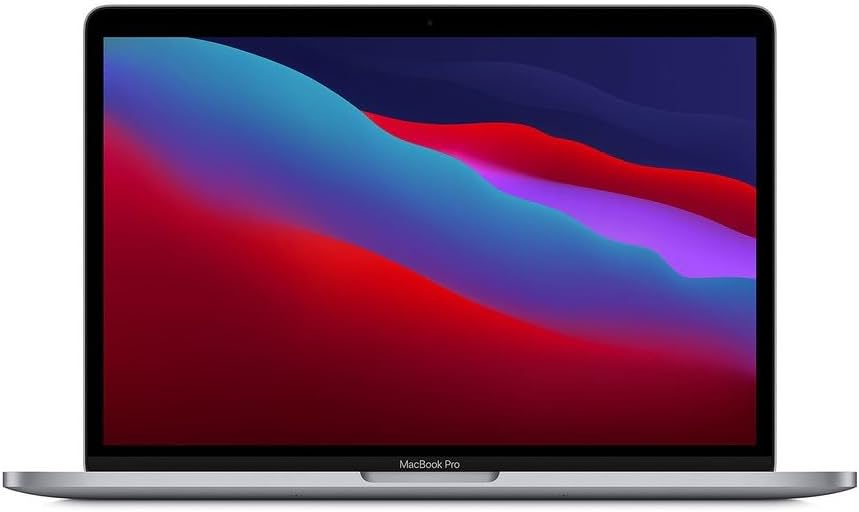
Apple MacBook Pro M1 13-inch Analysis: Renewed, Still Relevant
The Blunt Verdict
The Apple MacBook Pro M1 13-inch (Renewed) is a straightforward recommendation for anyone wanting a capable, long-lasting Mac without paying new-unit prices. This is the original Apple M1 chip — the one that genuinely surprised everyone when it landed — inside a compact 13-inch chassis, sold here as a certified renewed unit. It is fast, the battery life is real rather than marketing fiction, and the display is genuinely good. The headline weakness is the storage: 256GB SSD goes fast, especially on macOS. If you’re a heavy user who doesn’t manage files aggressively, you’ll feel that ceiling.
Under the hood you’ve got the Apple M1 chip with an 8-core CPU and 8-core GPU, paired with 8GB of unified memory and that 256GB SSD. The display runs at 2560×1600 pixels — genuinely sharp for a 13.3-inch panel. What makes this chip unusual is the unified memory architecture: the CPU and GPU pull from the same pool, which means the GPU doesn’t eat into a separate allocation. In everyday terms, it handles light creative work and heavy browser sessions better than the numbers alone suggest. The RAM is soldered, so what you buy is what you keep.
Buy it if you want a reliable, snappy everyday Mac and you’re comfortable working within Apple’s ecosystem. Students, writers, light photo editors, and people coming off older MacBooks will be satisfied. Avoid it if you need Windows, more than 256GB of local storage without constantly shuffling files, or anything approaching serious gaming.
See the current listing and availability for the Apple MacBook Pro M1 13-inch on Amazon.

Pros and Cons
Pros
- M1 chip delivers genuinely fast CPU and GPU performance that still holds up well in daily use
- Battery life is exceptional — multiple buyers report full working days with charge to spare
- 2560×1600 Retina display is sharp and clear with accurate colours
- Renewed condition widely reported as near-flawless — several buyers noted no visible marks and a charger in the box
- Fanless design under normal loads means near-silent operation for most everyday tasks
Cons
- 256GB storage is tight — macOS takes a chunk and iCloud fill-up happens fast
- RAM is soldered at 8GB with no upgrade path whatsoever
- At least one buyer received a unit in noticeably worse condition than advertised — renewed quality can vary
Spec Breakdown
- Model: Apple MacBook Pro 13-inch (2020) — MYD82B/A — Renewed
- CPU: Apple M1 — 8-core, up to 3.1GHz
- RAM: 8GB unified memory (soldered, not upgradeable)
- Storage: 256GB SSD
- GPU: Apple M1 8-core integrated GPU
- Display: 13.3-inch LED Retina, 2560×1600 resolution
- Operating System: macOS
- Connectivity: Wi-Fi 6 (802.11ax), Bluetooth
- Colour: Space Grey
- Form Factor: Ultra-Portable
- Dimensions: 34.1 x 24.8 x 7.3 cm
- Warranty: 1-year limited (renewed)
Hardware & Performance Reality Check
The Apple M1 chip with its 8-core CPU is the reason this machine still makes sense in 2026. When Apple launched it, it outperformed Intel chips drawing two to three times the power. That efficiency hasn’t expired. You’ll breeze through documents, spreadsheets, browser-heavy workflows, and light coding without the machine breaking a sweat. The 8GB of unified memory is soldered directly to the board — no slots, no upgrade path, end of story. For most users it’s fine. For anyone running virtual machines, keeping 30-plus browser tabs open alongside heavy apps, or doing sustained video work, it will become a bottleneck before the chassis does. If RAM headroom matters to you, check our guide on how much RAM you actually need before committing.
The 256GB SSD is fast — NVMe speeds on M1 storage are well above what you’d get from budget Windows machines — but the capacity is the problem. macOS itself, system files, and any reasonable app library will eat through that allocation quickly. Cloud offloading via iCloud helps, but it’s a workaround for a real constraint. The GPU is the 8-core integrated Apple silicon GPU, not a discrete card. It handles 4K video playback, light photo editing, and basic creative tasks without complaint. Don’t expect it to run demanding games — even with the M1’s efficiency, the 8-core GPU isn’t in the same conversation as a dedicated gaming card. If gaming is your priority, our budget gaming laptop guide is a better starting point.
For 2026 day-to-day use: student work and office tasks — yes, without question. Coding in Python, JavaScript, or web development — handles it well, especially given Apple’s developer toolchain. Video editing in iMovie or even basic Final Cut Pro sequences — workable, though 8GB unified memory will limit how complex your timelines get before rendering slows. Gaming — not this machine’s remit. The M1 runs Apple Arcade titles and some ported games, but if you’re comparing it to a Windows gaming laptop, it’s not a fair fight. For anyone wanting to understand how the chip itself stacks up in objective terms, our performance benchmarks guide provides useful context.
Port selection deserves a mention because it will affect daily use. The MacBook Pro M1 13-inch has two Thunderbolt/USB-C ports and nothing else. No USB-A, no HDMI, no Ethernet, no SD card slot. One buyer specifically flagged using an Anker 7-in-1 USB-C hub to compensate. If you have existing peripherals — external drives, monitors via HDMI, wired mice — budget for a hub. Our ports guide breaks down what the different connector types mean in practice.
Check the full spec sheet and buyer Q&As for the Apple MacBook Pro M1 13-inch on Amazon.
Everyday Usability: Battery, Build & More
Battery life is one of the strongest arguments for this machine. Apple quoted up to 20 hours, which is marketing ceiling rather than reality — but even the real-world figure is well above most of the competition. Buyers consistently report full working days without needing the charger, which is consistent with what the M1’s efficiency architecture delivers. The chip was designed to sip power rather than gulp it, and that shows. Heat is similarly non-dramatic under normal loads — the fanless design means it runs silently most of the time, with no fan ramp-up during typical browsing, writing, or video calls. Push it hard — long video renders, sustained heavy multitasking — and it will get warm, but it doesn’t throttle aggressively. The chassis is the familiar machined aluminium unibody that Apple has used for years: solid, dense, and resistant to the flex you get on cheaper plastic machines. At 1.4kg it’s genuinely light to carry.

The 2560×1600 Retina display is one of the genuinely good things about this machine. It’s bright, sharp, and colour-accurate enough for photo editing and design work without calibration. The 16:10 aspect ratio — taller than the 16:9 panels common on Windows laptops — gives you more vertical space, which matters when reading documents or working in code editors. The keyboard is backlit and comfortable, with the Touch Bar sitting where function keys would normally be — buyers either find it useful or ignore it, but nobody’s reported it as a dealbreaker. Touch ID fingerprint unlock is integrated into the Touch Bar. There is no touchscreen on this machine — that’s standard for MacBooks and worth stating plainly. The webcam is a 720p FaceTime HD camera: functional for video calls, not outstanding by modern standards. No Ethernet port — Wi-Fi only, which is fine for most people but worth flagging if you work somewhere that requires a wired connection. Speaker quality on MacBook Pros is notably good for a machine this size, which buyers in this category rarely comment on because it’s become expected.
Lifespan & Future-Proofing
The chassis longevity on a MacBook Pro is genuinely good. The machined aluminium unibody doesn’t creak, bend, or degrade the way cheaper plastic frames do. Buying a renewed unit does introduce some uncertainty — battery health at purchase varies, with buyers reporting figures from 89% to 100% — but Apple’s batteries are rated for 1,000 charge cycles before significant degradation. Even at 89% capacity you’ve got plenty of headroom. Realistically, the physical chassis on a well-maintained MacBook will outlast the hardware’s software support window.
That software support window is the sharper question. Apple’s M1 received macOS updates through Ventura, Sonoma, and Sequoia — as of 2026, it remains supported, but you’re working with a chip that launched in late 2020. Apple typically supports chips for around seven years, which puts this machine at the tail end of that window rather than the beginning. The 8GB of unified memory and 256GB SSD are locked in permanently — no slots, no expansion, nothing. As macOS and applications grow heavier, the RAM ceiling will become noticeable before the CPU does. You’re buying a machine with a clear end date for comfortable everyday use — probably three to four more years of smooth operation, then a gradual decline rather than a cliff edge. If you’re weighing whether to spend more for longevity, our laptop buying guide covers how to think through the tradeoff honestly.
View current stock levels for the Apple MacBook Pro M1 13-inch on Amazon.
What Buyers Are Saying (And Potential Dealbreakers)
This listing carries a rating of 4.4 out of 5 from 145 customer reviews — a reasonable sample size. The pattern across UK reviews is consistent: most buyers are genuinely pleased, the renewed condition is typically better than expected, and battery life earns specific praise across multiple reviewers. The one recurring concern is condition inconsistency — the vast majority receive units in near-new shape, but at least one buyer got a machine with significant external damage despite the listing claiming excellent condition. That’s a real risk with renewed stock, and worth knowing before you buy.
One buyer who came from a 2017 MacBook Air called the upgrade transformative — faster, sharper screen, noticeably longer battery. That tracks: anything coming from Intel-era hardware will feel like a different class of machine. Another buyer noted the charger that arrived wasn’t a genuine Apple unit, though it functioned. A third flagged the USB-C-only port situation and mentioned buying a hub to compensate — practical advice rather than a complaint, but useful to factor in. The one-star review stands out precisely because it’s a lone outlier against an otherwise strong thread: one buyer received a unit with significant scratches and damage inconsistent with the advertised condition. That doesn’t appear to be a pattern, but it’s not nothing either.
International buyers in France, Germany, Italy, and Spain all report positive experiences — consistent with the UK pattern of strong overall satisfaction. A UK-based buyer who used it as a secondary machine alongside a newer M4 Pro noted that while it predictably trails newer silicon, it handled OBS streaming and video editing without dropping frames, and ran silently throughout. For a machine of this generation, that’s a fair result.
Buyer Highlights
“I bought it as renewed and honestly it looked brand new — original Apple box, charger, paperwork, not a single mark on it.” — Matches the majority of UK buyer reports on condition.
“The battery life is a real plus — it actually lasts.” — Consistent feedback across multiple reviewers, not an outlier experience.
“I opened the box while filming it in case of damage, but I was genuinely surprised — it looked brand new.” — Worth doing if you’re anxious about renewed condition; most buyers found the caution unnecessary.
“It came with 91% maximum battery capacity and ran a live stream plus video edit without any issues.” — Useful real-world benchmark if light content creation is your use case.
“The charging cable that came with it wasn’t a UK plug — it was European with an adapter that wouldn’t actually charge the Mac.” — A genuine gotcha to watch for; verify the charger type when your unit arrives.
Who Should Buy It (And Who Shouldn’t)
Buy If
- You want a fast, reliable Mac for everyday work — writing, browsing, video calls, light creative tasks — and don’t want to pay new-unit prices
- You’re upgrading from an older Intel MacBook or MacBook Air and want a meaningful performance step up
- Battery longevity is a priority — this machine genuinely delivers a full working day without stress
- You’re a student or professional user who works within Apple’s ecosystem and doesn’t need Windows software
Avoid If
- 256GB of local storage isn’t enough for your working files and you’re not prepared to manage iCloud offloading actively
- You need Windows — either natively or via Boot Camp, which M1 doesn’t support — or rely on Windows-only software
- You want a machine you can upgrade later — the RAM and storage are permanently fixed at purchase
The Bottom Line
The Apple MacBook Pro M1 13-inch (Renewed) earns a clear recommendation for the right buyer. The M1 chip still delivers genuine speed and efficiency, the Retina display is sharp and colour-accurate, and the battery life is among the best you’ll find in this form factor. The storage limitation is real and the RAM is permanently soldered, so go in with eyes open. Renewed condition is overwhelmingly positive based on buyer feedback, with an occasional outlier on unit quality. If you’re in Apple’s ecosystem, want a compact everyday machine, and don’t need Windows or serious gaming capability, this is a sensible way to get there. If you’re still weighing options, our budget laptop shortlist covers the broader field.
The Apple MacBook Pro M1 13-inch is listed on Amazon with full buyer Q&As and condition details.
At LaptopAdvisorOnline, our methodology is built on data transparency rather than simulated hands-on testing. We rigorously analyse official manufacturer specifications and aggregate verified customer sentiment to provide objective, fluff-free buying advice that helps you cut through the marketing jargon.
As an Amazon Associate, I earn from qualifying purchases.
Browse by Specification
Looking for something specific? Browse our analyses by hardware and feature below, or check all laptop analyses in the Best Budget Laptops category archive.
[AMD Processor Laptops] — [Intel Processor Laptops] — [16GB RAM Laptops] — [32GB RAM Laptops] — [Dedicated Graphics] — [Long Battery Life] — [Lightweight Laptops] — [Student Laptops]
Browse by Screen Size
[13-inch Laptops] — [14-inch Laptops] — [15-inch Laptops] — [16-inch+ Laptops]




