
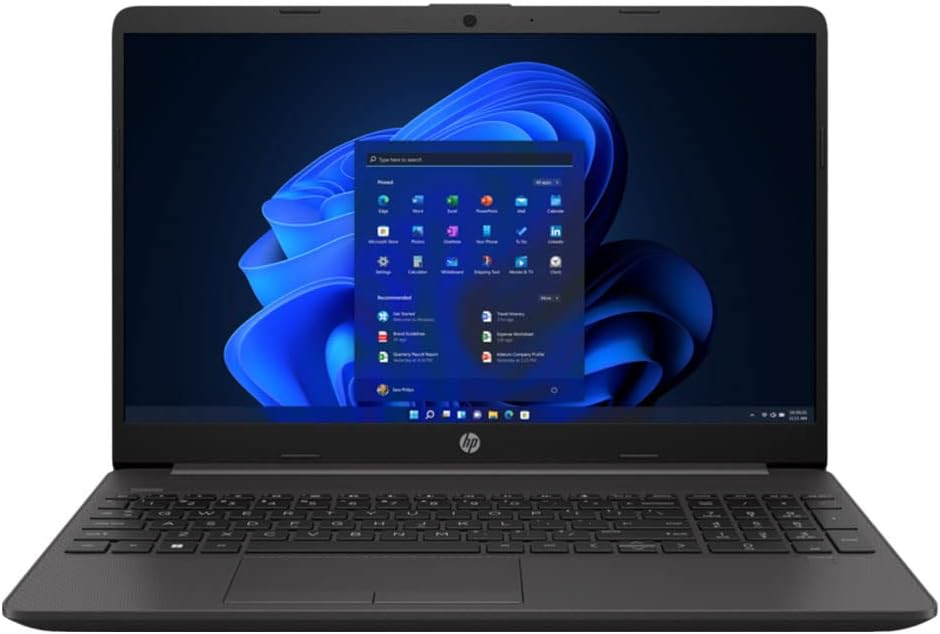
HP 250 G9 Analysis: The Windows Licence Problem
The Blunt Verdict
The HP 250 G9 is a business-class workhorse aimed squarely at office users and students who need Windows 11 Pro without spending a fortune. It pairs a 12th Gen Intel Core i5-1235U with 16GB of DDR4 RAM and a 512GB NVMe SSD — a genuinely capable spec sheet for the money. The headline weakness, however, is one that should make you pause before hitting buy: multiple buyers have received units with the wrong Windows licence installed. That is not a minor inconvenience. That is a material misrepresentation, and it is the first thing you need to know about this listing.
On paper, the HP 250 G9 hits the marks you want from a mid-range business laptop. The i5-1235U is a proper 10-core chip that handles multitasking well. Sixteen gig of RAM is comfortable headroom for most office workloads. The SSD is fast enough that you won’t be watching a spinning circle every time you launch an application. And Windows 11 Pro matters for IT-managed environments — if your workplace requires it for BitLocker, remote desktop, or domain join, you can’t just swap it for Home. Which makes the licence issue all the more serious.
If you need a no-fuss machine for spreadsheets, documents, video calls, and light multitasking, the hardware here is sound. If you specifically need genuine Windows 11 Pro — and in a business context, you might — proceed with extreme caution and verify the licence before the return window closes. Casual home users who don’t need Pro should probably be looking elsewhere entirely.
Check the current listing and buyer Q&As for the HP 250 G9 on Amazon before reading further.

Pros and Cons
Pros
- 12th Gen i5-1235U with a max boost of 4.4GHz handles everyday multitasking without breaking a sweat
- 16GB DDR4 RAM is more than most competitors offer at this tier — less chance of hitting a wall with multiple applications open
- 512GB NVMe SSD means fast boot times and snappy application launches, not the sluggish SATA drives common on cheaper machines
- Wi-Fi 6 (802.11ax) support is a genuine upgrade over older standards and future-proofs the wireless side
- Windows 11 Pro is listed — and if you actually receive it, it unlocks business features not available on Home
Cons
- Multiple buyers have reported receiving Windows 11 Home despite the listing clearly stating Pro — a significant and documented problem with this listing
- Only 13 reviews at the time of writing, and the rating is a mediocre 3.7 out of 5 — not enough data to call it reliable, and what data exists raises red flags
- Intel Iris Xe handles integrated graphics duties only — there is no discrete GPU here despite “Dedicated” appearing in the spec fields, which appears to be erroneous data from the seller
Spec Breakdown
- Model: HP 250 G9 (6S6S9EA#ABU)
- CPU: Intel Core i5-1235U, 12th Gen, up to 4.4GHz, 10 cores
- RAM: 16GB DDR4, 3200MHz, 2 slots
- Storage: 512GB NVMe SSD
- GPU: Intel Iris Xe Graphics (integrated)
- Display: 15.6-inch Full HD, 1920 x 1080, LCD
- OS: Windows 11 Pro (as listed — verify on receipt)
- Battery: Lithium-ion, claimed 8-hour life
- Weight: 2.49kg
- Ports: 1x HDMI, USB (total 5 ports listed), Ethernet
- Connectivity: Wi-Fi 6 (802.11ax), Bluetooth
- Keyboard: Full-sized QWERTY
- Camera: Yes (integrated webcam and microphone)
- Optical Drive: DVD SuperMulti
Hardware & Performance Reality Check
The Intel Core i5-1235U is a solid choice for this class of machine. It runs 2 performance cores and 8 efficiency cores, which translates well to the mixed workloads of office life — keeping Teams running in the background while you’re juggling a spreadsheet and a browser with a dozen tabs is where this chip earns its keep. Pair that with 16GB of DDR4 RAM and you’ve got a machine that won’t choke on multitasking. If you want to understand more about how RAM affects day-to-day use, our guide on how much RAM you actually need is worth a read. The spec sheet lists two RAM slots and a maximum of 8GB — that’s almost certainly an Amazon data error, since 16GB is already installed. Treat the installed spec as the authority here, and verify upgradeability via HP’s official documentation before assuming you can expand it.
The 512GB NVMe SSD is meaningfully better than the SATA SSDs you often find crammed into budget machines. You’ll notice it in boot times and application launches — the difference between a 3-second boot and a 15-second one is real and daily. On the GPU front: the spec fields list “Dedicated” in multiple places, but the actual graphics hardware is Intel Iris Xe Graphics — that’s integrated, not discrete. There is no separate GPU here. Iris Xe handles light photo editing and casual video playback without drama, but it won’t touch 3D applications, serious video editing, or any gaming beyond very old or very undemanding titles. For a deeper look at what specs like these actually mean in plain English, that link is useful background.
For 2026 use: student work and office tasks — yes, comfortably. Programming in Python, web development, light IDE use — fine. Video editing in DaVinci Resolve or Premiere — technically possible but you’ll be waiting. Gaming — forget it beyond browser-based or very old titles. The i5-1235U was already a mid-range chip when this machine launched, and it’ll remain adequate for everyday productivity tasks for a few years yet, but don’t expect it to age like fine wine. For context on where this sits against similar machines, our performance benchmarks guide gives useful reference points.
One thing worth flagging separately: the spec sheet lists a DVD SuperMulti optical drive. That’s increasingly unusual for a 15.6-inch laptop at this tier and could genuinely matter if you work with physical media or legacy disc-based software. It also adds to the chassis bulk — at 2.49kg, this isn’t something you’ll carry lightly. The port situation includes HDMI and Ethernet as confirmed hardware interfaces, which earns a tick for office connectivity. If you want a full breakdown of what each port type means for your setup, the ports guide covers it clearly.
See the full spec sheet and buyer questions for the HP 250 G9 on Amazon.
Everyday Usability: Battery, Build & More
HP claims 8 hours of battery life, which is a figure to be treated with the usual scepticism. Real-world battery life under mixed workloads — browser, Office apps, occasional video — tends to land 20–30% below manufacturer claims on machines like this. A more honest expectation is 5–6 hours of genuine use, which means a full working day away from a plug is borderline. Pack the charger. The 15.6-inch Full HD 1920 x 1080 display is a standard LCD panel — fine for documents and video calls, but don’t expect vivid colours or high brightness. If you want to understand what the difference between LCD panel types means for your eyes at a desk, our display types guide is worth a look. There is no touchscreen on this machine — it’s a straightforward clamshell, which is absolutely fine for a business laptop but worth stating clearly.

The full-sized keyboard is a baseline requirement for a business machine and the HP 250 G9 delivers it without fanfare. The integrated webcam and microphone make it video-call ready out of the box — adequate for Teams and Zoom, not flattering in poor lighting. Build quality on HP’s 250 series has historically been functional rather than premium: plastic chassis, acceptable hinge, nothing that inspires confidence or provokes concern. At 2.49kg it’s desk-bound more than it is genuinely portable. The 802.11ax Wi-Fi 6 support is a genuine highlight — faster and more stable on crowded networks than the older ac standard. Ethernet is also present, which IT departments will appreciate. No fingerprint reader is mentioned in the available data, so don’t assume one is there.
Lifespan & Future-Proofing
The chassis on HP’s 250 series is engineered for function, not longevity. Plastic construction and budget hinges typically hold up for three to four years of regular office use before showing wear — loose hinges, scuffed bezels, the usual. If you’re buying this for a business environment where laptops get knocked around, it’ll do the job. Don’t expect it to last five or six years without the odd physical complaint.
Spec longevity is the more interesting question. The i5-1235U and 16GB DDR4 combination is comfortable for 2024–2025 tasks and will remain adequate for standard office work into 2026 and likely 2027. After that, it depends on what software demands of it — if Microsoft and browser makers keep inflating RAM and CPU requirements at the current pace, you’ll feel it sooner rather than later. The SSD can theoretically be replaced if needed, and if the two RAM slots are genuinely accessible (verify this — the listed max of 8GB in Amazon’s data conflicts with the installed 16GB and smells like a data error), there may be an upgrade path. But realistically, budget business laptops of this type aren’t bought to be upgraded — they’re bought, used, and replaced. Treat it as a 3–4 year machine and you’ll have accurate expectations. Our buying guide covers how to think about longevity vs spec when choosing between tiers.
View current stock and availability for the HP 250 G9 on Amazon.
What Buyers Are Saying (And Potential Dealbreakers)
The HP 250 G9 holds a rating of 3.7 out of 5 from 13 customer reviews. That is a dangerously small sample — you cannot draw reliable conclusions from 13 data points, full stop. What you can do is take the specific, documented complaints seriously, because the pattern in the available feedback is not random noise.
Two of the most recent reviews — both from UK buyers — report the same problem independently: the machine was sold as Windows 11 Pro but arrived with Windows 11 Home. One buyer had to purchase a new Pro licence at their own expense. That is not a one-off. Two separate buyers reporting the same specific issue in the available reviews is a red flag that warrants treating as a systemic problem with this listing rather than an isolated incident. If you’re buying this machine specifically for Windows 11 Pro — for BitLocker encryption, domain join, or IT policy compliance — you need to verify the installed licence immediately upon receipt and act within the return window if it’s wrong.
Beyond the licence issue, the review pool is too thin to draw meaningful conclusions about build quality, keyboard feel, thermals, or long-term reliability. The hardware specs are solid enough that expert projection fills some of those gaps, but genuine buyer sentiment on day-to-day use is simply absent in useful quantity. For professional use cases, our professional laptops guide surfaces alternatives with more documented track records.
Buyer Highlights
“Laptop wasn’t even on Windows 11. Never mind Windows 11 Pro. Wrong description from the seller.” — A documented complaint from a UK buyer, not a one-off.
“Sold a laptop with Windows 11 Pro but the digital licence was Windows Home. I had to buy a new Windows 11 Pro licence for activation.” — This cost the buyer money out of pocket on top of the purchase price.
“The hardware spec looks fine on paper, but what you get out of the box isn’t what it says on the tin.” — The recurring theme across negative feedback for this listing.
“If you need Pro for work, check the licence the moment it arrives — don’t wait until you need to activate something.” — Practical advice that applies to any buyer of this specific listing.
Who Should Buy It (And Who Shouldn’t)
Buy If
- You want a 12th Gen i5 with 16GB RAM and a fast SSD for office and student work, and you’re prepared to verify the Windows licence immediately on delivery
- You need built-in Ethernet and HDMI for a desk-based office setup and don’t want to rely on dongles
- You’re buying through a channel where returns are easy, giving you a safety net if the OS licence turns out to be incorrect
Avoid If
- You specifically require genuine Windows 11 Pro and cannot afford the time or cost of dealing with a wrong licence — the documented complaints here make this a real risk
- You want to do any serious GPU work, gaming, or video rendering — Intel Iris Xe is not the tool for the job regardless of what the “Dedicated” label in the spec fields implies
- You want a machine backed by a strong body of buyer feedback — 13 reviews is not enough to trust, and what exists paints a concerning picture
The Bottom Line
The HP 250 G9 has the hardware to be a competent business and student laptop — the i5-1235U, 16GB RAM, and NVMe SSD combination is genuinely capable for everyday office work. But the listing has a documented, repeated problem with incorrect Windows licences being delivered, and at a 3.7 rating from only 13 buyers, there is not enough positive evidence to offset that concern. If you buy it, check the OS licence the moment it arrives. If that sounds like more hassle than a laptop purchase should involve, trust that instinct and look at alternatives with a cleaner track record.
At LaptopAdvisorOnline, our methodology is built on data transparency rather than simulated hands-on testing. We rigorously analyse official manufacturer specifications and aggregate verified customer sentiment to provide objective, fluff-free buying advice that helps you cut through the marketing jargon.
As an Amazon Associate, I earn from qualifying purchases.
Browse by Specification
Looking for something specific? Browse our analyses by hardware and feature below, or check all laptop analyses in the Best Mid-Range Laptops category archive.
[AMD Processor Laptops] — [Intel Processor Laptops] — [16GB RAM Laptops] — [32GB RAM Laptops] — [Dedicated Graphics] — [Long Battery Life] — [Lightweight Laptops] — [Student Laptops]
Browse by Screen Size
[13-inch Laptops] — [14-inch Laptops] — [15-inch Laptops] — [16-inch+ Laptops]




