
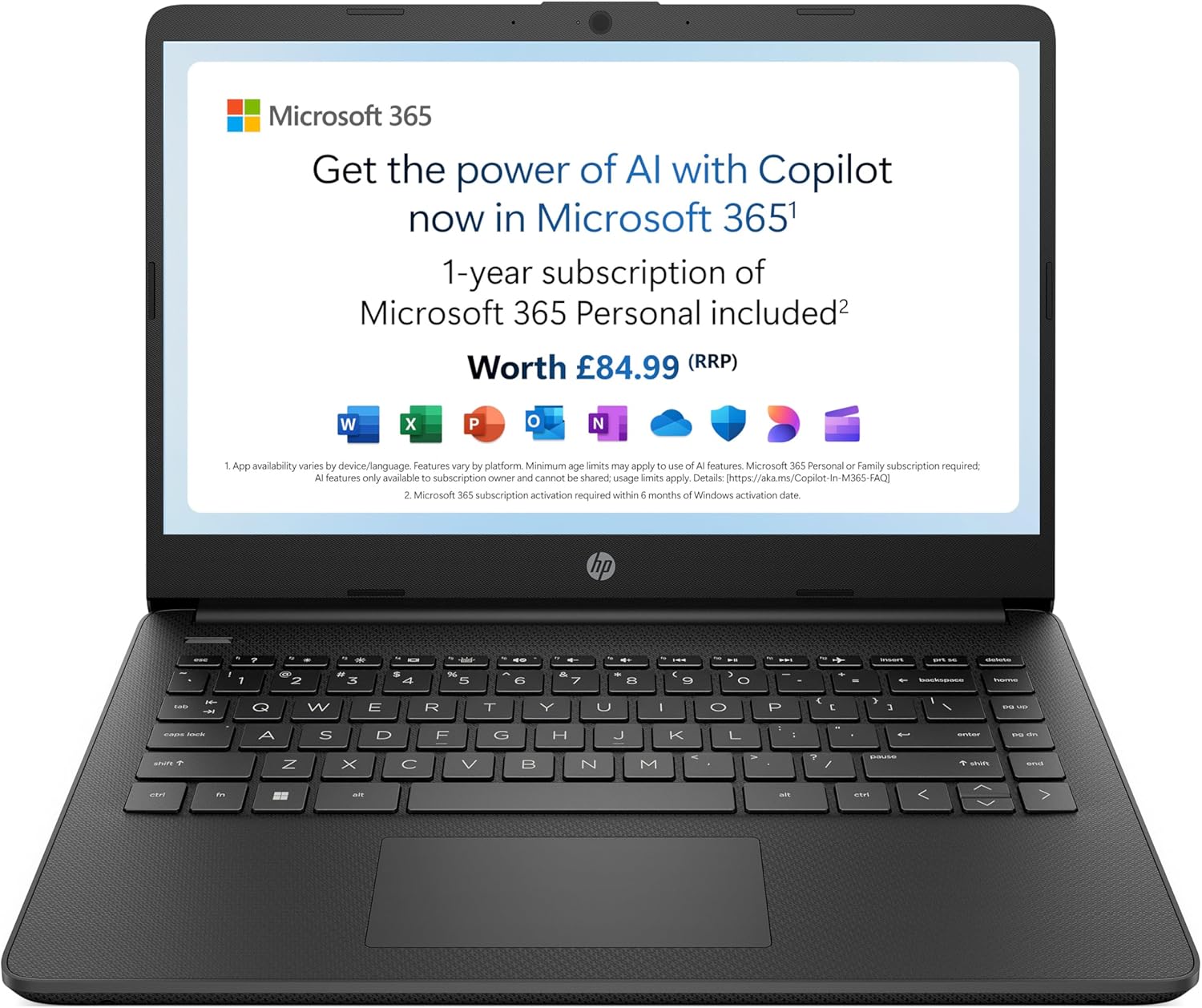
HP 14s-dq0011sa Analysis: Know the Limits
The Blunt Verdict
The HP 14s-dq0011sa is a bare-minimum laptop for bare-minimum tasks. If you need something to handle emails, light web browsing, and occasional Word documents — and you need it cheap — this will do that job. It won’t do much else. The Intel Pentium Silver N5030 processor and 4 GB of RAM are the defining constraints here, and both will make themselves felt the moment you push beyond the basics.
You’re getting a 14-inch 1920 x 1080 display, 128 GB SSD storage, Intel UHD Graphics 605, and Windows 11 Home out of the box. The included Microsoft 365 Personal 12-month subscription is a genuine bonus — that’s real software value bundled in. The 41 Wh battery is modest but reasonable for this class. The machine weighs 1,460 grams, which is light enough to carry without complaint.
Who should buy it: someone who genuinely only needs a secondary machine, a first laptop for a child, or a very light home-use device. Who shouldn’t: anyone who runs multiple browser tabs, works from home seriously, wants to do any creative work, or expects this to last five years without becoming frustratingly slow. Students taking this to university will hit its limits by the end of their first term.
See the HP 14s-dq0011sa listing and full spec details on Amazon.

Pros and Cons
Pros
- Full HD 1920 x 1080 resolution is genuinely good for this price tier — you’re not squinting at blurry text
- Microsoft 365 Personal 12-month subscription included — Word, Excel, PowerPoint and 1 TB OneDrive storage out of the box
- Touchscreen support via capacitive panel adds flexibility for casual use and navigation
- SSD storage means fast boot times and snappy file access compared to any HDD alternative at this end of the market
- Anti-glare coating makes the display usable in brighter indoor environments without constant reflections
Cons
- 4 GB DDR4 RAM is too tight for modern Windows 11 use — multitasking will slow noticeably with more than a handful of browser tabs
- The Pentium Silver N5030 is a low-power processor from 2019; this chip is already old by the time you buy it
- Only 45% colour gamut on the display — washed-out colours that make any creative or media work look underwhelming
Spec Breakdown
- Model: HP 14s-dq0011sa (A30R9EA#ABU)
- CPU: Intel Pentium Silver N5030, up to 3.1 GHz, 4 cores
- RAM: 4 GB DDR4 (3200 MHz) — listed maximum 4 GB
- Storage: 128 GB SSD
- GPU: Intel UHD Graphics 605 (shared memory)
- Display: 14-inch FHD LED LCD, 1920 x 1080, 250 nits, 45% colour gamut, anti-glare, touchscreen (capacitive), micro-edge bezel
- Battery: 41 Wh, 3-cell lithium-ion
- OS: Windows 11 Home
- Weight: 1,460 g
- Ports: USB 3.0 Type-A (x2), USB 3.0 Type-C (x1), HDMI
- Connectivity: Wi-Fi 802.11ac (Wi-Fi 5), Bluetooth
- Camera: Front-facing webcam with built-in microphone
- Audio: Dual speakers, headphone output
- Keyboard: Standard, with integrated precision touchpad
Hardware & Performance Reality Check
The Intel Pentium Silver N5030 is a Gemini Lake Refresh chip launched in 2019. Four cores, a base clock of 1.1 GHz, and a boost up to 3.1 GHz. On paper that boost speed sounds decent. In practice, this chip throttles quickly under sustained load because it’s designed for near-fanless, ultra-low-power devices. Pair it with 4 GB DDR4 RAM — which Windows 11 itself consumes a meaningful chunk of at idle — and you’ve got a system that will feel sluggish the moment you have more than four or five browser tabs open simultaneously, or run any two moderately demanding applications at once. On the RAM question: 4 GB is genuinely insufficient for comfortable daily use in 2024. The spec sheet lists the maximum RAM as 4 GB, which suggests this is soldered with no upgrade path. That’s a hard ceiling with no way around it.
The 128 GB SSD is a bright spot — SSDs of any size beat spinning hard drives categorically on responsiveness, and boot times will be acceptable. The downside is 128 GB disappears fast. Windows 11 and default bloatware will occupy a significant slice immediately; add Microsoft 365, a few downloads, and some personal files and you’ll be managing storage actively within months. There is no optical drive, which is standard for this form factor. The Intel UHD Graphics 605 is integrated and shares system memory. It will handle video playback without complaint and manage basic display output to an external monitor via HDMI. It cannot game — not even lightly. Integrated graphics at this tier aren’t in the same conversation as budget gaming options.
For real-world task suitability heading into 2026: word processing and spreadsheets — yes, just about. Email and calendar apps — fine. Streaming video — adequate, though the display’s colour limitations will dull the experience. Programming — very limited; IDEs are memory-hungry. Video editing — no. Gaming — no. Running multiple applications simultaneously — expect slowdowns. This machine is honest about what it is only if you read the specs carefully and ignore HP’s marketing copy about “powerful enough for your busiest days,” which is frankly misleading for anything beyond a genuinely light workload. Check performance benchmarks for this chip tier if you want numbers to anchor the picture.
The display warrants a separate note. 1920 x 1080 resolution at 14 inches gives you a sharp enough pixel density for text work. But 250 nits brightness is on the lower end — usable indoors, uncomfortable in brighter rooms. The 45% colour gamut is genuinely poor; colours look muted compared to any mid-range panel. If display quality matters to you at all, read about display panel differences before committing. The anti-glare coating is a practical plus for office lighting, and the touchscreen is a genuine usability addition for casual navigation.
Check the full HP 14s-dq0011sa spec sheet and buyer Q&As on Amazon.
Everyday Usability: Battery, Build & More
The 41 Wh battery is modest but this chip sips power, so real-world longevity should be reasonable for light tasks — browsing, documents, video calls. HP claims all-day battery life in the product copy, and for genuinely light use that’s plausible, though “all day” in HP’s world typically means eight hours under controlled conditions. Expect something between six and eight hours with typical mixed use. The machine weighs 1,460 g, which is genuinely light for a 14-inch device — comfortable in a bag for daily commuting. The narrow bezels give it a cleaner look than older budget machines, though the plastic chassis won’t feel robust. At this price and weight class, build quality is functional rather than premium — treat it carefully and it’ll hold up; drop it and you’ll find out how thin the casing is.

The port selection is actually decent for the price: two USB 3.0 Type-A ports, one USB 3.0 Type-C, and HDMI output — that’s a practical everyday set for connecting peripherals and an external monitor. No Ethernet port, so you’re relying entirely on Wi-Fi 5 (802.11ac) and Bluetooth for connectivity — fine for home use, mildly limiting if you need a stable wired connection for work. No fingerprint reader is present. The front-facing webcam with built-in microphone covers basic video calls without anything notable to say either way. The dual speakers are listed but there’s nothing in the data suggesting they’re anything beyond passable — at this price tier, laptop speakers are functional at best. The standard keyboard and precision touchpad should handle everyday typing without drama, though there’s no backlighting indicated in the specs, which is worth knowing if you work in low-light conditions.
Lifespan & Future-Proofing
On chassis longevity: a light plastic build like this, handled with reasonable care, should physically last three to four years before hinges or cosmetics become an issue. HP’s budget consumer range isn’t built to ThinkPad durability standards — there’s no military-spec certification here — but it won’t fall apart in a year under normal use. The one-year warranty is standard and offers no on-site repair, so factor in how you’d handle a fault.
On spec longevity: this is the harder conversation. The Pentium Silver N5030 was already a budget chip when it launched in 2019, and by 2026 it will be firmly in end-of-useful-life territory for anything beyond the most minimal tasks. The 4 GB RAM ceiling — with no upgrade path — means you cannot compensate for the processor’s age by adding memory. The 128 GB SSD will feel increasingly cramped as software grows. This machine has a realistic useful lifespan of two to three years for comfortable use, and that’s being generous. If you’re buying this expecting it to remain adequate for four or five years, that expectation will be disappointed. Anyone looking for something with a longer runway should look at the mid-range options that offer upgradeable RAM and current-generation processors. If you’re genuinely constrained to the lowest tier, our budget laptop guide covers alternatives worth comparing before you commit.
View current stock availability for the HP 14s-dq0011sa on Amazon.
What Buyers Are Saying (And Potential Dealbreakers)
The HP 14s-dq0011sa carries a rating of 4.4 out of 5 from 218 customer reviews on Amazon — a reasonable sample size with a surprisingly positive average. That said, this class of laptop tends to attract buyers who know exactly what they’re getting: something inexpensive for light tasks. Expectations calibrated to match the price point generate more generous feedback than the spec sheet alone might warrant.
Recurring praise centres on the display quality for the price — the full HD resolution genuinely exceeds expectations at this tier. Buyers frequently highlight the included Microsoft 365 subscription as tangible value. Setup is consistently described as straightforward, even by buyers with no technical background. Weight and portability get regular positive mentions.
Recurring complaints focus on the RAM. Buyers who attempted anything beyond basic tasks — running multiple browser tabs, streaming while having documents open — encountered noticeable slowdown. Storage filling up quickly is another theme. A handful of buyers flagged that the display looks acceptable in most indoor lighting but struggles when brightness is pushed. No catastrophic hardware failure patterns appear in the broader feedback, which is worth acknowledging.
One important note: because this machine ships with Windows 11 Home in S mode as the default configuration, some buyers may encounter restrictions on installing apps outside the Microsoft Store until S mode is manually disabled. This isn’t a dealbreaker, but it catches non-technical users off guard.
Buyer Highlights
“It does exactly what I need — emails, a bit of browsing, Netflix in the evening. Nothing fancy but it just works.” — Consistent sentiment from buyers using this as a secondary or light home machine.
“The screen is better than I expected for the price. Text is sharp and it’s easy on the eyes for long sessions.” — The 1080p resolution clearly lands well against buyers’ expectations at this price point.
“Started slowing down when I had too many tabs open. Manageable if you’re disciplined but it does notice.” — The 4 GB RAM ceiling showing up consistently once buyers push beyond minimal use.
“Having Word and Excel already included made it dead easy to set up straight away — didn’t have to sort out anything extra.” — The bundled Microsoft 365 subscription is a genuine differentiator buyers actively appreciate.
“Light as a feather to carry. Fits in my bag without even noticing it’s there.” — The sub-1.5 kg weight earns repeat mentions from buyers who commute or travel regularly with it.
Who Should Buy It (And Who Shouldn’t)
Buy If
- You need a lightweight machine exclusively for emails, basic documents, and casual web browsing — and genuinely nothing heavier than that
- You want a first laptop for a child or older relative who won’t push it beyond simple tasks and values ease of setup
- The bundled Microsoft 365 subscription tips the value equation for you and you’d have paid for it separately anyway
- You need a secondary travel machine that you can afford to replace without losing sleep if it gets damaged
Avoid If
- You plan to use this as your primary work or study machine — the RAM ceiling and processor age will frustrate you within months, and there’s no upgrade path out of it
- You expect it to handle video calls, multiple apps, streaming, and documents simultaneously — it won’t manage that gracefully; check the buying guide for what specs to look for if that’s your workflow
- You care about colour accuracy or display quality for any creative purpose — 45% colour gamut is poor and cannot be fixed in settings
The Bottom Line
The HP 14s-dq0011sa earns a narrow recommendation for a narrow use case. If you want a light, affordable machine for genuinely basic tasks — and you have calibrated expectations about what a Pentium processor and 4 GB of RAM can handle — it delivers what it promises. The full HD screen, bundled Microsoft 365, and respectable weight are genuine positives. The hard ceiling on RAM, the age of the processor, and the washed-out display gamut are real limitations that will define your experience. Go in knowing those constraints exist, and this does its job. Go in expecting a capable everyday workhorse and you’ll be disappointed inside a year. For anyone needing more, the specs explained guide is a useful starting point for understanding what to look for instead.
Read the latest buyer questions and current listing details for the HP 14s-dq0011sa on Amazon.
At LaptopAdvisorOnline, our methodology is built on data transparency rather than simulated hands-on testing. We rigorously analyse official manufacturer specifications and aggregate verified customer sentiment to provide objective, fluff-free buying advice that helps you cut through the marketing jargon.
As an Amazon Associate, I earn from qualifying purchases.
Browse by Specification
Looking for something specific? Browse our analyses by hardware and feature below, or check all laptop analyses in the Best Budget Laptops category archive.
[AMD Processor Laptops] — [Intel Processor Laptops] — [16GB RAM Laptops] — [32GB RAM Laptops] — [Dedicated Graphics] — [Long Battery Life] — [Lightweight Laptops] — [Student Laptops]
Browse by Screen Size
[13-inch Laptops] — [14-inch Laptops] — [15-inch Laptops] — [16-inch+ Laptops]




