
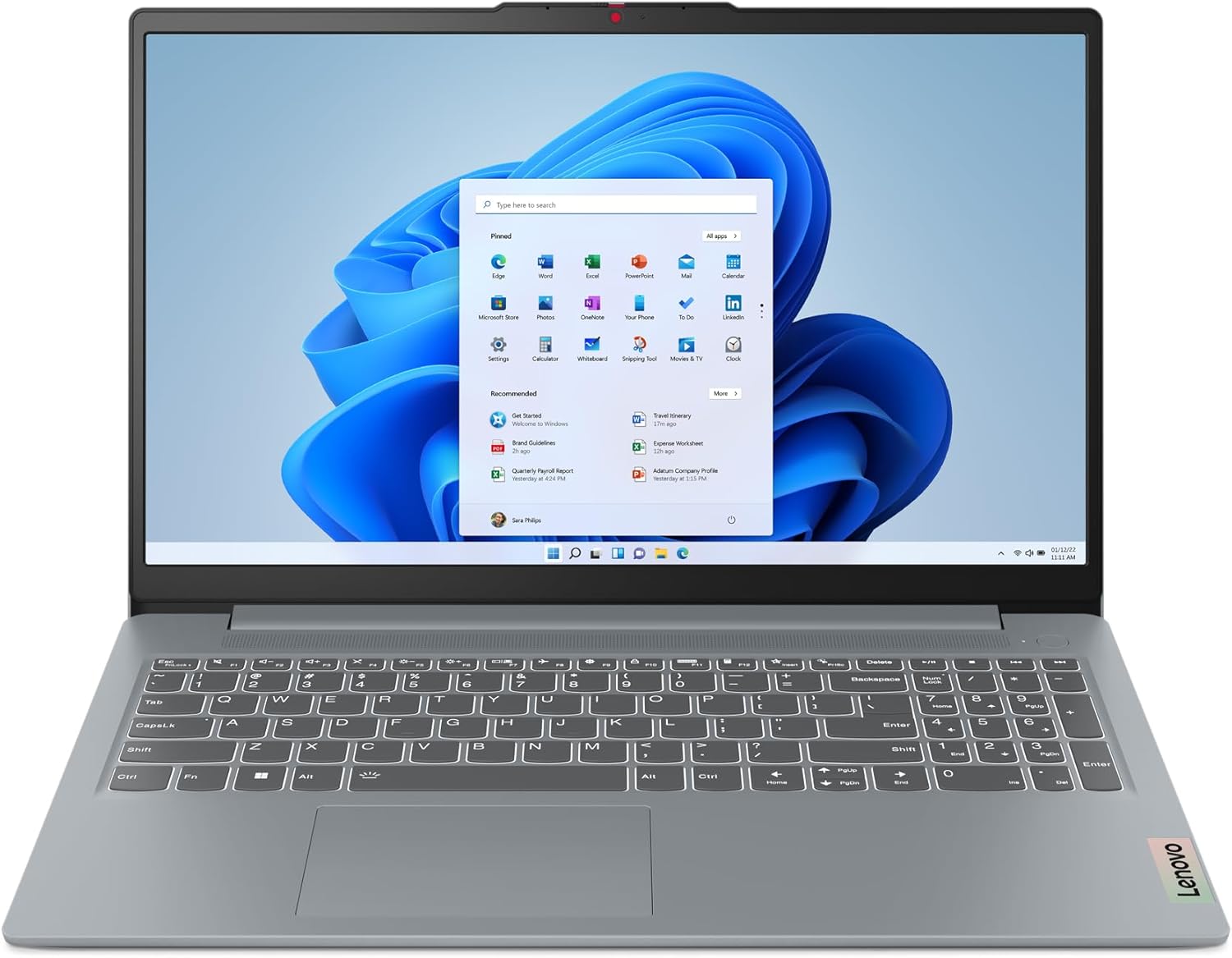
Lenovo IdeaPad Slim 3 15IAN8 Analysis: Know the Limits
The Blunt Verdict
The Lenovo IdeaPad Slim 3 15IAN8 is a no-frills light-use laptop that does exactly what it says on the tin — and nothing more. Emails, streaming, light document work, basic browsing. If that’s your world, this machine handles it without complaint. If you want anything beyond that, you’re in the wrong aisle. The focus keyword here is straightforward: this is an entry-level 15.6-inch machine aimed squarely at students, retirees, and anyone who just needs a laptop that turns on and works.
Under the hood you’re looking at an Intel Core i3-N305 processor, 8GB of LPDDR5 RAM, and 128GB of UFS storage. That’s a lean spec sheet. The display is a 15.6-inch 1920 x 1080 IPS panel with a 16:9 aspect ratio, which is perfectly serviceable for everyday use. The machine weighs in at 1.55kg — genuinely light for a 15-inch — and ships with Windows 11 Home in S mode, which we’ll come back to because it matters.
Buy this if you’re replacing an ageing machine for basic tasks and want something lightweight that won’t break the bank. Don’t buy it if you need meaningful storage, plan to multitask heavily, or want any upgrade path at all — because there isn’t one. If you’re still working out what specs actually matter for your use case, our laptop buying guide is worth a read before committing.
See the Lenovo IdeaPad Slim 3 15IAN8 on Amazon and check current availability.

Pros and Cons
Pros
- Genuinely lightweight at 1.55kg — easy to carry between rooms, classrooms, or cafes without it being a burden
- IPS display with narrow bezels delivers a decent screen-to-body ratio and solid viewing angles for the price bracket
- Wi-Fi 6 (802.11ax) support is a welcome inclusion at this level — faster and more stable on modern routers
- Full-sized keyboard with numeric keypad is a practical inclusion, especially for anyone doing data entry or using spreadsheets
- Camera privacy shutter is a small but genuinely useful physical feature — one less thing to worry about
- USB-C port (3.2 Gen 1), two USB-A 3.2 Gen 1 ports, HDMI, and a card reader means the port selection covers most everyday needs
Cons
- 128GB of storage is genuinely tight — Windows alone will chew through a significant chunk, and there’s no upgrade path
- RAM is soldered; the spec sheet confirms a maximum of 8GB with no available slots for expansion — what you buy is what you’re stuck with
- Windows 11 in S mode restricts app installs to the Microsoft Store by default — a real friction point if you’re not expecting it
Spec Breakdown
- Model: Lenovo IdeaPad Slim 3 15IAN8 (82XB0093UK)
- CPU: Intel Core i3-N305, up to 3.8GHz, 8-core
- RAM: 8GB LPDDR5 (soldered, non-upgradeable)
- Storage: 128GB UFS (soldered, non-upgradeable)
- GPU: Intel Integrated Graphics (UHD/Iris Xe), shared memory
- Display: 15.6-inch IPS, 1920 x 1080, 16:9, non-touch, anti-glare coating
- Battery: 47Wh lithium polymer, 3-cell, Rapid Charge Boost
- OS: Windows 11 Home (S mode)
- Weight: 1.55kg
- Ports: 1x USB-C 3.2 Gen 1, 2x USB-A 3.2 Gen 1, 1x HDMI, 1x 3.5mm combo jack, 1x SD card reader, 1x power connector
- Connectivity: Wi-Fi 6 (802.11ax), Bluetooth 5.0
- Keyboard: Full-sized QWERTY with numeric keypad, no backlight
- Camera: Integrated webcam with physical privacy shutter
Hardware & Performance Reality Check
The Intel Core i3-N305 is an N-series efficiency chip — designed for low power draw rather than raw grunt. Eight cores sounds promising until you realise these are all efficiency cores, not the performance cores you’d find in a Core i5 or i7. For a single browser with a handful of tabs, writing a document, or watching video, it’s fine. Add a video call on top and you’ll feel it. The 8GB of LPDDR5 RAM is adequate for light multitasking, but it’s soldered directly to the board with no upgrade path — the spec sheet explicitly lists the maximum RAM as 8GB. If you’re the sort of person who keeps 20 browser tabs open while listening to Spotify, you will hit that ceiling. Understanding how much RAM you actually need is worth doing before buying anything in this bracket.
The 128GB UFS storage deserves a frank conversation. UFS (Universal Flash Storage) is faster than eMMC, which is a genuine plus — but the capacity is the real issue. Windows 11 consumes roughly 20–30GB out of the box, leaving you with somewhere between 90 and 100GB of usable space before you’ve installed a single app. That fills up fast. There’s no M.2 slot, no 2.5-inch bay — this is soldered to the motherboard, full stop. Get a decent USB-C or USB-A external drive if you buy this. The Intel Integrated Graphics (UHD/Iris Xe) handles video playback and very light photo work without issue. Gaming is essentially off the table beyond the most basic browser titles — the integrated GPU shares system memory and doesn’t have the headroom for anything more demanding. For a proper look at how N-series chips stack up against Core i5 and i7 alternatives, it’s worth understanding the architecture gap before assuming “i3” means what it used to.
For everyday use heading into 2026 and beyond: student essays, PowerPoint, spreadsheets, email, Netflix — yes, this handles all of that without drama. Office tasks for a typical home or small business user — similarly fine, provided you stay within the storage limits. Programming: light scripting in something like Python is possible but you’ll want to manage your storage carefully; anything with a heavier IDE or build chain will be uncomfortable. Video editing: no. Even basic 1080p timeline work will be sluggish with this chip and shared graphics — look at a mid-range option if that’s your use case. Gaming beyond browser-based titles: also no.
One thing worth flagging: Windows 11 ships in S mode on this machine. S mode limits you to Microsoft Store apps only — no Chrome, no VLC, no third-party software unless you switch out of S mode (which is free and irreversible). Most buyers won’t even know this is the case until they try to install something and hit a wall. Switching out of S mode takes about two minutes and is straightforward, but it’s the kind of thing manufacturers bury in the small print and it catches people off guard.
Check the full spec sheet and buyer Q&As for the Lenovo IdeaPad Slim 3 15IAN8 on Amazon.
Everyday Usability: Battery, Build & More
The 47Wh battery with Rapid Charge Boost (claiming two hours of use from a 15-minute charge) sounds good in marketing terms. Real-world endurance on N-series chips with a full HD screen tends to land in the 6–8 hour range for mixed light use — browsing, documents, video. The manufacturer’s listed “2 hours” battery life figure in the spec data appears to reference the Rapid Charge feature rather than total runtime, which is a bit of a Lenovo spec-sheet sleight of hand worth being aware of. At 1.55kg with a 17.9mm profile, the physical form factor is genuinely one of the better things about this machine — it slips into a bag without announcing itself, and won’t fatigue your shoulder on the commute. Heat and fan noise shouldn’t be significant concerns at this performance tier; the N305 is an efficiency chip that runs cool under light loads.

The display is an IPS panel — which means acceptable viewing angles and reasonable colour consistency — and one buyer confirmed it looks fine when viewed straight on, less so from steep angles, which is typical of budget IPS. It’s non-touch and has an anti-glare coating, which helps in brighter environments. There is no Ethernet port, so you’re entirely dependent on the Wi-Fi 6 connection for wired-speed reliability — worth knowing if you’re in a location with patchy wireless. No fingerprint reader either. The keyboard includes a numeric keypad (genuinely useful for a 15-inch), but there is no backlight — one buyer flagged this specifically because Amazon listing images appear to show a backlight indicator on the space bar, which led to confusion. It doesn’t have one. The integrated webcam is functional for video calls; the physical privacy shutter is a nice touch. Speaker output is described as standard HD audio — serviceable for occasional use, not something you’d choose for serious listening. Connectivity specs and port placement are worth checking against your own setup — our ports guide gives context on what each connection type actually offers in practice.
Lifespan & Future-Proofing
On build quality: Lenovo claims military-grade durability for the Slim 3 line, and the chassis is generally reported as solid for the price bracket. Buyers describe it as feeling well-built. A plastic chassis at this weight is expected — don’t drop it and don’t expect it to take the same punishment as a ThinkPad. Realistically, if you look after it, the hardware should physically last five or more years without issues.
On spec longevity, the story is shorter. The combination of soldered 8GB RAM, soldered 128GB UFS storage, and an efficiency-class processor creates a hard ceiling. There is no upgrade path. None. RAM can’t be added, storage can’t be swapped — the spec sheet explicitly confirms zero available memory slots and a soldered drive. By 2026 and beyond, as browser memory demands and OS overhead continue to creep upward, 8GB will feel increasingly tight for anyone doing more than one thing at a time. The storage situation will become a problem much sooner for most buyers — possibly within the first year if you’re not disciplined about what you install. For the budget laptop category this sits in, two to three years of comfortable use is a realistic expectation before it starts feeling constrained. If you want longer legs from a machine, you need more headroom from the start — consider our specs guide for understanding which numbers actually matter for longevity.
View current stock levels for the Lenovo IdeaPad Slim 3 15IAN8 on Amazon.
What Buyers Are Saying (And Potential Dealbreakers)
The Lenovo IdeaPad Slim 3 15IAN8 carries a rating of 4.6 out of 5 from 38 customer reviews on Amazon. That’s a reasonably positive score, though 38 reviews is a fairly small sample — treat the sentiment as directional rather than definitive, and bear in mind there’s limited data from heavy or technical users in this pool.
The recurring praise centres on value for money, lightweight feel, and simplicity of setup. Several buyers are clear that this is a replacement for an older machine and it does the job they need — emails, word games, online browsing — without fuss. One buyer specifically highlights the SD card reader as a positive, which is a feature often dropped on budget machines. The screen gets a passing mention as clear when viewed straight on.
The complaints are worth taking seriously. One buyer flags the 128GB storage as critically small, noting it fills up quickly and can’t be upgraded — this is the single most likely source of frustration for anyone who doesn’t plan ahead. Another buyer raised a Bluetooth reliability issue, reporting it doesn’t function as expected — with only 38 reviews it’s impossible to know if that’s a one-off or a pattern, but it’s worth noting. The backlit keyboard confusion is a genuine issue: Amazon product images appear to suggest a backlight exists, and at least one buyer was caught out. It does not have a backlit keyboard. Full stop.
Windows 11 in S mode didn’t surface as a complaint in reviews, which suggests either buyers aren’t hitting it or they’re switching out of S mode early. Given the target demographic, it’s more likely they just aren’t aware yet.
Buyer Highlights
“Screen clarity is good if you’re looking straight at it — not from angles — but it’s great value for school work and watching stuff.” — Useful context on the display’s viewing angle limitations from everyday use.
“This is a laptop with a very small hard drive that’s a chip on the board with no possibility of upgrading — beware, the small drive can fill up very quickly.” — The clearest warning in the review pool, and accurate based on the spec data.
“For my needs this is perfect — I use it for emails, word games, and looking things up online.” — Exactly the use case this machine is designed for, and it delivers on it.
“Amazon images show a backlit keyboard on the space bar — the laptop sold does not have this function. No backlit keyboard. Otherwise a decent quality laptop.” — A legitimate complaint about misleading listing images; worth factoring in if that matters to you.
“Lightweight and has an SD card reader.” — Brief but consistent with the physical specs; the card reader is a genuinely useful inclusion for photographers or anyone pulling files from cards.
Who Should Buy It (And Who Shouldn’t)
Buy If
- You need a lightweight everyday laptop for emails, browsing, streaming, and basic documents — this does all of that without drama
- You’re a student on a tight budget who just needs something reliable for word processing and research, and can manage storage carefully or pair it with external storage
- You’re replacing a very old machine and the priority is simply having something modern, light, and easy to set up — for basic home use, this delivers
- You value Wi-Fi 6 and a full-sized keyboard with a numeric keypad at this price point — both are genuine practical wins
Avoid If
- 128GB of storage will not work for you as a primary drive — there is no upgrade path, so if your current laptop feels cramped on storage, this will be worse
- You need the machine for anything beyond light tasks — video editing, coding with heavy tools, design work, or gaming all require more headroom than this chip and RAM ceiling allow; look at a mid-range alternative instead
- You work in low-light environments and need a backlit keyboard — this machine doesn’t have one, regardless of what product images may suggest
The Bottom Line
The Lenovo IdeaPad Slim 3 15IAN8 is an honest, no-nonsense light-use laptop for buyers who know exactly what they need and don’t need anything more. The lightweight chassis, IPS display, and Wi-Fi 6 are genuine wins. The 128GB soldered storage and locked-down 8GB RAM are the machine’s hard limits, and you need to go in with eyes open on both. Switch out of S mode early, budget for external storage, and don’t expect to grow into this machine — because you can’t. For a student, a home user doing the basics, or a secondary travel machine, it does its job well. Just don’t ask it to do anyone else’s.
At LaptopAdvisorOnline, our methodology is built on data transparency rather than simulated hands-on testing. We rigorously analyse official manufacturer specifications and aggregate verified customer sentiment to provide objective, fluff-free buying advice that helps you cut through the marketing jargon.
As an Amazon Associate, I earn from qualifying purchases.
Browse by Specification
Looking for something specific? Browse our analyses by hardware and feature below, or check all laptop analyses in the Best Budget Laptops category archive.
[AMD Processor Laptops] — [Intel Processor Laptops] — [16GB RAM Laptops] — [32GB RAM Laptops] — [Dedicated Graphics] — [Long Battery Life] — [Lightweight Laptops] — [Student Laptops]
Browse by Screen Size
[13-inch Laptops] — [14-inch Laptops] — [15-inch Laptops] — [16-inch+ Laptops]




