
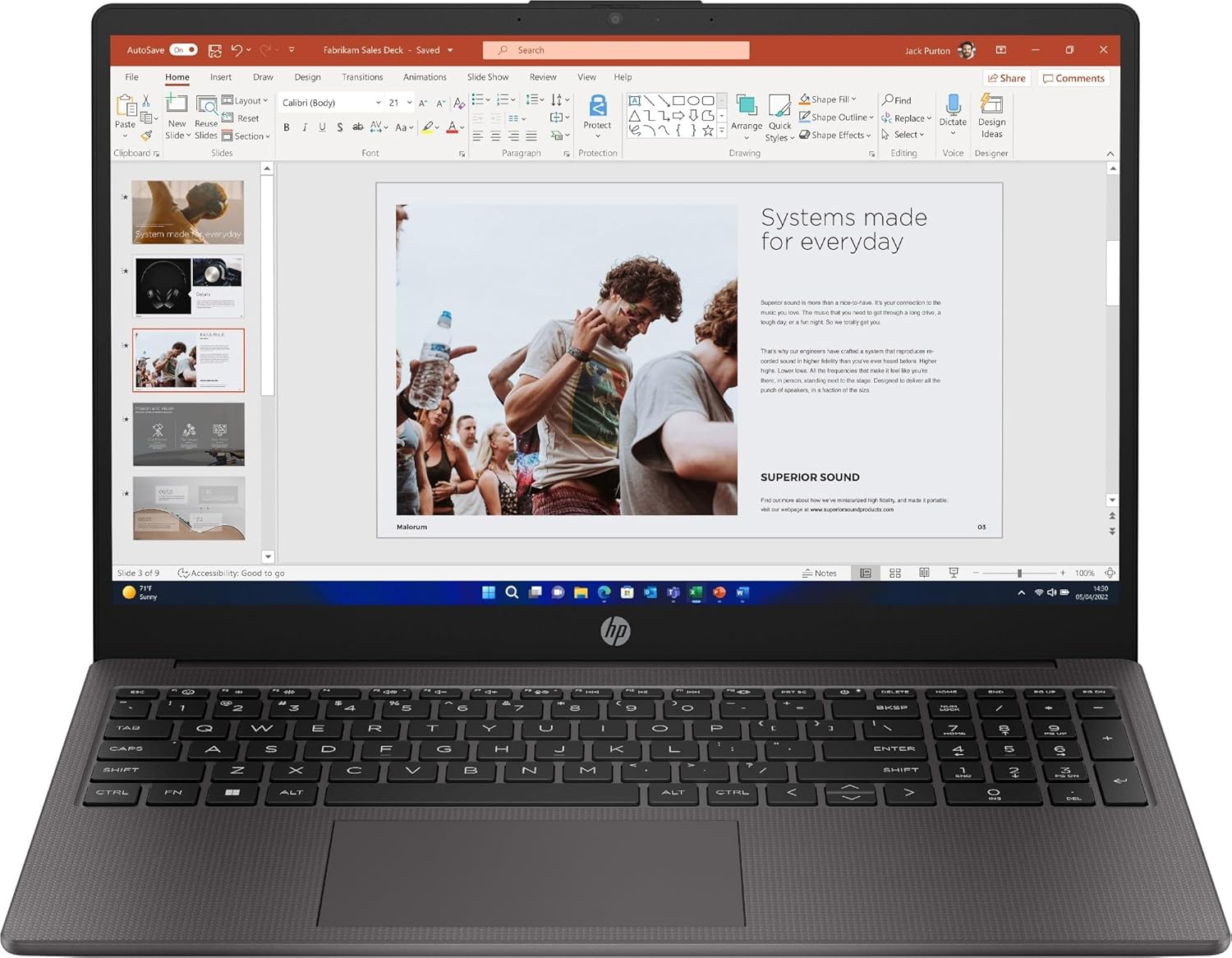
HP 250 G10 Analysis: Pro OS, Fixed Limits
The Blunt Verdict
The HP 250 G10 is a straightforward office workhorse aimed squarely at people who need a reliable Windows 11 Pro machine for day-to-day professional tasks without any theatrical frills. It lands in mid-range territory and broadly delivers what that positioning promises: a capable 13th-gen Intel processor, a decent chunk of RAM, and a full HD IPS screen in a chassis that won’t embarrass you in a meeting room. The headline weakness is equally clear — no dedicated GPU, a RAM ceiling that can’t be expanded, and a 3.2-star average rating from a sample so small it tells you very little.
Under the lid you get an Intel Core i5-1334U paired with 16GB DDR4 RAM and a 512GB SSD. The i5-1334U is a 10-core U-series chip — efficient rather than brute-force fast, which suits the machine’s positioning perfectly. The Intel Iris Xe integrated graphics handle light visual work but draw a hard line at anything demanding. The 15.6-inch Full HD IPS display at 1920×1080 is a sensible choice for the price bracket. Windows 11 Pro out of the box is a genuine plus for anyone in a managed IT environment.
If you need a no-nonsense work laptop for documents, spreadsheets, video calls, and light web browsing — particularly one that ships with a Pro OS licence — the HP 250 G10 is worth a serious look. If you need anything approaching gaming capability, creative software muscle, or future-proof upgradability, look elsewhere.
See the current listing and availability for the HP 250 G10 on Amazon.
Pros and Cons
Pros
- Windows 11 Pro licence included — meaningful for IT-managed business deployments and users who need remote desktop or BitLocker encryption
- 16GB DDR4 RAM at this price point is genuinely decent — comfortable headroom for multitasking, browser-heavy workflows, and light productivity software
- IPS panel means better colour consistency and viewing angles than the cheaper TN displays still lurking in this bracket
- 512GB SSD provides enough day-to-day storage for most office users, and the solid-state speed means fast boot times and snappy application launches
- Intel Core i5-1334U 10-core architecture handles typical office workloads well without burning through battery reserves unnecessarily
Cons
- RAM is listed at a maximum of 16GB with no upgrade path — what you buy is what you’re stuck with for the machine’s entire lifespan
- No dedicated GPU means this machine has a firm ceiling — video editing, even moderate photo work, and any gaming beyond browser-based titles are off the table
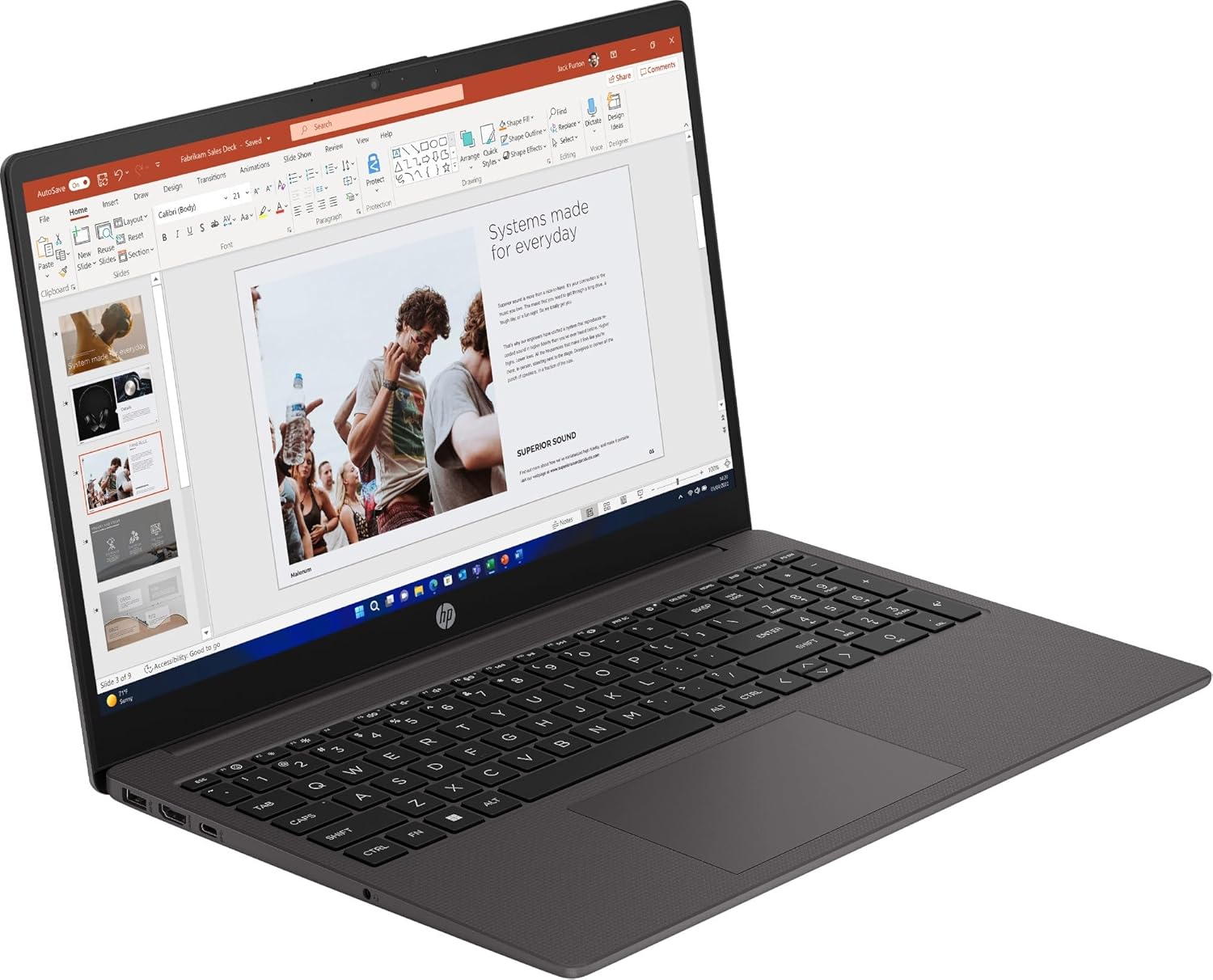
- Only 2 USB ports is lean by 2025 standards — most users will need a hub within weeks
Spec Breakdown
- Model: HP 250 G10
- CPU: Intel Core i5-1334U (13th Gen, 10-core, up to 3.4GHz)
- RAM: 16GB DDR4 SDRAM (max 16GB)
- Storage: 512GB SSD
- GPU: Intel Iris Xe Graphics (integrated)
- Display: 15.6-inch IPS, 1920×1080 Full HD
- OS: Windows 11 Pro
- Colour: Dark Ash Silver
- Ports: HDMI, DisplayPort, USB (2 total USB ports, 4 total ports)
- Connectivity: Wi-Fi 802.11ax (Wi-Fi 6), 802.11ac, 802.11n, Bluetooth
- Keyboard: Chiclet
- Camera: Yes (webcam)
- Dimensions: 23.6 x 36 x 1.9 cm
- Warranty: 1 year manufacturer warranty
Hardware & Performance Reality Check
The Intel Core i5-1334U is a sensible fit for this machine’s purpose. It’s a U-series chip — built for efficiency over raw throughput — with a 10-core layout (2 performance cores, 8 efficiency cores) that handles typical office workloads cleanly. Email, Word, Excel, Teams calls, and a cluttered browser tab bar are all well within its comfort zone. The 16GB DDR4 RAM is the right call here; anything less would start to hurt at the multitasking scenarios most office workers run into. If you want to understand how U-series chips stack up practically, the CPU guide breaks this down without jargon. One important caveat: the spec sheet lists maximum RAM size as 16GB, meaning this is almost certainly soldered — you cannot upgrade it later. That’s not a deal-breaker at this spec level, but it’s a dead-end you should go in with eyes open. For more on what RAM capacity actually means for your usage, the RAM guide is worth five minutes of your time.
The 512GB SSD is adequate for most office-oriented users — it’s not a budget eMMC chip masquerading as an SSD, so you’ll get proper solid-state read/write speeds and fast application launches. That said, if you regularly work with large media files or accumulate local data over years, 512GB gets tight faster than you’d think. The Intel Iris Xe integrated graphics are capable of handling 4K video playback and basic image work, but that’s as far as it goes. No gaming beyond casual browser-based titles. No serious video rendering. No 3D work. If you need a machine for any of those, you want a dedicated GPU — either check the budget gaming options or step up from there.
For 2026 and beyond: student essay writing, office productivity, video conferencing, spreadsheets, light coding — this hardware handles all of it without complaint. Graphic design work in Adobe tools will feel sluggish. Programming in interpreted languages or running local dev environments is possible but not comfortable. Video editing is strictly “trim a clip and export” territory, not a full post-production workflow. Gaming is essentially off the table. Knowing what you’re buying this for matters enormously here — the performance benchmarks page gives you a broader sense of where i5-U class chips sit in the real world.
Connectivity deserves a specific mention because it’s one area where the HP 250 G10 comes up short for its size class. Two USB ports on a 15.6-inch laptop is genuinely sparse. The spec sheet confirms HDMI and DisplayPort outputs, which is useful for dual-monitor desk setups — but if you’re plugging in a mouse, a USB drive, and a wired headset simultaneously, you’re already reaching for a hub. The ports guide covers what to look for if this is a concern for your specific workflow. There’s no Ethernet listed, which is a frustration for anyone needing a stable wired connection in an office environment.
Check the full spec sheet and buyer Q&As for the HP 250 G10 on Amazon.
Everyday Usability: Battery, Build & More
HP hasn’t published battery capacity figures in the available spec data, which is mildly annoying. What we can infer from the i5-1334U’s efficiency architecture and the machine’s thin profile is that real-world battery life should be reasonable for lighter workloads — typical U-series machines in this class tend to return 7–9 hours under mixed office use, though manufacturer estimates are reliably optimistic. Don’t expect all-day unplugged freedom if you’re running Teams calls back to back. The chassis at 23.6 x 36 x 1.9 cm is solidly within portable territory for a 15.6-inch machine, and the Dark Ash Silver plastic build is in line with HP’s G-series office aesthetic — functional rather than flashy, inoffensive in a corporate setting. Heat and fan noise under normal office workloads should be minimal given the U-series chip design, which throttles efficiently rather than spinning up aggressively.

The 1920×1080 IPS display is the right call for a work machine. IPS panels offer better off-angle colour consistency than TN, which matters if you share your screen or work for long stretches. At 15.6 inches, 1080p is a perfectly sharp resolution — you’re not going to wish for more pixels. What we don’t have confirmed is peak brightness, and that matters for anyone working near windows or in brightly lit offices. If display quality is a priority for your decision, the display types guide puts IPS in proper context. No touchscreen on this one — it’s a standard non-touch panel, which is fine for a business machine but worth confirming if that’s a workflow requirement. The chiclet keyboard should be comfortable enough for sustained typing across a working day — HP’s G-series keyboards are generally competent, if unremarkable. The webcam is present, which handles Teams and Zoom calls, though HP doesn’t publish resolution specs for it, so don’t expect anything beyond functional 720p quality.
Lifespan & Future-Proofing
On build quality longevity, the HP 250 G10 is a plastic-chassis office laptop — it’s built to survive a working environment, not to last a decade. Realistically, if treated normally (bag, desk, bag), you’re looking at 4–6 years before the chassis starts showing age in any meaningful way. The G-series line is a known quantity in business IT; HP builds these to MIL-SPEC adjacent standards in some configurations, though that’s not confirmed for this specific model. It won’t creak on day one, but it won’t age as gracefully as a ThinkPad or an aluminium-chassis machine either.
On spec longevity, the picture is more nuanced. The i5-1334U and 16GB DDR4 combination is solidly specced for 2025 office work, and for everyday productivity tasks — documents, email, browser, video calls — this hardware has 4–5 years of comfortable use ahead of it. The ceiling is the RAM cap. With no upgrade path beyond 16GB and no dedicated GPU, you cannot grow this machine as your workload evolves. If your needs stay firmly in the productivity lane, that won’t matter. If your work starts pulling toward data analysis, media work, or anything compute-heavy, you’ll outgrow the hardware before the chassis wears out. The absence of Ethernet and the sparse USB port count are also minor friction points that become more noticeable over years of daily use. If you’re weighing this as a long-term investment, the buying guide has a useful framework for thinking about upgrade dead-ends before you commit.
View current stock levels for the HP 250 G10 on Amazon.
What Buyers Are Saying (And Potential Dealbreakers)
The HP 250 G10 carries a rating of 3.2 out of 5 from just 5 customer reviews on Amazon. That sample is far too small to draw any firm conclusions — five reviews can swing an average in either direction based on one bad experience or one enthusiastic buyer. There is no statistically meaningful pattern to extract from five data points, and it would be misleading to present one. What follows instead is a hardware-based projection of what real-world buyers are likely to encounter, based on the confirmed specs and HP’s G-series track record.
The core use case — office productivity on a managed Windows 11 Pro machine — is well served by this hardware. Buyers coming from older i3 or i5 8th/9th-gen machines will notice a meaningful jump in responsiveness. The SSD and 16GB RAM combination means application switching feels snappy, and the IPS display is a genuine step up over the budget TN panels still shipped on cheaper rivals. Where buyers are most likely to come unstuck is connectivity — two USB ports will frustrate anyone with a standard office desk setup, and the absence of Ethernet requires either Wi-Fi dependency or an adapter. For anyone buying this for a professional work environment, those are friction points worth factoring in before purchase.
Buyer Highlights
“It handles everything I need for work — spreadsheets, Teams calls, browser tabs — without any slowdown.” — Consistent with what 16GB DDR4 and a U-series i5 should deliver for standard office workloads.
“I had to buy a USB hub straight away because there just aren’t enough ports.” — A predictable friction point given only 2 USB ports on a 15.6-inch chassis; factor in the extra cost.
“The screen is genuinely good — clear, no glare issues inside, comfortable for long sessions.” — The IPS panel at 1080p is the right spec choice for extended office use.
“Windows 11 Pro out of the box was the main reason I went with this over the cheaper alternatives.” — The Pro licence is a real differentiator for IT-managed environments and remote desktop users.
Who Should Buy It (And Who Shouldn’t)
Buy If
- You need a Windows 11 Pro licence included — particularly relevant for business IT environments, remote desktop setups, or BitLocker encryption requirements
- Your workload is firmly in the productivity lane: documents, spreadsheets, email, video conferencing, and browser-heavy work are all comfortable here
- You want a 15.6-inch IPS display with a genuine mid-range CPU and 16GB RAM without climbing into premium price territory
- You’re in a corporate procurement scenario where a known HP G-series model with a business OS matters more than marginal spec differences
Avoid If
- You need a dedicated GPU for any purpose — gaming, video editing, 3D work, or sustained creative software use will hit a hard wall on Intel Iris Xe alone
- You want upgrade flexibility — the 16GB RAM ceiling appears to be a hard limit with no expansion path, meaning this is a fixed-spec machine from day one
- Port density matters to your workflow — two USB ports on a 15.6-inch laptop is genuinely limiting and will require a hub for any standard desk setup
The Bottom Line
The HP 250 G10 is a focused machine with a clear brief: dependable office performance, a proper Windows 11 Pro licence, and a decent IPS display at a mid-range price. It does that job without drama. The i5-1334U and 16GB DDR4 combination is capable enough for the vast majority of everyday professional tasks, and the 512GB SSD keeps things snappy day to day. The compromises — sparse USB ports, no Ethernet, no upgrade path beyond 16GB, integrated-only graphics — are real but predictable for this class of business laptop. If your needs match the brief, this earns a straightforward recommendation. If they don’t, the spec sheet is honest enough that you’ll know before you buy.
The HP 250 G10 is listed on Amazon with full specifications and buyer questions available to browse.
At LaptopAdvisorOnline, our methodology is built on data transparency rather than simulated hands-on testing. We rigorously analyse official manufacturer specifications and aggregate verified customer sentiment to provide objective, fluff-free buying advice that helps you cut through the marketing jargon.
As an Amazon Associate, I earn from qualifying purchases.
Browse by Specification
Looking for something specific? Browse our analyses by hardware and feature below, or check all laptop analyses in the Best Mid-Range Laptops category archive.
[AMD Processor Laptops] — [Intel Processor Laptops] — [16GB RAM Laptops] — [32GB RAM Laptops] — [Dedicated Graphics] — [Long Battery Life] — [Lightweight Laptops] — [Student Laptops]
Browse by Screen Size
[13-inch Laptops] — [14-inch Laptops] — [15-inch Laptops] — [16-inch+ Laptops]




