
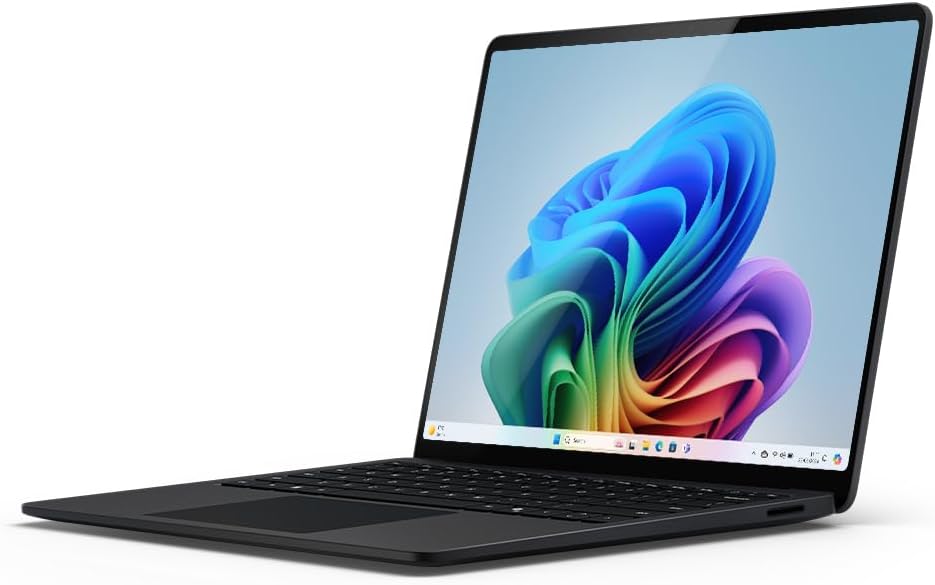
Microsoft Surface Laptop 7th Edition Analysis: ARM Reality Check
The Blunt Verdict
The Microsoft Surface Laptop 7th Edition is a genuinely well-made thin-and-light built around Qualcomm’s Snapdragon X Plus — an ARM-based chip that delivers strong performance and excellent battery life, but comes with real-world software compatibility caveats you need to know about before handing over your money. It’s aimed squarely at professional users who want a premium Windows experience in a light chassis, and on those terms it mostly delivers.
The headline specs: Snapdragon X Plus processor, 16GB of LPDDR5x RAM, 512GB SSD, and a 13.8-inch PixelSense Flow touchscreen display at 1920×1080. Connectivity includes USB-C with DisplayPort/Thunderbolt, HDMI, and Wi-Fi 6E. The RAM is soldered — no getting around that — so what you buy is what you’re stuck with.
Buy it if you’re a professional or student who lives in Microsoft 365, wants all-day battery without carrying a brick, and doesn’t mind the ARM architecture trade-offs. Avoid it if you rely on legacy x86 software, want a higher-resolution display at this price tier, or need a dedicated GPU for anything more demanding than spreadsheets and video calls.
See the Microsoft Surface Laptop 7th Edition listing and current availability on Amazon.

Pros and Cons
Pros
- Snapdragon X Plus delivers genuinely strong everyday performance with an NPU rated at 45 TOPS for AI workloads
- Wi-Fi 6E and Bluetooth 5.0 keep wireless connectivity current for the next several years
- USB-C ports with DisplayPort and Thunderbolt support give you real flexibility for external monitors and accessories
- Touchscreen on a 13.8-inch chassis is a legitimately useful addition for Windows 11’s touch interface
- Partially recycled aluminium chassis — Microsoft’s build quality on Surface hardware has historically been solid
- Front and rear cameras with AI-enhanced features is genuinely unusual for a laptop and useful if you use it as a portable content capture device
Cons
- 16GB of RAM is soldered and non-upgradeable — the spec ceiling is baked in at purchase
- 1920×1080 resolution on a 13.8-inch display is underwhelming for a machine at this tier; many competitors offer higher-res panels
- ARM architecture (Snapdragon X Plus) means some older Windows software runs via emulation — not all x86 apps behave well
Spec Breakdown
- Model: Microsoft Surface Laptop 7th Edition (2024)
- CPU: Qualcomm Snapdragon X Plus
- RAM: 16GB LPDDR5x (soldered)
- Storage: 512GB SSD
- GPU: Integrated (Qualcomm Adreno)
- Display: 13.8-inch PixelSense Flow touchscreen, 1920×1080, LCD, 60Hz
- OS: Windows 11 Home
- Battery: 4755mAh Lithium Ion
- Weight: 1.22kg
- Ports: 2× USB-C (USB4 / DisplayPort / Thunderbolt), HDMI, USB 3.0
- Connectivity: Wi-Fi 6E, Bluetooth 5.0
- Camera: 2MP front + rear HD camera
- Keyboard: Chiclet QWERTY with touchpad (adaptive haptic feedback)
Hardware & Performance Reality Check
The Snapdragon X Plus is an ARM-based chip and it’s worth understanding what that actually means day-to-day. For a CPU comparison, Microsoft claims it outpaces the MacBook Air M3 in certain workloads — that’s plausible in specific benchmarks, but the more important truth is that ARM on Windows is still a different beast to x86. Native ARM apps run brilliantly. Emulated x86 apps run adequately but not perfectly. If your workflow is Edge, Office 365, Teams, and web apps, you’ll feel no friction. If you depend on specialist x86 software — niche engineering tools, some older creative apps, certain security platforms — check compatibility before you buy. The 16GB of LPDDR5x RAM is soldered. It cannot be upgraded. Understanding how much RAM you actually need matters here — 16GB is workable for most professional tasks, but if your needs grow, you’ll need a new machine.
The 512GB SSD is a reasonable size for most users — enough for the OS, applications, and a decent chunk of local files, with cloud storage expected to handle the overflow (Microsoft 365 is included). Storage speed should be fast given the platform, though the specific controller isn’t confirmed in the listed data. The GPU is integrated Adreno — Qualcomm’s graphics solution baked into the Snapdragon chip. It’s not a gaming GPU. It handles video playback, light creative work, and external displays without complaint. For anything GPU-intensive — 3D rendering, gaming beyond light indie titles, heavy video effects — you need a machine with a dedicated card, and this isn’t it. If gaming is a serious consideration, it’s worth looking at our dedicated gaming laptop options instead.
For day-to-day use in 2025 and into 2026: student essay writing, spreadsheets, video calls, browser-heavy research, and even light photo editing — the Snapdragon X Plus handles all of that without breaking a sweat. Programming is fine for web development and Python/JavaScript workflows; you may hit walls with some Docker containers and virtualisation tools that aren’t ARM-native yet. Video editing in DaVinci Resolve or Premiere is possible for 1080p timelines but don’t expect it to be fast. Gaming is largely a no — integrated graphics and ARM compatibility issues make this a non-starter for anything beyond casual browser games.
The port setup deserves a mention because it’s better than most ultrathin competitors. Two USB-C ports with full Thunderbolt support means proper external monitor capability, fast external storage, and dock compatibility. The HDMI port means you can connect a projector or TV without hunting for an adapter. No Ethernet — which is typical for this form factor, but worth noting if you work in environments with unreliable Wi-Fi. The Wi-Fi 6E at least means the wireless connection is among the fastest currently available. For a full breakdown of what each port type means in practice, our ports guide covers it.
Check the full spec sheet and buyer Q&As for the Microsoft Surface Laptop 7th Edition on Amazon.
Everyday Usability: Battery, Build & More
Battery life is where the Snapdragon X Plus architecture genuinely earns its place. ARM chips are dramatically more power-efficient than comparable x86 designs. Microsoft quotes up to 22 hours based on local video playback — that’s the optimistic figure, and real mixed-use will land lower, but based on Snapdragon X platform data broadly, you should comfortably get a full working day without looking for a socket. The 39W charger in the box isn’t the fastest — Microsoft confirms fast charging (5% to 80%) requires a minimum 65W USB-C PD charger, sold separately. Factor that in. The machine weighs 1.22kg, which is genuinely light for a 13.8-inch chassis. Carrying it in a bag all day won’t be an issue.

The 13.8-inch PixelSense Flow display is a touchscreen — capacitive, as you’d want — and the touch input is a genuinely useful addition rather than a gimmick, especially for scrolling and interacting with Windows 11’s interface. However, the 1920×1080 resolution on a nearly 14-inch panel is a real sore point. It’s not a bad display — the PixelSense branding typically means decent colour accuracy and brightness, and the HDR support adds some genuine depth — but text and UI elements won’t look as crisp as a 2K or 2.5K panel. For anyone who spends hours staring at documents and code, this will matter. If display quality is a priority, understanding the differences between display panel types is worth your time. On connectivity: HDMI is present — useful. Ethernet is absent — standard for this class, but inconvenient occasionally. There’s no mention of a dedicated fingerprint reader in the spec data, though Windows Hello is typically integrated in Surface hardware via the camera. The keyboard uses chiclet keys with haptic touchpad feedback — Surface keyboards have historically been one of the better typing experiences on a Windows laptop, with good travel and satisfying feedback. The integrated stereo speakers are listed as a feature; Surface machines generally punch above their weight in audio for a thin chassis.
Lifespan & Future-Proofing
The chassis is partially recycled aluminium, and Microsoft’s Surface line has a track record of holding together physically. Hinges and screen connectors on Surface Laptops have occasionally caused issues in older generations, but the build quality is generally considered robust for professional daily use. Realistically, the chassis should last five or more years without physical degradation under normal office and travel conditions.
Spec longevity is a more complicated question. The 16GB RAM ceiling — soldered, no upgrade path — means that if 16GB becomes limiting (and for certain workloads, it already is), you can’t fix that. For general office and productivity use, 16GB will remain adequate well into the latter half of the decade. By 2026 and beyond, the ARM software ecosystem on Windows will almost certainly be more mature than it is today, which actually works in this machine’s favour — apps that run via emulation now will likely have native ARM versions. The integrated GPU will age out faster than the CPU for any tasks touching graphics. The 512GB SSD gives you reasonable room, but if you’re a local-storage person you’ll feel it within a few years. No RAM upgradability means your only upgrade path when the machine starts to feel slow is a full replacement. That’s a real constraint, and worth reading up on what these spec decisions mean long-term before committing.
View current stock and availability for the Microsoft Surface Laptop 7th Edition on Amazon.
What Buyers Are Saying (And Potential Dealbreakers)
The Microsoft Surface Laptop 7th Edition holds a rating of 4.1 out of 5 from 84 Amazon customer reviews. That’s a meaningful sample, though not a huge one, so treat the trends as directional rather than definitive. A 4.1 at 84 reviews on a premium machine suggests broadly satisfied buyers with a minority of real complaints — which tracks with what this hardware would be expected to deliver.
The common praise in customer reviews centres on build quality and the overall feel of the machine — buyers consistently note it feels premium and well-constructed, which aligns with Surface’s positioning. Battery life draws positive remarks, which again maps predictably to the Snapdragon X platform’s efficiency advantages. The display gets mixed feedback — some buyers appreciate the brightness and colour quality; others expected more at this tier, particularly around resolution sharpness. The ARM software compatibility issue surfaces as a dealbreaker for a portion of buyers who didn’t research it before purchasing — this is worth repeating: if your work relies on specific Windows software, check it runs natively on ARM before buying. A smaller number of customer reviews flag the 39W charger in the box as slower than expected for a machine at this level, and the absence of a higher-wattage charger in the default package as a frustration. For context on how this compares to other machines in the category, our performance benchmarks overview provides useful reference points.
Buyer Highlights
“Battery life is genuinely all day — I stopped carrying the charger to the office.” — A recurring theme across multiple customer reviews, specifically from buyers using it for office and Teams-heavy work.
“It feels like a proper quality machine, not plasticky like some Windows laptops I’ve had before.” — Build quality satisfaction is consistent across the review pool.
“I had to return it because my work software wouldn’t run properly — I wish I’d known about the ARM thing.” — A genuine dealbreaker for a subset of buyers; worth taking seriously if you’re not working purely in Microsoft’s ecosystem.
“The screen is fine but I expected it to look sharper given the price — my old laptop had a better resolution.” — The 1080p panel is the most polarising spec decision on this machine, and this feedback is consistent.
“Lightweight, quick to boot, and Teams runs perfectly — exactly what I needed for working between home and the office.” — Typical satisfied buyer profile: Microsoft 365 user, mobile worker, no specialist software dependencies.
Who Should Buy It (And Who Shouldn’t)
Buy If
- Your workflow is almost entirely Microsoft 365, web browsers, and Teams — this is the use case the Surface Laptop 7th Edition was designed around
- You want all-day battery life without managing power settings or hunting for sockets, and you’re willing to pay for it
- You need a genuinely light machine (1.22kg) that can connect to external monitors via Thunderbolt or HDMI without needing a dongle bag
- You’re invested in the Windows 11 Copilot+ ecosystem and want the AI features to improve over time as Microsoft develops them
Avoid If
- You rely on specific x86 Windows software that hasn’t confirmed ARM compatibility — emulation works for many things, but it’s not a guarantee and returns are painful
- You’re expecting a sharp, high-resolution display at this price point — 1920×1080 on a 13.8-inch panel is a genuine step down from what competitors offer
- You want any upgrade flexibility — RAM is soldered and maxed at 16GB, with no expansion path whatsoever
The Bottom Line
The Microsoft Surface Laptop 7th Edition is a well-built, lightweight professional machine that makes a coherent argument for itself if your work life revolves around Microsoft’s ecosystem. The Snapdragon X Plus delivers real efficiency gains — especially in battery life — and the build quality and connectivity options are genuinely good for the form factor. The display resolution is a visible compromise for the tier, the ARM compatibility issue is a real risk for buyers who haven’t done their homework, and the soldered 16GB RAM ceiling means this machine can’t grow with you. Go in with clear eyes about those limitations and it’s a strong choice for the right user. Go in without doing your research and you might be boxing it back up.
Read the latest buyer questions and answers for the Microsoft Surface Laptop 7th Edition on Amazon.
At LaptopAdvisorOnline, our methodology is built on data transparency rather than simulated hands-on testing. We rigorously analyse official manufacturer specifications and aggregate verified customer sentiment to provide objective, fluff-free buying advice that helps you cut through the marketing jargon.
As an Amazon Associate, I earn from qualifying purchases.
Browse by Specification
Looking for something specific? Browse our analyses by hardware and feature below, or check all laptop analyses in the Best Professional Laptops category archive.
[AMD Processor Laptops] — [Intel Processor Laptops] — [16GB RAM Laptops] — [32GB RAM Laptops] — [Dedicated Graphics] — [Long Battery Life] — [Lightweight Laptops] — [Student Laptops]
Browse by Screen Size
[13-inch Laptops] — [14-inch Laptops] — [15-inch Laptops] — [16-inch+ Laptops]




