
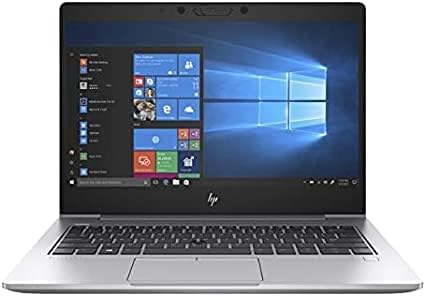
HP EliteBook 830 G6 Analysis: Ageing Hardware, Honest Limits
The Blunt Verdict
The HP EliteBook 830 G6 is a refurbished business machine that makes a reasonable case for itself as a secondary work laptop or a no-nonsense daily driver for light office tasks. It’s a genuine ThinkPad rival from HP’s business tier — built tougher than consumer kit, with a clean form factor and enough horsepower for document work, email, and video calls. The headline weakness is the age of the hardware: this is an 8th-gen Intel platform from 2019, and that matters more than the spec sheet implies.
You get an Intel Core i5-8365U with four cores and a boost to 3.9GHz, paired with 16GB of DDR4 RAM and a 512GB NVMe SSD. The display is a 13.3-inch Full HD IPS panel rated at 400 nits — genuinely bright for a business machine of this class. Connectivity is respectable: Thunderbolt via USB-C, HDMI 1.4b, RJ-45 Ethernet, and three USB ports. The OS is Windows 11 Pro, which is a legitimate inclusion on a refurbished unit at this tier.
If you need a compact professional laptop for office work and you’re not fussed about running anything remotely modern or GPU-intensive, this has a reasonable argument. If you need something that will feel fresh in three years, or you want to do any serious creative or technical work, look elsewhere. The hardware was already mid-cycle when this laptop launched, and we’re well past that point now.
See the HP EliteBook 830 G6 listing and current availability on Amazon.

Pros and Cons
Pros
- MIL-SPEC-grade chassis construction typical of the EliteBook line means this thing was built to survive the corporate grind — it’ll outlast most consumer-grade plastics
- 400 nit IPS panel is legitimately bright and anti-glare coated, which makes it workable in real-world office and outdoor conditions
- 16GB of DDR4 RAM is a meaningful advantage over the 8GB units that saturate the refurbished market — enough headroom for browser-heavy multitasking
- Full port complement including Thunderbolt, Ethernet, HDMI, and USB-A means you’re not hunting for a dock on day one
- Fingerprint reader, Smart Card reader, and Intel vPro are proper enterprise-tier security features rarely found on refurbished kit at this price point
Cons
- The i5-8365U is a 2019 processor — five years old at time of writing — and that gap compounds quickly for anything beyond basic office tasks
- Intel UHD Graphics 620 is integrated and has no meaningful GPU capability; this machine cannot handle video editing, photo processing, or any 3D work with any dignity
- It’s a refurbished unit, so condition and battery health vary — there’s genuine lottery risk here that a new laptop purchase doesn’t carry
Spec Breakdown
- Model: HP EliteBook 830 G6
- CPU: Intel Core i5-8365U, 4 cores, up to 3.9GHz (8th Gen)
- RAM: 16GB DDR4 (max 32GB)
- Storage: 512GB NVMe SSD
- GPU: Intel UHD Graphics 620 (integrated)
- Display: 13.3-inch IPS, 1920 x 1080, anti-glare, 400 cd/m², 60Hz
- Battery: 3-cell, 50Wh Li-ion
- OS: Windows 11 Pro
- Ports: 1x USB-C with Thunderbolt, 2x USB 3.1 Gen 1 (1 charging), HDMI 1.4b, RJ-45, headphone/mic combo, docking connector, AC power
- Connectivity: Wi-Fi 5 (802.11ac), Bluetooth 5.0
- Keyboard: Chiclet, QWERTY UK layout
- Security: Fingerprint reader, Smart Card reader, Intel vPro
- Camera: Yes (built-in webcam)
Hardware & Performance Reality Check
The i5-8365U is a quad-core Whiskey Lake chip — Intel’s 8th-gen architecture, built on a 14nm process that Intel was already flogging years before this laptop shipped. Paired with 16GB of DDR4, it handles word processing, spreadsheets, video calls, and browser-based work without complaint. Where it starts to show its age is under sustained load — multiple heavy applications running simultaneously, large Excel files, or anything that keeps all four cores busy for an extended period. If you want to understand what this CPU tier can and can’t do, the CPU guide breaks it down without the jargon. The RAM situation is worth checking before purchase: EliteBook 830 G6 units use soldered RAM on some configurations and SO-DIMM slots on others depending on the build — verify with the seller. If you want to understand how much RAM actually matters for your use case, this RAM guide is worth two minutes of your time.
The 512GB NVMe SSD is the single biggest quality-of-life upgrade over the SATA SSDs and spinning HDDs that still haunt too many refurbished listings. Boot times are fast, application launches are snappy, and file operations feel modern. The Intel UHD Graphics 620 is integrated — shared with system RAM, no dedicated VRAM — and that’s the full story. It’ll push 4K to an external monitor for productivity purposes, but it cannot handle gaming (beyond genuinely casual titles), video editing, or anything GPU-accelerated at a useful pace. If you need a machine that can handle creative work, look at options with a dedicated GPU in our mid-range picks.
For 2026 use cases: student essay and research work — fine. Office productivity and video conferencing — fine. Casual web browsing and media consumption — fine. Programming in lightweight IDEs for scripting or web development — manageable, though compilation times will frustrate. Gaming — no. Video editing — no. Data science or machine learning workloads — no. This chip and GPU combination has a narrow but well-defined lane, and it stays in it well enough for the audience that fits. For a grounded view of what to expect from older hardware in real use, the performance benchmarks guide gives useful context.
The port setup on the HP EliteBook 830 G6 deserves specific attention. A Thunderbolt-enabled USB-C port, HDMI 1.4b, and a dedicated RJ-45 Ethernet port on a 13-inch machine is genuinely good. The docking connector means it plays nicely with HP’s own dock ecosystem if you’re deploying this in a corporate environment. For anyone who regularly connects to a wired network or runs dual monitors, this is a better-equipped machine than most of its refurbished competitors. The ports guide explains what each of these connections is actually useful for.
Check the full spec sheet and buyer Q&As for the HP EliteBook 830 G6 on Amazon.
Everyday Usability: Battery, Build & More
The chassis is magnesium alloy — this is an actual business-class build, not a consumer laptop wearing a suit. EliteBook machines historically pass MIL-STD-810G testing for drop, vibration, and temperature extremes. The 13.3-inch form factor keeps it genuinely compact and carry-friendly without sacrificing a full keyboard. The chiclet keyboard is a known quantity in this line — reasonable key travel, good for extended typing sessions, and the UK layout is confirmed. The 50Wh battery is modest by modern standards, and the quoted seven-hour figure should be treated as best-case (screen dimmed, light tasks). Realistic working-day use should land you somewhere between four and six hours, which means a charger in your bag if you’re out for a full day. One honest caveat on battery: this is a refurbished unit, and battery health degrades with charge cycles. You may well receive one with meaningfully reduced capacity compared to the manufacturer spec. Worth asking the seller about cycle count before committing.
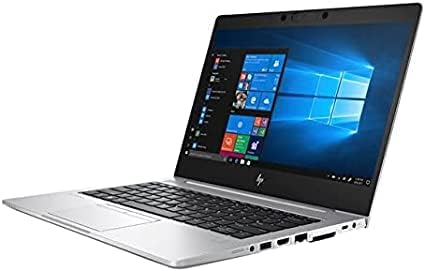
The 1920 x 1080 IPS panel with 400 nits brightness is a genuine highlight. At 400 cd/m² this screen is usable in bright environments, which is more than can be said for the 250-nit panels that populate a lot of budget and refurbished stock. The anti-glare coating does the work it’s supposed to. Colour coverage is 45% NTSC — adequate for productivity, not suitable for colour-accurate creative work. The display panel type is worth understanding if it matters to you; the display types guide covers the practical differences. The fingerprint reader and Smart Card reader work exactly as described — fast, reliable biometric login is a small daily convenience that quickly becomes something you miss on machines without it. Connectivity is Wi-Fi 5 (802.11ac), which handles typical home and office networks without issue but falls behind current-gen Wi-Fi 6 routers on throughput. Bluetooth is 5.0 — fine for peripherals. The built-in stereo speakers are adequate for calls and the occasional YouTube video; they’re not going to impress anyone, but they’re not embarrassing either.
Lifespan & Future-Proofing
The chassis itself will last. HP EliteBook construction is built to a corporate durability standard that consumer machines routinely fail to meet. If you’re not dropping it down a flight of stairs or running it through a coffee machine, the physical hardware — hinges, keyboard, trackpad, chassis — should remain functional for a good five to seven years from new. Given this was originally produced in 2019–2020, you’re buying into a machine that has already burned through some of that lifespan. That said, the build quality means it’s unlikely to physically fall apart on you in the near term.
Spec longevity is a different conversation. The i5-8365U was already not a top-tier chip when this laptop launched, and the gap between 8th-gen Intel and current hardware has only widened. By 2026 this processor will be seven years old. Windows 11 will continue to receive security updates until 2025’s end-of-support cycle, but Microsoft’s hardware requirements for future Windows releases are only getting tighter, and there’s no guarantee this chip makes the cut for whatever comes after. For office and light web use it’ll keep doing its job, but you’re not buying into a machine with a long runway. If you’re planning a five-year purchase, look at something with current-gen silicon — the buying guide has a clear framework for thinking about longevity vs. upfront cost.
View current stock and availability for the HP EliteBook 830 G6 on Amazon.
What Buyers Are Saying (And Potential Dealbreakers)
The HP EliteBook 830 G6 carries a rating of 3.8 out of 5 from 127 customer reviews on Amazon. That’s a middling score, and for a refurbished product it tells a specific story: the hardware itself broadly delivers what’s described, but the refurbishment lottery means some buyers get a great unit and others get one with a tired battery or cosmetic damage beyond what was advertised. A 3.8 on a refurbished product is meaningfully different from 3.8 on a new one — the spread of experiences is wider, and the outliers in both directions count for more.
The recurring praise centres on the build quality, the display brightness, and the overall snappiness of the NVMe SSD for everyday tasks. Buyers coming from older or cheaper machines consistently report a noticeable improvement in how quickly the machine gets out of its own way. The port selection — particularly having Ethernet built in — gets specific mentions from buyers who work in environments where Wi-Fi isn’t reliable.
The recurring complaints are almost entirely refurbishment-related rather than hardware-related: battery life coming in below expectations, cosmetic condition not matching the listing grade, and occasional inconsistency in what accessories were included. A smaller number of reviews flag performance limitations for anything beyond office tasks — which is a legitimate hardware observation, not a refurbishment issue. There are no widespread reports of thermal throttling or fan noise issues, which is consistent with what you’d expect from a well-built business chassis handling light workloads.
One dealbreaker worth flagging explicitly: if you’re buying this expecting it to feel like a modern laptop at the same price point, you’ll be disappointed. For context on what newer hardware at the budget end of the market looks like, it’s worth a direct comparison before committing.
Buyer Highlights
“Does everything I need for work — emails, Teams calls, spreadsheets — without any lag. Exactly what I was after.” — A consistent theme from buyers using this for office productivity.
“The screen is genuinely bright and clear, much better than I expected from a refurbished laptop.” — The 400 nit panel earns specific credit from buyers who’ve used dimmer machines before.
“Battery isn’t great — I’m getting about four hours at best before I need to plug in.” — Battery degradation is the most frequently cited disappointment and worth factoring into your expectations.
“Arrived with a few scratches that weren’t mentioned in the description, but the laptop itself works perfectly.” — Cosmetic condition inconsistency is a known variable with refurbished stock across this listing.
“Feels like a proper business machine — solid, no flex in the lid, and the keyboard is really nice to type on.” — Build quality praise is consistent, particularly the keyboard and chassis rigidity.
Who Should Buy It (And Who Shouldn’t)
Buy If
- You need a compact, well-built machine for office work, email, and video conferencing and don’t need to run anything GPU-intensive or computationally heavy
- You’re in a corporate or enterprise environment where the Smart Card reader, vPro support, and docking connector compatibility are actual requirements rather than nice-to-haves
- You want a secondary or travel machine with a proper port setup — including Ethernet and Thunderbolt — without paying new-laptop money for it
- You’re a student doing essay writing, research, and general productivity work and want something that feels more durable and professional than a consumer-grade alternative
Avoid If
- You need a machine that will remain capable and Windows-supported through the late 2020s — the 8th-gen Intel platform has a limited runway, and there’s no upgrade path for the processor
- You do any kind of video editing, photo processing, creative work, or gaming — the Intel UHD Graphics 620 cannot meaningfully assist with any of these tasks
- You need a reliable all-day battery without access to a charger — battery degradation on refurbished units is unpredictable, and the base spec is already modest
The Bottom Line
The HP EliteBook 830 G6 is a decent refurbished business laptop with a tight, honest use case: light office work, corporate environments where enterprise features matter, or as a secondary machine where build quality trumps bleeding-edge specs. The 400 nit IPS display and full port complement are genuine strengths. The 8th-gen Intel platform is a genuine constraint. If you go in knowing what it is — a well-built but ageing machine that handles productivity tasks cleanly and not much else — it earns its place. Go in expecting a modern laptop experience and you’ll be let down.
Browse the HP EliteBook 830 G6 on Amazon and check current buyer feedback.
At LaptopAdvisorOnline, our methodology is built on data transparency rather than simulated hands-on testing. We rigorously analyse official manufacturer specifications and aggregate verified customer sentiment to provide objective, fluff-free buying advice that helps you cut through the marketing jargon.
As an Amazon Associate, I earn from qualifying purchases.
Browse by Specification
Looking for something specific? Browse our analyses by hardware and feature below, or check all laptop analyses in the Best Budget Laptops category archive.
[AMD Processor Laptops] — [Intel Processor Laptops] — [16GB RAM Laptops] — [32GB RAM Laptops] — [Dedicated Graphics] — [Long Battery Life] — [Lightweight Laptops] — [Student Laptops]
Browse by Screen Size
[13-inch Laptops] — [14-inch Laptops] — [15-inch Laptops] — [16-inch+ Laptops]




