
Jumper S7-HI-12512 Analysis: Celeron’s Hard Limits
The Blunt Verdict
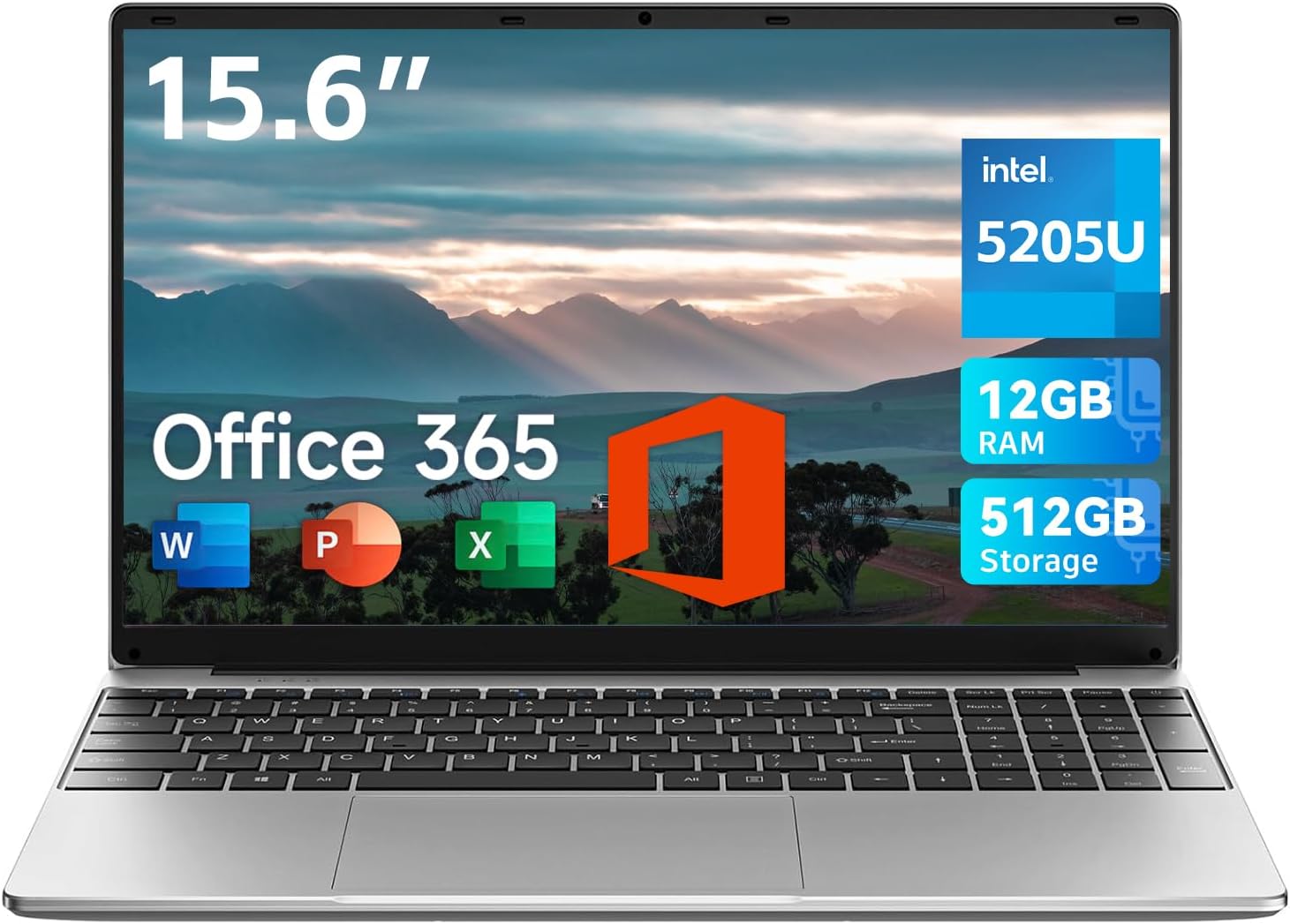
The Jumper S7-HI-12512 is a barebones machine aimed squarely at light document work and web browsing on a tight budget. It bundles a 12GB RAM, 512GB SSD, and a 1920×1080 display into a 15.6-inch chassis at a price point that makes it tempting. The headline weakness is the processor — an Intel Celeron — and that chip defines everything about what this laptop can and cannot do. If you need it for anything more demanding than writing emails and opening spreadsheets, stop here.
The 12GB of RAM is a step above the typical 8GB you’d find at this end of the market, which sounds encouraging. The 512GB SSD gives you enough room for documents, photos, and a few applications without constantly managing storage. But the Celeron processor is a hard ceiling on all of it. No amount of RAM makes a Celeron fast — it just means it manages basic multitasking without grinding to a halt quite as quickly.
Buy it if you need a secondary machine for simple tasks, or you’re buying it for someone who will only ever use Office and a browser. Avoid it if you expect smooth day-to-day performance, run into startup crashes regularly, or need a charger included in the box — because apparently that’s not guaranteed either.
See the Jumper S7-HI-12512 listing and current availability on Amazon.

Pros and Cons
Pros
- 12GB RAM is more headroom than most machines at this price point offer
- 512GB SSD means adequate local storage without paying extra for an upgrade
- Full HD 1920×1080 display on a 15.6-inch screen is a genuinely usable resolution
- One-year Office 365 subscription bundled in — saves you sorting it separately
- Several buyers report genuinely long battery life and quiet operation during light tasks
Cons
- Intel Celeron processor is chronically underpowered — real-world slowdowns and crashes reported repeatedly
- Office 365 activation has failed for at least one buyer, contradicting the core selling point
- At least one buyer received the laptop without a charger in the box
Spec Breakdown
- Model: Jumper S7-HI-12512
- CPU: Intel Celeron
- RAM: 12GB
- Storage: 512GB SSD
- Display: 15.6-inch, 1920×1080 Full HD
- Battery: 5000mAh
- Weight: 3.6lbs (approx. 1.63kg)
- Ports: USB 3.0 ×2, Type-C ×1, Mini HDMI ×1, 3.5mm headphone jack ×1, Micro TF card slot ×1
- Camera: 2MP front-facing webcam
- OS: Windows (with one-year Office 365 licence)
- Colour: Gray
Hardware & Performance Reality Check
The Intel Celeron processor is the defining spec here, and not in a good way. If you’re unfamiliar with where it sits, have a look at our laptop CPU guide — Celeron chips occupy the very bottom of Intel’s lineup, designed for ultra-low power consumption rather than throughput. In daily use that translates to: slow cold boot times (multiple buyers clocked the initial setup at close to two hours), sluggish response when more than a handful of browser tabs are open, and crashes under moderate load. The 12GB RAM softens this somewhat — you’re less likely to hit memory walls doing basic multitasking — but RAM doesn’t compensate for a processor that can’t keep up. If you want to understand why that matters, RAM capacity alone doesn’t tell the whole story.
The 512GB SSD is the most straightforwardly positive spec in this build. SSD storage means faster file access than an old spinning hard drive, so loading documents and booting the OS is quicker than it would otherwise be — the Celeron is still the bottleneck, but at least the storage isn’t adding to the problem. There’s no dedicated GPU here; you’re running on integrated graphics built into the Celeron, which means video editing is out, photo editing is painful, and gaming is limited to browser-based or very old titles at best. Check our performance benchmarks reference if you want to calibrate expectations against a spec sheet like this one.
In 2026 terms, the Celeron is already dated — these chips haven’t been competitive for everyday computing for years, and their trajectory isn’t improving. Student work — essays, spreadsheets, presentations — is manageable at a slow pace. Office tasks like email and light document editing are the sweet spot. Programming is technically possible but will test your patience for anything beyond basic scripting. Video editing: forget it. Gaming: integrated Celeron graphics means you’re looking at nothing more demanding than browser games or titles from over a decade ago. Be clear-eyed about those limits before committing.
One port worth flagging: the video output is Mini HDMI, not a standard full-size HDMI port. Most people don’t have a Mini HDMI cable lying around. If you’re planning to connect to an external monitor or projector, budget for an adaptor. The USB 3.0 and Type-C ports are welcome, but there’s no Thunderbolt, no Ethernet port, and no SD card reader — a Micro TF slot is not the same thing. See the full ports breakdown if connectivity matters to your workflow.
Check the full spec sheet and buyer Q&As for the Jumper S7-HI-12512 on Amazon.
Everyday Usability: Battery, Build & More
The 5000mAh battery is modest on paper, and at least one buyer reported 16 hours of use — which, if accurate, is well above what you’d expect from that figure. That probably reflects the Celeron’s extremely low power draw; it’s not doing enough work to drain the battery quickly. For light use — a bit of browsing, some document editing — you’ll likely get through a working day without hunting for a socket. That’s a genuine positive. The machine is also reported as running silently during light tasks, which makes sense given the low-power chip. Build quality gets a mixed reception: one buyer called it solidly built and attractive; another said it felt cheap. At this weight of 3.6lbs and 0.8 inches thick, it’s genuinely carry-friendly, but don’t confuse slim with sturdy.

The display is a 1920×1080 Full HD panel on a 15.6-inch screen, which gives a pixel density adequate for text and documents. What the specs don’t tell you is the panel type — there’s no data on whether it’s IPS, TN, or VA, which makes it hard to call on colour accuracy or viewing angles. Our display panel guide explains why that matters more than resolution at this price. The 2MP webcam is serviceable for video calls, nothing more. Speakers get poor marks from at least one buyer — quiet even through Bluetooth, with poor sound quality. There’s no fingerprint reader, no touchscreen, and no Ethernet port, so you’re entirely reliant on Wi-Fi. The keyboard film for UK layout is included, which is a small practical touch, though one buyer couldn’t locate the @ symbol — a basic usability issue that shouldn’t happen on a brand new machine.
Lifespan & Future-Proofing
Chassis longevity on a Jumper machine at this price is a question mark. The brand doesn’t have a long track record in the UK market, and build quality comments are too split to call definitively. Realistically, expect two to three years of light use before the build starts showing its age — hinges, keyboard flex, and battery degradation are the usual culprits at this end of the market.
On spec longevity, be blunt with yourself: the Celeron is already behind the curve in 2026. This chip was never intended to be a long-term workhorse — it’s a cost-reduction exercise from Intel, designed to hit a price point rather than deliver sustained performance. The RAM is listed at a maximum of 12GB, which suggests it may be soldered and non-upgradeable — and with no upgrade path on the processor either, there is no route to improving this machine’s performance short of replacing it. For genuinely budget options that offer a bit more longevity, there are better-specced machines available. If you’re considering anything for professional work, check our professional laptop shortlist instead — the gap in real-world performance is significant.
View current stock and availability for the Jumper S7-HI-12512 on Amazon.
What Buyers Are Saying (And Potential Dealbreakers)
The Jumper S7-HI-12512 carries a rating of 3.6 out of 5 from 16 customer reviews on Amazon. That’s a small sample — too few to draw firm statistical conclusions — but the spread is revealing: it’s not a case of most buyers being mildly satisfied. It’s a sharp split between five-star buyers who are using it for very light tasks and one-star buyers who hit crashes, failed setups, or missing accessories within the first week.
The recurring crash and slowness complaints are not one-off bad luck. Multiple buyers independently describe the same pattern: slow initial startup taking close to two hours, followed by recurring hard resets and sluggishness during normal use. That points to either a systemic software bloat issue out of the box, or the Celeron simply struggling with Windows setup overhead — possibly both. The Office 365 activation failure is a separate issue and arguably a more serious one given it’s the primary selling point of this machine.
One buyer flagged the absence of a charger in the box. If accurate, that’s a significant fulfilment problem, not a minor quibble. Another couldn’t locate the @ key — which is a keyboard layout issue that Jumper should have resolved before shipping UK units. These aren’t performance complaints; they’re basic product quality failures.
On the positive side, buyers using this for exactly what it’s designed for — quiet office use, light browsing, document editing — report genuine satisfaction. One noted 16 hours of battery life and silent running. Another praised the large touchpad and straightforward setup. The disconnect between the positive and negative reviews maps almost perfectly onto how each buyer is using the machine.
Buyer Highlights
“Start up took nearly two hours and required a hard reset — it crashes every couple of hours and I’ve had to hard reboot several times already.” — Multiple buyers report identical symptoms, which suggests this is a pattern rather than an isolated unit fault.
“It’s advertised as having Microsoft 365 but when opened it only offered a free month trial, and even that wouldn’t accept my credit card.” — The headline bundled software claim didn’t hold up for at least one buyer. Verify activation before you rely on it.
“It lasted 16 hours, runs silent, and the screen is huge — keyboard and touchpad work great.” — Consistent with what the hardware suggests for very light use; battery life at low load is a genuine strength.
“The laptop didn’t come with a charger, so I was very disappointed — really struggling to get started.” — Worth confirming what’s in the box before you need it urgently.
“Runs smoothly so far without any issue — set up was straightforward and easy, charging lasts longer than expected.” — Buyers using it for minimal tasks report a noticeably better experience than those pushing it harder.
Who Should Buy It (And Who Shouldn’t)
Buy If
- You need a basic secondary machine for emails, web browsing, and Word documents — nothing more
- Quiet, fanless operation during light tasks matters to you, such as working in shared spaces
- You’re buying for someone who will genuinely only use it for simple tasks and won’t push it
Avoid If
- You need a machine that handles multiple applications reliably without crashes — the Celeron track record here is poor
- Office 365 is the primary reason you’re buying it — activation has demonstrably failed for buyers and cannot be guaranteed
- You want a machine that will still feel usable in three to four years — the Celeron is already a dead end, and there’s no upgrade path
The Bottom Line
The Jumper S7-HI-12512 is a narrow machine for narrow use cases. If your needs start and end at basic documents, email, and light browsing, and you’re fully aware that the Celeron processor is the ceiling rather than the floor, it can do that job quietly and with decent battery life. But the failure rate in the early buyer reports — crashes, Office activation problems, missing chargers — is too high to recommend it confidently. If you’re shopping in this part of the market, have a look at our buying guide before committing, and read the spec breakdown guide so you know exactly what a Celeron means in practice. There are better-specced alternatives in the budget laptop category if you’re willing to look a little harder.
Read the latest buyer questions and answers for the Jumper S7-HI-12512 on Amazon.
At LaptopAdvisorOnline, our methodology is built on data transparency rather than simulated hands-on testing. We rigorously analyse official manufacturer specifications and aggregate verified customer sentiment to provide objective, fluff-free buying advice that helps you cut through the marketing jargon.
As an Amazon Associate, I earn from qualifying purchases.
Browse by Specification
Looking for something specific? Browse our analyses by hardware and feature below, or check all laptop analyses in the Best Budget Laptops category archive.
[AMD Processor Laptops] — [Intel Processor Laptops] — [16GB RAM Laptops] — [32GB RAM Laptops] — [Dedicated Graphics] — [Long Battery Life] — [Lightweight Laptops] — [Student Laptops]
Browse by Screen Size
[13-inch Laptops] — [14-inch Laptops] — [15-inch Laptops] — [16-inch+ Laptops]




