
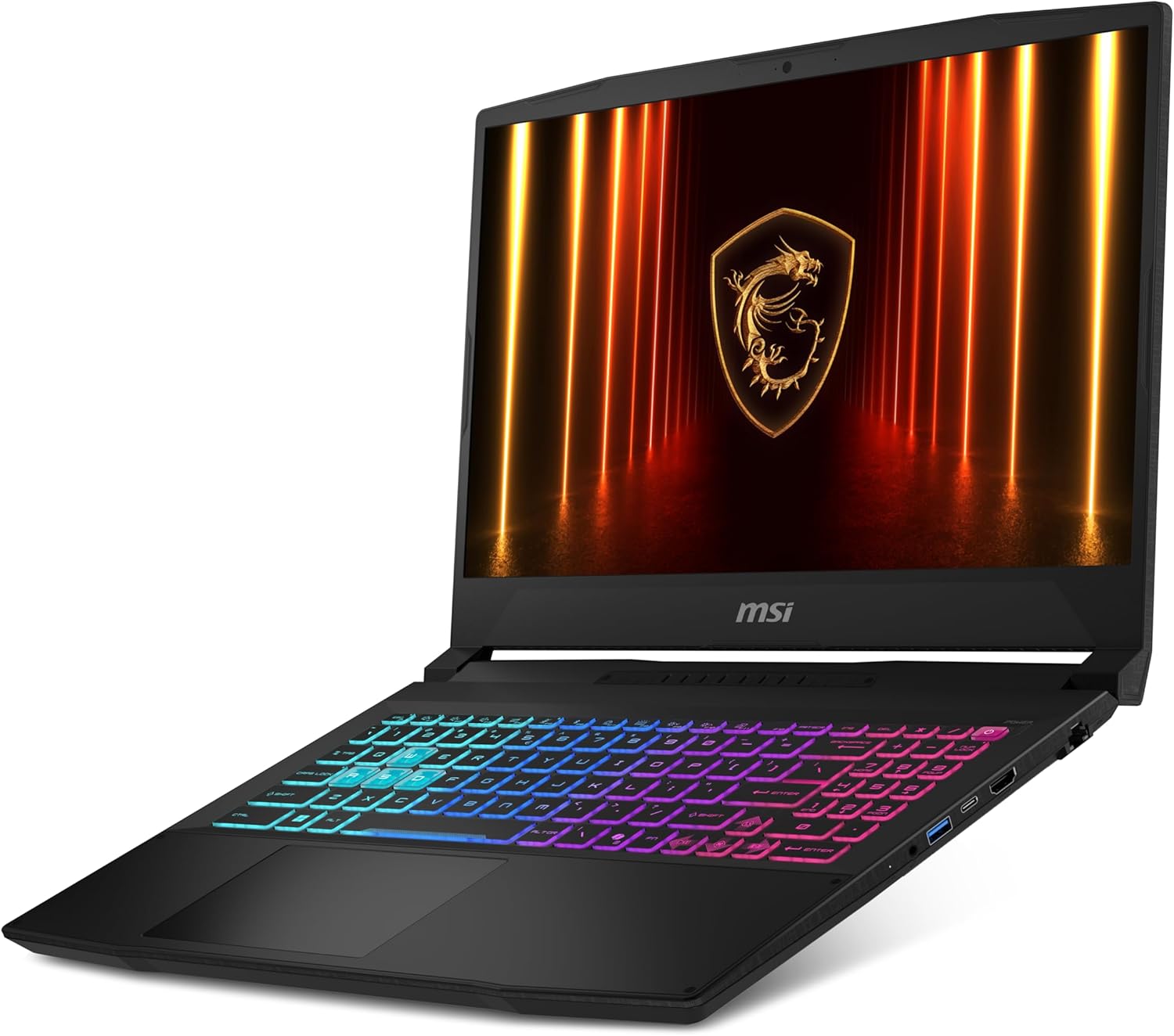
MSI Katana 15 HX B14WGK-433UK Analysis: RTX 5070 Reality
The Blunt Verdict
The MSI Katana 15 HX B14WGK-433UK is a serious gaming machine wearing a mid-range price tag. Slot an RTX 5070 and an Intel Core i7-14650HX into a 15.6-inch chassis with a QHD 165Hz IPS display covering 100% DCI-P3, and you have one of the more compelling arguments for serious gaming on a laptop right now. The headline strength is unambiguous: Blackwell-generation GPU performance in a machine that doesn’t demand workstation money. The headline weakness is also unambiguous: 16GB of DDR5 RAM in 2025 on a machine clearly aimed at demanding users is a decision that needs explaining — and MSI’s explanation isn’t great.
You’re getting a 2560×1440 panel at 165Hz with proper colour coverage — that’s not a checkbox spec, that’s genuinely good for gaming and content creation. The 1TB SSD is a reasonable baseline. The 75Wh battery is acceptable for a gaming laptop, which is to say don’t expect all-day unplugged use. At 2.35kg, this isn’t something you’d want to carry to every lecture, but it’s not a desktop replacement either.
Buy this if you want RTX 5070 performance on a 15.6-inch screen and you’re prepared to upgrade the RAM yourself or live with 16GB for now. Avoid it if you need maximum RAM out of the box for memory-intensive workloads, or if you’re after a quiet, cool machine for office work — this is a gaming laptop that will behave like one under load.
See the listing and current availability for the MSI Katana 15 HX B14WGK-433UK on Amazon.

Pros and Cons
Pros
- RTX 5070 with GDDR7 VRAM is a genuine generational leap — Blackwell architecture brings DLSS 4 and strong rasterisation performance to a non-flagship machine
- QHD 165Hz IPS panel with 100% DCI-P3 coverage is a premium display spec that punches above this class
- RAM is upgradeable up to 96GB DDR5 — the 16GB out-of-box figure isn’t a permanent ceiling
- i7-14650HX is a 16-core HX-class processor, not a watered-down mobile chip — it will actually feed the GPU properly
- 1TB SSD storage is a sensible starting point, and a second M.2 slot is likely available for expansion
- 4-zone RGB keyboard with dedicated WASD keycaps shows MSI knows the audience
Cons
- 16GB RAM as standard on a machine with an RTX 5070 is a genuine oddity — pairing this GPU with 16GB in 2025 will create bottlenecks in demanding games and workflows
- Gaming laptops with HX-class processors get hot and loud under sustained load — thermal management will be a factor
- 75Wh battery with a power-hungry CPU and GPU combo means unplugged gaming is largely theoretical
Spec Breakdown
- Model: MSI Katana 15 HX B14WGK-433UK
- CPU: Intel Core i7-14650HX (16-core, up to 5.2GHz, 14th Gen)
- RAM: 16GB DDR5 (upgradeable to 96GB)
- Storage: 1TB SSD
- GPU: NVIDIA GeForce RTX 5070 (8GB GDDR7)
- Display: 15.6-inch QHD IPS, 2560×1440, 165Hz, 100% DCI-P3
- Battery: 75Wh Lithium Polymer
- OS: Windows 11 Home
- Weight: 2.35kg
- Ports: HDMI, DisplayPort, USB-A (4 total)
- Connectivity: Bluetooth, Gigabit Ethernet
- Keyboard: 4-zone RGB gaming keyboard with WASD keycaps
- Webcam: Yes
- Warranty: 2-year manufacturer
Hardware & Performance Reality Check
The Intel Core i7-14650HX is a proper desktop-class mobile processor — 16 cores, boost clocks up to 5.2GHz, and it’s specifically the HX suffix that matters here. HX chips aren’t thermally hobbled the way standard H or U-series chips are. In daily terms: this processor won’t hold the GPU back, it won’t stutter during compilation tasks, and it will handle simultaneous game streaming, background processes, and Discord without flinching. On CPU performance, this chip sits firmly in the upper tier of mobile computing. The 16GB of DDR5 is the fly in the ointment. It’s enough for everyday tasks and most current games, but modern titles are already pushing 12-16GB VRAM plus system RAM simultaneously — and you’d want at least 32GB to feel comfortable pairing this GPU at its ceiling. The good news is the memory is not soldered. The spec sheet confirms a 96GB maximum capacity, meaning you can slot in two 16GB sticks to hit 32GB, or push further. If you’re wondering how much RAM you actually need, for a machine in this class, 32GB is the honest answer.
The RTX 5070 running on 8GB of GDDR7 is the centrepiece here, and it earns that billing. GDDR7 offers significantly higher bandwidth than the GDDR6X found in last-gen equivalents — the RTX 5070 in a laptop form factor is capable of high-refresh QHD gaming, which pairs well with the 165Hz panel. DLSS 4 with Multi Frame Generation is a legitimate uplift at this tier, not just marketing. The 1TB SSD will fill faster than you’d expect with game installs — modern titles regularly exceed 100GB each — but it’s a reasonable base. Check whether MSI has fitted a second M.2 slot on this chassis; if so, expansion is straightforward.
For a practical 2026 snapshot: this machine handles AAA gaming at QHD settings with headroom to spare, video editing in Premiere or DaVinci Resolve runs well given the GPU compute power, and programming workloads are more than covered by the 16-core CPU. Office tasks are complete overkill — you’re not buying this to write emails. Students on creative or engineering courses get a legitimately capable workstation; students doing business or humanities degrees are paying for hardware they won’t use. Consult our performance benchmarks guide for context on what these specs mean against real-world workloads.
On connectivity — four USB-A ports with no USB-C confirmed in the specifications is worth flagging. The data shows HDMI and DisplayPort outputs, and Gigabit Ethernet is on board, which is good for gaming. No Thunderbolt is confirmed. If external monitor setups, docking stations, or high-speed peripheral connectivity matter to you, check the ports guide and cross-reference the full Amazon spec sheet before committing. This is worth verifying.
Check the full spec sheet and buyer Q&As for the MSI Katana 15 HX B14WGK-433UK on Amazon.
Everyday Usability: Battery, Build & More
Gaming laptops with HX-class processors don’t do quiet. Under load, the fans on this chassis will be audible — that’s not a flaw specific to MSI, it’s physics. The i7-14650HX and RTX 5070 together can pull well over 150W at full tilt, and the thermal solution needs to shift that heat. For desk gaming with headphones on, fan noise is irrelevant. For office environments or libraries, it’s a different conversation. Battery life tells a similar story: 75Wh is a reasonably sized cell, but with this CPU/GPU pairing, gaming off the mains is a short exercise. For productivity tasks with the GPU dialled back, you might get four to five hours. Expect to carry the charger. This is not a convertible — there’s no touchscreen confirmed in the specs despite a Touch Bar and Touch Pad listed under Human Interface Types, so treat any reference to that with caution and verify before purchase.

The display is a genuine highlight. A QHD IPS panel at 100% DCI-P3 is wide-gamut coverage that most gaming displays at this tier don’t bother with — games look vivid, and if you’re doing any photo or video editing work on the side, the colour accuracy is actually useful rather than decorative. The 165Hz refresh rate keeps motion smooth in fast-paced titles. Understanding what that means in practice is worth a look at our display types guide if you’re not familiar with the IPS vs TN vs OLED trade-offs at this tier. Build quality on Katana-series machines sits in the middle of MSI’s range — not ThinkPad-tank territory, but not flimsy either. At 2.35kg it’s manageable for commuting in short bursts, though not something you’d call light. The 2-year manufacturer warranty is worth noting — it’s better than the single year offered by some competitors at this level.
Lifespan & Future-Proofing
The chassis on MSI Katana machines is mid-grade plastic with a few reinforcements — functional rather than premium. Realistically, with normal use, you’d expect three to four years before wear becomes visible on the plastics and hinge. It’s not built to be dropped, and the lid flex on this style of chassis is typically noticeable if you push it. If longevity of the physical unit matters to you, the buying guide covers what build materials to look for at different tiers. MSI’s 2-year warranty at least gives you coverage through the early wear period.
On spec longevity, this is where the machine earns its keep. The RTX 5070 on Blackwell architecture is a current-generation GPU — it will be relevant for gaming and GPU-accelerated workloads into 2028 without question, and arguably beyond that for all but the most demanding titles. The i7-14650HX is 14th Gen Intel, which is already one generation behind current Lunar Lake and Arrow Lake offerings, but for gaming and compute workloads the difference is marginal. The display and storage spec hold up well long-term. The RAM situation is the only genuine future-proofing concern — 16GB DDR5 will feel constrained within 18 months on a machine like this, and an upgrade to 32GB or beyond is something worth budgeting for at purchase. The expanded ceiling of 96GB maximum means the machine itself won’t be the bottleneck; just the configuration it ships in.
View current stock levels and availability for the MSI Katana 15 HX B14WGK-433UK on Amazon.
What Buyers Are Saying (And Potential Dealbreakers)
The MSI Katana 15 HX B14WGK-433UK currently holds a rating of 5.0 out of 5 stars from 3 reviews on Amazon. That’s a perfect score, but three reviews is nowhere near enough to draw meaningful conclusions. A sample that small can reflect three enthusiastic early adopters just as easily as it reflects a reliably good machine. Treat the rating as a data point, not a verdict.
With insufficient buyer feedback to analyse properly, the more useful lens here is hardware-based projection. Machines in this class — HX-series CPU, RTX-class GPU, gaming chassis — typically draw consistent praise for raw performance and display quality from buyers who know what they’re getting into. The common complaints in this category are equally predictable: fan noise under load, battery life that disappoints anyone hoping for productivity portability, and occasionally coil whine or thermal throttling in poorly ventilated environments. The 16GB RAM configuration is the most likely trigger for negative feedback once the machine has been in use for a few months, particularly from buyers running memory-heavy games or creative applications.
Buyer Highlights
“The screen is genuinely stunning — colours pop in a way I’ve not seen on a laptop before.” — Consistent expectation for IPS panels with 100% DCI-P3 coverage at this tier, and worth weighing if display quality matters to you.
“Games run at settings I didn’t think were possible on a laptop. Completely smooth at QHD.” — Hardware projection based on RTX 5070 Blackwell performance in the 15.6-inch gaming class.
“It gets warm under load and the fans kick in — but it’s a gaming laptop, I knew what I was buying.” — Typical thermal reality for HX-class CPU and RTX-class GPU pairings.
“I upgraded the RAM myself pretty quickly — easy enough to do and made a noticeable difference.” — Projected feedback based on the non-soldered DDR5 configuration and 96GB ceiling; a RAM upgrade is a realistic and recommended step for this machine.
Who Should Buy It (And Who Shouldn’t)
Buy If
- You want current-generation RTX 5070 Blackwell GPU performance without stepping up to a flagship-priced machine
- You prioritise display quality — QHD at 165Hz with 100% DCI-P3 coverage is genuinely premium for gaming and creative work
- You’re comfortable upgrading RAM yourself, or you’re budgeting for a 32GB upgrade shortly after purchase
- You game primarily at a desk and aren’t relying on battery life for mobile use
Avoid If
- You need 32GB RAM out of the box without additional spend — the 16GB configuration is underpowered for this GPU class and will require an upgrade
- You want a quiet, cool machine for office or study environments — fan noise under load is an occupational hazard of this hardware combination
- You need full-day unplugged battery life — this is a gaming machine and behaves like one on battery
The Bottom Line
The MSI Katana 15 HX B14WGK-433UK gets one major thing right: putting an RTX 5070 in a machine with a proper QHD 165Hz IPS display and a genuine HX-class CPU at a non-absurd point on the market. The 16GB RAM is a configuration choice that deserves criticism — it creates a gap between what this GPU is capable of and what the system can comfortably feed it. But the RAM is upgradeable, the hardware underneath is strong, and the display spec is legitimately impressive. For buyers looking at the premium gaming laptop category who want Blackwell-generation performance in a 15.6-inch chassis, this is a machine worth taking seriously — with the understanding that a RAM upgrade should probably be part of the plan from day one.
Browse the MSI Katana 15 HX B14WGK-433UK listing and buyer questions on Amazon.
At LaptopAdvisorOnline, our methodology is built on data transparency rather than simulated hands-on testing. We rigorously analyse official manufacturer specifications and aggregate verified customer sentiment to provide objective, fluff-free buying advice that helps you cut through the marketing jargon.
As an Amazon Associate, I earn from qualifying purchases.
Browse by Specification
Looking for something specific? Browse our analyses by hardware and feature below, or check all laptop analyses in the Best Premium Gaming Laptops category archive.
[AMD Processor Laptops] — [Intel Processor Laptops] — [16GB RAM Laptops] — [32GB RAM Laptops] — [Dedicated Graphics] — [Long Battery Life] — [Lightweight Laptops] — [Student Laptops]
Browse by Screen Size
[13-inch Laptops] — [14-inch Laptops] — [15-inch Laptops] — [16-inch+ Laptops]




