
HP 14s-dq5005sa Analysis: Clear Limits, Clear Purpose
The Blunt Verdict
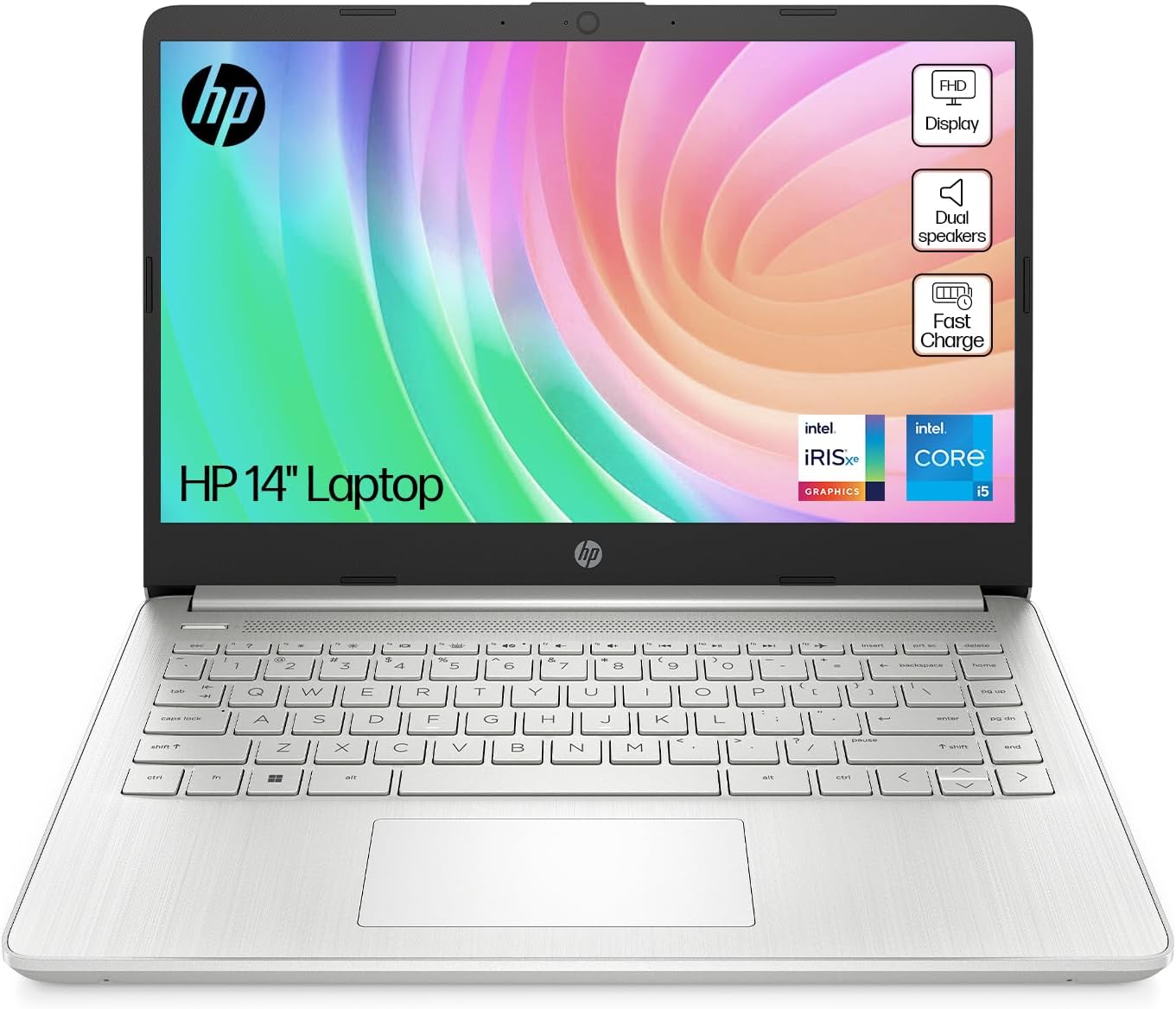
The HP 14s-dq5005sa is a straightforward, no-nonsense laptop aimed squarely at students and light home users who need something that works without drama. It runs on an Intel Core i5-1235U processor, packs 8GB of DDR4 RAM, and ships with a 512GB SSD — a combination that handles everyday computing without embarrassing itself. The headline weakness is also straightforward: 8GB of RAM with a maximum ceiling of 8GB means there’s nowhere to go if your workload grows. You’re buying exactly what’s in the box, forever.
This isn’t trying to be anything it’s not. The 14-inch 1920 x 1080 FHD display with anti-glare coating is functional if unspectacular. The 41Wh battery promises up to 8 hours of use — realistic for light tasks, optimistic for anything demanding. Intel Iris Xe handles graphics duties, which means browsing, video streaming, and light photo work are fine. Gaming is largely off the table. If you want to understand how specs like these translate to real-world use, the specs explained guide is worth a read before committing.
Buy this if you’re a student, a home user doing emails and documents, or someone who just needs a reliable machine for light daily tasks. Don’t buy it if you’re planning to run demanding software, edit video, do any serious multitasking, or want upgrade headroom. The RAM ceiling alone makes this a dead-end for anyone who might need more down the line.
See the HP 14s-dq5005sa listing and current availability on Amazon.

Pros and Cons
Pros
- The 512GB SSD is a proper amount of storage for a machine at this level — you won’t be deleting files every other week
- The Intel Core i5-1235U is a 12th Gen chip with 10 cores, which handles multitasking better than most of its budget-tier competition
- Anti-glare coating on the display is a genuine quality-of-life feature that many rivals at this tier skip
- At 1,460 grams, this is a genuinely light machine — easy to carry between lectures or rooms without it becoming a chore
- Windows 11 Home included out of the box — no additional OS cost, no fuss
Cons
- The RAM is capped at 8GB with no upgrade path — that’s the ceiling, not the starting point
- A colour gamut value of 45% sRGB means the display will look washed out compared to better-specced screens; acceptable for documents and video, poor for anything colour-sensitive
- No Ethernet port means you’re reliant on Wi-Fi 5 (802.11ac) — fine in most homes, but not ideal if you need a wired connection for stability or speed
Spec Breakdown
- Model: HP 14s-dq5005sa (A2WB2EA#ABU)
- CPU: Intel Core i5-1235U (12th Gen, 10 cores, up to 4.4GHz)
- RAM: 8GB DDR4 (3200MHz, max 8GB)
- Storage: 512GB SSD
- GPU: Intel Iris Xe Graphics (shared memory)
- Display: 14-inch FHD, 1920 x 1080, LED LCD, anti-glare, 250 nits, 45% colour gamut
- Battery: 41Wh, 3-cell lithium-ion, up to 8 hours
- OS: Windows 11 Home
- Weight: 1,460 grams
- Ports: USB 3.0 Type-A (x2), USB 3.0 Type-C (x1), HDMI
- Connectivity: Wi-Fi 5 (802.11ac), Bluetooth
- Camera: Front-facing webcam with built-in microphone
- Keyboard: Standard (no mention of backlight)
- Speakers: Dual speakers
Hardware & Performance Reality Check
The Intel Core i5-1235U is a 12th Gen chip with a hybrid architecture — two performance cores backed by eight efficiency cores. For everyday tasks this is plenty: browser tabs, Word documents, spreadsheets, video calls, and streaming all run without complaint. Where it gets trickier is sustained load — this processor can boost to 4.4GHz but its thermal headroom in a thin chassis like this tends to limit how long it sustains those peaks. Don’t expect it to hold top-end performance under prolonged heavy workloads. The 8GB of DDR4 RAM is workable for light use, but with Chrome or Edge open alongside Teams or Zoom, you’ll feel the pinch. If you want a proper understanding of how RAM affects day-to-day use, see our guide on how much RAM you actually need. The hard ceiling at 8GB with no upgrade path is genuinely frustrating — it’s a decision that limits this machine’s useful lifespan from the outset.
The 512GB SSD is one of this laptop’s better features. Even a mid-speed SATA SSD is dramatically faster than the HDDs still lurking in some budget machines, and 512GB gives you real breathing room for files, photos, and applications without constant housekeeping. Storage type isn’t confirmed in the spec data, so treat that caveat as noted — but either way, an SSD at this size is solid value. The Intel Iris Xe Graphics handles integrated duties with more grunt than older Intel UHD solutions, making light photo editing and casual media playback fine. It shares system memory rather than having dedicated VRAM, so anything GPU-intensive is off the table. Gaming, 3D rendering, and serious video work aren’t what this chip is for — for context on what integrated graphics actually means in practice, the CPU guide covers it well.
In terms of what this machine can handle in 2026: student coursework, yes, comfortably. Office tasks and email, yes. Light programming (Python scripts, web development basics), probably fine. Video editing beyond basic trimming, no. Gaming beyond very old or browser-based titles, no. Anything requiring reliable sustained performance under heavy load — also no. Think of this as a capable note-taking and browsing machine that can handle office software without fuss, and not much beyond that.
The port situation deserves a specific mention. Two USB 3.0 Type-A ports, one USB 3.0 Type-C, and HDMI — that’s a usable if not generous selection. No Thunderbolt, no dedicated SD card reader, and no Ethernet. If you regularly plug in multiple peripherals simultaneously, you’ll be reaching for a hub quickly. The ports guide is handy if you’re not sure what you actually need.
Check the full spec sheet and buyer Q&As for the HP 14s-dq5005sa on Amazon.
Everyday Usability: Battery, Build & More
At 1,460 grams, this is one of the lighter machines you’ll find in the budget laptop category. Genuinely chuckable in a bag without adding noticeable weight. The 41Wh battery with an 8-hour claim is modest by modern standards — in practice, expect around 5–6 hours under real mixed use (screen at reasonable brightness, Wi-Fi on, a handful of apps open). HP Fast Charge is a useful inclusion, though the claim that you can top up meaningfully in short breaks depends on the charger provided and usage patterns. For a full working day away from a socket, you’d want a charger nearby.

The 14-inch FHD display with anti-glare coating is a practical choice for indoor use — the coating genuinely helps in offices or near windows. The downside is the 45% colour gamut, which is below average even for budget displays. Colours look flat rather than vivid, and if you’re used to a phone screen or a modern MacBook, this will look noticeably underwhelming. Maximum brightness of 250 nits is fine for indoor use, borderline in bright conditions. No touchscreen — worth stating plainly, particularly for anyone coming from a tablet or 2-in-1. The display tech and what gamut percentages actually mean is covered in our display types guide if you want more context. On the audio front, dual speakers are present, and HP’s budget audio tends toward functional rather than good — adequate for calls and background playback, nothing to write home about. There’s no fingerprint reader listed in the spec data. No keyboard backlight is confirmed either — worth checking if you work in low light.
Lifespan & Future-Proofing
HP’s plastic-chassis budget machines are built to a price. The silver finish looks reasonable in photos, but the build quality in this class typically means flex in the lid, some keyboard tray give, and a hinge that’s fine for a few years but won’t survive being treated roughly. Realistically, the chassis holds up for 3–4 years with normal use. If you’re hard on hardware, that timeline shortens.
Spec longevity is the bigger concern. The i5-1235U and 8GB DDR4 combination handles 2024–2025 demands acceptably, but with no RAM upgrade path, this machine has no room to grow. By 2026 and beyond, 8GB is increasingly tight for Windows 11 with modern browser workloads — Microsoft’s own system requirements are heading in a direction that makes 8GB feel like a floor rather than a comfortable working amount. The 512GB SSD is at least replaceable on most HP 14s units (though you’d want to verify for this specific model), so storage isn’t necessarily a permanent dead-end. But the RAM situation is what it is. If you’re expecting this to serve you comfortably for 4–5 years without feeling the squeeze, you’ll likely be disappointed. Two to three years of decent performance is a more honest expectation, particularly as software continues to bloat. For a longer-term investment, checking out the mid-range options is worth your time.
View current stock levels for the HP 14s-dq5005sa on Amazon.
What Buyers Are Saying (And Potential Dealbreakers)
The HP 14s-dq5005sa holds a rating of 4.4 out of 5 stars from 171 Amazon customer reviews. That’s a solid enough sample to draw meaningful conclusions, though it’s worth noting that Amazon ratings tend to skew positive — buyers who encounter serious problems often return rather than review. The 4.4 figure is genuinely encouraging rather than being dismissed out of hand, but it doesn’t mean there are no rough edges.
The most consistent praise centres on value for money in the context of light daily use. Buyers who bought this for students, for family members needing a home browsing machine, or for basic work tasks generally report satisfaction. Setup is straightforward, Windows 11 loads cleanly, and the machine doesn’t arrive cluttered with excessive bloatware — a genuine plus. The weight gets specific mentions as a selling point for commuters and students. The display draws mixed feedback: fine for general use, but those used to better screens notice the colour quality gap. No recurring complaints about physical build quality failures appear, which is reassuring for a plastic-chassis machine at this level. For buyers comparing this against other options in this tier, our performance benchmarks guide gives useful context on what numbers like these mean in real use.
The RAM is the elephant in the room that knowledgeable buyers flag. Anyone who understands specs and reviews the listing carefully will see the 8GB ceiling and either accept it or look elsewhere. Buyers who didn’t realise this limitation upfront occasionally express frustration when the machine starts struggling with heavier multitasking after a few months. That’s not a product defect — it’s a spec reality that the product listing doesn’t make conspicuous enough.
Buyer Highlights
“Perfect for my daughter at university — it boots up fast, handles all her coursework, and she can carry it around all day without it weighing her down.” — A common theme from parents buying for students.
“Does exactly what I need it to — emails, spreadsheets, video calls. Nothing fancy but it hasn’t let me down once.” — Consistent feedback from home and light office users.
“The screen isn’t as bright or colourful as I expected, but for what I paid, I can’t really complain.” — Worth bearing in mind if display quality matters to you.
“Set it up in about twenty minutes straight out of the box — I’m not technical at all and it was genuinely straightforward.” — Repeated by several first-time laptop buyers in the reviews.
“It’s noticeably lighter than my old laptop and I actually take it with me now instead of leaving it on the desk.” — The weight makes a practical difference for people on the move.
Who Should Buy It (And Who Shouldn’t)
Buy If
- You’re a student or home user who needs a light, capable machine for documents, web browsing, video calls, and streaming — this does all of that without complaint
- Portability matters: at 1,460 grams, this is genuinely easy to carry daily without thinking about it
- You want a clean Windows 11 experience on a proper 512GB SSD without paying over the odds for storage
- You understand the RAM ceiling going in and your workload sits comfortably within what 8GB can handle
Avoid If
- You run multiple heavy applications simultaneously, edit video, or do anything that benefits from more than 8GB of RAM — there’s no upgrade path, and this will frustrate you within a year
- You need a display for creative work, colour accuracy, or anything where the 45% colour gamut will be visibly limiting — it will be
- Gaming is on your agenda in any serious sense — the Intel Iris Xe won’t cut it, and you’d be better served looking at the budget gaming options instead
The Bottom Line
The HP 14s-dq5005sa does what it says on the tin — a light, tidy laptop for everyday tasks with a decent processor, proper SSD storage, and nothing that will shock or disappoint a buyer who goes in with clear expectations. The 8GB RAM ceiling is the one thing to genuinely weigh up before purchasing. If your workload fits within it, this is a reasonable choice. If you might need more, walk away now rather than regret it in eighteen months. Check the buying guide if you’re still not sure what you actually need — it’s a genuinely useful exercise before spending money.
Read the latest buyer questions and answers for the HP 14s-dq5005sa on Amazon.
At LaptopAdvisorOnline, our methodology is built on data transparency rather than simulated hands-on testing. We rigorously analyse official manufacturer specifications and aggregate verified customer sentiment to provide objective, fluff-free buying advice that helps you cut through the marketing jargon.
As an Amazon Associate, I earn from qualifying purchases.
Browse by Specification
Looking for something specific? Browse our analyses by hardware and feature below, or check all laptop analyses in the Best Budget Laptops category archive.
[AMD Processor Laptops] — [Intel Processor Laptops] — [16GB RAM Laptops] — [32GB RAM Laptops] — [Dedicated Graphics] — [Long Battery Life] — [Lightweight Laptops] — [Student Laptops]
Browse by Screen Size
[13-inch Laptops] — [14-inch Laptops] — [15-inch Laptops] — [16-inch+ Laptops]




