
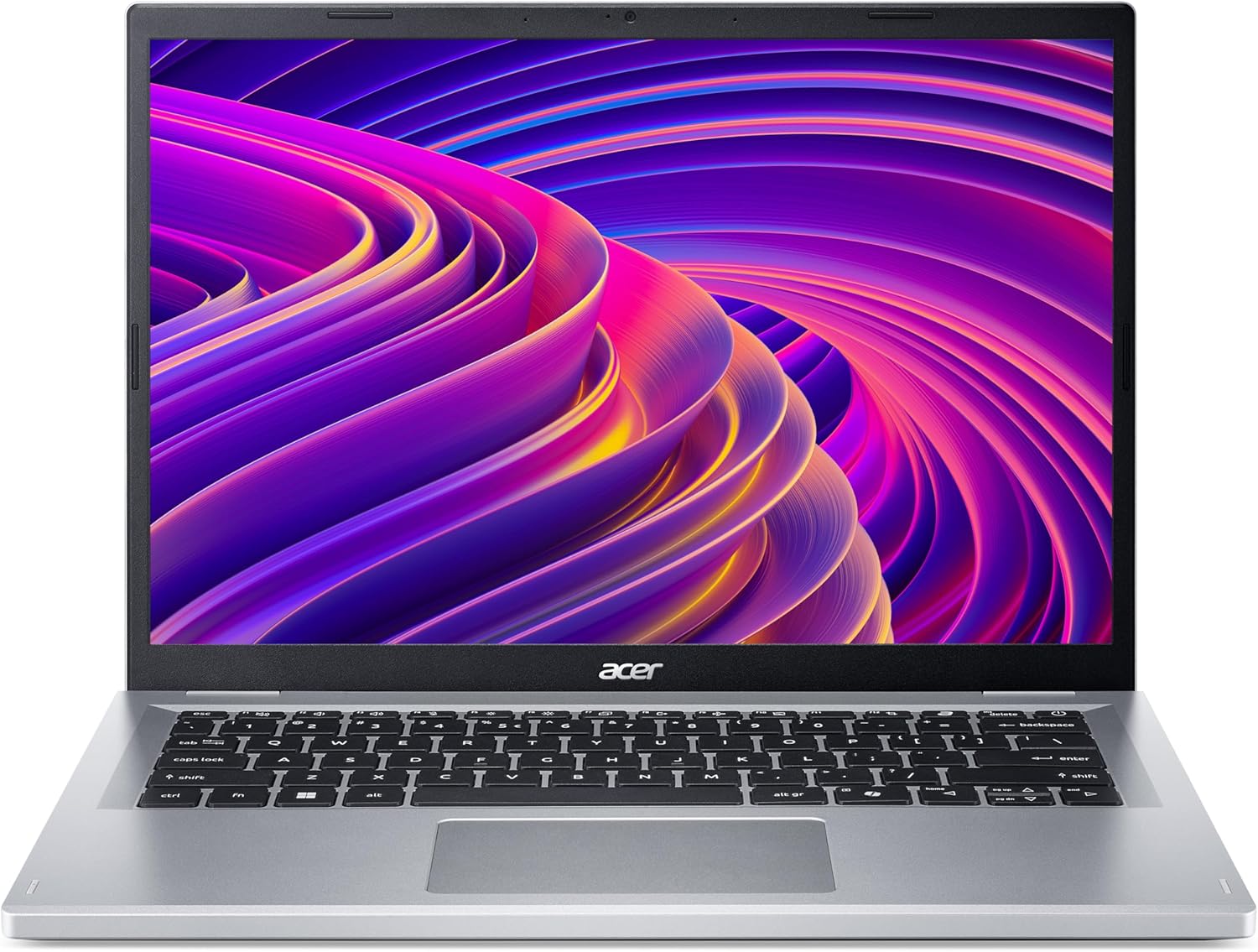
Acer Aspire Go 14 AG14-32P Analysis: Sharp Screen, Short Battery
The Blunt Verdict
The Acer Aspire Go 14 AG14-32P is a stripped-back budget machine built for light daily use — web browsing, document work, video calls, and not much else. It’s aimed squarely at students, families, and anyone who needs a functional Windows laptop without spending a lot. If that’s you, there’s a reasonable amount to like here. If you need anything beyond basic tasks, keep scrolling through the budget laptop options before committing.
The headline specs: an Intel N150 processor, 8GB of DDR5 RAM, 128GB of UFS storage, and a 14-inch 1920×1200 IPS-class display with a 16:10 aspect ratio. The display resolution is genuinely decent for this segment — WUXGA at 16:10 gives you more vertical screen space than the tired 1366×768 panels that plague cheaper machines. The N150 chip is a low-power processor that keeps the weight down to 1.45kg and helps with thermal management, but it’s not quick. Expect smooth Word documents and YouTube, not smooth Photoshop.
Buy it if you’re a student, a parent setting up a first laptop for a teenager, or someone who only needs a reliable machine for light daily tasks. Avoid it if you’re editing video, running anything demanding, or expecting the 128GB storage to last more than a year without cloud storage or an external drive.
Check the current listing and availability for the Acer Aspire Go 14 AG14-32P on Amazon.

Pros and Cons
Pros
- WUXGA 1920×1200 display with 16:10 ratio is a genuine step above most budget-tier screens
- DDR5 RAM gives faster memory bandwidth than the DDR4 found in many competing budget machines
- 1.45kg weight makes it genuinely light enough to carry daily in a bag
- Wi-Fi 6 (802.11ax) means it won’t be a connectivity bottleneck on modern routers
- USB-C with 4K external display output adds genuine desk flexibility for the money
Cons
- 128GB storage is cramped — Windows 11 alone eats a significant chunk, leaving limited room for apps and files
- Real-world battery life appears to fall well short of the claimed 8 hours based on buyer feedback
- Intel N150 is a low-power efficiency chip — fine for basic tasks, but it will struggle under any meaningful workload
Spec Breakdown
- Model: Acer Aspire Go 14 AG14-32P (NX.J3REK.002)
- CPU: Intel N150, up to 3.6GHz, 4 cores
- RAM: 8GB DDR5 (max 16GB)
- Storage: 128GB UFS
- GPU: Intel Integrated Graphics (shared memory)
- Display: 14-inch WUXGA 1920×1200, 16:10, 60Hz, LCD
- Battery: 48Wh lithium-ion, rated 8 hours
- OS: Windows 11
- Weight: 1.45kg
- Ports: USB-C (with 4K output and charging), USB-A x2, HDMI
- Connectivity: Wi-Fi 6 (802.11ax), Bluetooth
- Keyboard: Standard QWERTY with Copilot key
- Camera: Webcam (yes)
- Colour: Silver
Hardware & Performance Reality Check
The Intel N150 is a quad-core efficiency chip that runs at a base of 1GHz and boosts to 3.6GHz. It’s designed to sip power, not sprint. For a CPU comparison, it sits well below Intel’s Core i3 and Core i5 mainstream lineup — closer to Chromebook-grade silicon than a proper productivity processor. In practice that means: fast enough for Google Docs, Teams calls, streaming, and light multitasking. Not fast enough for anything that puts sustained load on the processor. The 8GB DDR5 helps — DDR5 bandwidth gives this chip more headroom than older DDR4 budget machines, so it handles a handful of browser tabs better than you’d expect. Whether the RAM is soldered depends on the specific unit — the spec sheet lists a max of 16GB, which suggests at least some upgrade potential exists, but I’d verify this before assuming you can expand it. If you want to understand what RAM capacity means for day-to-day use, the RAM guide is worth a read.
The 128GB UFS storage is where things get uncomfortable. UFS is faster than eMMC — a genuine positive over older budget machines — but 128GB fills up fast once Windows 11 is installed and updated. You’re looking at roughly 80–90GB usable from the start. Anyone storing photos, downloading apps, or keeping offline media will hit the ceiling quickly. Plan for cloud storage or an external drive from day one. The GPU is Intel integrated graphics with shared memory — there’s no dedicated chip here. That means light tasks, streaming, and casual use are fine. Gaming is limited to very old or very undemanding titles. Video editing is theoretically possible but painful. This is not a machine for either of those things, and the integrated graphics are not something Acer is hiding — it’s priced accordingly.
For 2026 use cases: student essays, research, light spreadsheets, video calls — yes, this handles all of it without complaint. Office tasks for a home worker with moderate demands — fine, with the caveat that storage is a constraint you’ll manage around. Gaming — no, not realistically beyond extremely light browser games. Programming — light scripting and web development in a text editor would work; anything involving compilation or running local servers would be sluggish. Video editing — the N150 and integrated graphics will make this a frustrating experience. If your workflow extends beyond the basics, check the mid-range options before settling here.
One connectivity note worth flagging: the USB-C port supports 4K external display output, data transfer, and charging simultaneously — that’s legitimately useful for a budget machine and gives it decent desk setup flexibility. There’s also a full-size HDMI port for direct monitor connection without an adapter. The port situation is covered in more detail in the ports guide if you want to plan your peripheral setup.
See the full spec sheet and buyer Q&As for the Acer Aspire Go 14 AG14-32P on Amazon.
Everyday Usability: Battery, Build & More
Acer rates the battery at 8 hours from the 48Wh cell. At least one buyer reports around 4 hours of real-world use doing basic web browsing and document work — which is a significant gap from the headline figure and worth taking seriously. Light-use sessions will push that number higher, but anyone expecting a full day away from a charger on a single top-up should lower their expectations. The 1.45kg weight is genuinely light for a 14-inch machine, so carrying the charger in a bag isn’t a heavy burden, but it’s still a dependency to plan around. The chassis measures 32cm x 22.8cm with a 2cm profile — compact enough for a backpack without drama.

The 1920×1200 display at 14 inches looks sharp for everyday use. The 16:10 ratio gives more vertical real estate than a 16:9 panel — useful for documents and web browsing where you want to see more of a page without scrolling. The display is LCD technology at 60Hz — nothing flashy, but appropriate for the use case. Colour accuracy and brightness specs aren’t published, which is fairly standard at this price tier; for a proper breakdown of what that means in context, the display types guide covers it. No touchscreen — the spec sheet confirms capacitive touch support, but this appears to relate to the touchpad rather than the display itself, so treat this as a standard non-touch laptop. Connectivity covers Wi-Fi 6, Bluetooth, and the port array mentioned above. No Ethernet port is listed, which is typical for this form factor — a USB-A to Ethernet adapter would be needed for wired connections. No fingerprint reader is confirmed in the data. The keyboard includes a dedicated Copilot key, which some buyers will find useful and others will ignore entirely. No backlight is confirmed, which matters if you’re working in dim conditions.
Lifespan & Future-Proofing
On build quality: Acer’s Aspire Go line is budget plastic construction — functional, not particularly robust under sustained physical stress. That said, buyers aren’t reporting build failures and the machine weighs sensibly light without feeling dangerously fragile. Realistically, if it’s treated with basic care — bag protection, not used as a tray — the chassis should hold up for three to four years of regular use. It’s not a machine you’d hand down expecting it to last a decade, but it’s not designed to be.
On spec longevity: the N150 and 8GB RAM combination is adequate for today’s light tasks, but Windows 11 is only getting heavier with each update. By 2026 and beyond, the memory ceiling will start to show in browser-heavy multitasking. The maximum RAM of 16GB provides some headroom if the slot is accessible and upgradeable — worth confirming before purchase. The 128GB storage is the most significant long-term constraint. You’ll likely be managing it actively within the first year. There is no upgrade path on the GPU side — integrated graphics is what it is, permanently. If your needs grow beyond light tasks, this machine won’t grow with them. For anyone who wants to understand what these spec limits mean over time, the specs explained guide lays it out plainly.
View current stock levels for the Acer Aspire Go 14 AG14-32P on Amazon.
What Buyers Are Saying (And Potential Dealbreakers)
The Acer Aspire Go 14 AG14-32P currently holds a rating of 4.1 out of 5 from 38 customer reviews on Amazon. That’s a reasonable sample — not huge, but enough to surface consistent themes. The overall tone skews positive, with most buyers satisfied given what they paid for it.
The recurring praise centres on ease of setup, screen quality, and the value proposition for basic use. Multiple buyers note it handles daily tasks without any noticeable drag — one returning Acer customer specifically noted a meaningful speed improvement over a machine that was seven years old, which is a fair baseline comparison for this segment. The display gets a positive mention from at least one buyer, described simply as a nice size — nothing revelatory, but no complaints either.
The recurring concerns are more pointed. Battery life is the most specific gripe: one buyer reports roughly four hours of real-world use doing web browsing and documents, against the claimed eight hours. That’s a halving of the headline figure under light use, not heavy load. That’s a dealbreaker to be aware of if you’re planning to work unplugged for extended periods. Storage is flagged as a limitation — acknowledged as manageable if you know going in, but a genuine constraint if you don’t plan for it. One buyer reported a Windows issue at first boot: the machine shipped with Windows 10 and updated to Windows 11, which felt misleading given the product is marketed as a Windows 11 machine. Another buyer had power-on issues early on that were resolved via a software update — not ideal for a new machine, though it appears isolated.
Buyer Highlights
“This is my second Acer — my old one lasted seven years and this one feels a lot faster.” — Useful context if you’re replacing an ageing budget machine and wondering whether the jump is worth it.
“Great specs for the price, but just be aware the storage is a bit low and the battery isn’t amazing — only around four hours doing basic stuff.” — The most detailed real-world feedback in the set, and worth taking seriously before buying.
“It’s good for the price, easy to set up, and the screen is a decent size.” — Consistent with other buyers who prioritise simplicity and ease of use over raw performance.
“Had issues with it not turning on at first, but a software update seemed to fix it.” — An isolated early-life issue, but worth knowing in case you encounter the same thing out of the box.
Who Should Buy It (And Who Shouldn’t)
Buy If
- You need a light, compact laptop for school, uni, or basic home use and want a sharp display for the money
- You’re setting up a first laptop for a child or teenager and want Windows 11 with sensible specs at a low entry cost
- You work mostly in a browser, Office apps, or streaming and don’t need the machine to do anything strenuous
- You have cloud storage or an external drive sorted and won’t be relying solely on local storage
Avoid If
- You need a full working day away from a charger — real-world battery life appears to be half the advertised figure under normal use
- Your workload includes video editing, gaming, programming with compilation, or any sustained CPU/GPU load — the N150 and integrated graphics will hit a wall quickly
- You’re buying for someone who generates a lot of local files, media, or large downloads — 128GB will cause frustration fast
The Bottom Line
The Acer Aspire Go 14 AG14-32P is a straightforward light-use laptop that delivers more than you’d expect on the display front and less than advertised on the battery front. The N150 chip, 8GB DDR5, and WUXGA screen make it a credible choice for students, families, and anyone whose daily tasks stay on the light end of the spectrum. The 128GB storage and real-world battery life are the honest constraints to plan around. Go in with clear eyes about what it is and it earns its place in the budget laptop category. Expect anything beyond that and you’ll be disappointed. If you’re unsure whether this level of spec is right for your use case, the laptop buying guide will help you benchmark your needs properly before spending anything.
The Acer Aspire Go 14 AG14-32P is listed on Amazon — check current availability before deciding.
At LaptopAdvisorOnline, our methodology is built on data transparency rather than simulated hands-on testing. We rigorously analyse official manufacturer specifications and aggregate verified customer sentiment to provide objective, fluff-free buying advice that helps you cut through the marketing jargon.
As an Amazon Associate, I earn from qualifying purchases.
Browse by Specification
Looking for something specific? Browse our analyses by hardware and feature below, or check all laptop analyses in the Best Budget Laptops category archive.
[AMD Processor Laptops] — [Intel Processor Laptops] — [16GB RAM Laptops] — [32GB RAM Laptops] — [Dedicated Graphics] — [Long Battery Life] — [Lightweight Laptops] — [Student Laptops]
Browse by Screen Size
[13-inch Laptops] — [14-inch Laptops] — [15-inch Laptops] — [16-inch+ Laptops]




