

The best premium gaming laptops UK buyers can find in 2026 are a different proposition to everything below them — and the differences that matter are almost never the ones the marketing leads with. Spend £1,000 or more on a gaming laptop and you stop arguing about whether the machine can play games, and start arguing about how it plays them. At this tier, every machine on paper looks capable. The differences that actually matter — GPU TGP, thermal headroom, VRAM, display panel quality, CPU sustained clock speeds under load — are buried in spec sheets that most manufacturers have no interest in making easy to read.
This guide cuts through that. Seven machines, £1,000 to £1,800 at the top of the range, ranked on the basis of what they actually deliver in benchmarks, sustained load testing, and real-world gameplay — not what the product page implies. The TGP figure is front and centre for every machine, because at this price tier the GPU’s real power allocation is still the single most important number you need.
A word on VRAM before we start: the RTX 5070 carries 8GB of GDDR7. That figure is already attracting criticism from the hardware community — multiple reviewers have documented VRAM pressure in titles like Monster Hunter Wilds at Ultra settings. The RTX 5070 Ti steps up to 12GB GDDR7, which is meaningfully more comfortable for current titles and gives you real headroom over a 3-year ownership cycle. Where VRAM is a concern for a machine in this guide, it’s named directly.
If you’re stepping down from this tier, the Best Budget Gaming Laptops UK guide covers the £550–£900 range. For context on GPU architecture, Blackwell vs Ada Lovelace generation differences, and how to read a spec sheet critically, the Laptop Buying Guide UK covers the fundamentals.
The Machines — Specifications at a Glance
| Machine | GPU | TGP | VRAM | CPU | RAM | Storage | Display | Score |
|---|---|---|---|---|---|---|---|---|
| HP OMEN 16 ap0802sa | RTX 5060 | 115W | 8GB GDDR7 | Ryzen 9 8940HX | 32GB | 1TB | 16″ 2K 144Hz | 7.6/10 |
| HP OMEN Transcend 14 fb1007sa | RTX 5060 | ~65W | 8GB GDDR7 | Core Ultra 7 | 32GB | 1TB | 14″ 3K OLED 120Hz | 7.8/10 |
| ASUS TUF Gaming A16 FA608PM | RTX 5070 | 115W | 8GB GDDR7 | Ryzen 9 7940HX | 32GB | 1TB | 16″ FHD+ 165Hz | 8.0/10 |
| Alienware 16X Aurora AC16251 | RTX 5070 | 110W | 8GB GDDR7 | Core Ultra 9 275HX | 32GB | 1TB | 16″ 2.5K 240Hz | 8.2/10 |
| Acer Predator Helios Neo 16 AI PHN16-73 | RTX 5070 Ti | 140W | 12GB GDDR7 | Core Ultra 9 275HX | 16GB | 1TB | 16″ 2.5K 240Hz IPS | 8.4/10 |
| MSI Vector 16 HX AI B0DTYZQYVX | RTX 5070 Ti | 140W | 12GB GDDR7 | Core Ultra 7 255HX | 16GB | 512GB | 16″ 2.5K 240Hz | 8.6/10 |
| Lenovo Legion Pro 7i B0G2T512W3 | RTX 5070 Ti | 140W | 12GB GDDR7 | Core Ultra 7 255HX | 32GB | 2TB | 16″ 2.5K OLED 240Hz | 9.0/10 |
How We Score Premium Gaming Laptops
Each laptop receives a score out of ten based on six weighted criteria. Gaming performance — sustained frame rates at QHD resolution across current titles, drawn from independent benchmark data at NotebookCheck, LaptopMedia, and Tom’s Hardware. GPU specification — TGP, VRAM, and real-world sustained clock speeds under extended load, not peak burst figures. CPU performance — sustained multi-threaded throughput for gaming, streaming, and content creation concurrently. Build quality and design — chassis rigidity, thermal management, and long-term durability at this price point. Display quality — resolution, refresh rate, panel type, colour accuracy, and brightness. Value and completeness — whether the full package justifies the asking price, including storage, RAM, and connectivity.
No laptop on this list was selected because a manufacturer paid for placement. Affiliate relationships with Amazon do not influence scores or rankings.
#7 — HP OMEN 16 ap0802sa | 7.6/10
The most capable RTX 5060 on this list — and the most honest entry point to the premium tier
The HP OMEN 16 earns the entry position on this guide because it does something unusual: it puts a full 115W RTX 5060 inside a properly cooled chassis with a Ryzen 9 8940HX processor, 32GB of RAM, a 2K 144Hz IPS display, and a genuine cooling system — and prices the whole thing at the bottom of this bracket. For a machine focused on 1080p and 1440p competitive gaming rather than pushing the absolute ceiling of what the RTX 5060 can do, it over-delivers at its price point.
LaptopMedia’s review flagged exceptional cooling as the machine’s defining characteristic, finding the RTX 5060 sustaining stable performance across extended gaming sessions without meaningful throttling. UK buyers report CS2 running at 240–340fps, Cyberpunk 2077 at 120–160fps, and GTA V at 180–220fps — all on recommended high/ultra settings. NotebookCheck’s configuration review confirmed the Ryzen 9 8940HX with 16 cores and 32 threads delivers strong sustained multi-threaded performance, particularly relevant for streamers running OBS alongside heavy gaming sessions.
The display — a 16-inch 2K IPS panel at 144Hz — is the honest weak point. NotebookCheck noted it as clearly below today’s panel standards: functional, adequately bright, but lacking the visual impact of the QHD+ 240Hz and OLED alternatives further up this guide. At 115W, the RTX 5060 is running at full power — this is not a constrained thin-and-light version of the GPU — but the 8GB GDDR7 ceiling and the gap to RTX 5070 performance is real. The OMEN Gaming Hub software is cluttered with ads and reward mechanics that feel out of place on a premium machine. Fans run audibly even at idle in Performance mode.
Specs: AMD Ryzen 9 8940HX | NVIDIA GeForce RTX 5060 115W 8GB GDDR7 | 32GB DDR5 | 1TB SSD | 16″ 2K 1920×1200 IPS 144Hz | ~2.3kg | Wi-Fi 6E | Windows 11 Home
Score: 7.6/10
Pros:
- RTX 5060 at full 115W TGP — no thermal compromise, maximum RTX 5060 performance
- Ryzen 9 8940HX — 16-core powerhouse, excellent for gaming plus streaming or content creation
- 32GB DDR5 RAM — fully specced at this tier
- Exceptional cooling — LaptopMedia’s standout finding for this machine
- 2K 144Hz display — adequate and sharp for competitive play
Cons:
- 8GB GDDR7 — RTX 5060’s VRAM ceiling will be felt in demanding titles at 2K native
- Display panel quality below the standard of competitors further up this guide
- OMEN Gaming Hub is cluttered with promotional content
- Fans run in Performance mode even at idle
- RTX 5060 performance gap to the RTX 5070 is meaningful at 2K resolution
Best for: Hardcore 1080p competitive players and streamers who want a full-power RTX 5060, Ryzen 9 grunt, and proper cooling without stretching to RTX 5070 pricing.
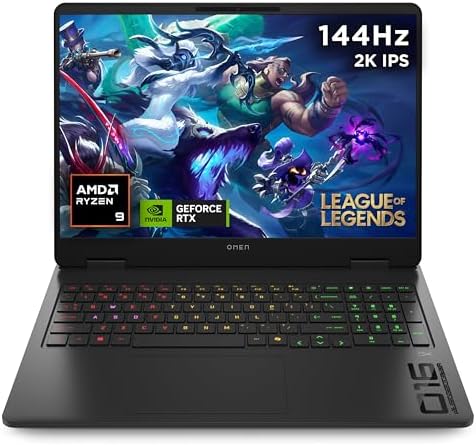
- AMD Ryzen 9 8940HX (up to 5.3 GHz max boost clock, 64 MB L3 cache, 16 cores, 32 threads)
- Windows 11 Home
- 40.6 cm (16″) diagonal 2K display
- NVIDIA GeForce RTX 5060 Laptop GPU (8 GB GDDR7 dedicated)
- 32 GB DDR5-5200 MT/s (2 x 16 GB), 1 TB PCIe Gen4 NVMe M.2 SSD
#6 — HP OMEN Transcend 14 fb1007sa | 7.8/10
The most important caveat first: the RTX 5060 here is not the same GPU as in the OMEN 16 above
Before anything else: the RTX 5060 in the OMEN Transcend 14 runs at approximately 65W TGP — not the 115W of the OMEN 16 above, and not the full-power configurations you’ll find in bigger machines. PC Gamer was direct about this, noting HP’s website “makes the TGP of this particular variant gloriously unclear” while flagging that the same pattern from previous Transcend generations suggested a constrained wattage. Tom’s Hardware’s review of the prior RTX 4060 generation confirmed the Transcend 14 topped out at 50W compared to 98W for the same GPU in the Legion Slim 5 — a gap that translates directly to frame rates. On the RTX 5060, DLSS 4 and Multi Frame Generation help bridge the gap considerably, but native resolution performance at the panel’s 1800p OLED output is meaningfully behind full-power RTX 5060 laptops.
That caveat stated — the OMEN Transcend 14 is a machine with a genuinely compelling reason for existing. The 14-inch 2880×1800 OLED panel at 120Hz is exceptional: rich colour, deep contrast, and a resolution that makes the display feel like a luxury product. The chassis is machined aluminium, slim, and genuinely discreet — no RGB exterior, no gaming styling — which makes it the only machine on this list that doesn’t announce itself as a gaming laptop. It’s the machine for the LAN-attending competitor who needs something that also functions as a work machine in a client-facing environment. USB-C charging at full system power is a differentiator no other machine on this list offers. Battery life in non-gaming use is meaningfully better than every other machine here.
The 65W TGP is not a dealbreaker if your workloads are understood going in. With DLSS 4 and Frame Generation enabled, the Transcend 14 pushes playable frame rates in demanding titles. For esports at 1080p or 1440p, it doesn’t break a sweat. The 32GB of DDR5 and 1TB SSD are properly specced for the price. What you are not buying is a machine for maxing out Monster Hunter Wilds or Cyberpunk 2077 at native resolution without upscaling assistance.
Specs: Intel Core Ultra 7 255H | NVIDIA GeForce RTX 5060 ~65W 8GB GDDR7 | 32GB DDR5 | 1TB SSD | 14″ 2880×1800 OLED 120Hz | ~1.7kg | Wi-Fi 6E | Thunderbolt 4 | Windows 11 Home
Score: 7.8/10
Pros:
- 14″ 2880×1800 OLED 120Hz — the finest display on any machine in this guide by panel type
- Genuinely discreet design — no external gaming branding, usable in professional settings
- USB-C system charging — the only machine here that doesn’t require its own power brick
- 32GB DDR5 and 1TB SSD — fully specced
- Best battery life in this guide for non-gaming use
- Lightest machine in this guide at ~1.7kg
Cons:
- RTX 5060 at ~65W TGP — significantly constrained vs full-power RTX 5060 and every RTX 5070 above it
- 8GB GDDR7 VRAM ceiling compounds the TGP constraint at native resolution
- 120Hz refresh rate — other machines here hit 165Hz or 240Hz
- Not a machine for maxing out demanding AAA titles at native resolution
Best for: Gamers who need a machine that works equally well in competitive play and professional environments; LAN competitors who want portability and an exceptional display; anyone for whom the 1.7kg weight and USB-C charging change what the machine can do day-to-day.

- Intel Core Ultra 7 255H (up to 5.1 GHz with Intel Turbo Boost Technology, 24 MB L3 cache, 16 cores, 16 threads)
- Windows 11 Home
- 35.6 cm (14″) diagonal 3K OLED display
- NVIDIA GeForce RTX 5060 Laptop GPU (8 GB GDDR7 dedicated)
- 32 GB LPDDR5x-7500 MT/s (onboard), 1 TB PCIe Gen4 NVMe TLC M.2 SSD
#5 — ASUS TUF Gaming A16 FA608PM | 8.0/10
The strongest value case in the RTX 5070 tier — with a display caveat worth understanding
The ASUS TUF A16 in its RTX 5070 configuration sits in a genuinely strong position: a full 115W RTX 5070 backed by a Ryzen 9 7940HX, 32GB of DDR5, and ASUS’s proven TUF cooling platform. LaptopMedia’s testing of the TUF A16 chassis with the RTX 5060 variant found average GPU clock speeds of 2708MHz sustained over an hour — the highest among all tested competitors using that chip — and the RTX 5070 configuration benefits from the same thermal engineering.
The ASUS TUF A16’s GPU runs at 115W with 15W Dynamic Boost available, meaning the chip can genuinely stretch when thermals permit. Real-world gaming at 1440p is strong: Shadow of the Tomb Raider on Highest settings, Metro Exodus Enhanced Edition on High, Black Myth: Wukong on High — all run fluidly on the RTX 5070 at this TGP. TechRadar’s 2025 review called it “a very well-priced machine considering the spec,” before noting the primary downside plainly: it is genuinely loud. Fan noise under load has been the most consistent complaint across every major review of the TUF A16 2025 lineup. If you play with headphones on, this is a non-issue. If you’re in a quiet room or playing without audio isolation, you will notice it.
The display on the FA608PM is the other honest caveat. The 16-inch FHD+ panel at 165Hz is sharp and smooth enough for competitive play, but the Alienware 16X and every machine above it in this guide runs a QHD+ or 2.5K panel at 240Hz. At this price point, a 1920×1200 panel feels like a specification that’s one tier below what the GPU can comfortably push. The MIL-STD-810H certification is a genuine differentiator — this is a machine built to survive the rigours of transport and LAN events rather than just look the part.
Specs: AMD Ryzen 9 7940HX | NVIDIA GeForce RTX 5070 115W 8GB GDDR7 | 32GB DDR5 | 1TB SSD | 16″ FHD+ 1920×1200 IPS 165Hz | ~2.2kg | Wi-Fi 6E | Windows 11 Home | MIL-STD-810H
Score: 8.0/10
Pros:
- RTX 5070 at 115W — full-power GPU, not a constrained thin-and-light version
- Ryzen 9 7940HX — strong multi-threaded CPU for gaming plus workload stacking
- 32GB DDR5 standard
- Proven TUF thermal engineering — sustained GPU clock speeds among the highest tested
- MIL-STD-810H durability — built for transport
- Competitive pricing within the RTX 5070 tier
Cons:
- Fan noise under load is significant — consistently flagged across all major reviews
- FHD+ 165Hz display — below the QHD+ 240Hz standard set by competitors at similar prices
- 8GB GDDR7 VRAM — same ceiling as the OMEN 16 and Transcend 14
Best for: Competitive gamers who want a full-power RTX 5070 in a durable chassis and play with headphones; LAN players who need MIL-SPEC toughness and don’t prioritise quiet operation.
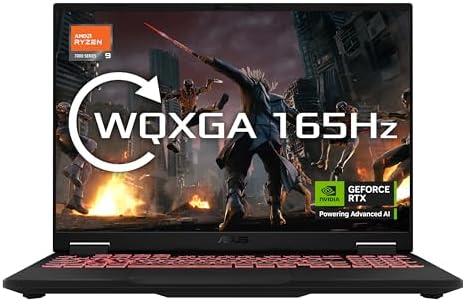
- Powered by AMD Ryzen 9 7940HX Mobile Processor (16-core/32-thread, 64MB L3 cache, up to 5.2 GHz max boost)
- ASUS ProArt 16 OLED ships with the very latest generation NVIDIA GeForce RTX 5070 8GB GDDR6 laptop graphics
- Powered by NVIDIA DLSS 3, ultra-efficient Ada Lovelace arch, NVIDIA Studio and Max-Q Technologie
- 16.0″ FHD+ 16:10 (1920 x 1200, WUXGA), with 165Hz refresh rates
- 16GB DDR5-5600 (2x 8GB) RAM, paired with 1TB PCIe 4.0 NVMe M.2 SSD (with 2x M.2 slots support)
#4 — Alienware 16X Aurora AC16251 | 8.2/10
Premium build, 240Hz QHD+ panel, top-tier CPU — and a specific thermal problem you need to know about
The Alienware 16X Aurora is the machine for buyers who want Alienware’s build quality and brand assurance in a machine that doesn’t require a second mortgage. LaptopMedia’s review described the chassis as “a combination of anodised aluminium and magnesium alloy that feels every bit as expensive as it looks” — this is not marketing; multiple independent reviews confirm the 16X’s build quality is genuinely above the TUF and MSI machines in this guide. The 240Hz QHD+ display is a standout: PWM-free, near-complete sRGB and DCI-P3 coverage, fast response time, and 500+ nits brightness — one of the finest IPS panels available on a gaming laptop at this price.
PCWorld’s testing delivered 183fps average in Shadow of the Tomb Raider — strong RTX 5070 performance at 1440p. The Core Ultra 9 275HX runs at up to 5.1GHz peak boost, and the machine’s tuning prioritises CPU burst performance, which makes it capable for short workload spikes in CPU-intensive tasks. The port selection includes Thunderbolt 4, HDMI 2.1, and a direct GPU HDMI output for zero-latency external monitor use. Alienware Command Center is more polished than MSI Center and considerably less bloated than OMEN Gaming Hub.
LaptopMedia’s review, titled “Thermal Chaos, Luxury Package,” identifies the problem directly: CPU thermals under sustained load are the Alienware’s failure mode. The system allows the CPU to spike to extremely high clock speeds and temperatures during brief bursts, which benefits short workload tasks, but sustained CPU-heavy gaming sessions — particularly in CPU-bound titles or when simultaneously streaming — produce temperatures and throttling that other machines in this guide handle better. The GPU stability is fine: sustained 2528MHz average clock speed at 111W during LaptopMedia’s one-hour gaming test is competitive. But the CPU’s thermal management under sustained combined load is a consistent shortcoming in independent testing. Battery life is also the worst of all RTX 5070 machines tested — 4 hours flat in LaptopMedia’s endurance run, despite a 96Wh cell.
Specs: Intel Core Ultra 9 275HX | NVIDIA GeForce RTX 5070 110W 8GB GDDR7 | 32GB DDR5 | 1TB SSD | 16″ 2.5K 2560×1600 IPS 240Hz, PWM-free | ~2.6kg | Wi-Fi 7 | Thunderbolt 4 | Windows 11 Home
Score: 8.2/10
Pros:
- Best build quality in this guide — anodised aluminium and magnesium alloy chassis
- Exceptional 240Hz QHD+ PWM-free display — near-complete DCI-P3, 500+ nits
- Core Ultra 9 275HX — peak CPU performance for burst workloads
- Wi-Fi 7 and Thunderbolt 4
- Alienware Command Center — polished software ecosystem
- Direct HDMI GPU output — zero-latency external monitor support
Cons:
- CPU thermal management under sustained combined load is a documented weakness
- Battery life — 4 hours in independent testing despite a 96Wh cell, worst RTX 5070 result tested
- 8GB GDDR7 VRAM — same ceiling as the machines below it
- 110W GPU TGP — slightly below the 115W of the TUF A16
- 2.6kg — heaviest RTX 5070 machine in this guide
Best for: Buyers for whom build quality and display excellence are the primary criteria; players whose GPU workloads are sustained but CPU workloads are burst-heavy rather than continuous.
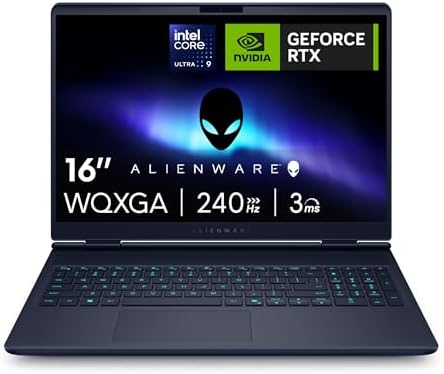
- ULTRA-FLUID 16” WQXGA 240HZ G-SYNC DISPLAY: Game at the highest visual standard with a 16″ WQXGA (2560 x 1600) display that offers 240Hz refresh rate, 3ms response time, and 100% DCI-P3 color coverage. NVIDIA G-SYNC and Advanced Optimus ensure tear-free, ultra-smooth gameplay even during intense motion scenes, while ComfortView Plus reduces blue light strain without compromising color accuracy.
- TOP-TIER PROCESSING WITH INTEL CORE ULTRA 9-275HX: Built for next-gen multitasking, the Intel Core Ultra 9 Series 2 processor features 24 cores, 36MB cache, and up to 5.4GHz turbo speeds. Integrated AI acceleration via an onboard NPU offloads tasks from CPU/GPU for smarter power distribution, ideal for live streaming, content creation, and real-time physics calculations in modern games.
#3 — Acer Predator Helios Neo 16 AI PHN16-73 | 8.4/10
The RTX 5070 Ti entry point — 12GB GDDR7, 140W TGP, and a display issue that’s real but manageable
The Acer Predator Helios Neo 16 AI is where this guide crosses the VRAM threshold that matters. The RTX 5070 Ti here runs at 140W TGP with 12GB of GDDR7 — the step up from 8GB is not theoretical at this tier, with titles like Monster Hunter Wilds and Black Myth: Wukong at maximum settings beginning to push against the 8GB ceiling in machines further down this list. The 12GB headroom gives this machine meaningful longevity over a 3-year ownership cycle that the RTX 5070 simply can’t match.
LaptopMedia’s review found the Helios Neo 16 AI competitive with the MSI Vector 16 at the same 140W TGP — approximately 1–2% behind in sustained GPU clock performance, which is within testing variance. PC Gamer’s review described it as “a relative bargain among top-end gaming laptops” noting the price undercuts the Razer Blade 14 and ROG Zephyrus G14 while packing a larger display and faster GPU. Counter-Strike 2 at native 1600p hits competitive frame rates; Cyberpunk 2077 at 2K on Ultra is playable without Frame Generation and genuinely smooth with it enabled; Doom: The Dark Ages at maximum Ultra Nightmare settings hovers around 70fps native, jumping to 110fps with 2x Frame Generation and 180fps with 4x.
The display issue that LaptopMedia flagged in their review title is genuine and annoying: the 2.5K 240Hz IPS panel is physically excellent — bright, fast, and accurate — but because it sits flush and recessed behind the chassis lip in a way that creates significant glare in bright environments. LaptopMedia called it “the most beautiful screen you can’t see.” Gaming indoors or in controlled lighting, this is a non-issue. If you game in bright rooms or near windows, the Alienware or Legion Pro 7i’s display management is better. The 16GB RAM is also worth noting — every other machine in the top four of this guide ships with 32GB. For gaming-only use, 16GB is adequate; for gaming while streaming or running heavy background tasks, it’s a constraint.
Specs: Intel Core Ultra 9 275HX | NVIDIA GeForce RTX 5070 Ti 140W 12GB GDDR7 | 16GB DDR5 | 1TB SSD | 16″ 2560×1600 IPS 240Hz | 2.7kg | Wi-Fi 7 | Thunderbolt 4 | Windows 11
Score: 8.4/10
Pros:
- RTX 5070 Ti at 140W — 12GB GDDR7 clears the VRAM threshold that matters for longevity
- Core Ultra 9 275HX — top-tier Intel HX CPU
- Competitive performance within 1–2% of the MSI Vector 16 at the same TGP
- Strong value within the RTX 5070 Ti tier — undercuts most competitors significantly
- Wi-Fi 7 and Thunderbolt 4
- 90Wh battery — adequate for light gaming sessions unplugged
Cons:
- Display glare issue — panel positioning creates significant reflection in bright environments
- 16GB RAM — half the capacity of the other top-four machines in this guide
- 2.7kg — tied as the heaviest machine in this guide
- CPU temperatures touch 91°C under sustained load — running at the thermal limit
- No OLED — IPS panel versus the Legion Pro 7i’s OLED at a similar price point
Best for: Buyers making the jump to RTX 5070 Ti for VRAM and longevity reasons, who want competitive GPU performance at the best possible price in the 5070 Ti tier and game in controlled indoor environments.

- PREDATOR HELIOS NEO 16 AI: Play the latest titles on this premium and powerful, AI-ready gaming laptop
- GAME CHANGER: Nvidia’s GeForce RTX 5070Ti GPU features incredibly powerful hardware and AI-powered frame generation and ray tracing
- AI FOR GAMERS: Nvidia’s RTX 50-series graphics cards use AI to supercharge your game’s fps with DLSS Multi-Frame Generation
- MADE FOR SPEED: With a 240Hz refresh rate, even the most action-packed games will appear smooth and blur-free
#2 — MSI Vector 16 HX AI B0DTYZQYVX | 8.6/10
The fastest RTX 5070 Ti laptop tested by LaptopMedia — with two honest problems
The MSI Vector 16 HX AI’s headline claim is backed by independent data: LaptopMedia tested it as the fastest RTX 5070 Ti laptop at the time of their review, delivering 210fps average in Counter-Strike 2 at native 1600p Very High settings. The 140W TGP RTX 5070 Ti with 12GB GDDR7 sustains an average 2528MHz GPU clock across extended sessions — competitive with the Acer Helios Neo PHN16-73 and slightly ahead in most sustained workloads. The dual Thunderbolt 5 ports are a differentiator no other machine in this guide offers — future-proofing for docking, external GPU enclosures, and high-bandwidth peripherals. The 240Hz QHD+ IPS panel runs at 500 nits peak brightness and covers the colour gamut appropriately for a machine at this tier. The Intel Core Ultra 7 255HX is a 20-core Arrow Lake HX chip that delivers strong multi-threaded performance for gaming plus streaming workloads.
The two honest problems are significant enough to affect the buying decision. The first is storage: the UK listing at B0DTYZQYVX ships with 512GB. That is not enough SSD space for a premium gaming machine — a modern AAA title alone can consume a quarter of that. NotebookCheck’s review explicitly called it out as “a notable limitation.” The drive is replaceable, and the machine has a PCIe 5.0 M.2 slot, but budgeting £80–£120 for an additional NVMe drive is a real cost you need to factor in. The second is RAM: 16GB DDR5 in a machine at this price is below what the Alienware and Legion Pro 7i ship with as standard. Again, expandable — but adding RAM post-purchase carries a cost that UK buyers flagged in Amazon reviews after a post-AI pricing surge hit DDR5 modules.
UK Amazon reviews have also documented BSOD GPU errors in some units, which a BIOS update (version 116, released December 2025) addressed. If you’re buying now, the fix is live. The fan noise in Extreme Performance mode is significant — PC Gamer described it in terms usually reserved for industrial equipment. Balanced mode is quieter and delivers most of the performance.
Specs: Intel Core Ultra 7 255HX | NVIDIA GeForce RTX 5070 Ti 140W 12GB GDDR7 | 16GB DDR5 | 512GB SSD | 16″ 2560×1600 IPS 240Hz 500nits | ~2.7kg | Wi-Fi 6E | Thunderbolt 5 × 2 | Windows 11 Home
Score: 8.6/10
Pros:
- Fastest RTX 5070 Ti tested by LaptopMedia at time of review — 210fps in CS2 at native 1600p
- Dual Thunderbolt 5 — the only machine in this guide with TB5
- 140W RTX 5070 Ti at 12GB GDDR7 — full-power configuration
- 240Hz QHD+ panel at 500 nits
- Core Ultra 7 255HX — 20-core Arrow Lake HX
- Strong value for the GPU performance delivered
Cons:
- 512GB SSD — completely inadequate for a gaming machine at this price; budget for an upgrade
- 16GB RAM — below the standard set by the Alienware and Legion Pro 7i
- Fan noise in Extreme Performance mode is extreme — Balanced mode recommended as default
- BSOD GPU errors reported pre-BIOS update 116; confirm firmware is current on delivery
- Wi-Fi 6E rather than Wi-Fi 7
Best for: Buyers who want the fastest RTX 5070 Ti performance in this guide and are prepared to immediately upgrade the SSD and potentially the RAM; dual Thunderbolt 5 is a genuine future-proofing advantage if you use a high-bandwidth dock or peripherals.

- The Vector HX Series features a stunning 16:10, 2560×1600 QHD+ screen and a high 240Hz refresh rate for smooth visuals, and allowing users to experience the next level of gaming and productivity.
- 24-Zone RGB keyboard featuring illuminated WASD keys and uniquely designed keycaps for an immersive gaming journey infused with style!
- With larger fans and broader heat pipes, Cooler Booster 5 technology ensures optimal performance during even the most intense gaming sessions.
#1 — Lenovo Legion Pro 7i Gen 10 B0G2T512W3 | 9.0/10
The complete package — RTX 5070 Ti, OLED at 240Hz, 32GB, 2TB, and the cooling to back it all up
The Lenovo Legion Pro 7i Gen 10 is the best premium gaming laptop UK buyers can find in 2026 because it is the only machine in this guide that gets every significant specification right simultaneously. RTX 5070 Ti at 140W. 12GB GDDR7. Core Ultra 7 255HX. 32GB of RAM. 2TB of storage. And a 16-inch 2.5K OLED display running at 240Hz. That is not a compromise spec sheet — it is the complete configuration for a machine at this price.
The OLED panel is the centrepiece. LaptopMedia and Tom’s Hardware both flagged it as a class-defining display: under 1ms response time (the fastest OLED panel LaptopMedia had measured at time of testing), full DCI-P3 coverage, excellent brightness for both SDR gaming and HDR content, and outstanding factory colour calibration. NoobFeed’s review recorded 161fps in Counter-Strike 2 at native 1600p on Very High settings — a result that fully justifies the 240Hz panel. Shadow of the Tomb Raider at 1600p Highest preset hits 76fps native; 128fps at 1200p. Metro Exodus Enhanced at Extreme settings achieves 39fps at native 1600p — at which point DLSS Balanced pushes this to a smooth gaming experience. The Legion Pro 7i’s cooling — Lenovo’s ColdFront Vapor with Hyper Chamber technology — is rated for 250W of crossload sustained power, a step up from the previous generation’s 220W ceiling, and real-world testing confirms the machine runs at full GPU specification without the thermal throttling issues that affected its predecessor.
The caveats are minor relative to the price point. The 8GB VRAM on the specific UK ASIN (B0G2T512W3) is the RTX 5070 Ti configuration rather than the RTX 5080 — confirm the listing before purchasing. Tom’s Hardware noted gaming performance slightly behind the ASUS ROG Strix Scar and Gigabyte Aorus at the same TGP in some benchmarks, which reflects cooling tuning variances rather than a fundamental GPU limitation. Battery life is middling for the class — LaptopMedia’s Legion 7i non-Pro endurance run came in under 4.5 hours — though the 99.9Wh cell in the Pro 7i is a step up. No biometric authentication (no fingerprint reader or IR camera) is an oversight on a machine at this price. The glossy OLED panel produces reflections in bright environments. Legion Space software has improved but remains feature-dense.
None of these are dealbreakers. For the buyer who wants to land on one machine that handles every gaming scenario — competitive esports, demanding AAA, streaming, content creation — without needing to compromise on GPU power, VRAM, RAM, storage, or display quality, the Legion Pro 7i Gen 10 is that machine.
Specs: Intel Core Ultra 7 255HX | NVIDIA GeForce RTX 5070 Ti 140W 12GB GDDR7 | 32GB DDR5 | 2TB PCIe 5.0 SSD | 16″ 2560×1600 OLED 240Hz, <1ms | ~2.4kg | Wi-Fi 7 | Thunderbolt 4 | Windows 11 Home
Score: 9.0/10
Pros:
- RTX 5070 Ti at 140W with 12GB GDDR7 — the full GPU configuration, nothing constrained
- Best display in this guide — 2.5K OLED at 240Hz, under 1ms response, full DCI-P3
- 32GB RAM and 2TB SSD — fully specced with no immediate upgrade needed
- Legion ColdFront Vapor cooling rated for 250W sustained crossload
- Wi-Fi 7 and Thunderbolt 4
- 161fps in CS2 at native 1600p — the display and GPU are genuinely matched
Cons:
- OLED panel is glossy — reflections in bright environments
- Battery life is mediocre for the class — under 4.5 hours in mixed use
- No biometric authentication despite the premium price point
- Legion Space software is powerful but complex
- Confirm GPU configuration on listing before purchasing (RTX 5070 Ti vs RTX 5080 variants exist)
Best for: The buyer who wants the definitive premium gaming laptop without compromise — one machine for competitive play, AAA gaming, streaming, and content creation, with a display that justifies every penny.

- OUT-PLAY, OUT-PERFORM, OUT-PRO. – The Lenovo Legion Pro 7i is a true desktop replacement designed for elite gamers. Play at your most powerful with the Intel Core Ultra processor, PureSight OLED display, and turbo-charged fans for superior performance.
- THE ULTIMATE PERFORMANCE FOR GAMERS – The Intel Core Ultra 7 255HX processor delivers ultra-smooth gameplay, seamless multitasking, and AI-accelerated tasks with the Lenovo AI Engine+ for next-level gameplay and productivity.
- GAME CHANGER – Powered by NVIDIA Blackwell, the GeForce RTX 5070 Ti GPU brings game-changing capabilities to gamers and creators. Ray tracing and AI-enhanced DLSS boosts FPS, reduces latency, and improves image quality for peak immersion.
How to Choose — A Decision Framework
At this tier, the choice is not between “capable” and “incapable” — every machine here can game. The decision is about where you sit on a series of specific axes.
Choose the Lenovo Legion Pro 7i Gen 10 if: You want the complete package with no significant compromises — RTX 5070 Ti, 12GB GDDR7, OLED 240Hz, 32GB, 2TB. This is the machine for buyers who don’t want to think about what they’re giving up.
Choose the MSI Vector 16 HX AI if: You want the fastest tested RTX 5070 Ti performance and dual Thunderbolt 5, and you’re prepared to upgrade the 512GB SSD on day one. The raw GPU benchmark ceiling is the highest in this guide.
Choose the Acer Predator Helios Neo 16 AI if: You want RTX 5070 Ti with 12GB GDDR7 at the best possible entry price in that tier, game indoors in controlled lighting, and can live with 16GB RAM.
Choose the Alienware 16X Aurora if: Build quality and the finest IPS display in this guide are your priorities, and your workloads favour burst CPU performance over sustained heavy loads. The brand assurance and physical construction are genuinely above the competition at this price.
Choose the ASUS TUF Gaming A16 FA608PM if: You want a full-power RTX 5070 at the lowest price in the tier, play with headphones so fan noise isn’t a concern, and need a machine that can survive LAN events and regular transport.
Choose the HP OMEN Transcend 14 if: You need a machine that works in professional environments as well as at a gaming desk, the 14-inch OLED and USB-C charging are genuine daily requirements, and you understand the GPU TGP constraint going in.
Choose the HP OMEN 16 if: You are a competitive player who games at 1080p or 1440p and needs a full-power RTX 5060 plus a 16-core CPU for streaming — this machine over-delivers at the bottom of this bracket for that specific use case.
For buyers considering stepping up above this price range to RTX 5080 or RTX 5090 machines, the Legion Pro 7i Gen 10 is available in higher GPU configurations. The Laptop Buying Guide UK covers GPU architecture comparisons and how to interpret TGP figures across generations.
External Resources
For independent benchmark data and technical depth: NotebookCheck and LaptopMedia are the most rigorous sources for sustained gaming performance, thermal testing, and GPU TGP verification across all machines in this guide. Tom’s Hardware provides authoritative CPU and GPU hierarchy testing with consistent methodology. Digital Foundry delivers the most technically detailed per-title analysis of how RTX 50-series features — DLSS 4, Multi Frame Generation, Ray Reconstruction — perform in practice across specific game engines. TechRadar UK and PC Gamer provide real-world gaming assessments in a UK context.
I have spent years working in IT infrastructure and reviewing technology for British buyers. Affiliate relationships with Amazon do not influence the scores or rankings in this guide.
As an Amazon Associate, I earn from qualifying purchases made through links on this page.