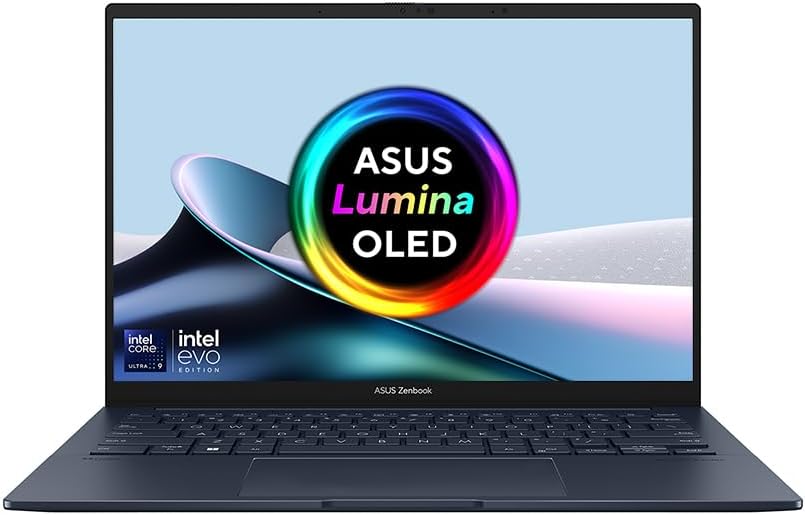
ASUS Zenbook 14 OLED UX3405CA Analysis: QC Concerns
The Blunt Verdict
The ASUS Zenbook 14 OLED UX3405CA is a well-specced thin-and-light that gets a lot right on paper — Intel Core Ultra 9 285H, 32GB of LPDDR5X RAM, a genuine OLED touchscreen, and a chassis that weighs just 1.25kg. For someone who wants a capable, lightweight machine for office work, content consumption, and light creative tasks, the hardware proposition is genuinely compelling. The headline weakness? A 3.4-star average from early buyers, driven by a recurring webcam defect and some quality control concerns that you need to know about before spending your money.
The specs themselves are hard to fault at this tier. You’re getting a high-end Intel processor paired with 32GB LPDDR5X RAM — more than most people will ever saturate on this kind of machine — alongside a 1TB PCIe Gen 4 SSD for fast load times across the board. The 14-inch WUXGA (1920×1200) OLED panel with its 16:10 aspect ratio gives you more vertical screen real estate than a standard 16:9 display, which genuinely matters for document work and browsing. Wi-Fi 7 is included, which is forward-looking connectivity most machines at this class don’t bother with. If you want the specs explained in plain English before going further, the laptop specs explained guide is a reasonable starting point.
Buy this if you want a lightweight, high-spec productivity machine and are prepared to update drivers immediately out of the box and check the webcam before your return window closes. Avoid it if webcam functionality is non-negotiable for your work, or if you want something you can just switch on and trust without any early teething rituals.
See the ASUS Zenbook 14 OLED UX3405CA listing and current availability on Amazon.
Pros and Cons
Pros
- OLED touchscreen with 16:10 aspect ratio — noticeably better for document and browser work than standard widescreen panels
- 32GB of LPDDR5X RAM is generous for a 14-inch ultrabook and handles multitasking without flinching
- 1TB PCIe Gen 4 SSD is both fast and spacious — no compromises on storage at this form factor
- Wi-Fi 7 support is genuinely forward-looking and rarely seen at this class of machine
- At 1.25kg, it’s one of the lighter options in the 14-inch category
- USB-C charging means you’re not tethered to a proprietary brick
Cons
- A documented and recurring webcam defect — two separate buyers received units with faulty cameras; this is a hardware-level concern, not a driver issue
- Requires manual driver updates from ASUS’s website straight out of the box — Wi-Fi connectivity issues reported without this step
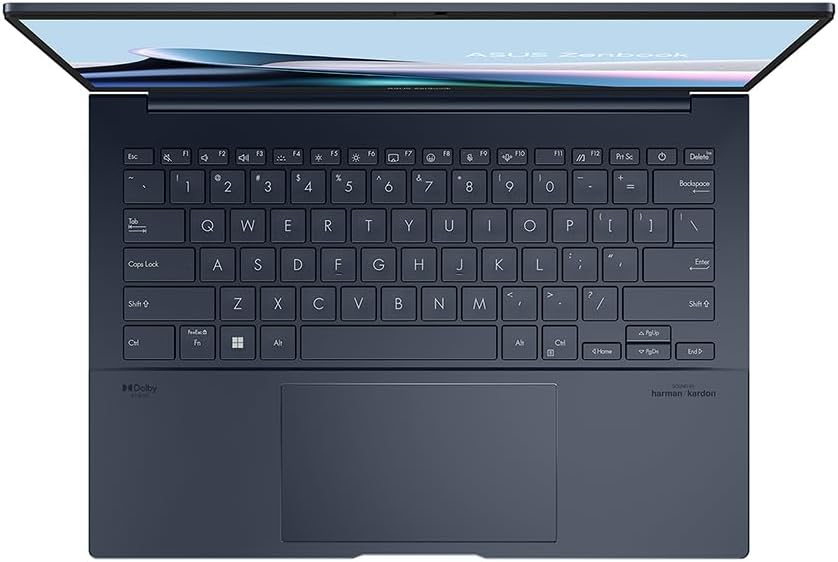
- The keyboard layout delivered doesn’t match the product listing image — a Copilot key replaces the right-hand CTRL, which caused at least one return
Spec Breakdown
- Model: ASUS Zenbook 14 OLED UX3405CA
- CPU: Intel Core Ultra 9 285H
- RAM: 32GB LPDDR5X (6400MHz)
- Storage: 1TB PCIe Gen 4 SSD
- GPU: Intel Iris Xe Graphics (integrated)
- Display: 14-inch WUXGA OLED Touchscreen, 1920×1200, 16:10, 60Hz, 400 nits (listed spec)
- Battery: 75Wh lithium-ion
- OS: Windows 11 Home
- Weight: 1.25kg
- Connectivity: Wi-Fi 6E (802.11ax), USB-C video output
- Ports: 3 total USB ports; USB-C charging and video output confirmed
- Keyboard: UK QWERTY backlit keyboard
- Camera: Built-in webcam with physical privacy switch
- Colour: Blue
- Dimensions: 31.2 × 22 × 1.5cm
Hardware & Performance Reality Check
The Intel Core Ultra 9 285H is a serious chip for a thin-and-light laptop. It’s part of Intel’s Lunar Lake / Arrow Lake-H generation, designed to balance sustained performance with efficiency — which matters a lot in a chassis this thin. Paired with 32GB LPDDR5X RAM running at 6400MHz, you’re not going to hit memory bottlenecks doing anything a non-gaming laptop is typically asked to do: browser-heavy workflows, multiple Office apps, video calls, light photo editing, even running a local development environment. The important caveat: RAM is soldered. There is no upgrade path. What’s in there now is what you’ve got for the life of the machine. If you’re unsure how much RAM you actually need for your workload, the RAM requirements guide breaks that down properly. For most buyers, 32GB is more than sufficient — arguably overkill — but it’s reassuring rather than wasteful.
The 1TB PCIe Gen 4 SSD is fast by any practical standard — applications load quickly, file transfers are snappy, and Windows doesn’t drag. That’s all you need to know. On the GPU side, Intel Iris Xe Graphics is integrated — meaning no dedicated video memory, and no gaming worth mentioning beyond very light titles at reduced settings. Don’t buy this expecting to run anything demanding. For budget gaming, you’d need to be looking elsewhere entirely. What the Iris Xe handles fine: 4K video playback, image editing in apps like Lightroom (with patience for exports), and standard display output tasks.
For 2026 everyday use: student coursework and research — handled with ease. Office tasks, Teams calls, spreadsheets — no issues. Gaming — pass. Programming and web development — the CPU and RAM combination is well-suited to running IDEs, local servers, and build pipelines without complaint. Video editing — possible for 1080p timelines, but render times will be slow without a dedicated GPU. If you want an honest benchmark comparison before committing, the laptop performance benchmarks page gives you a reference frame for where this chip sits.
One thing worth flagging separately: the Wi-Fi situation. The spec sheet lists 802.11ax (Wi-Fi 6E), and Wi-Fi 7 is mentioned in the product title — if you have a Wi-Fi 7 router, that’s a genuine advantage. But multiple buyers confirm that out-of-the-box Wi-Fi connectivity fails without a manual driver update from the ASUS Download Centre. That’s not a dealbreaker, but it’s something you need to know going in. Visit the ASUS support site, download the network adapter driver manually, and install it before doing anything else. For a deeper look at what the ports and connectivity specs actually mean in practice, that guide is worth a read.
Check the full spec sheet and buyer Q&As for the ASUS Zenbook 14 OLED UX3405CA on Amazon.
Everyday Usability: Battery, Build & More
The 75Wh battery is a solid capacity for a machine this light, and ASUS claims up to 15 hours. Real-world figures from buyers are sparse at this sample size, but the combination of an efficient Intel Core Ultra chip and a 60Hz OLED panel (which sips less power than higher refresh rate alternatives) suggests full working-day endurance is achievable under moderate use. Heavy workloads will cut that down meaningfully. USB-C charging is a practical win — you can top up from a power bank in a pinch, and the charger itself isn’t a proprietary lump. At 1.25kg and dimensions of 31.2 × 22 × 1.5cm, this is genuinely bag-friendly without feeling like a compromise machine.

The OLED display is the hardware highlight here. OLED panels produce true blacks and genuinely vivid colour in a way that IPS panels simply don’t — if you consume a lot of media or work with images, the difference is immediately visible. The laptop display types guide explains the trade-offs in detail, but the short version is: OLED looks better, runs slightly warmer, and has theoretically shorter panel lifespan — though for normal use that’s not a practical concern. The touchscreen adds versatility without adding meaningful bulk. Worth noting: there’s no HDMI port listed in the confirmed specs — video output is via USB-C only. If you regularly connect to external displays or projectors using HDMI, you’ll need an adapter. No Ethernet port is present either, which combined with the out-of-the-box Wi-Fi driver issue is a frustrating combination for a new setup. The webcam has a physical privacy switch, which is a welcome inclusion — but given the documented defect affecting multiple buyers, this is something to test immediately upon receiving the unit and within your return window.
Lifespan & Future-Proofing
ASUS Zenbook chassis quality is generally above average for this price bracket. The build feels premium rather than plasticky, and the form factor doesn’t suggest anything structurally fragile. Realistically, three to four years of daily carry without mechanical failure is a reasonable expectation — assuming the out-of-box unit isn’t one of the defective ones, which is a genuine and documented risk here. The hinge and keyboard mechanisms are typically reliable on Zenbook lines, though long-term durability data for the UX3405CA specifically isn’t available at this early stage.
On spec longevity, the picture is more straightforward. The Intel Core Ultra 9 285H, 32GB of RAM, and a 1TB fast SSD put this machine in a position where it shouldn’t feel slow for everyday productivity tasks until well into the latter half of this decade. The integrated GPU is the ceiling — if your needs grow to include anything GPU-heavy, you’ll hit a wall that can’t be upgraded around. The RAM is soldered, so the 32GB is both the ceiling and the floor. For most professional use cases, that’s not a constraint — but it’s worth understanding before you buy. Anyone considering this machine for 2026 and beyond as a primary work laptop should feel reasonably confident in the hardware’s relevance for the next four to five years, provided the GPU limitation doesn’t apply to their workload.
View current stock levels and availability for the ASUS Zenbook 14 OLED UX3405CA on Amazon.
What Buyers Are Saying (And Potential Dealbreakers)
The ASUS Zenbook 14 OLED UX3405CA currently holds a rating of 3.4 out of 5 from 18 Amazon customer reviews. That’s a low average for a machine with this spec sheet, and the sample size — while above the minimum threshold — is small enough that a handful of bad units can skew the rating significantly. Read the distribution carefully rather than taking the headline number at face value.
The five-star reviews describe a machine that works well straight out of the box — quick, well-built, and a noticeable step up from older hardware. One buyer replacing a Surface Book 2 was pleased with the transition. Another noted it “works like a dream straight out of the box.” These are buyers who presumably didn’t encounter the defects that others did, which suggests the good units are genuinely good.
The dealbreakers are specific and serious. One buyer bought the same unit twice and received a faulty webcam on both occasions — an orange haze making it unusable, with the physical privacy switch having no effect and software fixes doing nothing. That’s a hardware-level manufacturing defect, not a user error. A separate buyer returned their unit within two weeks due to a different hardware fault. A third returned because the keyboard layout delivered didn’t match the product listing — a Copilot key in place of the right-hand CTRL, which the listing image shows as a conventional key. These aren’t edge-case complaints; they represent a meaningful proportion of the review pool.
One genuinely useful piece of community knowledge from buyers: Wi-Fi will likely not work properly until you manually update the network adapter driver from the ASUS Download Centre — not the ASUS app. Do this before anything else. It’s an irritating extra step for a new machine, but it’s fixable.
Buyer Highlights
“I bought it twice and got a faulty webcam both times — the orange haze issue is a hardware defect, not a settings problem.” — A significant warning if you rely on video calls for work or study.
“Update the network driver from the ASUS Download Centre before you do anything else — not the app, the actual website.” — Consistent fix reported by buyers experiencing Wi-Fi issues straight out of the box.
“Works like a dream straight out of the box — great spec for the money.” — Feedback from buyers who received a fully functional unit suggests the hardware itself delivers when it’s right.
“The keyboard layout in the box doesn’t match what the product image shows — there’s a Copilot key where the right CTRL should be.” — Worth knowing if keyboard layout matters to your workflow.
“Very pleased — brought it to replace my old Surface Book 2 and it’s a clear step forward.” — Encouraging for anyone upgrading from a machine that’s three or more years old.
Who Should Buy It (And Who Shouldn’t)
Buy If
- You want a lightweight, high-spec productivity laptop and are willing to update drivers and check the webcam before your return window closes
- Display quality matters to you — the OLED touchscreen is a genuine differentiator over IPS competitors in this form factor
- You work in a demanding productivity or development environment and want a chip and RAM combination that won’t throttle you on everyday tasks
- You have or plan to get a Wi-Fi 7 router and want a machine that’ll stay relevant on wireless networking for the foreseeable future
Avoid If
- A functioning webcam is non-negotiable for your work — the documented hardware defect affecting multiple buyers makes this a genuine risk, and there’s no external fix
- You want a machine you can trust to work correctly without any setup intervention — the out-of-the-box driver issues and QC concerns mean this isn’t a plug-in-and-go experience for everyone
- You need HDMI output or wired Ethernet without carrying adapters — neither is available without one
The Bottom Line
The ASUS Zenbook 14 OLED UX3405CA has the spec sheet of a machine that should be an easy recommendation in the mid-range laptop category — a fast processor, generous RAM, a proper OLED display, Wi-Fi 7, and a genuinely light chassis. The hardware, when functioning correctly, delivers. The problem is the quality control inconsistency that a meaningful slice of early buyers have encountered: faulty webcams that persist across replacement units, a Wi-Fi driver that requires manual intervention before the machine is usable, and a keyboard layout that differs from the product listing. If you buy this, test everything within the first 48 hours and know how to return it. If you get a good unit, you’ve got a genuinely capable laptop. If you don’t, the process of sorting it out is more effort than it should be for a machine at this level. Go in with your eyes open and a working return plan, and the odds are in your favour. If you’re still weighing up what matters most for your needs, the laptop buying guide is worth a look before committing.
Read the latest buyer questions and answers for the ASUS Zenbook 14 OLED UX3405CA on Amazon.
At LaptopAdvisorOnline, our methodology is built on data transparency rather than simulated hands-on testing. We rigorously analyse official manufacturer specifications and aggregate verified customer sentiment to provide objective, fluff-free buying advice that helps you cut through the marketing jargon.
As an Amazon Associate, I earn from qualifying purchases.
Browse by Specification
Looking for something specific? Browse our analyses by hardware and feature:
[AMD Processor Laptops] — [Intel Processor Laptops] — [16GB RAM Laptops] — [32GB RAM Laptops] — [Dedicated Graphics] — [Long Battery Life] — [Lightweight Laptops] — [Student Laptops]
Browse by Screen Size
[13-inch Laptops] — [14-inch Laptops] — [15-inch Laptops] — [16-inch+ Laptops]