

Apple MacBook Neo Review — The Mac That Changes Everything

This Apple MacBook Neo review covers the most affordable Mac Apple has ever made — and one of the most interesting laptops released in years regardless of price or operating system. The MacBook Air was excellent — everyone knew it — but the entry price kept it out of reach for students, casual users, and anyone who simply didn’t want to spend that much on a laptop. Apple knew this. And on 4 March 2026, they did something about it.
The MacBook Neo is Apple’s most affordable laptop ever. It is also, arguably, the most interesting thing Apple has done in the laptop space in years. Not because it cuts corners and gets away with it — but because it doesn’t cut the corners that actually matter.
I’ve spent time with the specs, benchmarks, and early independent reviews closely enough to give you a clear, honest picture of what this machine delivers and who it’s genuinely for. The short version: if you’ve ever thought about switching to Mac but the price stopped you, your moment has arrived!
Check the current UK price of the Apple MacBook Neo on Amazon.
Specifications
| Spec | Detail |
|---|---|
| Chip | Apple A18 Pro (6-core CPU: 2 performance + 4 efficiency cores) |
| GPU | 5-core integrated GPU with hardware-accelerated ray tracing |
| Neural Engine | 16-core, 60GB/s memory bandwidth |
| Memory | 8GB unified memory |
| Storage | 256GB SSD (512GB model also available) |
| Display | 13-inch Liquid Retina, 2408×1506 at 219ppi, 500 nits, 1 billion colours |
| Battery | 36.5Wh — up to 16 hours video streaming, 11 hours wireless web |
| Ports | USB 3 (USB-C), USB 2 (USB-C), 3.5mm headphone jack |
| Wireless | Wi-Fi 6E, Bluetooth 6 |
| Camera | 1080p FaceTime HD |
| Audio | Dual side-firing speakers with Spatial Audio, Dolby Atmos support |
| Microphones | Dual-mic array with directional beamforming |
| Cooling | Fanless — completely silent |
| Weight | 1.23kg |
| Dimensions | 29.75 × 20.64 × 1.27cm |
| OS | macOS Tahoe |
| Colours | Silver, Blush, Citrus, Indigo |
The A18 Pro — An iPhone Chip in a MacBook. Here’s Why That’s a Big Deal.
The most talked-about decision Apple made with the MacBook Neo is the chip. Rather than using one of its M-series laptop processors, Apple put the A18 Pro inside — the same chip that powers the iPhone 16 Pro. To some people, that sounds like a compromise. It isn’t.
According to Geekbench 6 results compiled from early benchmark submissions, the MacBook Neo scores 3,461 in single-core and 8,668 in multi-core. For context: the M1 MacBook Air — a machine that set the benchmark for what affordable Apple Silicon looked like — scored 2,346 single-core and 8,342 multi-core. The Neo’s single-core performance is nearly 50% higher. That matters in everyday use more than multi-core figures do, because the vast majority of daily computing tasks — opening apps, switching tabs, loading pages, responding to messages — are single-threaded operations.
The A18 Pro is built on TSMC’s 3nm process. It has six CPU cores (two high-performance, four efficiency-focused), a five-core GPU, and a 16-core Neural Engine running at 60GB/s memory bandwidth. Apple says this chip is up to 50% faster for everyday tasks than the bestselling Intel Core Ultra 5 PC laptop. It also handles AI operations up to three times faster for on-device workloads — relevant now that Apple Intelligence is baked into macOS Tahoe and the apps you already use are beginning to take advantage of it.
The decision to use the A18 Pro rather than an M-series chip is also what keeps the MacBook Neo completely silent. There is no fan. Not a quiet fan — no fan at all. The machine runs in total silence under all conditions, from browsing to photo editing to 4K video playback. For students in lectures, professionals in open offices, or anyone who finds fan noise genuinely distracting, that is not a small thing.
For a full breakdown of how Apple Silicon generations compare against each other and against Intel and AMD alternatives, our Laptop CPU Guide covers the relevant context.
The Display — Liquid Retina at This Price
The 13-inch Liquid Retina display is 2408×1506 — a 3:2 aspect ratio that gives you noticeably more vertical screen space than the standard 16:9 widescreen panels on most Windows laptops at comparable prices. That extra height is immediately useful for reading articles, editing documents, scrolling through spreadsheets, or doing anything that involves text. It’s a more natural proportion for laptop work than widescreen.
Resolution sits at 219 pixels per inch, which is sharp enough that individual pixels are invisible at normal viewing distances. Text is crisp. Images are clean. Brightness peaks at 500 nits — not the peak brightness of the MacBook Pro’s ProMotion display, but entirely comfortable in most indoor and outdoor settings. Colour coverage is sRGB with support for 1 billion colours, which handles the vast majority of everyday photo viewing, video streaming, and casual creative work without difficulty.
The display has no notch — a distinction worth noting for anyone who found the MacBook Air’s notch design distracting — and the bezels, while not as slim as the MacBook Pro’s edge-to-edge look, are consistent and balanced. It reads as a clean, well-proportioned screen, not a compromised one.
Build Quality and Design — This Is Still a MacBook

One thing Apple chose not to compromise on was the chassis. The MacBook Neo is built from recycled aluminium — 60% recycled content by weight, which Apple says is the most ever in any Apple product — and it feels exactly like what it is: a Mac. It does not flex, it does not creak, it does not rattle. Early reviewers who handled it alongside similarly priced Windows laptops noted the difference in solidity immediately.
At 1.23kg and 1.27cm thick, it’s the smallest-footprint Mac laptop Apple currently makes. The 13-inch screen size means the overall dimensions are genuinely compact — smaller than the 13.6-inch MacBook Air in footprint, even if the Air is fractionally thinner. The colour-coordinated keyboard matches the chassis in whichever finish you choose, giving the whole machine a considered, unified look that budget laptops rarely achieve.
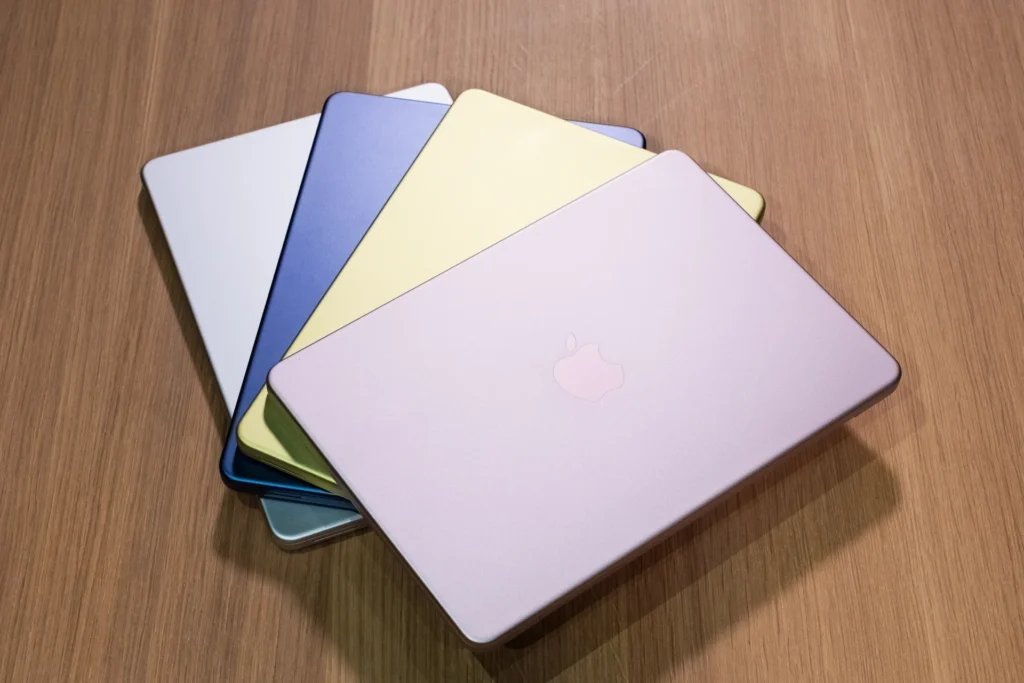
The four colour options are worth dwelling on because they’re genuinely distinct. Silver is the classic, clean choice — versatile and professional, equally at home in a lecture hall or a meeting room. Blush is a warm pinkish rose tone. Citrus is a bright yellow-green that reviewers have described as genuinely fun and a little divisive. Indigo is a deep blue with character. Each comes with a keyboard matched to the chassis colour — it’s a thoughtful detail that makes the machine feel personal rather than generic.
See the Apple MacBook Neo Silver on Amazon UK and check current availability.
Battery Life — 16 Hours Is Not a Marketing Number
Apple claims up to 16 hours of video streaming and up to 11 hours of wireless web browsing. These figures come from controlled testing with specific brightness settings, which means real-world results will vary. But the A18 Pro’s 3nm architecture is extraordinarily power-efficient — this is the same chip family that powers an iPhone through a full day on a fraction of the battery capacity the MacBook Neo carries.
The built-in battery is 36.5Wh. A 20W USB-C charger is included in the box, which charges via either of the two USB-C ports. For students who want to get through a full day of lectures without hunting for a socket, or for anyone who travels and wants the freedom to work without range anxiety, the MacBook Neo’s battery life is one of its clearest practical advantages over similarly priced Windows machines.
Apple Intelligence, iPhone Integration, and the Software Advantage
This is where the MacBook Neo becomes genuinely compelling for a specific audience: iPhone users.
macOS Tahoe ships with Apple Intelligence built in — the system-level AI that handles writing assistance, image generation, smart reply in Mail and Messages, notification summaries, and on-device processing that keeps your data private. The 16-core Neural Engine in the A18 Pro handles these tasks locally, not in the cloud. That distinction matters both for privacy and for responsiveness.
iPhone Mirroring lets you view and control your iPhone directly from the MacBook Neo’s screen. Copy something on your iPhone and paste it on the Mac. Your iPhone notifications appear on your Mac. FaceTime calls from your iPhone can be answered on your Mac. If you already live in the Apple ecosystem — even partially — the MacBook Neo slots into that world in a way that no Windows laptop can replicate.
For students who use iPhone and want a laptop that works alongside it rather than in spite of it, this integration is genuinely valuable day-to-day. It’s not a gimmick. It’s the kind of feature that, once you’ve used it, makes going back feel like a step backwards.
The 1080p FaceTime HD camera, dual-mic array with directional beamforming, and dual side-firing speakers with Spatial Audio and Dolby Atmos support round out a video and audio package that is meaningfully better than most Windows laptops at this price. Video calls look clear. Music sounds genuinely good on the built-in speakers. These are not afterthoughts.
A Few Honest Trade-offs
The MacBook Neo makes deliberate compromises to reach its price point, and being straight about them is more useful than pretending they don’t exist.
The base 256GB model does not include Touch ID — authentication is handled via password or Apple Watch unlock. The 512GB model adds Touch ID. For most buyers this won’t be a daily frustration, but it’s worth knowing before you purchase.
The keyboard on all models is not backlit. In a dimly lit room, the white keys provide better visibility than black ones would, but it’s not the same as a proper backlit keyboard. If you regularly work in the dark, this is the one trade-off you’ll notice most often.
Port selection is minimal: two USB-C ports (one running at USB 3 speeds, one at USB 2), and a headphone jack. No MagSafe, no SD card slot, no HDMI. External display support is limited to one screen at up to 4K at 60Hz. For most everyday users this is perfectly fine — two USB-C ports cover charging and peripherals without difficulty. But if you need to connect multiple monitors or require USB-A ports regularly, factor in a USB-C hub.
These are real trade-offs. They’re also the exact trade-offs Apple made to arrive at a price point that previously didn’t exist for a Mac. None of them affect the core experience of using this machine for the tasks it’s built for.
Who Is the MacBook Neo For?

Students are the obvious answer, but the audience is broader than that.
iPhone users who’ve never tried Mac. The integration between the two devices is tighter than it has ever been, and the MacBook Neo removes the one barrier that stopped most people from making the switch: the price. If you’re on your iPhone all day and you want a laptop that works with it rather than alongside it, this is that laptop.
Students heading to university. A full day’s battery, a silent fanless design for lectures, a sharp display for reading, Pages, Numbers, and Keynote included free, and a build quality that will survive three years of daily carrying — the MacBook Neo checks every practical box.
Everyday home users. Browsing, streaming, video calls, light photo editing, email, documents — the A18 Pro handles all of this without difficulty and without noise, while running cool enough to sit comfortably on a lap. For a household laptop, it’s hard to argue with.
Windows switchers who’ve been waiting for the right moment. This is that moment. The MacBook Neo is the lowest the barrier to entry has ever been, and the machine is good enough that the switch will not feel like a downgrade in any meaningful way.
Verdict — 9.1/10
The Apple MacBook Neo is the most significant entry-level laptop Apple has ever made, and one of the most compelling laptops available at its price point regardless of operating system. A chip that outperforms the best Intel budget processors, a Liquid Retina display at a resolution and quality level that budget Windows machines rarely touch, all-day battery life backed by a genuinely efficient 3nm architecture, a fanless silent chassis built from recycled aluminium, and deep iPhone integration — all of this in a machine that weighs 1.23kg.
The trade-offs are real but narrow: no backlit keyboard on the base model, limited ports, no MagSafe. These are compromises Apple made deliberately, and they’re the right compromises for the price.
If you have an iPhone and you’ve been waiting for a Mac that doesn’t require a significant financial commitment to justify, the MacBook Neo is exactly what you’ve been waiting for.
View the Apple MacBook Neo on Amazon UK and check today’s price.
Pros and Cons
Pros
- A18 Pro chip — faster single-core than MacBook Air M1, outperforms every current Intel Core Ultra 5 laptop
- Completely fanless — silent under all conditions
- Liquid Retina display — 219ppi, 500 nits, 1 billion colours at this price is exceptional
- Up to 16 hours battery life
- Seamless iPhone integration with iPhone Mirroring, Universal Clipboard, and Apple Intelligence
- Apple build quality — recycled aluminium chassis, no flex, no creak
- Four genuinely distinctive colour options with colour-matched keyboards
- 1.23kg — genuinely light
- macOS Tahoe with Apple Intelligence built in
Cons
- No backlit keyboard on base 256GB model
- Only two USB-C ports — no MagSafe, no SD card, no HDMI
- Touch ID requires upgrading to 512GB model
- External display limited to one screen at 4K/60Hz
- 8GB unified memory — not upgradeable after purchase
MacBook Neo Colour Comparison
All three colour options share identical specifications — the only difference is finish and keyboard colour. Choose based on your personal preference.
I have spent years working in IT infrastructure and reviewing technology for British buyers. Affiliate relationships with Amazon do not influence scores or editorial assessments on this site. As an Amazon Associate, I earn from qualifying purchases.