Apple MacBook Air 13-inch M4 Analysis: Worth It?
The Blunt Verdict
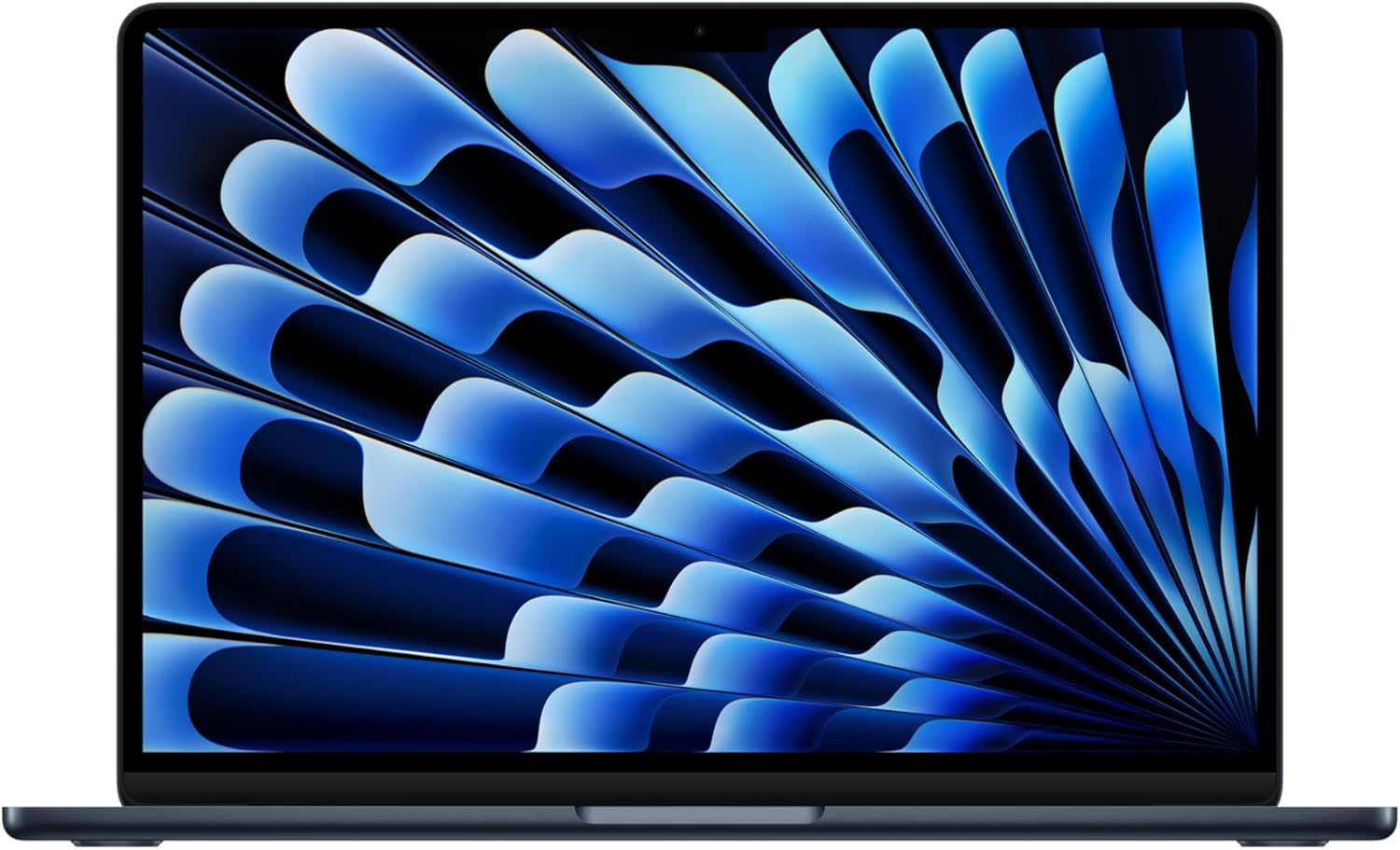
The Apple MacBook Air 13-inch M4 (2025) is the best thin-and-light laptop you can buy if you’re already in the Apple ecosystem — and a genuinely strong argument for joining it. It’s built for people who want a fast, silent, well-made machine that does serious work without drama. The headline strength is the Apple M4 chip delivering performance that embarrasses most comparably sized Windows laptops while running completely fanless. The headline weakness is two ports and a base storage spec that’s already tight the day you unbox it.
You get 16GB unified memory, a 256GB SSD, a 13.6-inch Liquid Retina display, two Thunderbolt 4 ports, Wi-Fi 6E, and up to 18 hours of quoted battery life. That RAM figure isn’t comparable to conventional laptop RAM — unified memory in Apple Silicon architecture operates differently, and 16GB here pulls considerably more weight than 16GB DDR5 in a Windows machine doing the same tasks. The 256GB storage, however, is genuinely limiting for anyone dealing with large files.
Buy this if you want a machine that handles student work, creative tasks, coding, and general productivity without throttling, without fan noise, and without dying before dinner. Don’t buy it if you need Windows-only software, want to game seriously, or plan to store large media libraries locally without an external drive. If you’re weighing up your options more broadly, our laptop buying guide covers what to prioritise before spending this kind of money.
See the current Amazon listing for the Apple MacBook Air 13-inch M4 before reading on.

Pros and Cons
Pros
- Apple M4 chip delivers genuinely fast, fanless performance — no throttling, no heat, no noise under typical workloads
- 16GB unified memory handles multitasking, photo editing, coding, and light video work without breaking a sweat
- Battery life routinely gets buyers through a full day without a charger — Apple’s 18-hour claim appears to hold in real use
- MagSafe charging port frees up both Thunderbolt 4 ports during use — a small thing that matters daily
- 12MP Center Stage webcam is a meaningful step up from what most laptops offer at this size
- Build quality is aluminium throughout — buyers consistently describe it as solid and well-finished
Cons
- 256GB base storage fills up fast — anyone working with video, large photo libraries, or big project folders will feel squeezed quickly
- Only two Thunderbolt 4 ports, both on the left side — a dongle is a near-certainty for most real-world desk setups
- Display is 60Hz — not an issue for general use, but noticeable if you’re coming from a 120Hz screen
Spec Breakdown
- Model: Apple MacBook Air 13-inch M4 (2025), Midnight
- CPU: Apple M4
- RAM: 16GB Unified Memory
- Storage: 256GB SSD
- GPU: Integrated (Apple M4 integrated graphics)
- Display: 13.6-inch Liquid Retina, 1 billion colours, P3 wide colour gamut
- OS: macOS
- Ports: 2x Thunderbolt 4 (USB-C), MagSafe 3 charging port, 3.5mm headphone jack
- Connectivity: Wi-Fi 6E, Bluetooth 5.3
- Camera: 12MP Center Stage
- Special Features: Backlit keyboard, Touch ID fingerprint reader
- External Display Support: Up to two external displays
- Battery: Up to 18 hours (Apple claim)
Hardware & Performance Reality Check
The Apple M4 is a serious chip. Not “good for a thin laptop” serious — just serious. It uses a unified memory architecture, which means the 16GB of RAM is shared between the CPU and GPU on a single high-bandwidth pool rather than split between separate components. The practical result is that 16GB here goes further than you’d expect from the number alone. Apps open fast, multitasking stays smooth, and the system doesn’t start stuttering when you have a browser, a design tool, and a video call running simultaneously. If you want to understand how this stacks up against conventional laptop chips, our CPU guide has a plain-English breakdown. One thing to be clear about: this RAM is soldered. There is no upgrade path. What you buy is what you have for the life of the machine. For most users, 16GB is sufficient for years — but it’s worth understanding you’re making a permanent decision at purchase.
The 256GB SSD is the spec that causes the most buyer regret. It’s fast — Apple’s SSDs consistently perform well — but 256GB doesn’t leave much room once macOS, apps, and a working file structure are installed. Anyone dealing with video projects, large RAW photo libraries, or substantial software installs will hit that ceiling fast. An external drive or cloud storage isn’t optional at this capacity, it’s inevitable. The GPU is integrated within the Apple M4 chip itself — there’s no dedicated graphics card here. For creative work, photo editing, and casual to moderate gaming, the integrated GPU punches above what you’d expect from an integrated solution. For serious gaming or GPU-intensive rendering at high settings, it won’t compete with a dedicated card. If gaming is your primary use case, you want something from our dedicated gaming laptop options instead.
In 2026 and beyond, this machine holds up well for the majority of real-world workloads. Students writing essays, editing photos, coding in Python or JavaScript, running design tools like Figma or Lightroom — all handled without complaint. Office tasks are non-events. Video editing in Final Cut Pro or even Premiere runs smoothly for most project types. Where it shows limits is 4K multi-stream editing or heavy 3D rendering — workloads that would push any fanless thin-and-light machine regardless of chip. Programming is one of the stronger use cases here, with multiple reviewers noting smooth performance across dev tools. Gaming is possible but limited by the integrated GPU and the macOS software library — if that’s your primary need, the performance benchmarks on dedicated gaming hardware tell a different story.
Port configuration is worth flagging explicitly because it affects daily life. Two Thunderbolt 4 ports, both on the left side, plus MagSafe and a headphone jack. No HDMI. No SD card slot. No Ethernet. If you’re running an external monitor, a USB drive, and anything else simultaneously, you need a hub. That’s a real-world cost and inconvenience to factor in — our ports guide explains what the different standards actually mean if you’re not sure what you need.
Check the full spec sheet and buyer Q&As for the Apple MacBook Air 13-inch M4.
Everyday Usability: Battery, Build & More
Battery life is one of the most consistently praised aspects of this machine across buyer feedback, and Apple’s 18-hour claim isn’t being laughed at. Multiple buyers report getting through full working days without reaching for a charger — one reviewer noted they couldn’t get the battery below 50% during an eight-hour day of Lightroom and Photoshop use. That’s not typical, but it signals what the baseline looks like. The fanless design means it runs completely silently under all but the most sustained loads, and thermal performance appears solid — buyers note it stays cool even during extended use. Portability is genuine: the aluminium chassis at around 1.24kg makes it one of the lighter 13-inch machines available.

The 13.6-inch Liquid Retina display gets genuine praise — sharp, colour-accurate, and bright enough for indoor use. It supports P3 wide colour gamut and the “billion colour” claim translates to noticeably richer, more accurate colour rendering than most Windows laptops in this class. It is a 60Hz panel, which is worth knowing if you’re coming from a higher refresh rate screen — the difference is visible during fast scrolling and cursor movement, though for document work and media consumption it’s a non-issue. This is not a touchscreen; macOS doesn’t support touch input and there’s no stylus functionality here. The display quality is covered well in our display guide if you want context on what Liquid Retina means versus OLED or IPS alternatives. The 12MP Center Stage webcam is genuinely good by laptop standards — buyers mention it specifically for video calls and online meetings. The four-speaker setup with Spatial Audio earns consistent positive comments for audio quality at this form factor. Touch ID via the fingerprint reader works reliably for fast login. The keyboard gets broadly positive marks, though one reviewer notes adjustment time coming from older MacBook layouts. The backlit keyboard is confirmed by the spec sheet.
Lifespan & Future-Proofing
The aluminium unibody chassis is built to last. Apple’s construction quality is genuinely hard to argue with — buyers explicitly compare it favourably against Windows alternatives at similar or higher price points, and there’s nothing in the feedback to suggest build concerns. Realistically, the physical machine should stay in good condition for five-plus years with normal use. Hinge mechanism, keyboard, trackpad — these are areas where cheap Windows laptops often degrade first, and the MacBook Air’s build history suggests better longevity here.
On spec longevity, the Apple M4 with 16GB unified memory has a solid runway. Apple Silicon chips have proven to age well — machines built on the M1 from 2020 are still running 2026 workloads without significant strain, and the M4 is considerably ahead of that baseline. For everyday tasks, creative work, and general productivity, this hardware should remain capable for at least four to five years without feeling outdated. The hard ceiling is the 256GB storage — it’s already lean, it can’t be upgraded, and as software and file sizes grow, that constraint only tightens. macOS update support from Apple has historically run to around seven years for a given generation. The bigger risk over a long ownership period is the no-upgrade reality: RAM, storage, and GPU are all fixed at purchase. There’s no expansion path. What you buy is what you keep.
Current stock and availability for the Apple MacBook Air 13-inch M4 are listed on Amazon UK.
What Buyers Are Saying (And Potential Dealbreakers)
The Apple MacBook Air 13-inch M4 carries a rating of 4.7 out of 5 from 677 customer reviews on Amazon. That’s a meaningful sample size, and the consistency of the feedback is striking — this is one of those rare cases where the headline rating genuinely reflects the breadth of opinion rather than a handful of outliers.
Performance praise dominates. Buyers coming from M1 MacBook Airs report a clear, noticeable step up — faster app launches, smoother multitasking, and heavier creative workloads handled without the machine breaking sweat. One buyer specifically calls out Adobe Photoshop running more smoothly than they’d ever seen it. Several buyers flag the machine for student use: lightweight enough for daily carry, powerful enough for the full range of academic and creative tasks, with battery life that removes charger anxiety from the equation. The fanless, silent operation is mentioned approvingly multiple times.
The port situation is the most consistent complaint. Two Thunderbolt 4 ports, both on the left, and nothing else — no HDMI, no SD card, no Ethernet. Buyers accept it, and several mention USB-C hubs as the fix, but it’s a real friction point for anyone coming from a more generously ported machine. The 256GB storage gets flagged too — one detailed review explicitly warns buyers who handle large media files to consider a higher-capacity configuration. The 60Hz display and the loss of the traditional MacBook Air wedge shape also get mentions, though neither appears to have significantly dented buyer satisfaction.
One area that generates no complaints whatsoever: build quality. Every buyer who addresses it comes back positive. Compared directly against a Windows competitor, the MacBook Air is described as being in a different class of physical construction.
Buyer Highlights
“Apps open faster, multitasking feels smoother, and heavier tasks like video editing and photo work run far more efficiently — the M4 chip really does make the Air feel like a much more capable machine.” — Consistent sentiment from buyers upgrading from older Apple Silicon models.
“Battery easily lasts all day — you won’t have to worry about sockets if you’re moving around campus or libraries.” — Repeated across student and professional buyers alike, and it appears to reflect genuine real-world use.
“Ports are limited but a simple USB-C dongle will fix the issue. At home I plug it into my monitor and use it as a desktop — no issues.” — Worth knowing if you’re planning a desk setup alongside daily carry use.
“I haven’t been able to get the battery below 50% even on my busiest day, with plenty of Lightroom and Photoshop — Apple’s promise of all-day battery life really seems to hold here.” — More emphatic than the typical battery claim, but corroborated by multiple buyers.
“My cousin just bought a £750 Windows laptop — put beside this Mac, that one seems so cheap and plasticky in comparison.” — Build quality perception comes up repeatedly when buyers compare directly against Windows alternatives.
Who Should Buy It (And Who Shouldn’t)
Buy If
- You’re a student or creative professional who needs a fast, silent, lightweight machine that handles writing, photo editing, coding, and design work without thermal drama
- You’re already in the Apple ecosystem — iPhone, iPad, iCloud — and want seamless continuity between devices
- You’re upgrading from an M1 or Intel MacBook Air and want a clear generational step up in performance without moving to a heavier Pro model
- All-day battery life without carrying a charger is a genuine priority for your workflow
Avoid If
- You rely on Windows-only software — there is no workaround for this, and virtualisation on macOS adds friction and cost
- You work with large video files, RAW photo libraries, or heavy project folders — 256GB is not enough base storage for that, and you cannot expand it later
- Gaming is a significant use case — the integrated GPU and macOS library won’t satisfy anyone who games seriously; look at dedicated gaming laptops instead
The Bottom Line
The Apple MacBook Air 13-inch M4 is as close to a no-brainer as a laptop gets at this end of the market — for the right buyer. The Apple M4 chip with 16GB unified memory delivers fast, fanless performance that most 13-inch Windows machines can’t match on efficiency alone. Battery life, build quality, and display are all class-leading at this size. The compromises are real but knowable: two ports, no upgrade path, and 256GB of storage that will feel tight sooner than the rest of the machine does. If you can work around those constraints — or upgrade the storage configuration at purchase — this is one of the most well-rounded professional-grade machines available in this form factor.
At LaptopAdvisorOnline, our methodology is built on data transparency rather than simulated hands-on testing. We rigorously analyse official manufacturer specifications and aggregate verified customer sentiment to provide objective, fluff-free buying advice that helps you cut through the marketing jargon.
As an Amazon Associate, I earn from qualifying purchases.
Browse by Specification
Looking for something specific? Browse our analyses by hardware and feature:
[AMD Processor Laptops] — [Intel Processor Laptops] — [16GB RAM Laptops] — [32GB RAM Laptops] — [Dedicated Graphics] — [Long Battery Life] — [Lightweight Laptops] — [Student Laptops]
Browse by Screen Size
[13-inch Laptops] — [14-inch Laptops] — [15-inch Laptops] — [16-inch Laptops]