

Buying a computer in 2026 is an absolute minefield, which is why I’ve put together this laptop buying guide to help you sort the wheat from the chaff. It’s easier because the tech is generally decent, but more confusing because manufacturers have got really good at hiding mediocre kit behind flashy labels like “AI-powered” or “Ultra-performance.”
I have spent years working in IT infrastructure, analysing hardware performance across every price range and helping people make sense of specifications… that are deliberately written to impress rather than inform. This guide cuts through all of that. My goal is simple: I want to give you a laptop buying guide that helps you know exactly what to look for, what to ignore, and which questions to ask before spending your money.
Start With the Work, Not the Specs
Most buyers make the same mistake. They start with numbers — processor tier, RAM size, storage capacity — and try to reverse-engineer a purchase decision from there. That approach almost always leads to either overspending on capabilities you will never use, or underspending in the one area that actually matters for how you work.
Start instead with an honest account of what you will actually do. Not what you might do. Not what would be nice to do one day. What you will genuinely do, most days, on this machine.
A student writing essays and attending online lectures has fundamentally different requirements from a graphic designer working with large Photoshop files. A remote worker running Teams calls all day has different priorities from someone who mainly browses, streams, and shops online. A commuter who carries their laptop on the Tube every morning cares deeply about weight and battery life in a way that someone working from a fixed home desk does not.
Write this down before you look at a single product listing. It will save you money and prevent the creeping regret that comes from realising three months in that the machine you bought was built for someone else’s life.
The Processor — Generation Matters More Than Tier
The processor is still the most misunderstood component in a laptop, largely because manufacturers continue to present tier names — i5, i7, Ryzen 5, Ryzen 7 — as if they represent absolute performance levels. They do not. Generation matters far more than tier in the world of laptops.
A current Intel Core Ultra 5 (13th or 14th generation) will outperform an older Core i7 from several generations back in almost every real-world task. The generational leap in efficiency and per-core performance is simply that significant. Checking the generation — not just the tier — before buying is one of the most important habits you can develop as a laptop buyer.
In 2026, the three main CPU platforms are Intel’s Core Ultra series, AMD Ryzen AI processors, and Apple Silicon. For Windows laptops, both Intel and AMD offer competitive options for everyday use. Apple’s M-series chips, now reaching M4 and beyond, continue to lead the field on performance-per-watt and sustained efficiency — if you are open to macOS, they remain exceptional.
There is also a subtler issue that spec sheets will never tell you about: TDP throttling. Every laptop CPU has a sustained power limit — the wattage it can maintain under prolonged load. In thin, lightweight chassis, manufacturers frequently set this limit lower than the chip is capable of, because the cooling system cannot handle sustained heat. This means two laptops can carry the same Core Ultra 7 processor and deliver meaningfully different real-world performance depending on how that chip has been configured. A thinner ultrabook might cap the CPU at 15–28 watts sustained, while a thicker machine with the same chip runs it at 45 watts. The result is that the slim machine throttles under load while the heavier one does not. Always check performance benchmarks for the specific laptop model, not just the chip.
For most UK buyers, a current-generation mid-tier processor — Intel Core Ultra 5, AMD Ryzen 5 AI, or any current Apple Silicon — handles everything from university work to home office productivity without compromise. Step up to a Core Ultra 7 or Ryzen 7 AI if your work regularly involves video editing, large datasets, or running multiple demanding applications simultaneously. Our Laptop CPU Guide goes deeper on what each processor generation actually means for performance.
RAM — The 8GB Era Is Over
8GB of RAM was an acceptable baseline for a laptop in 2020. In 2026, it is not. Modern operating systems, browsers, and productivity applications have grown substantially in their memory demands. Opening Chrome with a dozen tabs, running a Teams call in the background, and keeping a Word document open simultaneously is enough to push an 8GB machine into slowdown.
16GB is the sensible minimum for anyone buying a laptop today. It handles comfortable multitasking, keeps browsers responsive under heavy tab loads, and provides enough headroom for software updates to not immediately age the machine. If your work involves video editing, music production, or running virtual machines, 32GB is worth the premium.
There is an important nuance that most buying guides gloss over: on most modern ultrabooks and thin-and-light laptops, RAM is soldered directly to the motherboard and cannot be upgraded after purchase. Unlike desktop computers or older laptop designs where you could add memory later, the decision you make at point of sale is permanent. This makes buying 16GB even more critical — there is no safety net. If you buy 8GB, you own an 8GB machine forever.
When comparing options, our guide on how much RAM you actually need breaks down the right choice for every type of user in more detail.
The Display — The Most Overlooked Battleground
More buyers regret their display than almost any other component, because it is also the one that is hardest to evaluate from a spec sheet. Manufacturers routinely list resolution and screen size while burying the details that actually determine whether a display is pleasant or painful to look at for hours.
Resolution is the starting point. Full HD (1920 × 1080) is the acceptable minimum for any screen under 15 inches. On a 15 or 16-inch panel, 1080p is adequate but begins to show its limits — text and icons are noticeably less sharp than on a QHD (2560 × 1440) panel. If you are editing photos, working with detailed documents, or simply want a screen that looks genuinely good, QHD is worth seeking out.
Panel type matters enormously and is often not prominently featured in retail listings. IPS panels offer good colour accuracy and wide viewing angles — they are the sensible choice for most buyers. OLED panels deliver stunning contrast and vivid colour but come at a premium and have historically raised concerns about burn-in with static elements. TN panels, still found in some cheaper machines, offer poor viewing angles and washed-out colours and should be avoided if you have any choice.
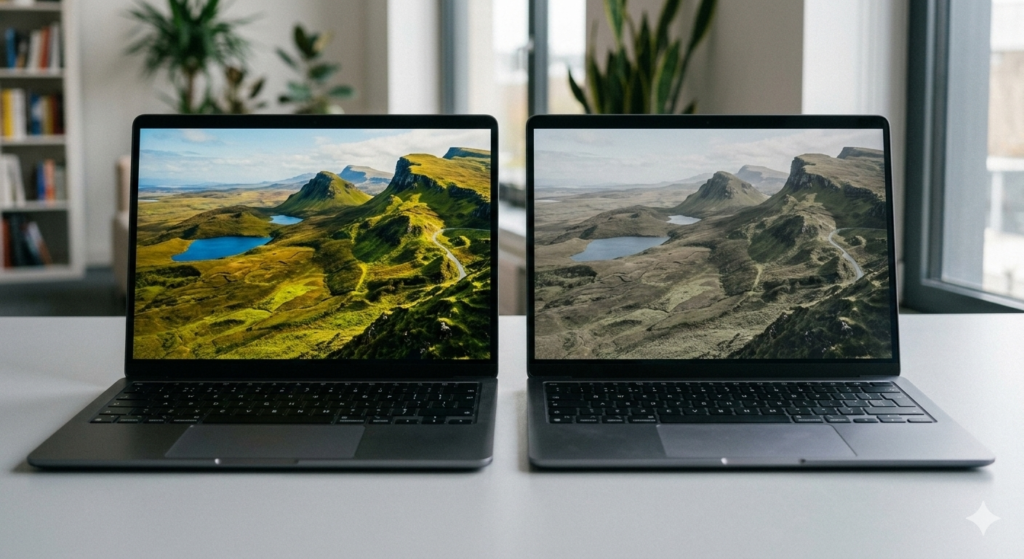
Colour gamut is the detail that most separates genuinely good displays from merely adequate ones. A panel covering 100% sRGB looks markedly better for everyday use than one covering only 45–60% sRGB, which produces flat, muted colours. Interestingly, stretching your budget slightly to reach a panel with proper sRGB coverage will improve your daily experience more noticeably than upgrading from 1080p to 1440p on the same mediocre panel. Colour accuracy matters more than pixel count for everyday use.
Brightness (measured in nits) determines how well the screen holds up in natural light. Anything below 250 nits will wash out in a bright UK office or near a window. Aim for 300 nits or above for comfortable everyday use; 400 nits or higher if you regularly work near windows or outdoors.
Our Laptop Display Guide covers panel types, refresh rates, and how to read display specifications in full detail.
Storage — NVMe SSD Is Non-Negotiable, but Not All SSDs Are Equal
Never buy a laptop with an HDD (hard disk drive) in 2026. This should not need saying, but budget machines occasionally still ship with spinning drives, and the difference in day-to-day experience is stark. A solid-state drive boots Windows in seconds, opens applications instantly, and makes the entire machine feel responsive.
What is less commonly understood is that not all SSDs are equal. The two main types are NVMe SSDs (which use PCIe lanes and deliver very fast read and write speeds) and SATA SSDs (an older interface that is substantially slower, though still vastly better than an HDD). A third type, eMMC storage, is essentially embedded flash memory soldered to the motherboard — it is the slowest of the three and found primarily in the cheapest budget machines. Boot times and application launches on eMMC feel noticeably sluggish compared to a proper NVMe drive.
For capacity, 512GB is a comfortable minimum for most buyers — enough for the operating system, standard applications, and a reasonable library of files without constant management. If you work with video, photography, or large project files, 1TB is worth the step up.
The AI PC Question — Worth Paying Extra For?
You will not get through a single laptop listing in 2026 without encountering “AI PC” and “Copilot+” marketing. It deserves an honest assessment rather than either uncritical enthusiasm or reflexive dismissal.
Copilot+ PCs are laptops that meet Microsoft’s minimum hardware requirements for AI features: a dedicated NPU (Neural Processing Unit) capable of at least 40 TOPS (trillion operations per second), 16GB of RAM, and a fast SSD. The NPU handles AI tasks locally on the device rather than routing them to the cloud, which means lower latency, better battery efficiency for those specific tasks, and the ability to use certain features offline.
The features that are genuinely useful today include Windows Studio Effects (background blur, voice clarity, eye contact correction during video calls), live captions and real-time translation across more than 40 languages, and Windows Recall (a searchable history of everything you have seen on screen). For anyone on frequent video calls, the Studio Effects alone are noticeably better on a Copilot+ machine than on a non-NPU laptop.
However, the honest picture is more complicated. As of early 2026, Microsoft has significantly shifted its AI processing strategy towards GPUs and CPUs rather than NPUs, raising legitimate questions about how important the NPU will be in the long term. Early adopters report that Copilot itself still relies heavily on cloud processing and rarely uses the NPU directly. The features that do use the NPU effectively are useful, but they are not — for most people — worth paying a significant premium for on their own.
The practical guidance: if a laptop already meets your requirements and happens to carry a Copilot+ badge, that is a bonus. Do not pay a large premium specifically for NPU credentials unless the Studio Effects or Recall features are genuinely important to your workflow.
Battery Life — Read the Small Print
Manufacturer battery claims are almost universally optimistic. Figures of “up to 18 hours” typically reflect video playback at low brightness with Wi-Fi disabled — not the reality of working with a browser, Teams calls, and background applications running simultaneously.
Real-world battery life for a modern laptop in active use is typically 50–70% of the manufacturer’s claimed figure. A machine claiming 16 hours will realistically deliver 8–10 hours of productive work. A machine claiming 10 hours will realistically give you 5–7. Always cross-reference with independent reviews that test battery under real working conditions rather than synthetic benchmarks.
USB-C charging is increasingly standard and genuinely useful — it means you can charge from a phone charger, a portable power bank, or a hotel room’s USB-C socket in an emergency. Laptops that still use a proprietary barrel jack charger are a minor but real inconvenience for anyone who travels. Check the charging method before buying.
Weight and battery life are often in direct tension. Thinner machines tend to have smaller batteries to save space and reduce weight. The machines with genuinely exceptional all-day battery tend to be slightly thicker. If battery life is a priority, expect to make a small compromise on how slim the chassis is.

GPU — Only Pay for What You Will Actually Use
For the majority of UK buyers — students, remote workers, home office users, casual everyday users — integrated graphics are entirely sufficient. Modern integrated GPUs, particularly Intel’s Arc integrated graphics, AMD’s RDNA iGPUs, and Apple Silicon’s GPU cores, handle 4K video streaming, photo editing, video calls, and light creative work without any issue.
A dedicated GPU becomes genuinely necessary in two scenarios: you are gaming, or you are doing serious creative work involving 3D rendering, video production, or machine learning. Outside of these use cases, you are paying for hardware that will sit idle.
If gaming is on the agenda, the RTX 4050 handles 1080p gaming comfortably. The RTX 4060 steps up to confident 1440p performance. There is one important trap to watch for here: many thin gaming laptops ship with powerful GPUs that are capped at a low wattage — an RTX 4070 running at 60 watts can perform no better than an RTX 4050 running at full power. The wattage allocation matters as much as the GPU model. Check benchmarks for the specific laptop, not the chip in isolation. My laptop buying guide for budget gaming and premium options breaks down real-world performance data so you know what you’re actually getting.
Build Quality and Portability — The Bits You Feel Every Day
Specifications are only part of what determines whether a laptop is good to live with. The physical quality of the machine — how it feels to open, type on, carry, and look at — matters enormously for daily satisfaction and long-term durability.
Chassis material is the most visible indicator of build quality. Aluminium and magnesium alloy chassis feel premium, flex less under pressure, and tend to survive the minor knocks and drops of daily use better than plastic alternatives. Plastic is not inherently bad — some well-engineered budget machines use reinforced plastics that are genuinely robust — but a flexing lid or creaking hinge will irritate you within weeks.
Keyboard quality is subjective but important. Key travel (how far the key depresses when pressed) and tactile feedback vary significantly between models. Some ultrabooks sacrifice key travel in pursuit of thinness to the point where typing for extended periods becomes uncomfortable. If you write a lot, this matters more than almost any component specification.
Weight is worth thinking about honestly rather than in the abstract. A 2kg laptop feels fine on a desk. Carried in a bag across London for a day, it becomes noticeable. If you commute, travel frequently, or move between rooms at home with your laptop, aim for under 1.5kg for genuine light portability.
For a closer look at what the ports actually offer in practice — Thunderbolt, USB-A legacy connectivity, HDMI versions — our guide to laptop ports and connectivity explains what each connection type means for your specific setup.
Which Type of Laptop Is Right for You?
Rather than prescribing a specific choice, here is an honest map of the main categories and who they suit.
Budget laptops (under £500) are better than they have ever been. The key is finding models with a proper NVMe SSD, 16GB of RAM (or at least 8GB with the ability to upgrade), and an IPS display. Compromises in this bracket tend to fall on build quality, display brightness, and battery life. They suit students, light everyday users, and people who need a secondary machine. Our best budget laptops guide identifies the strongest current options.
Mid-range laptops (£500–£900) represent the sweet spot for most UK buyers. At this level, you can expect solid build quality, a decent display, a current-generation processor, and 16GB of RAM as standard. This is where the best all-round value lives. See our best mid-range laptops for current recommendations.
Professional laptops (£900–£1,500) are aimed at users who need reliability, premium build quality, and business-grade features — strong keyboards, long battery life, and in some cases enhanced security and manageability. They are not necessarily faster than mid-range alternatives, but they are built to a higher standard of consistency. Our best professional laptops covers this category in detail.
Gaming laptops are a world of their own, with choices that hinge heavily on GPU performance, thermal management, and display refresh rate. See both our budget gaming and premium gaming guides for tested recommendations.

The Spec Sheet Traps — A Final Warning
Before closing, a few specific things to watch for that manufacturers rely on buyers not knowing.
Same chip, different performance. The same Intel or AMD processor model can perform very differently depending on how the laptop manufacturer has configured its power limits. Two machines with “Core Ultra 7” processors can deliver substantially different performance in sustained workloads. Always look for real-world benchmark data from a specific model, not just the chip designation.
RAM that cannot be upgraded. Most thin laptops in 2026 have soldered RAM. Buying 8GB is buying 8GB permanently. Confirm before purchasing.
GPU wattage omissions. A laptop listing an RTX 4070 without mentioning it is running at 60 watts is technically accurate and practically misleading. Look for the TGP (Total Graphics Power) figure in technical breakdowns like this laptop buying guide.
Battery figures under ideal conditions. See above. Always seek real-world battery test figures from independent reviewers.
Display resolution without colour information. A 1440p display covering 45% sRGB looks worse than a 1080p display covering 100% sRGB. Resolution alone tells you nothing about display quality.
For a thorough grounding in what every specification actually means, our Laptop Specs Guide and Performance Benchmarks Explained break everything down in full detail.
I have spent years working in IT infrastructure and analysing consumer technology for British buyers. All recommendations on this site are based on genuine hardware research and editorial independence—affiliate relationships never influence my technical assessments.
As an Amazon Associate, I earn from qualifying purchases.