
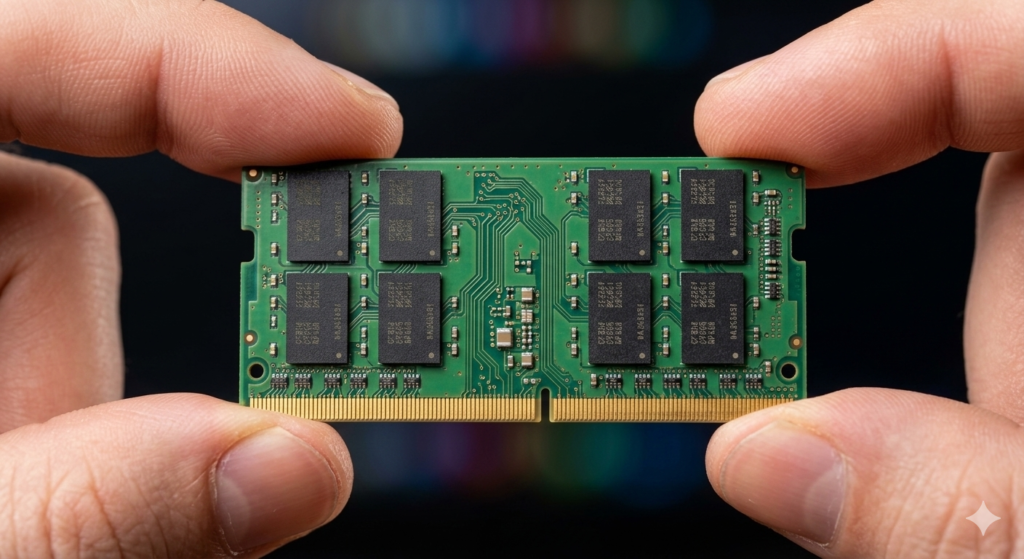
“How much RAM do I need for a laptop” is one of the most searched questions among UK buyers in 2026 — and right now it carries more weight than ever. How much RAM you need for a laptop has always mattered — buy too little and the machine slows down, buy too much and you waste money. But in 2026, a global memory shortage has changed the stakes entirely. RAM prices have surged dramatically, laptops with adequate memory are becoming harder to find at sensible prices, and the option to upgrade after purchase has largely disappeared from modern ultrabooks.
This guide gives you a straight answer for every type of user — and explains the context that makes the decision more consequential than it has ever been.
What RAM Actually Does — and Why It Matters More Than People Realise
RAM (Random Access Memory) is your laptop’s short-term working memory. Every application you open, every browser tab you load, every file you edit — all of it lives in RAM while you are actively using it. When your laptop runs out of RAM, it starts borrowing space from the much slower SSD or hard drive in a process called paging or swapping. This is the precise moment a laptop starts to feel sluggish — applications take longer to switch between, browsers stall when opening new tabs, and the whole machine feels like it is wading through treacle.
The critical distinction that most buying guides skip over: RAM is not just about raw capacity. It is about headroom. A laptop with 16GB of RAM does not only run applications that need 16GB — it runs everything you need simultaneously, with breathing room left over for the operating system, background processes, security software, cloud sync, and the next application you have not opened yet. That headroom is what determines whether a laptop feels fast or frustrating in daily use.
DDR5 is now the standard memory type in current-generation laptops, offering faster speeds and better power efficiency than the previous DDR4 standard. For most buyers the practical difference is modest in everyday tasks, but DDR5 becomes more significant for integrated graphics performance — AMD’s RDNA integrated GPUs in particular benefit from faster memory bandwidth, which directly improves gaming frame rates and GPU-accelerated creative work.
The Upgrade Trap — Why the RAM Decision Is Permanent on Most Modern Laptops
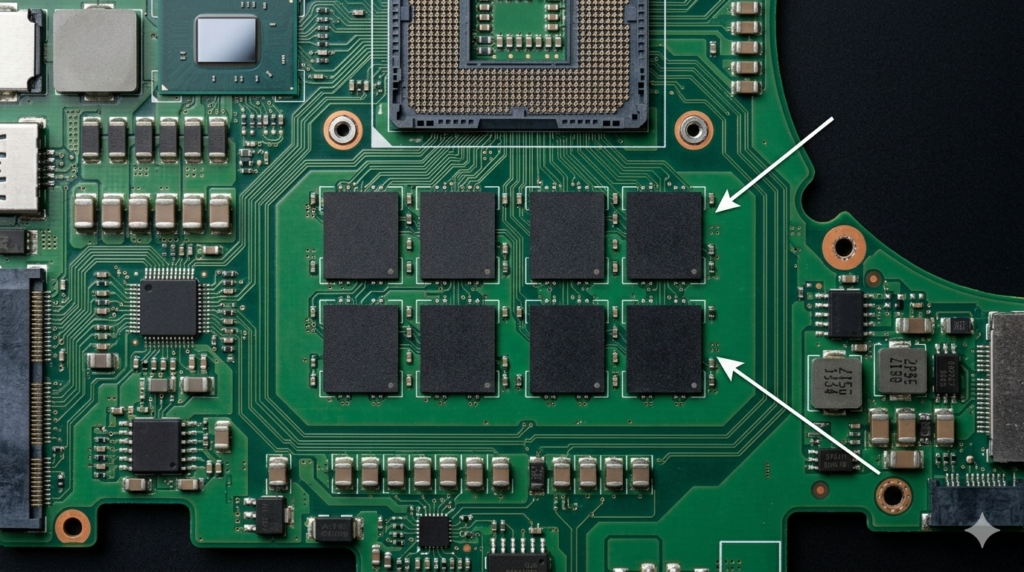
This is the single most important point in this entire guide. On the majority of modern thin-and-light laptops, RAM is soldered directly to the motherboard. It is not in a removable slot. It cannot be upgraded after purchase. The amount of RAM your laptop ships with is the amount it will have for its entire life.
This is an engineering decision driven by the pursuit of thinness and battery efficiency. Socketed RAM modules require connectors and physical space. Soldered RAM can be placed directly on the board in a much smaller footprint, enabling the slim profiles buyers expect from modern ultrabooks.
The practical consequence is stark. Buying an 8GB laptop today is making a permanent commitment to 8GB for the next four to five years. Software will continue to demand more memory as it always has. Windows 11 will receive further updates that increase its baseline memory footprint. Applications you rely on will grow heavier. What is marginal today becomes painful within two years and genuinely restrictive within three.
Before purchasing any laptop, confirm whether the RAM is soldered or socketed. This information appears in the technical specifications, sometimes listed as “onboard memory” (soldered) versus “SO-DIMM slots” (upgradeable). If you cannot find it in the spec sheet, check independent reviews — publications like NotebookCheck routinely include this detail in their hardware analysis.
The 2026 RAM Crisis — What UK Buyers Need to Know Right Now

The RAM market in early 2026 is unlike anything seen in recent memory. Understanding what is happening helps explain both why some laptops now ship with less RAM than they should, and why buying the right amount upfront has never mattered more.
The crisis began with the explosive growth of AI data centres. Training and running large language models requires enormous quantities of specialised High Bandwidth Memory (HBM). The three companies that manufacture the vast majority of the world’s DRAM — Samsung, SK Hynix, and Micron — began redirecting their production capacity towards this higher-margin HBM rather than conventional DDR4 and DDR5 consumer memory. The result was a severe supply shortfall for the laptops and PCs that UK buyers purchase every day.
According to IDC’s global memory shortage analysis, DRAM prices have surged significantly as AI data centre demand continues to outstrip supply. Analysis from BISI puts the year-on-year price increase at 171%, with DDR5 spot prices having quadrupled since September 2025. Box.co.uk’s analysis confirms the direct impact on UK buyers, noting that PC prices are rising 15–20% as a direct result.
Making the situation worse, Micron — one of the three major DRAM manufacturers — announced it is exiting the consumer memory market in early 2026, as reported by Windows Central. This leaves Samsung and SK Hynix as the primary suppliers of consumer DRAM, reducing competitive pressure on pricing further.
The practical consequence for UK laptop buyers is twofold. First, laptops that previously shipped with 16GB as standard are appearing with 8GB configurations as manufacturers try to hold price points. Consumer Reports warned this “shrinkflation” would affect the 2026 laptop market — same chassis, same processor, less RAM. Second, the cost of specifying more RAM at point of purchase has increased substantially, making the upgrade option even more expensive than it was previously.
The advice this context generates is clear: do not compromise on RAM to save money right now. The saving is smaller in real terms than it appears, the performance cost over the laptop’s lifetime is significant, and you will not be able to add more later on most machines.
How Much RAM Do You Need? — By Use Case
Everyday Use — Browsing, Streaming, Email, Video Calls
The right answer: 16GB
Windows 11 itself consumes between 3–5GB of RAM at idle with a standard set of background processes running. Add a browser with a realistic number of tabs — eight to twelve is not unusual for anyone working or researching online — and you are already at 6–8GB before opening a single application. A Teams or Zoom call adds another 1–2GB. A music streaming application, a cloud sync client, and a security suite add more.
On an 8GB laptop, this everyday scenario pushes the machine to its limit. The system begins paging, response times increase, and switching between applications slows down noticeably. This is not a theoretical edge case — it is what 8GB feels like in the reality of 2026 software demands.
As TechRadar’s analysis notes, while 8GB is technically sufficient for very basic use, Windows 11 users who multitask will find it restrictive. The same assessment from Izoate’s buyer guidance is blunt: an 8GB laptop will start to “choke” as soon as a few programmes are open simultaneously.
16GB provides comfortable headroom for all of this with capacity remaining. It is the realistic minimum for a laptop purchased in 2026 that you intend to use for four or five years.
Students
The right answer: 16GB
Student workloads typically involve a browser with multiple research tabs open simultaneously, a word processor or presentation tool, a PDF reader, a communication platform like Teams or Discord, and often a music streaming service in the background. Depending on the course, additional applications for data analysis, coding, or design may be involved.
16GB handles all of this comfortably. 8GB handles the lightest version of it and struggles with anything more demanding. Given that a student laptop needs to remain capable across a full three or four year degree programme — during which software demands only increase — buying 16GB is the only sensible choice.
Professional and Office Use
The right answer: 16GB minimum, 32GB if working with large files
For most professional use — spreadsheets, presentations, email clients, Teams calls, cloud applications, and browser-based tools — 16GB provides comfortable performance without compromise. The combination of Microsoft Office, a browser, Teams, and standard background applications sits well within 16GB.
If your work regularly involves large Excel models, extensive InDesign or Illustrator files, or running virtual machines, 32GB becomes worthwhile. The jump from 16GB to 32GB for genuinely heavy professional workloads eliminates paging entirely during complex tasks and keeps everything responsive regardless of what is open simultaneously.
Content Creators — Photo and Video Editing
The right answer: 32GB, 64GB for 4K workflows
Adobe Lightroom, Photoshop, Premiere Pro, and DaVinci Resolve are all memory-hungry applications by nature. Adobe’s own guidance recommends a minimum of 16GB for HD video work and 32GB for 4K workflows, as detailed in Adobe’s official system requirements. In practice, editing a 4K timeline while simultaneously running a browser, a music application, and a file sync client pushes 16GB systems into paging territory regularly.
32GB is the appropriate baseline for serious content creation. 64GB becomes relevant for complex After Effects compositions, large Photoshop files with many layers, or editing multicam 4K footage. As confirmed by Kwazzy Sells’ workload analysis, 32GB is recommended for HD workflows and 64GB for 4K and heavier timelines.
Gaming
The right answer: 16GB is the minimum, 32GB is the sweet spot
How much RAM you need for gaming is a question that has shifted in 2026. UK Gaming Computers’ analysis is clear: 16GB is sufficient for the majority of games currently available, with titles such as Cyberpunk 2077, Call of Duty: Black Ops 7, and Marvel Rivals all recommending 16GB. For 95% of games, 16GB delivers the full experience.
The case for 32GB in gaming is primarily future-proofing and background application overhead. Running a game alongside Discord, a game launcher, a browser with a walkthrough open, and a streaming overlay can push memory use above 16GB in some titles. Kwazzy Sells’ gaming analysis notes that 32GB has become the “set-and-forget” choice for gaming with better future-proofing, preventing paging and maintaining frame-time stability.
For dedicated gaming laptops, Microsoft themselves recommend 32GB as the ideal configuration for serious players running demanding titles, as noted in Neowin’s coverage. Our guides to best budget gaming laptops and best premium gaming laptops list confirmed RAM configurations for every recommendation.
3D, CAD, and Scientific Workloads
The right answer: 64GB minimum, 128GB for large projects
Professional 3D rendering, engineering simulation, and scientific computing are memory-intensive in ways that dwarf consumer workloads. Blender’s official system requirements list 32GB as recommended with 8GB as the absolute minimum — and that is for moderate scenes. Large 3D environments, complex simulations, and multi-pass rendering pipelines benefit significantly from 64GB or more. At this level, the laptop platform itself begins to show limitations, and a dedicated workstation may be more appropriate than a portable machine.
RAM Speed — Does It Matter for Laptops?
Most discussions of how much RAM is needed focus entirely on capacity. Speed is secondary for most use cases but worth understanding for two specific scenarios.
DDR5 vs DDR4: Modern laptops use DDR5 as standard. The performance advantage over DDR4 in everyday computing is modest — typically a few percentage points in real-world tasks. Where it matters more is in integrated graphics performance. AMD’s RDNA integrated GPUs use system RAM as their video memory, meaning faster RAM directly translates to better frame rates in games and GPU-accelerated creative tasks. If you are relying on integrated graphics for any demanding work, DDR5 speed matters more than it would on a system with a dedicated GPU.
Dual-channel vs single-channel: Most laptops run RAM in dual-channel mode — two memory modules working in parallel, providing roughly double the memory bandwidth of a single module at the same capacity. Some ultra-budget laptops or configurations use a single module to cut costs, running in single-channel mode with measurable performance penalties. Always check whether a laptop’s RAM configuration is dual-channel, particularly if integrated graphics performance matters to you.
XMP and EXPO: On laptops that support it, XMP (Intel) and EXPO (AMD) profiles allow RAM to run at its rated speed rather than the default JEDEC speed. Some laptops ship with fast RAM running below its rated speed until this is enabled in the BIOS. This is more relevant to desktop builds but worth being aware of for high-performance gaming laptops.
A Quick Reference — How Much RAM Should A Laptop Have?
| Use Case | Minimum | Recommended | Future-Proof |
|---|---|---|---|
| Everyday use / browsing | 8GB | 16GB | 16GB |
| Student | 8GB | 16GB | 16GB |
| Office / professional | 16GB | 16GB | 32GB |
| Photo editing | 16GB | 32GB | 32GB |
| HD video editing | 16GB | 32GB | 32GB |
| 4K video editing | 32GB | 64GB | 64GB |
| Gaming | 16GB | 16GB | 32GB |
| Serious gaming | 16GB | 32GB | 32GB |
| 3D / CAD / scientific | 32GB | 64GB | 128GB |
The Recommended column reflects what delivers a smooth, frustration-free experience for that workload in 2026. The Future-Proof column reflects what provides comfortable headroom for the next four to five years of software development, which matters enormously given that most laptops cannot be upgraded after purchase.
Signs Your Laptop Is Running Out of RAM
If you already own a laptop and are wondering whether your current RAM is adequate, these are the tell-tale signs of a machine that is memory-constrained:
Application switching slowdown — clicking between open applications takes noticeably longer than it did when the laptop was new, or longer than it should given the processor’s capability.
Browser tab reloading — returning to a tab you opened earlier causes it to reload from scratch rather than displaying instantly. Chrome, Edge, and Firefox all discard tab content from memory when RAM runs low, forcing a reload on return.
Increased fan activity during light tasks — a memory-starved laptop forces the processor to work harder managing paging, which generates more heat than the task itself would normally require.
Task Manager memory usage consistently above 80% — open Task Manager (Ctrl + Shift + Esc), click Performance, and select Memory. If usage regularly sits above 80% during your normal working pattern, the machine is memory-constrained.
Unexplained general slowness — not slow on any specific task, but a pervasive sense that everything takes slightly longer than expected.
The Bottom Line on How Much RAM You Need
The answer for the overwhelming majority of UK laptop buyers in 2026 is 16GB. It is not the minimum — 8GB is the minimum — but it is the practical baseline that delivers a genuinely responsive, capable machine for everyday use, student workloads, and professional productivity without compromise.
For gaming, content creation, and professional work involving large files, 32GB is the appropriate step up and is increasingly the sensible choice given both software trends and the impossibility of upgrading most laptops after purchase.
Given the current RAM shortage and rising prices, the temptation to save money by choosing 8GB is understandable — but it is a false economy. The performance you sacrifice over a four or five year ownership period is substantial, and the laptop’s frustrating slowness in year three will cost you far more in productivity and eventual replacement cost than the saving at point of purchase.
For the full picture on how RAM fits alongside processor and display choices, see our Laptop Buying Guide UK, our Laptop CPU Guide, and our recommendations for the best mid-range laptops which all specify confirmed RAM configurations.
I bring years of experience in IT infrastructure and tech reviews for British buyers. Any affiliate links on this site do not shape our evaluations.
As an Amazon Associate, I earn from qualifying purchases.